README.md
February 18, 2026 · View on GitHub

nestjs-doctor
Diagnose and fix your NestJS code in one command.




50 built-in rules across security, performance, correctness, architecture, and schema. Outputs a 0-100 score with actionable diagnostics. Zero config. Monorepo support. Catches the anti-patterns that AI-generated code introduce (slop code).
Quick Start
npx nestjs-doctor@latest .
With file paths and line numbers:
npx nestjs-doctor@latest . --verbose
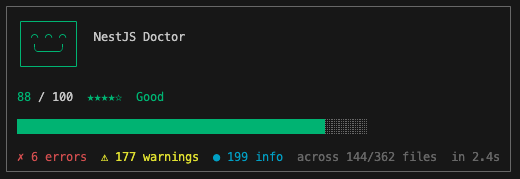
Report
npx nestjs-doctor@latest . --report
Self-contained HTML file with five sections: score summary, source-level diagnostics with code viewer, interactive module graph, schema ER diagram, and a custom rule playground. Opens in your browser.
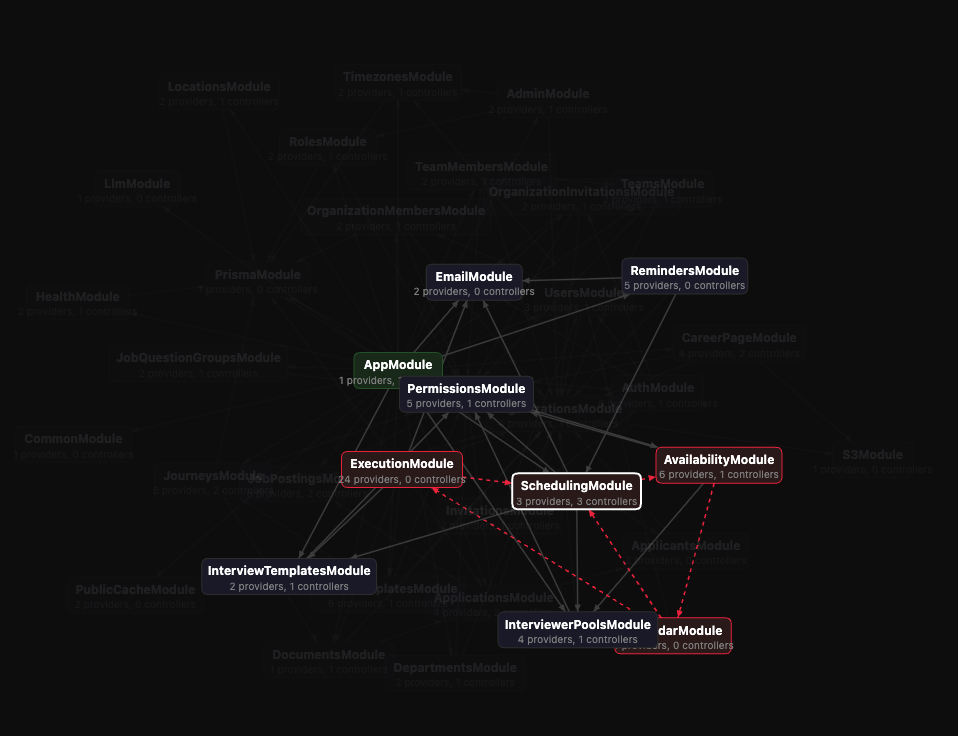
VS Code Extension
Install NestJS Doctor from the VS Code Marketplace. Requires nestjs-doctor as a dev dependency — the extension's LSP server loads it from your workspace.
npm install -D nestjs-doctor
Same 50 rules as the CLI, surfaced as inline diagnostics in the editor and in the Problems panel. Files are scanned on open and on save with a configurable debounce.
Use NestJS Doctor: Scan Project from the command palette to trigger a full scan manually.
CI
Pin it as a devDependency:
npm install -D nestjs-doctor
Use --min-score to gate on a minimum health score:
npx nestjs-doctor . --min-score 75
Or wire it into package.json:
{
  "scripts": {
    "health": "nestjs-doctor . --min-score 75"
  }
}
Exit codes: 1 if the score is below threshold, 2 for bad input.
Usage: nestjs-doctor [directory] [options]

  --verbose       Show file paths and line numbers per diagnostic
  --score         Output only the numeric score (for CI)
  --json          JSON output (for tooling)
  --report        Generate an interactive HTML report (--graph also works)
  --min-score <n> Minimum passing score (0-100). Exits with code 1 if below threshold
  --config <p>    Path to config file
  --init          Set up the /nestjs-doctor skill for AI coding agents
  -h, --help      Show help
AI Coding Agents
Ships with skills for popular AI coding agents. Run --init to auto-detect installed agents and install the nestjs-doctor skill for each one:
npm install -D nestjs-doctor
npx nestjs-doctor --init
| Agent | Detection | Skill location |
|---|---|---|
| Claude Code | ~/.claude exists | ~/.claude/skills/nestjs-doctor/ |
| Amp Code | ~/.amp exists | ~/.config/amp/skills/nestjs-doctor/ |
| Cursor | ~/.cursor exists | ~/.cursor/skills/nestjs-doctor/ |
| OpenCode | opencode CLI or ~/.config/opencode | ~/.config/opencode/skills/nestjs-doctor/ |
| Windsurf | ~/.codeium exists | Appends to ~/.codeium/windsurf/memories/global_rules.md |
| Antigravity | agy CLI or ~/.gemini/antigravity | ~/.gemini/antigravity/skills/nestjs-doctor/ |
| Gemini CLI | gemini CLI or ~/.gemini | ~/.gemini/skills/nestjs-doctor/ |
| Codex | codex CLI or ~/.codex | ~/.codex/skills/nestjs-doctor/ |
A project-level fallback is always written to .agents/nestjs-doctor/. Commit it so every contributor gets the skill automatically.
Skills
--init installs two skills per agent:
| Skill | Command | Description |
|---|---|---|
| nestjs-doctor | /nestjs-doctor | Runs the scan, shows the report, and fixes what it can |
| nestjs-doctor-create-rule | /nestjs-doctor-create-rule | Scaffolds a custom rule: checks feasibility, writes the .ts file, updates config, verifies it loads |
Configuration
Optional. Create nestjs-doctor.config.json in your project root:
{
  "minScore": 75,
  "ignore": {
    "rules": ["architecture/no-orm-in-services"],
    "files": ["src/generated/**"]
  },
  "rules": {
    "architecture/no-barrel-export-internals": false
  },
  "categories": {
    "performance": false
  }
}
Also works as a "nestjs-doctor" key in package.json.
| Key | Type | Description |
|---|---|---|
include | string[] | Glob patterns to scan (default: ["**/*.ts"]) |
exclude | string[] | Glob patterns to skip (default includes node_modules, dist, build, coverage, *.spec.ts, *.test.ts, *.e2e-spec.ts, *.e2e-test.ts, *.d.ts, test/, tests/, __tests__/, __mocks__/, __fixtures__/, mock/, mocks/, *.mock.ts, seeder/, seeders/, *.seed.ts, *.seeder.ts) |
minScore | number | Minimum passing score (0-100). Exits with code 1 if below threshold |
ignore.rules | string[] | Rule IDs to suppress |
ignore.files | string[] | Glob patterns for files whose diagnostics are hidden |
rules | Record<string, RuleOverride | boolean> | Enable/disable individual rules, override severity, and pass rule-specific options |
categories | Record<string, boolean> | Enable/disable entire categories |
customRulesDir | string | Path to a directory containing custom rule files |
Example rule-specific override:
{
  "rules": {
    "architecture/no-manual-instantiation": {
      "excludeClasses": ["Logger", "PinoLogger"]
    }
  }
}
Inline suppression
Silence a rule from within the source — useful for one-off exceptions that don't warrant a config change. Write the directive inside a // or /* */ comment:
// Suppress on the same line
const config = eval(raw); // nestjs-doctor-ignore security/no-eval

// Suppress on the next line
// nestjs-doctor-ignore-next-line security/no-eval
const config = eval(raw);

// Suppress for the entire file (put it anywhere, typically at the top)
// nestjs-doctor-ignore-file security/no-eval
| Directive | Scope |
|---|---|
nestjs-doctor-ignore <rules> | The line the comment is on |
nestjs-doctor-ignore-line <rules> | The line the comment is on |
nestjs-doctor-ignore-next-line <rules> | The line below the comment |
nestjs-doctor-ignore-file <rules> | Every line in the file |
disable is accepted as an alias for ignore (e.g. nestjs-doctor-disable-next-line), matching the muscle memory of other linters.
The rule list is space- or comma-separated (security/no-eval, security/no-weak-crypto). Omit it to suppress all rules for that scope. An optional -- reason trailer is ignored, so you can document why:
const token = sign(payload); // nestjs-doctor-ignore security/no-weak-crypto -- legacy HS256, migration tracked in #42
Directives must live on a single line, inside a real comment — a directive that only appears inside a string literal is ignored. Put the -- reason after the rules (a bare ignore whose reason contains a slash is read as naming a rule).
The line-scoped forms match only code diagnostics — schema diagnostics have no line, so suppress those with nestjs-doctor-ignore-file, either in the entity source (TypeORM / MikroORM / Drizzle) or directly in schema.prisma (Prisma).
Custom Rules
Extend the built-in rule set with project-specific checks. Only .ts files are supported.
Rule shape
Each .ts file in the custom rules directory must export an object with a meta descriptor and a check function:
import type { RuleContext } from "nestjs-doctor";

export const noTodoComments = {
  meta: {
    id: "no-todo-comments",
    category: "correctness",        // "security" | "performance" | "correctness" | "architecture" | "schema"
    severity: "warning",            // "error" | "warning" | "info"
    description: "TODO comments should be resolved before merging",
    help: "Replace the TODO with an implementation or open an issue.",
    // scope: "file",              // optional — "file" (default) or "project"
  },
  check(context: RuleContext) {
    const text = context.sourceFile.getFullText();
    const regex = /\/\/\s*TODO/gi;
    let match: RegExpExecArray | null;
    while ((match = regex.exec(text)) !== null) {
      const pos = context.sourceFile.getLineAndColumnAtPos(match.index);
      context.report({
        message: "Unresolved TODO comment",
        filePath: context.filePath,
        line: pos.line,
      });
    }
  },
};
Rule IDs are automatically prefixed with custom/ (e.g. no-todo-comments becomes custom/no-todo-comments).
Usage
Set customRulesDir in your config file:
{
  "customRulesDir": "./rules"
}
Error handling
Invalid rules produce warnings but never crash the scan. Common issues — missing check function, invalid category/severity, syntax errors — are surfaced in CLI output so you can fix them without blocking the rest of the analysis.
Monorepo Support
Monorepo detection supports five strategies (checked in priority order — first match wins):
1. nest-cli.json (takes precedence)
When "monorepo": true is set, each sub-project is scanned independently and results are merged.
{
  "monorepo": true,
  "projects": {
    "api": { "root": "apps/api" },
    "admin": { "root": "apps/admin" },
    "shared": { "root": "libs/shared" }
  }
}
2. pnpm-workspace.yaml (pnpm / Turborepo)
Reads pnpm-workspace.yaml, expands the packages globs, and filters to packages that depend on @nestjs/core or @nestjs/common.
packages:
  - "apps/*"
  - "packages/*"
3. package.json workspaces (npm / Yarn)
Reads the workspaces field from the root package.json. Both array and object formats are supported. Skipped when pnpm-workspace.yaml exists to avoid duplicate detection.
{
  "workspaces": ["apps/*", "packages/*"]
}
{
  "workspaces": {
    "packages": ["apps/*", "packages/*"]
  }
}
4. nx.json (Nx)
Detects nx.json and discovers sub-projects by scanning for project.json files. Each project must have a package.json with a NestJS dependency to be included.
// nx.json
{
  "targetDefaults": { "build": { "dependsOn": ["^build"] } }
}
5. lerna.json (standalone Lerna)
Reads lerna.json when useWorkspaces is not set. Uses the packages globs (defaults to ["packages/*"]). When useWorkspaces is true, detection is handled by strategy 3 instead.
{
  "packages": ["packages/*"]
}
Non-NestJS packages are always filtered out automatically — only packages with @nestjs/core or @nestjs/common are included.
If a monorepo is detected but no NestJS packages are found, nestjs-doctor emits a warning and falls back to single-project mode.
Output includes a combined score and a per-project breakdown.
Schema Analysis
Auto-detected from Prisma schema files (schema.prisma), TypeORM/MikroORM entity decorators (@Entity()), or Drizzle table declarations (pgTable(...) / mysqlTable(...) / sqliteTable(...)). When a schema is found, nestjs-doctor extracts entity-relationship data and:
- Renders an interactive ER diagram in the Schema tab of the HTML report (sidebar entity tree + canvas diagram + problems panel)
- Runs 3 schema-specific rules covering primary keys, timestamps, and cascade configuration
Supported ORMs: Prisma, TypeORM, Drizzle, MikroORM.
See the schema rules documentation for the full rule list.
Scoring
Weighted by severity and category, normalized by file count:
| Severity | Weight | Category | Multiplier | |
|---|---|---|---|---|
| error | 3.0 | security | 1.5x | |
| warning | 1.5 | correctness | 1.3x | |
| info | 0.5 | schema | 1.1x | |
| architecture | 1.0x | |||
| performance | 0.8x |
| Score | Label |
|---|---|
| 90-100 | Excellent |
| 75-89 | Good |
| 50-74 | Fair |
| 25-49 | Poor |
| 0-24 | Critical |
Node.js API
import { diagnose, diagnoseMonorepo } from "nestjs-doctor";

const result = await diagnose("./my-nestjs-app");
result.score;       // { value: 82, label: "Good" }
result.diagnostics; // Diagnostic[]
result.summary;     // { total, errors, warnings, info, byCategory }

const mono = await diagnoseMonorepo("./my-monorepo");
mono.isMonorepo;    // true
mono.subProjects;   // [{ name: "api", result }, ...]
mono.combined;      // Merged DiagnoseResult
Rules (50)
Security (10)
| Rule | Severity | What it catches |
|---|---|---|
no-hardcoded-secrets | error | API keys, tokens, passwords in source code |
no-eval | error | eval() or new Function() usage |
no-csrf-disabled | error | Explicitly disabling CSRF protection |
no-dangerous-redirects | error | Redirects with user-controlled input |
no-synchronize-in-production | error | synchronize: true in TypeORM config -- can drop columns/tables |
no-weak-crypto | warning | createHash('md5') or createHash('sha1') |
no-exposed-env-vars | warning | Direct process.env in Injectable/Controller |
no-exposed-stack-trace | warning | error.stack exposed in responses |
no-raw-entity-in-response | warning | Returning ORM entities directly from controllers -- leaks internal fields |
require-guards-on-endpoints | warning | Endpoints without @UseGuards() at class or method level |
Correctness (20)
| Rule | Severity | What it catches |
|---|---|---|
no-missing-injectable | error | Provider with constructor deps missing @Injectable() |
no-duplicate-routes | error | Same method + path + version twice in a controller |
no-missing-guard-method | error | Guard class missing canActivate() |
no-missing-pipe-method | error | Pipe class missing transform() |
no-missing-filter-catch | error | @Catch() class missing catch() |
no-missing-interceptor-method | error | Interceptor class missing intercept() |
require-inject-decorator | error | Untyped constructor param without @Inject() |
prefer-readonly-injection | warning | Constructor DI params missing readonly |
require-lifecycle-interface | warning | Lifecycle method without corresponding interface |
no-empty-handlers | info | HTTP handler with empty body |
no-async-without-await | warning | Async function/method with no await |
no-duplicate-module-metadata | warning | Duplicate entries in @Module() arrays |
no-missing-module-decorator | warning | Class named *Module without @Module() |
no-fire-and-forget-async | warning | Async call without await in non-handler methods |
param-decorator-matches-route | error | @Param() name doesn't match any :param in the route path |
factory-inject-matches-params | error | useFactory inject array length mismatches factory parameter count |
no-duplicate-decorators | warning | Same decorator appears twice on a single target |
validated-non-primitive-needs-type | warning | Non-primitive DTO property with class-validator decorators missing @Type() |
validate-nested-array-each | warning | @ValidateNested() on array property missing { each: true } |
injectable-must-be-provided | info | @Injectable() class not registered in any module's providers |
Architecture (10)
| Rule | Severity | What it catches |
|---|---|---|
no-business-logic-in-controllers | error | Loops, branches, data transforms in HTTP handlers |
no-repository-in-controllers | error | Repository injection in controllers |
no-orm-in-controllers | error | PrismaService / EntityManager / DataSource in controllers |
no-circular-module-deps | error | Cycles in @Module() import graph |
no-manual-instantiation | error | new SomeService() for injectable classes |
no-orm-in-services | info | Services using ORM directly (should use repositories) |
no-service-locator | warning | ModuleRef.get()/resolve() hides dependencies |
prefer-constructor-injection | warning | @Inject() property injection |
require-module-boundaries | info | Deep imports into other modules' internals |
no-barrel-export-internals | info | Re-exporting repositories from barrel files |
Performance (7)
| Rule | Severity | What it catches |
|---|---|---|
no-sync-io | warning | readFileSync, writeFileSync, etc. |
no-blocking-constructor | warning | Loops in Injectable/Controller constructors |
no-dynamic-require | warning | require() with non-literal argument |
no-unused-providers | warning | Provider never injected and no self-activating decorators |
no-request-scope-abuse | warning | Scope.REQUEST creates new instance per request |
no-unused-module-exports | info | Module exports unused by importers |
no-orphan-modules | info | Module never imported by any other module |
Schema (3)
| Rule | Severity | What it catches |
|---|---|---|
schema/require-primary-key | error | Entity without a primary key column |
schema/require-timestamps | warning | Entity missing createdAt/updatedAt columns |
schema/require-cascade-rule | info | Relation missing explicit onDelete behavior |