Docker
July 18, 2026 · View on GitHub
Overview
This directory contains the Docker configuration for running and managing the Techexpo-CRM application. Environment specific docker-compose files are used to establish live Docker configuration - see docker-compose.
Each service has a dedicated sub-folder that contains initialization scripts and configuration files.
These files are intended for developers setting up the application environment locally, and for OPS deployment in production.
The /certs sub-folder contains the TLS certification configuration for all applicable services and serves as a repository in production for generated certification via OpenSSL.
Important
See certification README for details.
Current Directory
docker.sh
This script is used to initialize the Docker services; generating all the required secrets files using SOPS decryption before making calls to Docker itself.
The script is run from the current working directory ./docker.sh
Important
- Docker will fail if secrets are not decrypted prior to issuing commands
- Secrets are retained in memory only; under current user at
/run/user/<USER>/secrets
docker-compose
Docker compose files are merged through the CLI, the composition dependent on what environment to initialize for. The environment is classified by the filename suffix prior to the file extension e.g. 'override' (development).
Metricsis environment agnostic- All environments require the base file
docker-compose- basedocker-compose.override- developmentdocker-compose.prod- production (local, non-swarm)docker-compose.metrics- metricsdocker-compose.swarm- swarm (deployment)
- Requires
./.env.dev.dockeror./.env.prod.dockerdependent on environment - Profiles available for targeting services
Example initialization; Development, and using metrics:
docker compose -f docker-compose.yml -f docker-compose.override.yml -f docker-compose.metrics.yml --env-file ./.env.dev.docker --profile dev up
Metrics Portal
Development
To access the Grafana metrics UI in the browser, a HTTPS TLS connection is made to the Nginx-metrics reverse-proxy:
https://localhost:1081/grafana/
The port is defined by the NGINX_METRICS_LOCAL_PORT_TLS environment variable
Production
Required files
Important
.envLocal ports to be determined by user - check for alignment with nginx services 'listen' if applicable.secretFiles requireMozilla SOPSfor in-place encryption and decryption
.env.dev.docker
# .env.dev.docker

NODE_ENV=development

# Container Names
CADVISOR_CONTAINER=xxxx
CERTS_CONTAINER=xxxx
EXPRESS_CONTAINER=xxxx
GRAFANA_CONTAINER=xxxx
MAILPIT_CONTAINER=xxxx
MONGO_CONTAINER=xxxx
MONGO_EXPORTER_CONTAINER=xxxx
MONGOEXPRESS_CONTAINER=xxxx
NGINX_PUBLIC_CONTAINER=xxxx
NGINX_METRICS_CONTAINER=xxxx
NGINX_REACT_CONTAINER=xxxx
POSTGRES_CONTAINER=xxxx
POSTGRES_EXPORTER_CONTAINER=xxxx
POSTGRES_SEEDER_CONTAINER=xxxx
PROMETHEUS_CONTAINER=xxxx
REDIS_CONTAINER=xxxx
REDIS_EXPORTER_CONTAINER=xxxx
REDISINSIGHT_CONTAINER=xxxx
REDISINSIGHT_PROXY_CONTAINER=xxxx

# Nginx-Reverse-Proxy-Public
NGINX_PUBLIC_LOCAL_PORT_HTTP=80
NGINX_PUBLIC_DOCKER_PORT_HTTP=80
NGINX_PUBLIC_DOCKER_PORT_TLS=443
NGINX_PUBLIC_LOCAL_PORT_TLS=443
# Nginx-Reverse-Proxy-Metrics
NGINX_METRICS_LOCAL_PORT_HTTP=xxxx
NGINX_METRICS_DOCKER_PORT_HTTP=80
NGINX_METRICS_LOCAL_PORT_TLS=xxxx
NGINX_METRICS_DOCKER_PORT_TLS=443

# NodeJS Express
EXPRESS_DOCKER_PORT=4000
EXPRESS_LOCAL_PORT=xxxx

# Mongo
MONGO_ARGS=?authSource=admin&tls=true
MONGO_DOCKER_PORT=27017
MONGO_LOCAL_PORT=xxxx
MONGO_PORT=xxxx
MONGO_PROTOCOL=mongodb

# Mongo Express
ME_CONFIG_MONGODB_ENABLE_ADMIN=false
ME_MONGO_ARGS=?authSource=admin&tls=true&tlsCertificateKeyFile=/certs/client-mongoexpress.pem&tlsCAFile=/certs/root-ca.crt
MONGOEXPRESS_DOCKER_PORT=8081
MONGOEXPRESS_LOCAL_PORT=xxxx

# Postgres
POSTGRES_HOST=localhost
POSTGRES_DOCKER_PORT=5432
POSTGRES_LOCAL_PORT=xxxx

# Redis
REDIS_DOCKER_PORT=6379
REDIS_LOCAL_PORT=xxxx

# RedisInsight
REDISINSIGHT_DOCKER_PORT=5540
REDISINSIGHT_LOCAL_PORT=xxxx

# Mailpit
MAILPIT_HOST=mailpit
MAILPIT_SMTP_LOCAL_PORT=xxxx
MAILPIT_WEBUI_LOCAL_PORT=xxxx
MAILPIT_SMTP_DOCKER_PORT=1025
MAILPIT_WEBUI_DOCKER_PORT=8025
MAILPIT_PROMETHEUS_PORT=xxxx    # PROMETHEUS_LOCAL_PORT

# Prometheus
PROMETHEUS_LOCAL_PORT=xxxx
PROMETHEUS_DOCKER_PORT=9090

# Prometheus-Exporters
POSTGRES_EXPORTER_LOCAL_PORT=xxxx
POSTGRES_EXPORTER_DOCKER_PORT=9187
MONGO_EXPORTER_LOCAL_PORT=xxxx
MONGO_EXPORTER_DOCKER_PORT=9216
REDIS_EXPORTER_LOCAL_PORT=xxxx
REDIS_EXPORTER_DOCKER_PORT=9121

# Grafana
GRAFANA_LOCAL_PORT=xxxx
GRAFANA_DOCKER_PORT=3000
GF_SMTP_ENABLED=true
GF_SMTP_FROM_ADDRESS=xxxx
GF_SMTP_SKIP_VERIFY=true
GF_SMTP_STARTTLS_POLICY=OpportunisticStartTLS

# Exporters
METRICS_EXPORTER_CERTS_VOLUME=tmpfs-certs:/certs:ro

# Docker Secret Path
# NOTE: This final line is auto-populated by the ./docker.sh script
# SECRET_PATH=/run/user/1001/secrets
.env.prod.docker
# .env.prod.docker

NODE_ENV=production

# Docker
IMAGE_AUTHOR=xxxx
MONGO_VERSION=8.0.10
NODE_VERSION=22-alpine3.22
POSTGRES_VERSION=17.5
REACT_VERSION=22-alpine3.22
REDIS_VERSION=8.0
MONGO_CUSTOM_IMAGE_VERSION=1.0.0
NODE_CUSTOM_IMAGE_VERSION=1.0.0
POSTGRES_CUSTOM_IMAGE_VERSION=1.0.0
REACT_CUSTOM_IMAGE_VERSION=1.0.0
REDIS_CUSTOM_IMAGE_VERSION=1.0.0

# Container Names
EXPRESS_CONTAINER=xxxx
GRAFANA_CONTAINER=xxxx
MAILPIT_CONTAINER=xxxx
MONGO_CONTAINER=xxxx
MONGO_EXPORTER_CONTAINER=xxxx
MONGO_EXPRESS_CONTAINER=xxxx
NGINX_PUBLIC_CONTAINER=xxxx
NGINX_METRICS_CONTAINER=xxxx
NGINX_REACT_CONTAINER=xxxx
POSTGRES_CONTAINER=xxxx
POSTGRES_EXPORTER_CONTAINER=xxxx
POSTGRES_SEEDER_CONTAINER=xxxx
PROMETHEUS_CONTAINER=xxxx
REDIS_CONTAINER=xxxx
REDIS_EXPORTER_CONTAINER=xxxx
REDISINSIGHT_CONTAINER=xxxx

# Nginx-Reverse-Proxy-Public
NGINX_PUBLIC_LOCAL_PORT_HTTP=80
NGINX_PUBLIC_DOCKER_PORT_HTTP=80
NGINX_PUBLIC_DOCKER_PORT_TLS=443
NGINX_PUBLIC_LOCAL_PORT_TLS=443
# Nginx-Reverse-Proxy-Metrics
NGINX_METRICS_LOCAL_PORT_HTTP=xxxx
NGINX_METRICS_DOCKER_PORT_HTTP=80
NGINX_METRICS_LOCAL_PORT_TLS=xxxx
NGINX_METRICS_DOCKER_PORT_TLS=443
# Nginx-Reverse-Proxy-React
NGINX_REACT_LOCAL_PORT_HTTP=xxxx
NGINX_REACT_DOCKER_PORT_HTTP=80
NGINX_REACT_LOCAL_PORT_TLS=xxxx
NGINX_REACT_DOCKER_PORT_TLS=443
NGINX_REACT_EXPOSE_PORT=443

# NodeJS Express
EXPRESS_EXPOSE_PORT=xxxx
EXPRESS_DOCKER_PORT=xxxx

# Mongo
MONGO_ARGS=?authSource=admin&tls=true
MONGO_DOCKER_PORT=27017
MONGO_LOCAL_PORT=xxxx
MONGO_PORT=xxxx
MONGO_PROTOCOL=mongodb

# Prometheus
PROMETHEUS_LOCAL_PORT=xxxx
PROMETHEUS_DOCKER_PORT=9090

# Grafana
GRAFANA_LOCAL_PORT=xxxx
GRAFANA_DOCKER_PORT=3000
GF_SMTP_ENABLED=false

# Exporters
# Empty string; tmpfs not required in prod (use swarm for .keys)
METRICS_EXPORTER_CERTS_VOLUME=""

# Rollbar Logging
ROLLBAR_ENABLED=true
# NOTE: Rollbar credentials to be manually generated by user at https://rollbar.com
ROLLBAR_POST_CLIENT_ITEM=xxxx
ROLLBAR_POST_SERVER_ITEM=xxxx
ROLLBAR_READ=xxxx
ROLLBAR_WRITE=xxxx

# Pino Logging
PINO_LOG_LEVEL=error

# Docker Secret Path
# NOTE: This final line is auto-populated by the ./docker.sh script
# SECRET_PATH=/run/user/1001/secrets
.secret.yaml
Caution
- Credential strength recommended 30+ characters. Refer to Password Strength Checker
- File must be stored encrypted;
./docker.shrequires secrets to be encrypted - File should ideally be stored outside of repository in non-git folder; refer to Environment Variables Setup
# .secret.yaml

# Node Express
jwt_auth_secret: xxxx
jwt_refresh_secret: xxxx
# Mongo
mongo_user_root: xxxx
mongo_user_service: xxxx
mongo_user_metrics: xxxx
mongo_password_root: xxxx
mongo_password_service: xxxx
mongo_password_metrics: xxxx
mongo_database: xxxx
# Mongo-Express
mongoexpress_password: xxxx
mongoexpress_user: xxxx
mongoexpress_url: mongodb://${mongo_user_root}:${$mongo_password_root}@${MONGO_CONTAINER}:${MONGO_DOCKER_PORT}/${mongo_database}?authSource=admin&tls=true
mongoexpress_cookiesecret: xxxx
mongoexpress_sessionsecret: xxxx
# Postgres
postgres_database: xxxx
postgres_user_super: xxxx
postgres_user_migrator: xxxx
postgres_user_service: xxxx
postgres_user_metrics: xxxx
postgres_password_super: xxxx
postgres_password_migrator: xxxx
postgres_password_service: xxxx
postgres_password_metrics: xxxx
postgres_pepper: xxxx
postgres_url: postgres://${postgres_user_super}:${postgres_password_super}@127.0.0.1:${POSTGRES_DOCKER_PORT}/${postgres_database}
postgres_exporter_uri: ${POSTGRES_CONTAINER}:${POSTGRES_DOCKER_PORT}/${postgres_database}?sslmode=verify-ca&sslrootcert=/etc/prometheus/certs/prometheus-ca.crt&sslcert=/etc/prometheus/certs/prometheus-postgresexporter.crt&sslkey=/etc/prometheus/certs/prometheus-postgresexporter.key
# Redis
redis_username: xxxx
redis_password: xxxx
# GraphQL
graphql_introspect_auth: xxxx
# NodeMailer
nodemailer_username: xxxx
nodemailer_password: xxxx
nodemailer_dev_email: xxxx
# Mailpit
mailpit_ui_auth: xxxx:xxxx # user:password
mailpit_smtp_auth: xxxx:xxxx # user:password
mailpit_smtp_auth_username: xxxx
mailpit_smtp_auth_password: xxxx
# Prometheus
prometheus_user: xxxx
prometheus_password: xxxx
# Grafana
grafana_user: xxxx
grafana_password: xxxx
# Demo Accounts
demo_acc_generic_non_user_password: xxxx
.secret.mongoExporter.txt
Caution
Store encrypted - ./docker.sh requires secrets to be encrypted
MONGODB_URI=mongodb://${mongo_user_metrics}:${mongo_password_metrics}@${MONGO_CONTAINER}:${MONGO_DOCKER_PORT}/admin?tls=true&tlsCertificateKeyFile=/etc/prometheus/certs/prometheus-mongoexporter.pem&tlsCAFile=/etc/prometheus/certs/prometheus-ca.crt
.secret.redisExporter.json
Caution
Store encrypted - ./docker.sh requires secrets to be encrypted
{
  "redis://<REDIS_CONTAINER>:REDIS_DOCKER_PORT>": "<redis_password>",
  "rediss://<REDIS_CONTAINER>:REDIS_DOCKER_PORT>": "<redis_password>"
}
Debugging
Important
- Ensure mapped ports are specified in
docker-compose.overrideexpress-api service. - Ensure mapped ports are specified in
package.jsonnodemon and scripts--inspect.
Add the following objects to your 'configurations' array in the VSCode launch.json:
{
  "name": "Docker Node.js - CRM App",
  "type": "node",
  "request": "attach",
  "port": 9229,
  "address": "localhost",
  "restart": true,
  "localRoot": "${workspaceFolder}/apps/crm/server",
  "remoteRoot": "/app/server",
  "skipFiles": [
    // Node.js internal core modules
    "<node_internals>/**",
    // Ignore all dependencies (optional)
    "${workspaceFolder}/node_modules/**"
  ]
},
{
  "name": "Docker Node.js - CRM App - Drizzle",
  "type": "node",
  "request": "attach",
  "port": 9230,
  "address": "localhost",
  "restart": true,
  "localRoot": "${workspaceFolder}/apps/crm/server",
  "remoteRoot": "/app/server",
  "skipFiles": [
    // Node.js internal core modules
    "<node_internals>/**",
    // Ignore all dependencies (optional)
    "${workspaceFolder}/node_modules/**"
  ]
}
Tooling
DBeaver
The following configuration is applicable for DBeaver v25. Free community-level software is available from DBeaver.io.
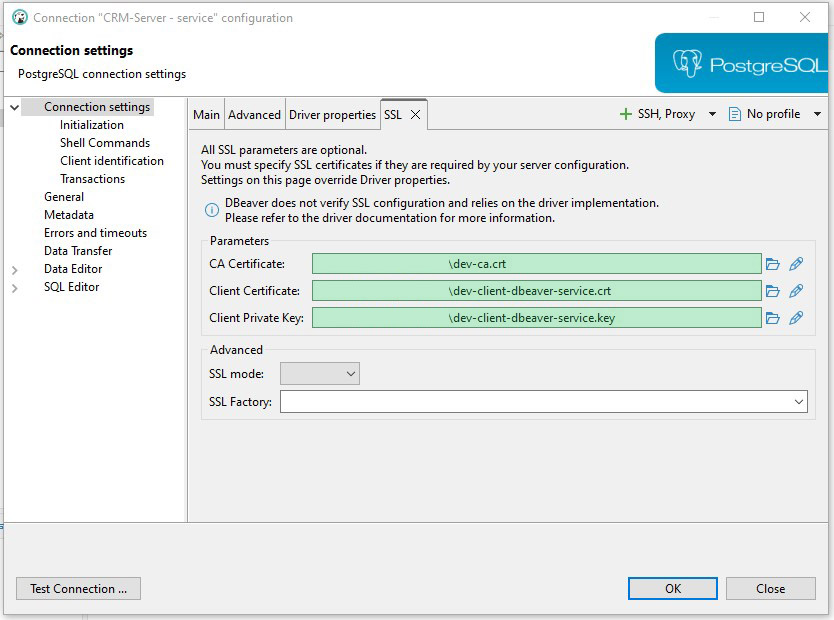
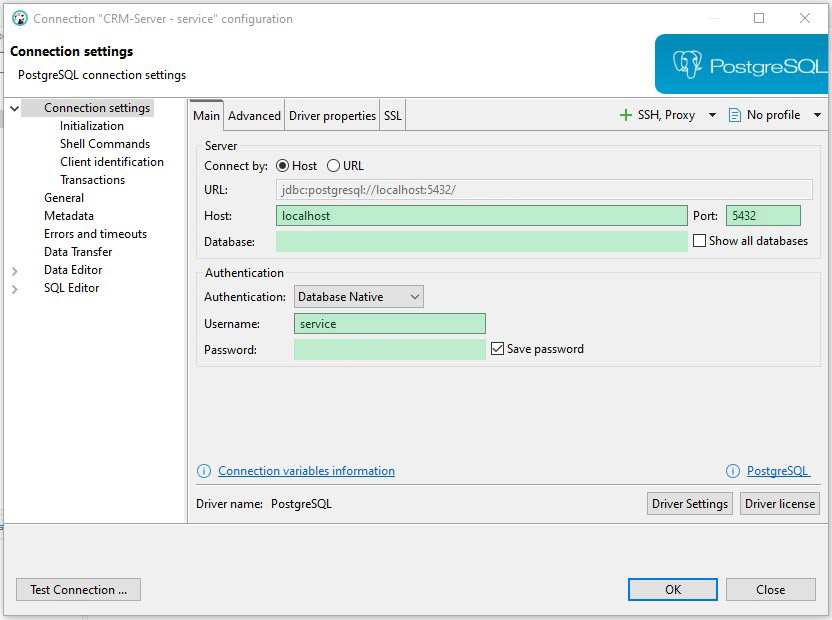
Three separate connections to the postgresql docker service were configured, for: the superuser, migrator and service user accounts. The following example demonstrates the service user connection - only authentication details differ between the connections.
- Right-click in the Database Navigator panel; Create > Connection
- Main tab, set:
- 'database' to the name/value specified in
secret.yamlunderpostgres_database - 'port' to 5432 (default) unless manually specified
- 'username' and 'password' to the values specified in
secret.yamlunderpostgres_user_serviceandpostgres_password_servicerespectively
- 'database' to the name/value specified in
- SSL tab, set:
- Paths to the required
.crtand.keyfiles, as produced by the certification procedure; refer tocerts READMEandcerts/dev/postgres READMEfor details.
- Paths to the required
Create Connection; Main
Create Connection; SSL