Leveraging Shape Completion for 3D Siamese Tracking
June 8, 2020 · View on GitHub
Supplementary Code for the CVPR'19 paper entitled Leveraging Shape Completion for 3D Siamese Tracking
Citation
@InProceedings{Giancola_2019_CVPR,
author = {Giancola, Silvio and Zarzar, Jesus and Ghanem, Bernard},
title = {Leveraging Shape Completion for 3D Siamese Tracking},
booktitle = {The IEEE Conference on Computer Vision and Pattern Recognition (CVPR)},
month = {June},
year = {2019}
}
Usage
Download KITTI Tracking dataset
Download the dataset from KITTI Tracking.
You will need to download the data for velodyne, calib and label_02.
Place the 3 folders in the same parent folder as following:
[Parent Folder]
--> [calib]
    --> {0000-0020}.txt
--> [label_02]
    --> {0000-0020}.txt
--> [velodyne]
    --> [0000-0020] folders with velodynes .bin files
Create Environment
conda create -y -n ShapeCompletion3DTracking python tqdm numpy pandas shapely matplotlib pomegranate ipykernel jupyter imageio
source activate ShapeCompletion3DTracking
conda install -y pytorch=0.4.1 cuda90 -c pytorch
pip install pyquaternion
Train a model
python main.py --train_model --model_name=<Name of your model> --dataset_path=<Path to KITTI Tracking folder>
Test a model
python main.py --test_model --model_name=<Name of your model> --dataset_path=<Path to KITTI Tracking folder>
Options
Run python main.py --help for a detailed description of the parameters.
OPT:
    --model_name=<Name of your model>
    --dataset_path=<Path to KITTI Tracking>
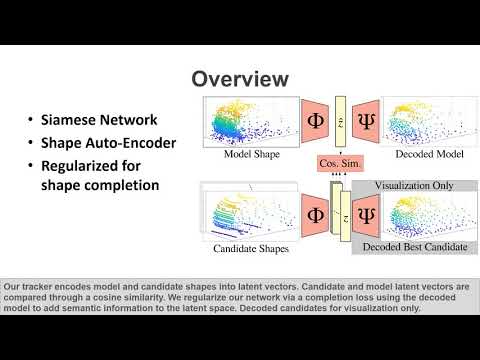
    --lambda_completion=1e-6: balance between tracking and completion loss
    --bneck_size=128: lenght of the latent vector
    --GPU=1: enforce the use of GPU 1
    --tiny: use a tiny set of KITTI Tracking
Pretraining
cd pretraining
python trainAE_main.py --top_in_dir=<Path to ShapeNet directory>
Visualize the results
You can create the GIF visualization from the supplementary material running the following command:
python VisualizeTracking.py --model_name Ours --track 29 --path_KITTI <PATH_KITTI>
python VisualizeTracking.py --model_name PreTrained --track 29 --path_KITTI <PATH_KITTI>
python VisualizeTracking.py --model_name Random --track 29 --path_KITTI <PATH_KITTI>
usage: VisualizeTracking.py [-h] [--GPU GPU] [--model_name MODEL_NAME]
                            [--track TRACK] [--path_results PATH_RESULTS]
                            [--path_KITTI PATH_KITTI]

Visualize Tracking Results

optional arguments:
  -h, --help            show this help message and exit
  --GPU GPU             ID of the GPU to use (default: -1)
  --model_name MODEL_NAME
                        model to infer (Random/Pretrain/Ours) (default: Ours)
  --track TRACK         track to infer (supp. mat. are 29/45/91) (default: 29)
  --path_results PATH_RESULTS
                        path to save the results (default: ../results)
  --path_KITTI PATH_KITTI
                        path for the KITTI dataset (default:
                        KITTI/tracking/training)
Tracking and Reconstruction of sample 29 from KITTI Tracking Dataset:
- using random weights


- using PreTrained weights


- using Our training

