Pentestlab provisioning
February 8, 2017 · View on GitHub
Requirements
Chef Server
You will need an up and running Chef server, with a pentestlab organization to upload all cookbooks, roles, data bags.
See the Chef Server documentation page to prepare your Chef server.
Openstack
An up and running openstack is required to deploy all machines, you will need also to update some references depending to your Openstack installation (images ref, networks etc..).
Generate a SSH keypair:
mkdir secrets
ssh-keygen -f secrets/pentester
Import it to your openstack as pentester alias. This key will be deployed in created machines and used for provisioning.
Bootstraping
Install dependencies:
bundle install
rake vendor
Upload cookbooks, roles and data bags to chef server:
rake server:upload:cookbooks
rake server:upload:roles
rake server:upload:databags
All in one:
rake upload:all
See also the Chef Server documentation page for data bags customization.
Create lab stack
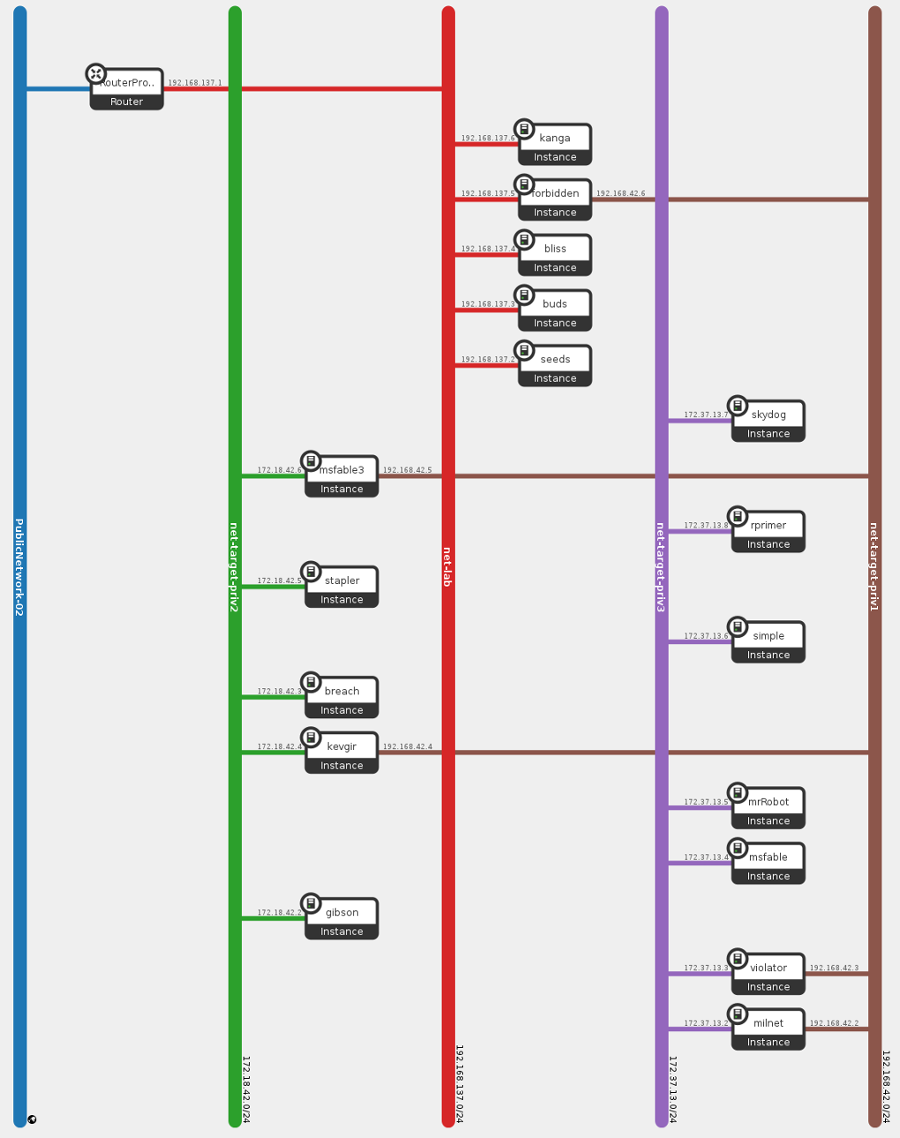
This stack will create basic network where will be attached all nodes managed by Chef.
openstack --os-cloud pentestlab stack create -e openstack/env.yml -t openstack/lab-network.hot lab
Get the network id of created stack and update .chef/knife.rb:
machine_options bootstrap_options: {
                  ...
                  nics: [{net_id: '<network-id>'}],
                  ...
Feel free to modify all others options in .chef/knife.rb, you need to adapt some options for your cloud environment.
Look at recipes in the machines cookbook to change specific machine options.
Boostrap seeds
Seeds is the workstation, we need to deploy the workstation over internet, so a free floating ip is required in your cloud environment. It is the only machine reachable through internet, all other machines will be provisioned inside the private network, from the workstation. It also provides a VPN server to connect to the lab.
To bootstrap seeds:
rake "provision[seeds]"
Once provisioning finished, connect to seeds
knife node show seeds -a cloud.public_ipv4
ssh eliot@seeds
mkdir lab
Package and upload pentestlab repo:
rake package
scp pentestlab.tar.gz eliot@seeds:lab/
Reconnect to seeds and install dependencies:
ssh eliot@seeds
cd lab
tar xfz pentestlab.tar.gz
bundle install --path=vendor/bundle
The workstation is now ready to provision all machines, copy your secrets key in seeds and openstack creds if required.
Provision lab
First provision Buds, the database:
ssh eliot@seeds
cd lab
rake "provision[buds]"
Next, Bliss and the teamserver Forbidden:
rake "provision[bliss]"
rake "provision[forbidden]"
The Kanga machine is optional, it's a Kali linux vm automatically configured with the teamserver.
Targets
See Targets documentation for targets network provisioning.
Connect forbidden to target networks by creating new port on network:
neutron port-create $(neutron net-list | grep "net-target-priv1 " | cut -d" " -f2)
then attach created port to forbidden:
nova interface-attach forbidden --port-id port-id-1
VPN
Check the server is correctly running:
root@seeds:/home/eliot# ss -npl | grep vpn
udp    UNCONN     0      0                      *:1194                  *:*      users:(("openvpn",pid=372,fd=4))
The VPN server is automatically configured with openvpn, but clients are not configured and need a manual setup.
The seeds machine installed and configured an openvpn server, and generated keys for each clients in /etc/openvpn/keys/. Each items in users data bag got a tar.gz package containing its own configuration. Copy with scp the appropriate package on each machines:
sudo su
for m in buds bliss forbidden; do scp -i /home/eliot/.ssh/id_rsa /etc/openvpn/keys/$m.tar.gz eliot@$(knife node show $m -a ipaddress|grep ipaddress|cut -d" " -f4):vpn.tar.gz; done;
exit
rake lab:vpn_setup
If there is now newly created interface (tun0), try to restart openvpn service on each vpn clients, or reboot:
knife ssh 'role:openvpn-client' 'sudo systemctl restart openvpn -x debian -i secrets/pentester -a ipaddress
knife ssh 'role:openvpn-client' 'sudo systemctl reboot' -x debian -i secrets/pentester -a ipaddress
Checks
The target network 192.168.42.0/24 should be reachable from all machine connected to the vpn. The openvpn server (seeds) will push the route on all clients, which will route all target traffic (192.168.42.0/24) to forbidden.
If the target network is not reachable, check routes and iptables rules, example:
Seeds (vpn server)
# ip r
default via 192.168.137.1 dev eth0
10.13.37.0/24 via 10.13.37.2 dev tun0
10.13.37.2 dev tun0  proto kernel  scope link  src 10.13.37.1
192.168.42.0/24 via 192.168.137.5 dev eth0
192.168.137.0/24 dev eth0  proto kernel  scope link  src 192.168.137.2

# iptables -L -t nat
...
Chain POSTROUTING (policy ACCEPT)
target     prot opt source               destination
MASQUERADE  all  --  10.13.37.0/24        192.168.42.0/24
Forbidden (teamserver)
# ip r
default via 192.168.137.1 dev eth0
10.13.37.0/24 via 10.13.37.17 dev tun0
10.13.37.1 via 10.13.37.17 dev tun0
10.13.37.17 dev tun0  proto kernel  scope link  src 10.13.37.18
172.17.0.0/16 dev docker0  proto kernel  scope link  src 172.17.0.1
192.168.42.0/24 dev eth1  proto kernel  scope link  src 192.168.42.6
192.168.137.0/24 dev eth0  proto kernel  scope link  src 192.168.137.5

# iptables -L -t nat
...
Chain POSTROUTING (policy ACCEPT)
target     prot opt source               destination
MASQUERADE  all  --  172.17.0.0/16        anywhere
MASQUERADE  all  --  anywhere             192.168.42.0/24
Bliss (client)
default via 192.168.137.1 dev eth0
10.13.37.0/24 via 10.13.37.13 dev tun0
10.13.37.1 via 10.13.37.13 dev tun0
10.13.37.13 dev tun0  proto kernel  scope link  src 10.13.37.14
172.17.0.0/16 dev docker0  proto kernel  scope link  src 172.17.0.1
192.168.42.0/24 via 10.13.37.13 dev tun0
192.168.137.0/24 dev eth0  proto kernel  scope link  src 192.168.137.4
Inspec
Run Inspec with following command:
rake lab:inspec
Final converge
Finally, run rake lab:chef_client from seeds to converge all nodes. A cron job is installed on each machine to run the chef-client command at 07:00AM. See lab::cron_chef_client
Now the lab is provisioned, look at the services and teamserver pages to setup arsenal.
OpenStack Network Topology