README.md
September 20, 2026 · View on GitHub

SpecPi
A Pi harness setup, built to specification.


Website · Documentation · Evaluations · Releases
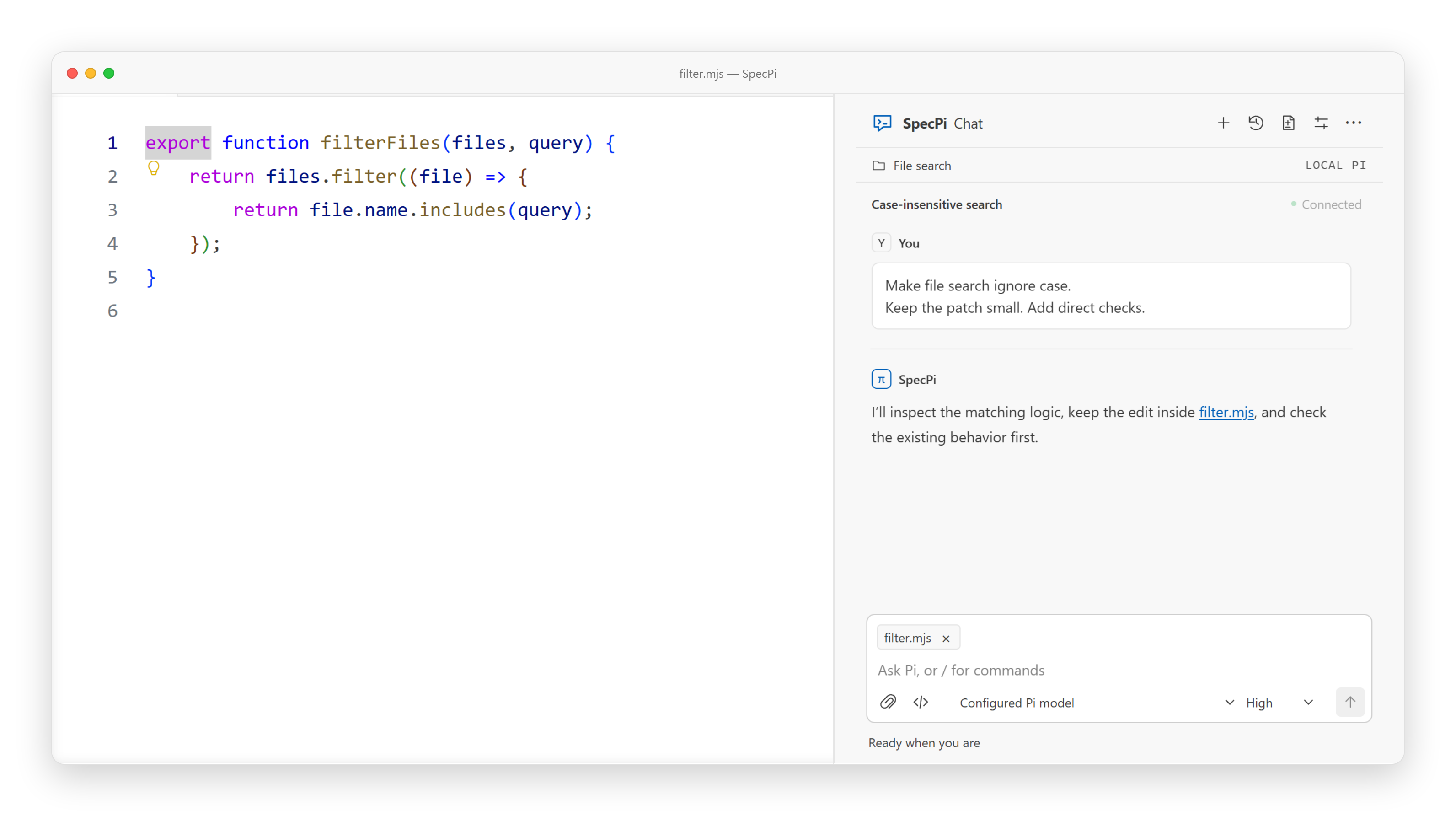
SpecPi Chat · Example workspace
SpecPi is a small starting point for the Pi coding agent. It is one opinionated setup for how the agent should work, not a marketplace of plugins.
At the center are two built-in extensions. Scope control keeps each task to the files it said it would touch. The improvement loop turns repeated friction into small, tested changes to the setup, instead of letting prompts and workarounds pile up. Around those are eight hand-picked packages, each locked to an exact version and checked before anything installs, plus SpecPi Chat, a VS Code panel for working alongside the agent.
It focuses on five things:
- Control: clear scope, tool permissions, and lifecycle commands that ask before they change anything
- Accuracy: exact version pins, checksums on state, rollback on failure, and proof over promises
- Improvement: local notes become small, checked changes through
/harness-improvement - Efficiency: delegation, persistent goals, and browser QA handled by the right tool for the job
- Lean default: web access, browser QA, and delegation stay off until you need them. Turn them on for a session with
/webaccess on,/browser on, and/delegate on— or let the agent ask when it hits the need, and answer the prompt
Everything it touches is written down, versioned, and easy to undo.
Measured context
This chart shows first-call context from a clean install: all eight pinned packages, the working agreement, and the skills Pi finds. It has not been re-measured since the command guard returned to a pinned package rather than a native system. "Enabled" means browser QA, delegation, and web access are switched on, with no goal, scope, or improvement selection active.
The solid rows are measured by us, from the request each setup actually sends through one local test provider. That includes OpenCode, the DeepSeek Harness, and Oh My Pi, all measured as installed. The faded Codex CLI and Claude Code rows come from HarnessTax's published numbers, measured under their own setup. Treat those as a rough reference, not a head-to-head test. These are character counts. They say nothing about tokens, cost, or how well each tool does the job. The research page breaks down the enabled setup by feature, so you can see what each switch costs on its own.
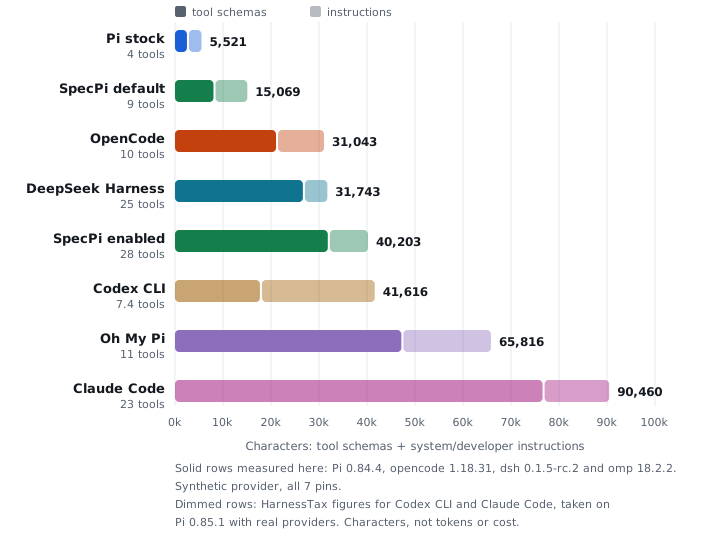
Measured tool schemas + system/developer instructions · node scripts/measure-context.mjs --chart --omp=<path to Oh My Pi's cli.js> --oc=<path to OpenCode's binary> --dsh=<path to the DeepSeek Harness bin> · Recorded measurements and package pins · Method and caveats
The gap between the two SpecPi bars comes from a few separate switches, so the enabled tools are also measured group by group. For example, the fourteen browser QA tools add up to less than the four web access tools:
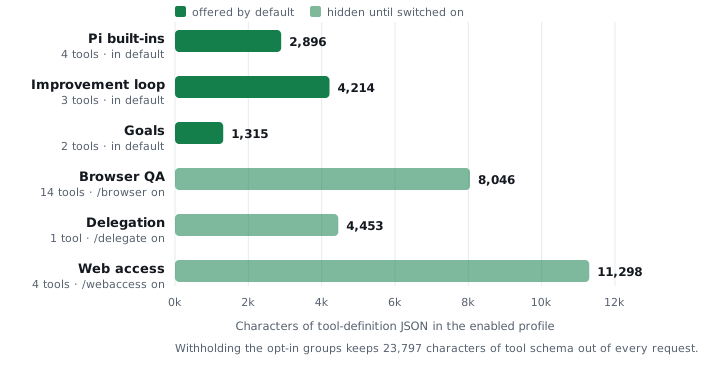
Every tool in the measured request belongs to exactly one group · Leaving all three opt-in groups hidden keeps 23,797 characters of tool schema out of every request
Harness evaluations
The chart above counts characters. It says nothing about what a harness costs to actually use, or whether it finishes the job. That is what the eval suite is for: the same tasks, the same model and the same frozen price list, with only the harness changing.
259 attempts across 7 harnesses and 24 tasks, all on deepseek-v4.1-flash.
| Harness | Solved | Cost/attempt | Prompt tokens | Sent before any work |
|---|---|---|---|---|
| Pi | 34/37 | $0.0038 | 112,681 | 5,522 |
| SpecPi | 35/37 | $0.0042 | 134,859 | 13,799 |
| OpenCode | 31/37 | $0.0043 | 143,830 | 38,097 |
| SpecPi + Jev | 35/37 | $0.0046 | 153,077 | 13,799 |
| Codex CLI | 30/37 | $0.0067 | 242,031 | 38,148 |
| Oh My Pi | 35/37 | $0.0070 | 257,783 | 62,612 |
| DeepSeek Harness | 35/37 | $0.0078 | 281,676 | 31,750 |
Cost is the harness's own model spend, priced from recorded usage against a dated price file. The last column is the tool schema plus system instructions riding every single request, which is the fixed toll a harness charges before the model does anything.
Read the method, the charts and the caveats on the
evaluations page. The runner,
the tasks and the recorded results are in evals/, and this table is
regenerated from those reports by node scripts/eval-site.mjs, so it cannot
drift from the published figures.
Install
Requires Node.js 22.19+, Git, npm, and an existing Pi installation on PATH.
npm install --global specpi@latest
specpi plan
specpi install
specpi doctor
plan shows what will change without modifying anything. Restart Pi after install.
Full setup options, package details, and requirements: website.
Where things live
| Packages | The seven pinned packages and what each provides |
| Scope control | /scope commands and drift monitoring |
| Improvement loop | Local wishlist, /harness-improvement, and retirement with evidence |
| SpecPi Chat | VS Code frontend and VSIX install · Chat guide |
| Updating | Update, uninstall, and migration notes |
Development
npm install --ignore-scripts --omit=peer --no-package-lock
node --test tests/workflow-controls.test.mjs tests/workflow-controls-extension.test.mjs
npm run check
Installer tests use disposable Pi directories — never test against a live Pi installation. Publication follows the release procedure.
Security model · Third-party components · Release notes · MIT License