Entities
April 1, 2024 · View on GitHub
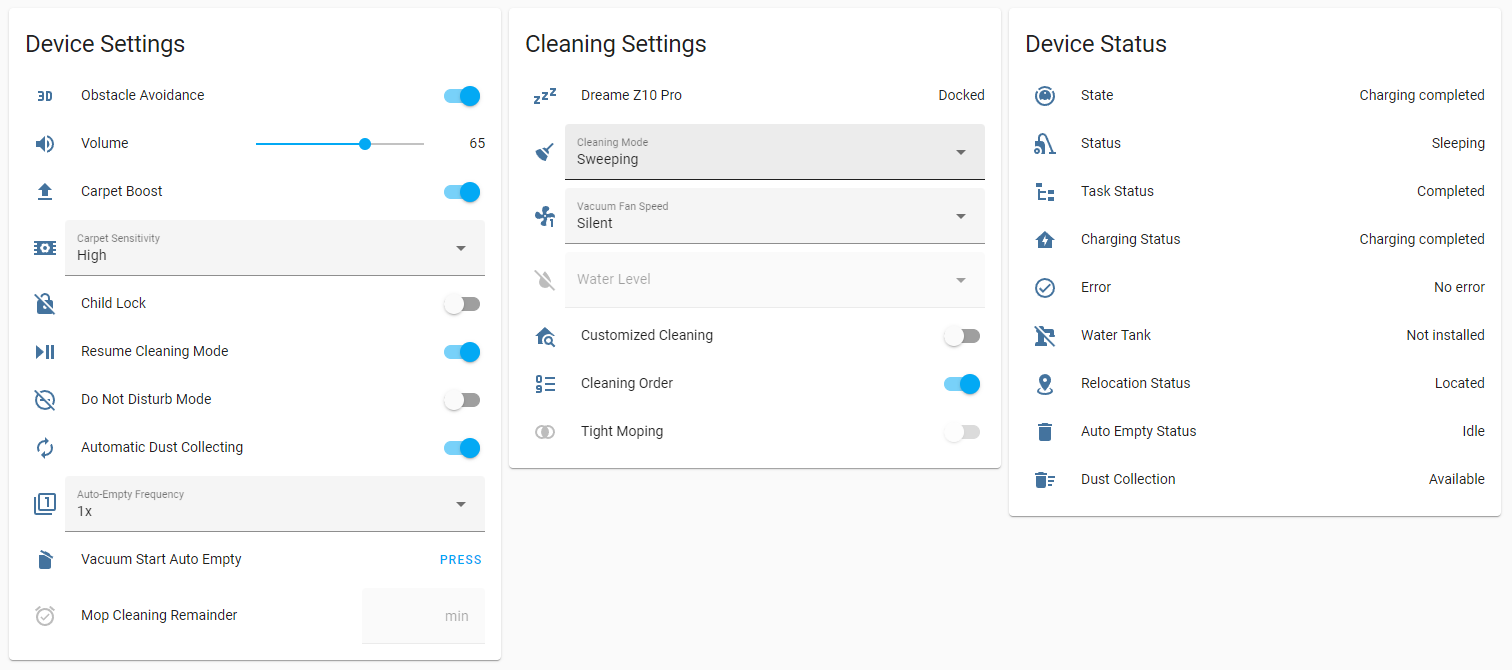
-
Integration exposes almost all available settings and states reverse engineered from the official App.
-
Almost all entities are dynamically exposed for specific device. If the device does not have property that tied to specific entity, integration will not add that entity to the Home Assistant.
-
Some entities may not be available on devices with older firmware versions like customized_cleaning and cleaning_mode that are also not available on valetudo.
-
Most of the entities including the vacuum entity has dynamic icons for their state and can be overridden from entity settings.
-
Most of the sensor and all select entities returns their current raw integer value on
raw_value,map_idorsegment_idattributes for ease of use on automations and services. -
All entities has dynamic refresh rate determined by its change range and device state. Integration only inform Home Assistant when a device property has changed through listeners. This is more like a local_push type of approach instead of local_pull but please note that it may take time entity to reflect the changes when you edit related setting from the official App.
-
Some entities has custom availability rules for another specific entity or state. E.g. tight_mopping entity will become unavailable when water tank or mop pad is not attached. (All off the rules extracted from the official App)
-
Exposed cloud connected entities for all available settings that are stored not on the device but on specific map data itself. E.g. map_rotation
-
Generated entities have the following naming schema:
[domain].[vacuum name]_[entity name]
Some entities are disabled by default and some entities can be accessed over vacuum entity attributes.
Switch
| Name | Description | Notes |
|---|---|---|
resume_cleaning | Enable/Disable resume cleaning feature | Vacuum entity return its state as paused before cleaning continues while charging |
carpet_boost | Enable/Disable carpet boost feature | |
carpet_recognition | Enable/Disable recognition feature | Available on vacuums with ultrasonic sensor |
obstacle_avoidance | Enable/Disable 3D obstacle avoidance | Available on vacuums with line laser |
customized_cleaning | Enable/Disable customized room cleaning | Available on devices with firmware above 1056 |
child_lock | Enable/Disable child lock | |
tight_mopping | Enable/Disable tight mopping pattern | Available on devices with firmware above 1056 and unavailable and water tank or mop pad is not installed. |
dnd | Enable/Disable do not disturb | |
multi_floor_map | Enable/Disable multi-floor map | Available on vacuums can store more than one map |
auto_dust_collecting | Enable/Disable automatic dust collecting when cleaning completed | Available on vacuums with auto-empty station |
self_clean | Enable/Disable automatic self cleaning feature | Available on vacuums with self-wash base |
auto_drying | Enable/Disable automatic drying of the mop after the cleaning is completed | Available on vacuums with self-wash base |
water_electrolysis | Enable/Disable water electrolysis feature | Available on vacuums with water electrolysis feature |
auto_water_refilling | Enable/Disable external water input for self-wash base | Available on vacuums with self-wash base and external water input |
auto_mount_mop | Enable/Disable automatic assembly and disassembly of mop pads according selected cleaning mode | Available on vacuums with automatic mop assembly feature |
carpet_avoidance | Avoid carpets if mop pads are attached | Available on vacuums with mop pad lifting feature |
auto_add_detergent | Use detergent cartridge for cleaning the mop pads | Available on vacuums with self-wash base and detergent cartridge |
map_saving | Map saving mode setting for VSLAM devices | Available on vacuums without lidar navigation |
ai_obstacle_detection | Enable/Disable AI obstacle detection | Available on S10 and L10s models |
ai_obstacle_image_upload | Enable/Disable uploading obstacle picture to cloud | Available on devices with front camera |
ai_obstacle_picture | Enable/Disable obstacle picture displaying | Available on devices with front camera |
ai_pet_detection | Enable/Disable AI pet detection | Available on devices with front camera |
ai_human_detection | Enable/Disable AI human detection | Available on S10 and S10 Pro |
ai_furniture_detection | Enable/Disable AI furniture detection | Available on devices with front camera |
ai_fluid_detection | Enable/Disable AI fluid detection | Available on devices with front camera |
fill_light | After turned on, it will automatically fill light in a poorly lit environment to improve the obstacle avoidance ability and the screen clarity in the video. | Available on devices with front camera and front light |
collision_avoidance | After it is turned on, the robot will reduce collisions with walls, furniture and obstacles, and the cleaning efficiency and coverage will be slightly reduced. | Available on devices with this feature |
stain_avoidance | After it is turned on and when a stain is identified, the robot will avoid and do not clean the area. | Available on devices with AI fluid detection feature |
intelligent_recognition | Enable/Disable automatic map switching when multi-floor map is enabled | Available on devices with wifi map feature |
cleaning_sequence | Enable/Disable custom room cleaning sequence | Available with map feature (This a dynamically created entity and not actually tied to any setting directly, when turned of it actually deletes current cleaning order and regenerates with default order or restores previous order from memory when turned on again) |
Sensor
| Name | Description | Notes |
|---|---|---|
cleaning_time | Cleaning duration of last/current cleaning job | Unavailable during fast mapping |
mapping_time | Mapping duration of current fast mapping job | Only available when robot is fast mapping |
cleaned_area | Cleaned area of last/current cleaning job | Unavailable during fast mapping |
state | State of the robot | This entity exposes robot states that are not present in the home assistant like charging_completed |
status | Status of the robot | |
relocation_status | Relocation status of the robot | |
task_status | Task status of the robot | |
water_tank | Water tank status of the robot | Available on vacuums with water tank |
mop_pad | Water mop pad status of the robot | Available on vacuums with self-wash base |
dust_collection | Dust collection is available, not available or not preformed due to do not disturb settings | Available on vacuums with auto-empty station |
auto_empty_status | Status of auto empty dock | Available on vacuums with auto-empty station |
self_wash_base_status | Status of self-wash base | Available on vacuums with self-wash base |
error | Fault code description of robot | Error reporting |
charging_status | Charging status of the robot | |
battery_level | Battery level of the robot | |
first_cleaning_date | First cleaning date | |
total_cleaning_time | Total cleaning duration | |
cleaning_count | Total cleaning times | |
total_cleaned_area | Total cleaned area | |
main_brush_left | Main brush life left in percent | |
main_brush_time_left | Main brush life left in hours | |
side_brush_left | Side brush life left in percent | |
side_brush_time_left | Side brush life left in hours | |
filter_left | Filter life left in percent | |
filter_time_left | Filter life left in hours | |
sensor_dirty_left | Time left to clean the sensors in percent | Available on vacuums with line laser |
sensor_dirty_time_left | Time left to clean the sensors in hours | Available on vacuums with line laser |
mop_pad_left | Mop life left in percent | Available on vacuums with self-wash base |
mop_pad_time_left | Mop life left in hours | Available on vacuums with self-wash base |
silver_ion_left | Silver-ion life left in percent | Available on vacuums with silver-ion feature |
silver_ion_time_left | Silver-ion life left in hours | Available on vacuums with silver-ion feature |
detergent_left | Detergent left in percent | Available on vacuums has detergent cartridge |
detergent_time_left | Detergent left in hours | Available on vacuums has detergent cartridge |
cleaning_history | Previous cleaning job details as attributes | Available with map feature |
current_room | Current room that vacuum currently in | Available with map feature |
Number
| Name | Description | Notes |
|---|---|---|
volume | Volume level | |
mop_cleaning_remainder | Mop cleaning remainder | |
dnd_start_hour | Do not disturb start hour (XX:00 -> 00:00) | Unavailable when do not disturb is disabled |
dnd_start_minute | Do not disturb start minute (00:XX -> 00:00) | Unavailable when do not disturb is disabled |
dnd_end_hour | Do not disturb end hour (00:00 -> XX:00) | Unavailable when do not disturb is disabled |
dnd_end_minute | Do not disturb end minute (00:00 -> 00:XX) | Unavailable when do not disturb is disabled |
Button
| Name | Description | Notes |
|---|---|---|
reset_main_brush | Reset main brush remaining life left | |
reset_side_brush | Reset side brush remaining life left | |
reset_filter | Reset filter remaining life left | |
reset_sensor | Reset sensor cleaning remaining left | Available on vacuums with line laser |
reset_mop_pad | Reset mop pad remaining life left | Available on vacuums with self-wash base |
reset_silver_ion | Reset silver-ion remaining life left | Available on W10 Pro |
start_auto_empty | Start auto-emptying | Available on vacuums with auto-empty station |
clear_warning | Clear warning | Unavailable when there is no warning to clear |
start_fast_mapping | Start fast mapping | Unavailable when maximum map count reached |
start_mapping | Create new map with cleaning the whole floor | Unavailable when maximum map count reached |
start_washing | Manually start mop washing | Available on vacuums with self-wash base, unavailable when washing is not possible or already washing mop |
pause_washing | Pause mop washing | Available on vacuums with self-wash base, unavailable when robot is not currently washing mop |
start_drying | Manually start mop drying | Available on vacuums with self-wash base, unavailable when drying is not possible or already drying mop |
stop_drying | Stop mop drying | Available on vacuums with self-wash base, unavailable when robot is not currently drying mop |
Select
| Name | Description | Notes |
|---|---|---|
suction_level | Suction level of the vacuum | Unavailable if customized cleaning enabled and current job is not zone cleaning or spot cleaning |
water_volume | Water volume of the vacuum | Available on vacuums with water tank and unavailable if customized cleaning enabled and current job is not zone cleaning or spot cleaning. |
mop_pad_humidity | Humidity level of the mop pad | Available on vacuums with self-wash base and unavailable if customized cleaning enabled and current job is not zone cleaning or spot cleaning. |
cleaning_mode | Cleaning mode of the vacuum. (Sweeping, Mopping, Sweeping and mopping) | Unavailable during cleaning. (Options are dynamically generated for vacuums without liftable mop pad.) |
carpet_sensitivity | Carpet sensitivity of carpet boost feature | Unavailable when carpet boost is disabled |
auto_empty_frequency | Auto empty frequency | Unavailable when automatic dust collection is disabled or not available |
self_clean_area | Select cleaning area before return to clean the mop pad | Available on vacuums with self-wash base |
mop_wash_level | Mop cleaning water usage level | Available on vacuums with self-wash base and external water input |
drying_time | Mop drying time in minutes | Available on vacuums with self-wash base |
mopping_type | Mopping type for deep or daily cleaning | Available on vacuums with AI fluid and stain detection feature |
map_rotation | Sets the rotation of selected map | Available with map feature and unavailable when current map is not one of the selected maps (Different map rotations can be for saved maps but only selected map is editable via this entity) |
selected_map | Currently selected map | Available with map feature and unavailable when multi-floor map is disabled or not available (Robot will end active job when selected map is changed) |
Select Entities for rooms
- Room select entities are only available with cloud connection.
- Entities are dynamically generated from saved maps but only selected map is editable via shared room entities.
- Entity names and icons are dynamically generated from segment id, custom name or segment type and can be overridden from entity settings (Not recommended when multi-floor map is enabled).
- Entities uses segment id system but generated from all saved maps. When multi-floor map is enabled, specific room entity may not be available on currently selected map.
- Customized cleaning and custom cleaning sequence settings are not available on devices with older firmware versions.
- Generated entities have the following naming schema:
select.[vacuum name]_room_[segment id]_[room entity name]
| Name | Description | Notes |
|---|---|---|
name | Room name from predefined types or current custom name | Unavailable when room does not exists on current map |
suction_level | Suction level for the room | Unavailable if customized cleaning is disabled |
water_volume | Water volume for the room | Available on vacuums with water tank and unavailable if customized cleaning is disabled |
mop_pad_humidity | Humidity level of the mop pad for the room | Available on vacuums with self-wash base and unavailable if customized cleaning is disabled |
cleaning times | Cleaning times of the room | Unavailable when cleaning job is active or customized cleaning is disabled |
order | Cleaning order of the room | Unavailable when cleaning job is active or cleaning sequence is disabled |
For more info about customized cleaning feature
Camera
| Name | Description | Notes |
|---|---|---|
map | Live map | Live map image |
map_data | Live map data for valetudo-card | Disabled by default |
map_1 | First saved map | Saved map at index 1 |
map_2 | Second saved map | Saved map at index 2, available if multi-floor map is enabled and there are at least two saved maps on map list |
map_3 | Third saved map | Saved map at index 3, available if multi-floor map is enabled and there are at least three saved maps on map list |
- Camera entities are only available with cloud connection.
- All camera entities has different dynamic refresh rate determined by its last request time and device state.
- Camera will only render a map when an image request has been made and only render changed areas of the image.
- Saved map camera names generated dynamically from index or custom name.
- Saved map entities for multi-floor map entities uses indexing system instead of map id. More info
- Live map is not editable and renders saved map after an edit has been made until robot starts cleaning.
- map_1 entity always renders saved map of currently selected map when multi-floor map is disabled