Project - Building a REST API with Node and Express in the Backend
May 6, 2026 · View on GitHub
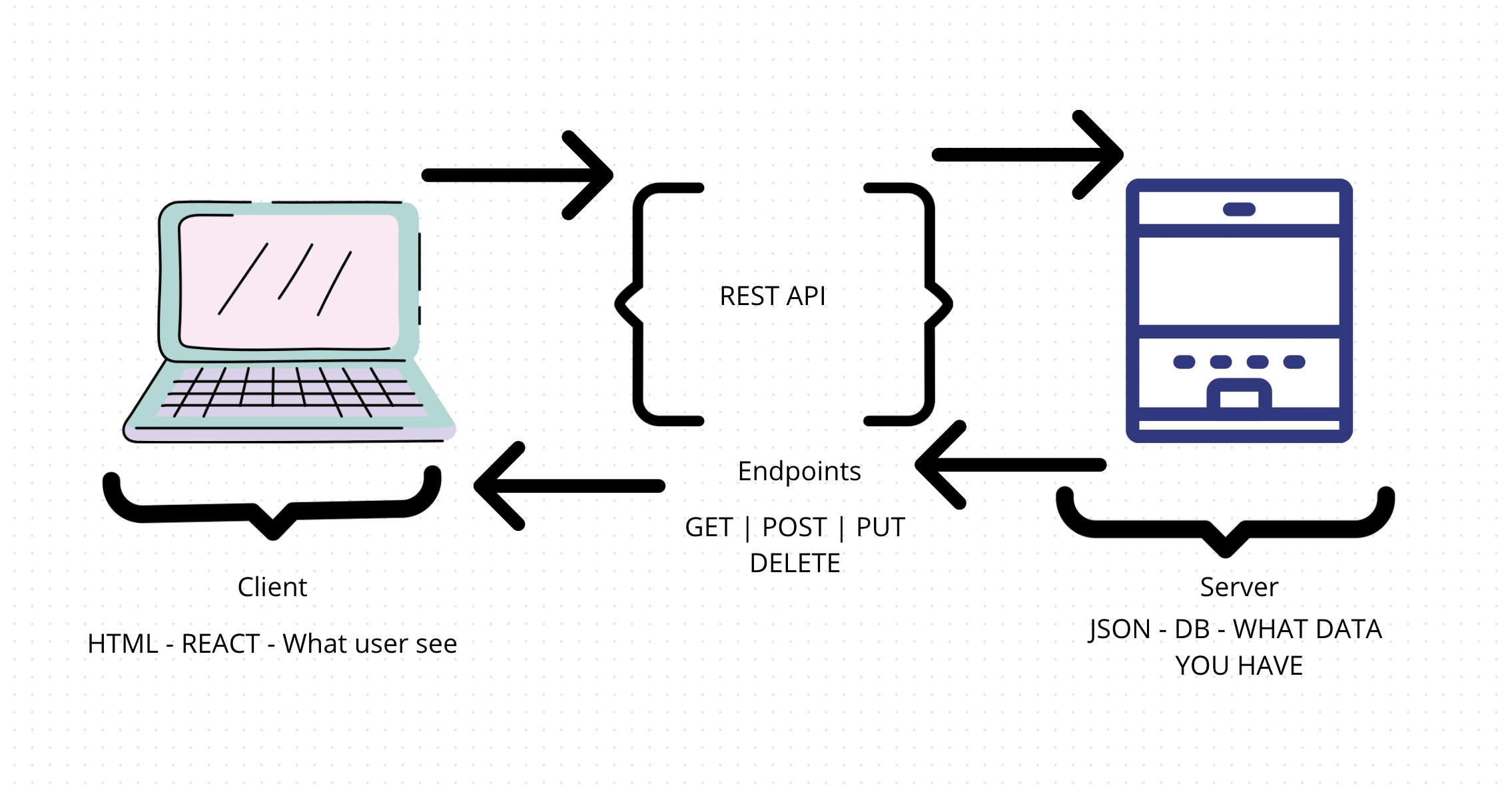
A RESTful API (also referred to as RESTful web services) is an Application Programming Interface (API) that uses HTTP verbs like GET, PUT, POST, and DELETE to access or manipulate data.
🍎 Learning Objective:
What you will learn with this project is how to organize the data that comes from your backend using a REST API. At this moment, you don't know how to connect a DB, so for now, we will work with data in a JSON file. (see the file books.js)
Don't be afraid of the terminology. A REST API is just a way of organizing data according to the CRUD operations

- In this project, you will build a REST API with Node.js and Express to manage a list of books.
- You will use a simple JSON to store
. If you want to learn a little about how to use hardcoded data in a project follow this document - Remember to start the project by creating a new branch in your assignments repo. By Friday, you should push your commit up to GitHub and have a PR ready to go for your partner.
- OPTIONAL BONUS: This project is focused on the backend. If you don't have anything in the frontend- it's ok. Your frontend could be just the JSON in the file.
Hardcoded JSON Data File
The hardcoded JSON data file serves as a simple, static data source for testing and development purposes. It allows developers to quickly prototype and test API endpoints without setting up a full database system initially.
Local Database
A local database provides a more robust and dynamic data storage solution compared to hardcoded JSON. It enables real-time data manipulation, supports complex queries, and simulates production-like conditions during development and testing phases.
Working with Postman (Hardcoded)
Using Postman with hardcoded data helps developers test and validate API endpoints using static data. This approach allows for quick verification of endpoint functionality and response formats without the need for a full database setup.
Working with Postman (Local Database)
Working with Postman against a local database enables comprehensive testing of API endpoints with dynamic data. It allows developers to simulate various scenarios, including CRUD operations, error handling, and performance testing under realistic conditions.
PostgreSQL Querying
PostgreSQL querying involves interacting with a powerful relational database management system. It allows developers to perform complex data operations, optimize queries for better performance, and ensure data integrity through constraints and relationships, ultimately leading to a scalable and efficient backend system.
🛠️ Requirements:
- Change the information inside the file books.js to have your own unique data (we suggest books, but if you want to use any other data, it's ok)
- Using Node and Express, create a GET router with a response that converts all
using Json() - Using that endpoint build a list of all your books in the backend(server side).
- Using Node and Express, create a route for each one of the verbs in CRUD operations in the backend. You don't need to have a frontend. You can test your API using Postman.
- Have at least 50 commits
- Optional Bonus: Using that endpoint build a list of all your books in the frontend (client side). Note: you will need to make a GET request to bring all your information to the frontend too
What Staff Will Evaluate
Staff will evaluate this project against the requirements above and the shared project evaluation criteria. Be ready to show CRUD API routes, Postman verification, JSON-to-database transition work when assigned, clean server organization, frequent commits, and a reviewed PR.
🗓️ Suggested Timeline
Day 1 & 2: Hardcoded JSON Data Manipulation
On these days, participants will:
- Create a hardcoded JSON data file containing sample records.
- Implement CRUD (Create, Read, Update, Delete) operations using this JSON data.
- Test these operations using Postman.
Expectations:
- Participants should have functional API endpoints for basic CRUD operations.
- They should be able to add, retrieve, update, and delete records from the JSON file.
- Postman requests and responses should demonstrate successful interaction with the hardcoded data.
Day 3: Transition to Local Database
On this day, participants will:
- Set up a local database (e.g., PostgreSQL).
- Transfer the hardcoded JSON data into the local database table.
- Implement basic CRUD operations for the local database.
- Test both hardcoded JSON and local database operations using Postman.
Expectations:
- Participants should have a functioning local database with the transferred data.
- They should be able to run queries on both the JSON file and the local database.
- Postman tests should demonstrate successful interaction with both data sources.
Day 4: Full Transition to Local Database
On this final day, participants will:
- Complete the transition of all CRUD operations to use the local database exclusively.
- Refine and optimize database queries.
- Ensure all API endpoints now interact with the local database.
- Conduct thorough testing using Postman.
Expectations:
- All operations should now be performed on the local database.
- Participants should demonstrate understanding of SQL queries and database interactions.
- Postman tests should show consistent behavior across all CRUD operations using the local database.
👷♂️ Step by Step instructions - Building this from scratch
For creating the server (using Express)
-
Make a new directory or folder for your project.
-
cd into your new directory
-
create a package.json file by running the command
npm init -y -
Make sure that the main file in your package is
index.js. Create your index.js file (you can do that withtouch index.jsor directly on your VSCode) -
Install all the dependencies with the commands:
npm i expressandnpm i cors -
Install the module nodemon in the dev server with the command
npm i nodemon --save-dev -
Inside your package.json, change the scripts to:
"type": "module",
"start": "node index.js",
"server": "nodemon index.js",
(doing this, you will delete the test script)
-
Run
npm run startin your terminal -
Set up express by running
npm install express --save -
Consult these instructions for more details.
⚙️ Transitioning from Hardcoded JSON data to SQL Querying a Local DB
By progressing from hardcoded JSON to local database querying, participants gain hands-on experience with the full lifecycle of backend development, from rapid prototyping to robust, scalable solutions. Participants transition from querying hardcoded JSON to SQL querying a local database table for several important reasons:
- Real-world Preparation: Most production applications use databases, so this transition prepares developers for real-world scenarios.
- Performance Optimization: Databases offer better performance for complex queries and large datasets compared to parsing JSON files.
- Data Integrity: Databases enforce constraints and relationships, ensuring data consistency and reducing errors.
- Scalability: As projects grow, database querying becomes essential for managing increasing amounts of data efficiently.
- Learning Curve: This transition helps developers understand database concepts, SQL syntax, and ORM (Object-Relational Mapping) techniques.
- Feature Enhancement: Databases support advanced features like transactions, indexing, and caching, which aren't easily replicable with JSON files.
Postman will be used throughout the project to test API endpoints. Participants will learn to send HTTP requests (GET, POST, PUT, DELETE) and analyze responses. They'll see how the same operations differ when querying JSON vs a database.
- Set up a local database (e.g., PostgreSQL).
- Create a table structure matching your JSON data schema.
- Write a script to import JSON data into the database.
- Modify existing CRUD functions to use SQL queries instead of JSON manipulation.
- Update API endpoints to call these new database functions.
- Test thoroughly using Postman to ensure functionality remains intact.
📚 Helping Resources:
- You can see how the first task in Cristina's example. This code only does a route for the initial GET for all the books and shows a specific book. It shows in the Frontend, but you don't need to get to that point. You can show your API with only code in the backend
- Creating a REST API with Node.js and Express: A step-by-step guide (Article)
- Build a REST API with Node JS and Express (Video, 1 hr. )
- HTTP Request Practice (GitHub)
- RESTful API (GitHub)
- PostgreSQL Installation (GitHub)
- Database Table Connection (Video, 1 hr.)
- Books Array of Objects (GitHub)
- How to Dump and Restore PostgreSQL Database? (Article)
🙋 Frequently Asked Questions
We can add common FAQs here. Open a PR if you have any questions.
Full Time Program Week 6: RESTful API App Part 1 of 1