MiP Power Up - D1 mini library
August 1, 2026 · View on GitHub

This library for the Arduino IDE, together with the MiP Power Up - D1 mini, allows you to take control of WowWee Labs' MiP and turn it into an autonomous, cloud-connected robot.
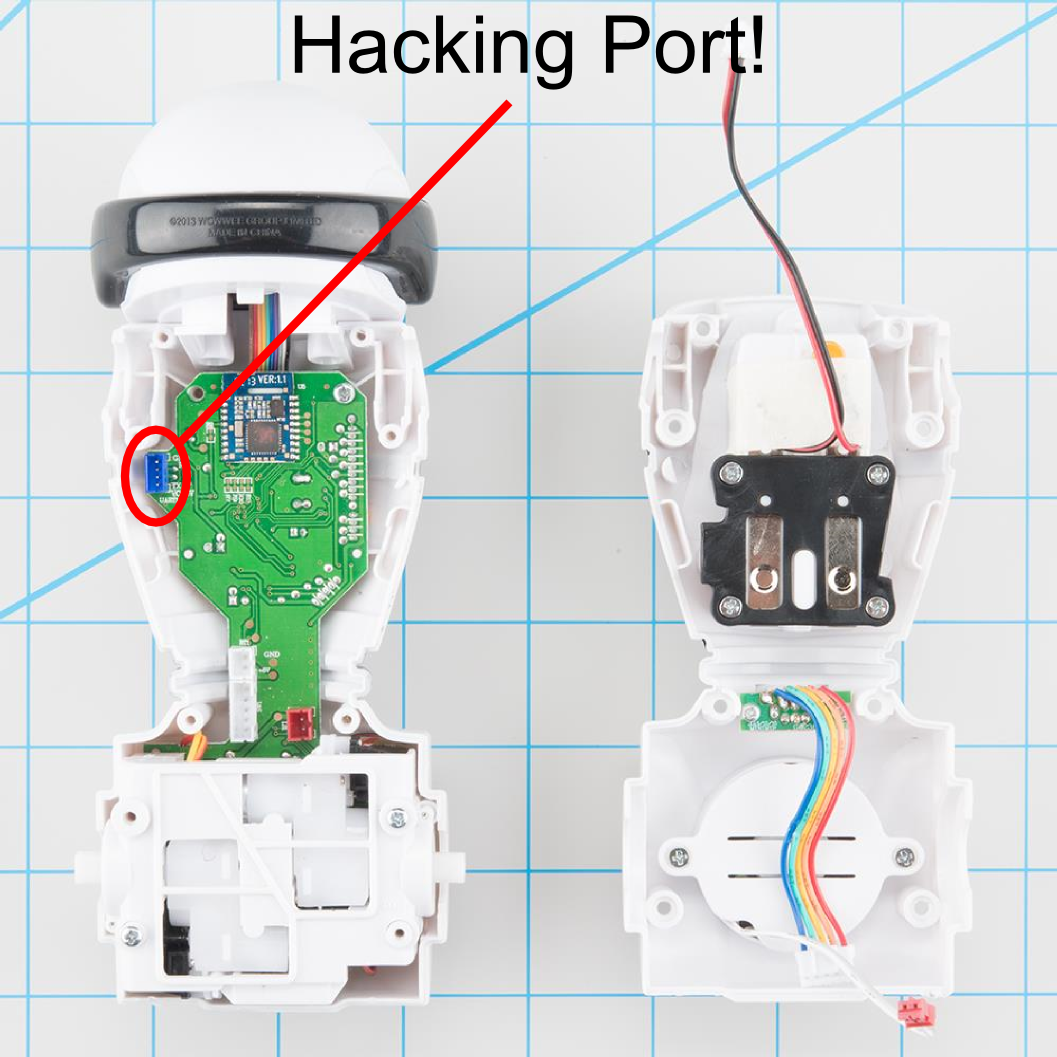
MiP is a hacker-friendly self-balancing robot. WowWee provides the MiP Protocol Specification on GitHub, and a 4-pin hacker port, complete with JST connector, right on the mainboard. The connector makes it easy to connect an external controller such as the D1 mini or compatible boards and take control of your MiP. Once connected, you can:
- Command the speed and direction of motion for the gravity-defying MiP.
- Command the individual control (on, off, blink) of the four LED eye segments on the head.
- Take full control of the RGB LED in MiP's chest.
- Command the playback of sound lists using the >100 built-in sounds.
- Use the head-mounted IR sensors to read 'radar' distance measurements or detect user hand gestures.
- Detect user claps with the built-in microphone.
- Detect the MiP's current pose via its inertial sensors, the same sensors that make its balancing magic possible.
- And more!
Be sure to check out the MiP Power Up - D1 mini which conveniently allows you to mount a D1 mini to MiP's battery compartment.
Acknowledgements
- This library is a port of adamgreen's MiP_ProMini Pack. Here you will find all the same functionality as his original library but with cloud connectivity added.
- JoaoLopesF developed the highly valuable RemoteDebug library which makes debugging MiP wireless and easy.
- Without the esp8266's Arduino library, none of this would be possible.
Installation
- The esp8266 Arduino library should be installed prior to using this library.
- The MiP Power Up - D1 mini library is intended for use with the Arduino IDE. Installation is the same as for other libraries. Download the zip and select
Sketch->Include Library->Add .ZIP Library.... Browse to the downloaded zip file and the Arduino IDE will do the rest.
Usage
- A very thorough guide to installing and using library is provided in the wiki.
- A D1 mini can be connected to MiP using a breadboard. Even better, use the MiP Power Up - D1 mini adapter board.
Contributing
This project is intended to make programming MiP easy and fun. To that end, contributions are highly encouraged! Please see CONTRIBUTING.md for more information.