F8 Event
April 9, 2026 · View on GitHub



简介(希望自己点击F8,就能开始制作游戏,不想多余的事)
Unity F8 Event组件
- 优雅的发送消息、事件监听系统
- 防止消息死循环
- EventDispatcher可自动释放Event
导入插件(需要首先导入核心)
注意!内置在->F8Framework核心:https://github.com/TippingGame/F8Framework.git
方式一:直接下载文件,放入Unity
方式二:Unity->点击菜单栏->Window->Package Manager->点击+号->Add Package from git URL->输入:https://github.com/TippingGame/F8Framework.git
视频教程:【Unity框架】(6)事件管理
代码使用方法
// 消息的定义,枚举
public enum MessageEvent
{
    // 框架事件,10000起步
    Empty = 10000,
    ApplicationFocus = 10001, // 游戏对焦
    NotApplicationFocus = 10002, // 游戏失焦
    ApplicationQuit = 10003, // 游戏退出
}

private void Start()
{
    // 全局监听(参数兼容int和枚举)
    FF8.Message.AddEventListener(MessageEvent.ApplicationFocus, OnPlayerSpawned, this);
    FF8.Message.AddEventListener<int, string>(10002, OnPlayerSpawnedNoGC, this);
    FF8.Message.AddEventListener<MessageEvent, int, string>(MessageEvent.ApplicationFocus, OnPlayerSpawnedNoGC, this);
    FF8.Message.AddEventListener<int, string, bool, float, long, byte, char>(10004, OnPlayerSpawnedT7, this);

    // 发送全局消息(不带参数/带参数)
    FF8.Message.DispatchEvent(MessageEvent.ApplicationFocus);
    FF8.Message.DispatchEvent(10002, 123123, "asdasd");
    FF8.Message.DispatchEvent(MessageEvent.ApplicationFocus, 123123, "asdasd");
    FF8.Message.DispatchEvent(10004, 123123, "asdasd", true, 1.5f, 999L, (byte)7, 'F');

    // 异步分帧发送全局消息(每帧只执行 1 个监听器)
    FF8.Message.DispatchEventAsync(MessageEvent.ApplicationFocus);
    FF8.Message.DispatchEventAsync(10002, 123123, "asdasd");
    FF8.Message.DispatchEventAsync(MessageEvent.ApplicationFocus, 123123, "asdasd");
    FF8.Message.DispatchEventAsync(10004, 123123, "asdasd", true, 1.5f, 999L, (byte)7, 'F');

    // 移除监听
    FF8.Message.RemoveEventListener(MessageEvent.ApplicationFocus, OnPlayerSpawned, this);
    FF8.Message.RemoveEventListener<int, string>(10002, OnPlayerSpawnedNoGC, this);
    FF8.Message.RemoveEventListener<MessageEvent, int, string>(MessageEvent.ApplicationFocus, OnPlayerSpawnedNoGC, this);
    FF8.Message.RemoveEventListener<int, string, bool, float, long, byte, char>(10004, OnPlayerSpawnedT7, this);
}

private void OnPlayerSpawned()
{
    LogF8.Log("OnPlayerSpawned");
}

private void OnPlayerSpawnedNoGC(int id, string name)
{
    LogF8.Log("OnPlayerSpawnedNoGC");
    LogF8.Log(id);
    LogF8.Log(name);
}

private void OnPlayerSpawnedT7(int id, string name, bool active, float speed, long score, byte level, char rank)
{
}

/*--------------------------EventDispatcher用法--------------------------*/
// 用作在实体或UI上,简化代码,监听自动释放
AddEventListener(MessageEvent.ApplicationFocus, OnPlayerSpawned);
AddEventListener<int, string>(10002, OnPlayerSpawnedNoGC);

// 发送全局消息(不带参数/带参数)
DispatchEvent(MessageEvent.ApplicationFocus);
DispatchEvent(10002, 123123, "asdasd");

// 异步分帧发送全局消息(每帧只执行 1 个监听器)
DispatchEventAsync(MessageEvent.ApplicationFocus);
DispatchEventAsync(10002, 123123, "asdasd");

// 可不执行,Clear()时会清理此脚本所有监听
RemoveEventListener(MessageEvent.ApplicationFocus, OnPlayerSpawned);
RemoveEventListener<int, string>(10002, OnPlayerSpawnedNoGC);
无GC参数事件
事件接口已统一为强类型重载,参数固定时直接使用对应泛型方法。
FF8.Message.AddEventListener<int, string>(10002, OnPlayerSpawnedNoGC, this);
FF8.Message.DispatchEvent(10002, 123123, "asdasd");
FF8.Message.DispatchEventAsync(10002, 123123, "asdasd");
FF8.Message.RemoveEventListener<int, string>(10002, OnPlayerSpawnedNoGC, this);

AddEventListener<int, string>(10002, OnPlayerSpawnedNoGC);
DispatchEvent(10002, 123123, "asdasd");
DispatchEventAsync(10002, 123123, "asdasd");
RemoveEventListener<int, string>(10002, OnPlayerSpawnedNoGC);

void OnPlayerSpawnedNoGC(int id, string name)
{
}
目前支持 0~7 个固定参数。
EventDispatcher使用方法(参考BaseView.cs)
Demo直接拖拽(DemoEventDispatcher.cs),挂载到GameObject
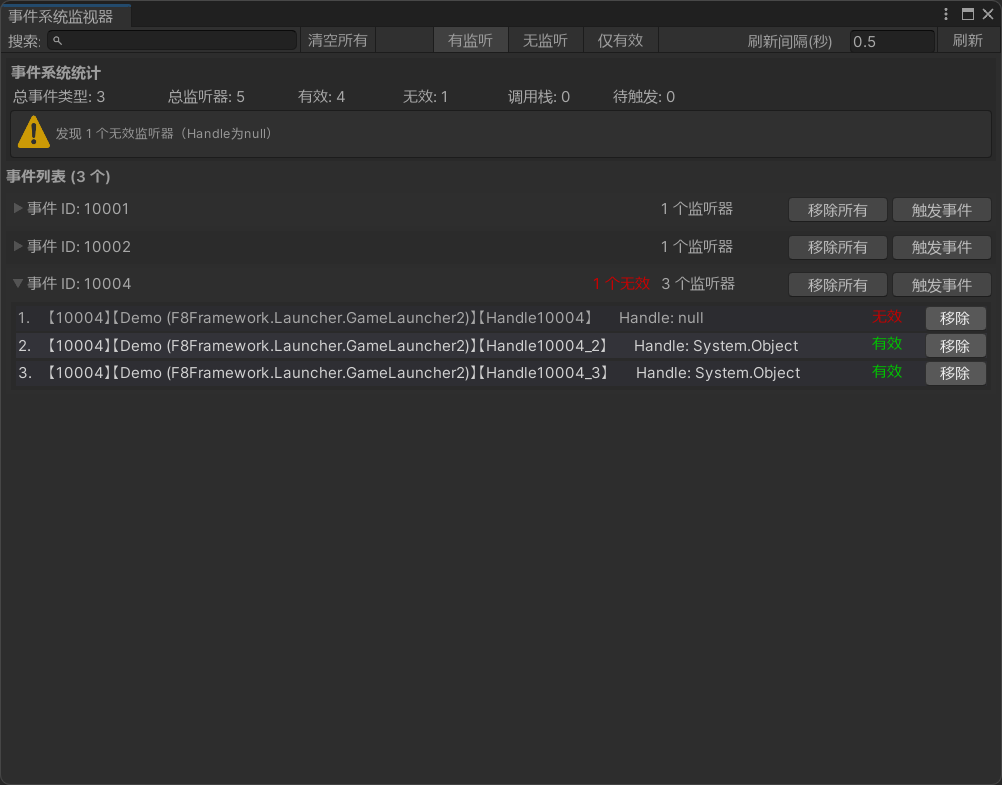
编辑器拓展功能
事件系统监视器