F8 HotUpdate
June 30, 2026 · View on GitHub



简介(希望自己点击F8,就能开始制作游戏,不想多余的事)
Unity F8 HotUpdate 热更新版本管理
- 资源打包
- 资源分包
- 热更新资源
导入插件(需要首先导入核心)
注意!内置在->F8Framework核心:https://github.com/TippingGame/F8Framework.git
方式一:直接下载文件,放入Unity
方式二:Unity->点击菜单栏->Window->Package Manager->点击+号->Add Package from git URL->输入:https://github.com/TippingGame/F8Framework.git
视频教程:【Unity框架】(20)热更新和分包
编辑器界面使用
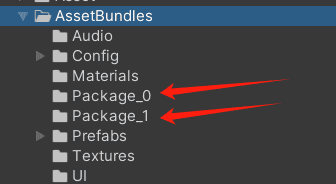
- 如何设置分包资源,命名规则:
Package_ + 标识
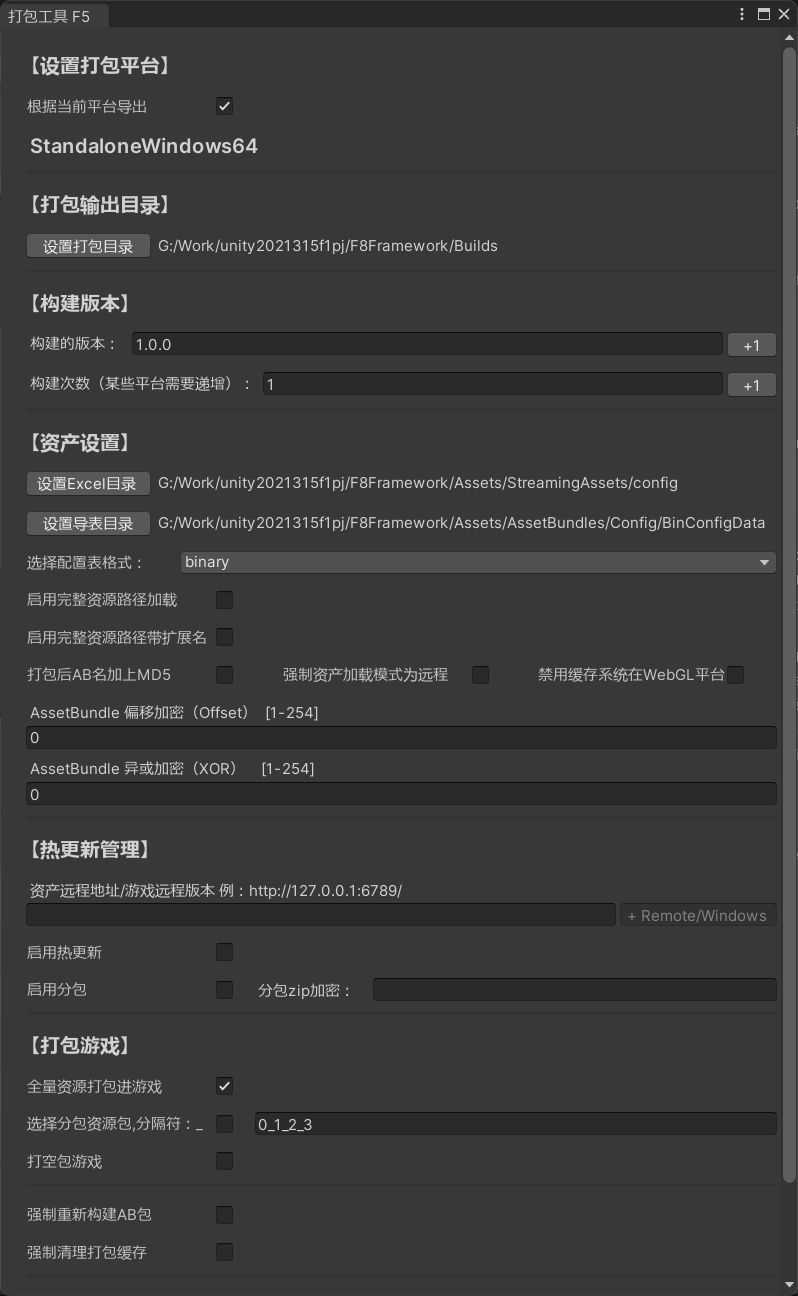
- 配置选项:
- 选择打包平台
- 输出路径
- 版本号
- 远程资产加载地址
- 启用热更新
- 全量打包,分包,空包
- 加密
- 更多资产设置
- 如需本地测试热更新,注意清理沙盒目录中的临时文件
- 远程资产地址既可以使用打包工具写入的默认值,也可以在运行时用代码动态获取:
GameConfig.SetAssetRemoteBaseAddressGetter(...):传入 CDN 基础地址,框架自动追加Remote/平台GameConfig.SetAssetRemoteFinalAddressGetter(...):传入最终远程资产根地址,框架不再追加后缀
如构建失败:请尝试使用Unity自带的Build一次后再尝试
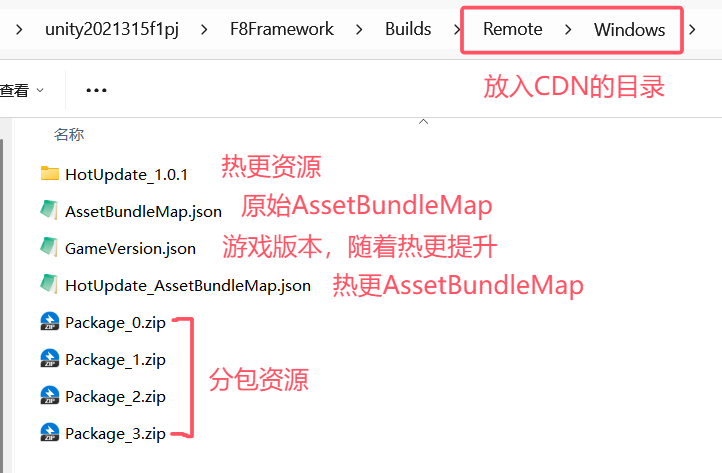
- 构建后将文件放入CDN服务器
代码使用方法
private static string GetHotfixUrl()
{
#if TEST_VERSION
    return "https://cdn-test.xxx.com/hotfix/";
#else
    return "https://cdn-prod.xxx.com/hotfix/";
#endif
}

IEnumerator Start()
{
    // 启动必须要的模块,热更新版本管理-->使用了资产模块-->使用了下载模块
    FF8.HotUpdate = ModuleCenter.CreateModule<HotUpdateManager>();
    FF8.Asset = ModuleCenter.CreateModule<AssetManager>();
    FF8.Download = ModuleCenter.CreateModule<DownloadManager>();
    yield return AssetBundleManager.Instance.LoadAssetBundleManifest();

    // 初始化本地版本
    FF8.HotUpdate.InitLocalVersion();

    // 可选:用代码动态获取远程资产基础地址,框架会自动追加 Remote/平台
    GameConfig.SetAssetRemoteBaseAddressGetter(GetHotfixUrl);

    // 初始化远程版本
    yield return FF8.HotUpdate.InitRemoteVersion();

    // 初始化资源版本
    yield return FF8.HotUpdate.InitAssetVersion();

    // 检查需要热更的资源,总大小
    var (downloadInfos, allSize) = FF8.HotUpdate.CheckHotUpdate();

    // 资源热更新
    FF8.HotUpdate.StartHotUpdate(downloadInfos, () =>
    {
        LogF8.Log("完成");
    }, () =>
    {
        LogF8.Log("失败");
    }, eventArgs =>
    {
        // 已下载大小(字节)
        long downloadedBytes = eventArgs.TotalDownloadedLength;

        // 总大小(字节)
        long totalBytes = allSize;

        // 下载速度计算(字节/秒)
        double speedBytesPerSecond = eventArgs.DownloadInfo.DownloadedLength / eventArgs.DownloadInfo.DownloadTimeSpan.TotalSeconds;

        // 单位转换:字节 -> MB
        double downloadedMB = downloadedBytes / (1024.0 * 1024.0);
        double totalMB = totalBytes / (1024.0 * 1024.0);
        double speedMBPerSecond = speedBytesPerSecond / (1024.0 * 1024.0);

        // 日志输出:进度,速度
        LogF8.Log($"进度:{downloadedMB:F2}MB/{totalMB:F2}MB, 速度:{speedMBPerSecond:F2}MB/s");
    });

    // 检查未加载的分包,总大小
    var (packageDownloadTasks, packageAllSize) = FF8.HotUpdate.CheckPackageUpdate(GameConfig.LocalGameVersion.SubPackage);

    // 分包加载
    FF8.HotUpdate.StartPackageUpdate(packageDownloadTasks, () =>
    {
        LogF8.Log("完成");
    }, () =>
    {
        LogF8.Log("失败");
    }, eventArgs =>
    {
        // 同上,可使用 packageAllSize 作为总下载量
    });
}