F8 HotUpdate
June 30, 2026 · View on GitHub



Introduction (Simply press F8 to start game development without distractions)
Unity F8 HotUpdate
Version Management System for Hot Updates
- Asset Bundling - Package game resources efficiently
- Subpackage Management - Split content into downloadable chunks
- Hot Update Resources - Deploy patches without requiring full app updates
Plugin Installation (Requires Core Framework First)
Note! Built into → F8Framework Core: https://github.com/TippingGame/F8Framework.git
Method 1: Download files directly and import to Unity
Method 2: Unity → Menu Bar → Window → Package Manager → "+" → Add Package from git URL → Enter: https://github.com/TippingGame/F8Framework.git
Editor Interface Usage
- How to Set Up Subpackage Resources, Naming convention:
Package_ + identifier
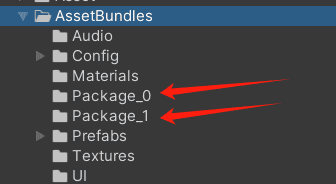
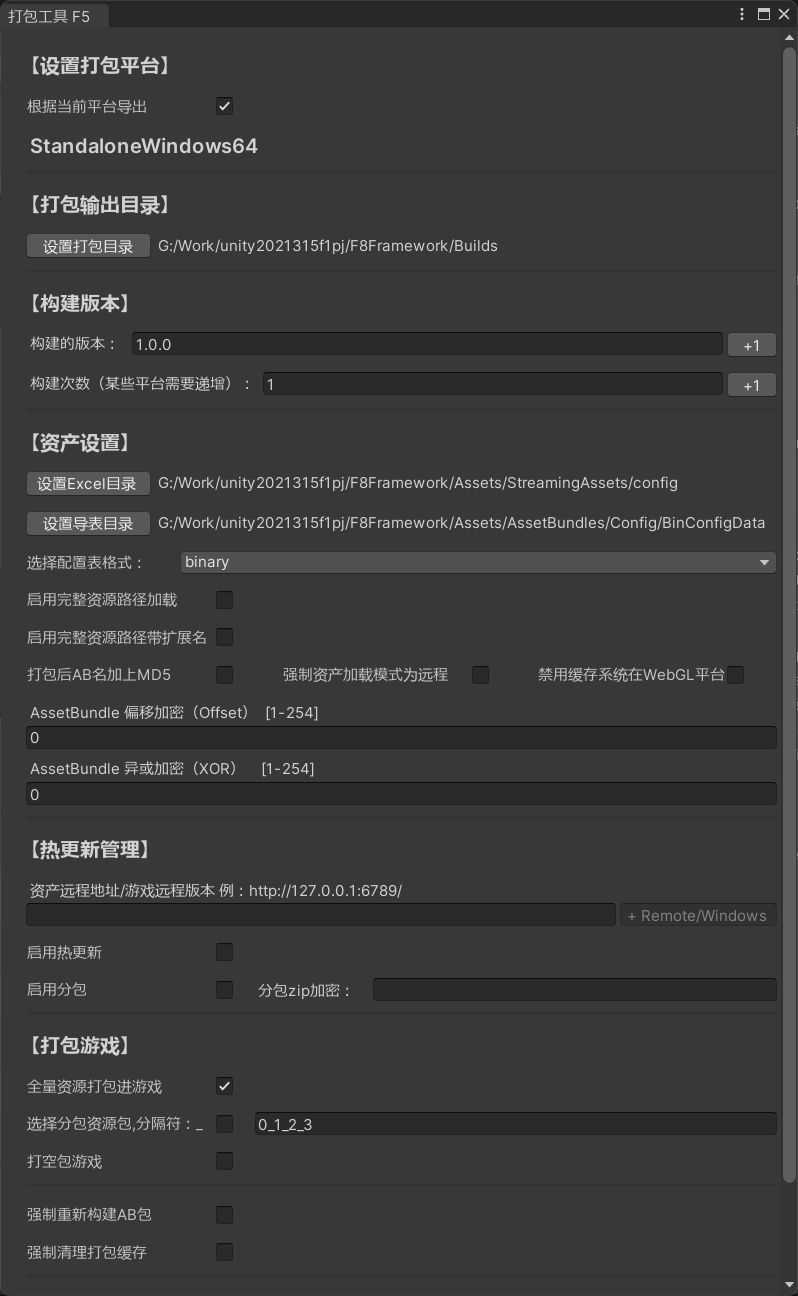
- Configuration Options:
- Select build platform
- Set output path
- Specify version number
- Configure remote asset loading URL
- Enable hot updates
- Full build / Subpackage build / Empty build
- Encrypt
- More asset settings
- For Local Hot Update Testing: Clear temporary files in the sandbox directory before testing.
- Remote asset URLs can use the default value written by the build tool, or be resolved from code at runtime:
GameConfig.SetAssetRemoteBaseAddressGetter(...): pass the CDN base URL; the framework appendsRemote/platformGameConfig.SetAssetRemoteFinalAddressGetter(...): pass the final remote asset root; no suffix is appended
If Build Fails: Try running Unity's native Build once before retrying.
- After Building: Upload files to CDN server
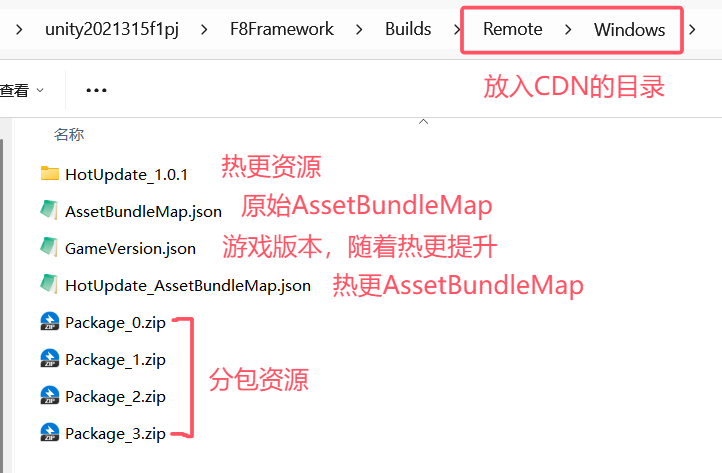
Code Examples
private static string GetHotfixUrl()
{
#if TEST_VERSION
    return "https://cdn-test.xxx.com/hotfix/";
#else
    return "https://cdn-prod.xxx.com/hotfix/";
#endif
}

IEnumerator Start()
{
    // Required modules for startup, hot update version management -->used asset module -->used download module
    FF8.HotUpdate = ModuleCenter.CreateModule<HotUpdateManager>();
    FF8.Asset = ModuleCenter.CreateModule<AssetManager>();
    FF8.Download = ModuleCenter.CreateModule<DownloadManager>();
    yield return AssetBundleManager.Instance.LoadAssetBundleManifest();

    // Initialize local version
    FF8.HotUpdate.InitLocalVersion();

    // Optional: resolve the CDN base URL from code; the framework appends Remote/platform
    GameConfig.SetAssetRemoteBaseAddressGetter(GetHotfixUrl);

    // Initialize remote version
    yield return FF8.HotUpdate.InitRemoteVersion();

    // Initialize asset version
    yield return FF8.HotUpdate.InitAssetVersion();

    // Check resources needing hot updates (returns file list + total size)
    var (downloadInfos, allSize) = FF8.HotUpdate.CheckHotUpdate();

    // Execute hot update
    FF8.HotUpdate.StartHotUpdate(downloadInfos, () =>
    {
        LogF8.Log("Completed");
    }, () =>
    {
        LogF8.Log("Failed");
    }, eventArgs =>
    {
        // Downloaded size in bytes
        long downloadedBytes = eventArgs.TotalDownloadedLength;

        // Total size in bytes
        long totalBytes = allSize;

        // Download speed calculation in bytes/second
        double speedBytesPerSecond = eventArgs.DownloadInfo.DownloadedLength / eventArgs.DownloadInfo.DownloadTimeSpan.TotalSeconds;

        // Unit conversion: bytes → MB
        double downloadedMB = downloadedBytes / (1024.0 * 1024.0);
        double totalMB = totalBytes / (1024.0 * 1024.0);
        double speedMBPerSecond = speedBytesPerSecond / (1024.0 * 1024.0);

        // Log output: Progress and speed
        LogF8.Log($"Progress: {downloadedMB:F2}MB/{totalMB:F2}MB, Speed: {speedMBPerSecond:F2}MB/s");
    });

    // Check unloaded subpackages (returns prepared download tasks + remaining size)
    var (packageDownloadTasks, packageAllSize) = FF8.HotUpdate.CheckPackageUpdate(GameConfig.LocalGameVersion.SubPackage);

    // Load subpackages
    FF8.HotUpdate.StartPackageUpdate(packageDownloadTasks, () =>
    {
        LogF8.Log("Completed");
    }, () =>
    {
        LogF8.Log("Failed");
    }, eventArgs =>
    {
        // Same as above, packageAllSize is the total download size
    });
}