Or manually edit ~/.deepsec/targets/scope.json targets field
August 12, 2026 · View on GitHub
DeepSec
AI Security Platform — Shield Code Audit + Spear Authorized Penetration Testing
Catch what AI missed. Penetrate what others can't.









[Global] 中文版: README.md (简体中文)
[Quick Start] 3-Minute Quick Start
Don't want to read the long docs? Click here →
docs/QUICKSTART.md(English)中文版快速上手:
docs/QUICKSTART.zh-CN.mdDownload
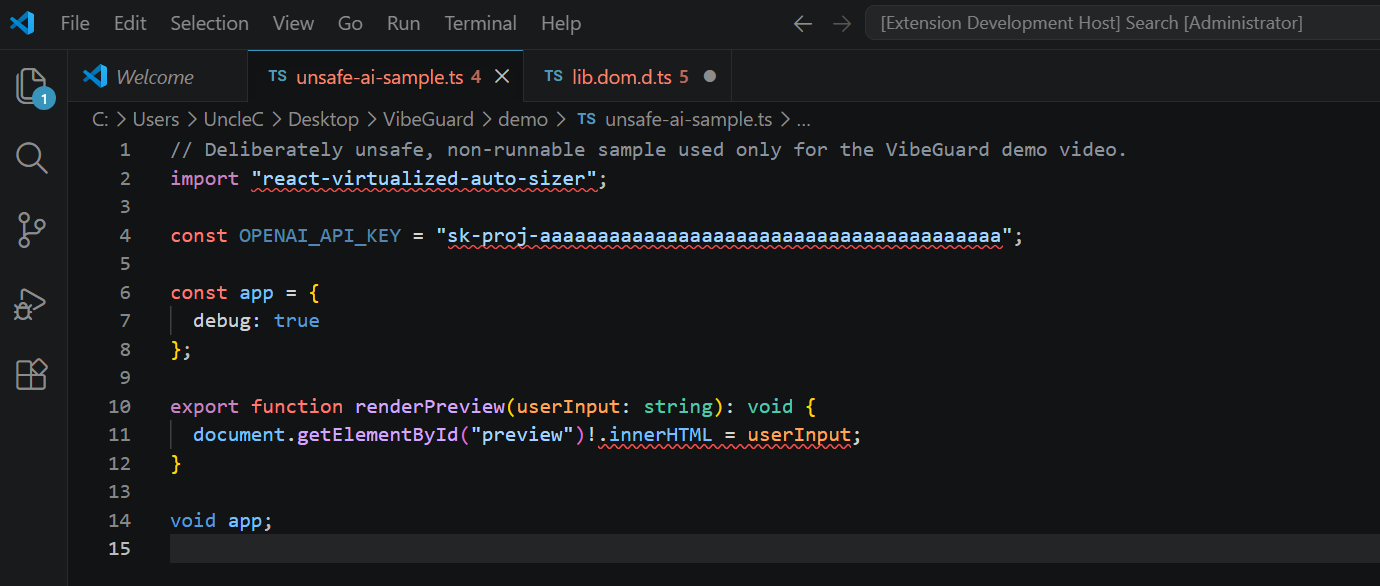
deepsec-tui-windows.exefrom Releases → run it → type/shield scan <your-project>→ see vulnerabilities in 2 seconds. Don't know what to scan? The repo ships a deliberately vulnerable sample,demo/unsafe-ai-sample.ts.
DeepSec TUI terminal workbench
https://github.com/user-attachments/assets/2b041a72-4566-48f1-aca8-2c685c0a52cc
— Shield scan, Spear penetration, live animations
DeepSec is an AI security platform evolved from VibeGuard. It unifies Shield (AI code security audit) and Spear (authorized penetration testing engine) into a single CLI, a TUI terminal workbench, and a set of IDE plugins.
┌──────────────────────────────────────────────────────────┐
│                      DeepSec Platform                     │
│                                                          │
│   ┌──────────┐  ┌──────────┐  ┌──────────┐  ┌─────────┐ │
│   │ Shield   │  │  Spear   │  │   TUI    │  │   MCP   │ │
│   │ Code     │  │ Pentest  │  │ Terminal │  │ Server  │ │
│   │ Audit    │  │ Engine   │  │ Workbench│  │         │ │
│   └────┬─────┘  └────┬─────┘  └────┬─────┘  └────┬────┘ │
│        │             │             │              │       │
│        └─────────────┴─────────────┴──────────────┘       │
│                          │                               │
│              ┌───────────┴───────────┐                   │
│              │   Unified Config      │                   │
│              │   ~/.deepsec/         │                   │
│              │   config.yaml         │                   │
│              └───────────────────────┘                   │
└──────────────────────────────────────────────────────────┘
         │                              │
   ┌─────┴─────┐                  ┌─────┴──────┐
   │  VSCode   │                  │  JetBrains │
   │  Plugin   │                  │   Plugin   │
   │  (TS/LSP) │                  │  (Kotlin)  │
   └───────────┘                  └────────────┘
Shield — Code Security Audit
Three-layer detection architecture, from real-time regex to LLM semantic analysis:
| Layer | Detects | Speed | Method |
|---|---|---|---|
| L1 | Hallucinated packages, hardcoded secrets, unsafe configs, AI coding patterns | < 50ms | Regex + entropy analysis + seed directory |
| L2 | SQL injection, XSS, SSRF, path traversal, command injection | < 2s | Tree-sitter WASM AST analysis |
| L3 | Missing auth/rate-limiting/validation, semantic vulnerabilities | < 5s | LLM (DeepSeek/Claude/OpenAI/Ollama) + local heuristic fallback |
Spear — Authorized Penetration Testing
End-to-end automated penetration engine migrated from VulnClaw:
- Recon → Explore → Fact → Reflect → Report → PoC full pipeline automation
- 40+ built-in skill packs (nmap, dirsearch, subfinder, nuclei, sqlmap, ffuf, httpx, feroxbuster)
- 5 roles (pentester, redteam, auditor, blueteam, ctf_player)
- Signed authorization scope (Signed Scope), time-limited + audit logging
- Attack chain visualization, multi-format reports (Markdown / SARIF / JSON / HTML)
TUI — Terminal Workbench
Security workbench built with Rust + ratatui, inspired by DeepSeek-TUI's interaction design:
- Three-panel layout: Workspace sidebar · Session Transcript · Findings Inspector
- Plan / Agent / YOLO mode switching
- Slash command system + command history recall
- Side-Git snapshots (create/restore code state anytime)
- Session persistence (Ctrl+S save / Ctrl+R restore)
Quick Start
Installation
# Python core + CLI
pip install -e .

# Rust TUI (optional)
cargo build --manifest-path tui/Cargo.toml

# IDE plugins
# VSCode: Press F5 in project root to launch Extension Development Host
# JetBrains: cd jetbrains && ./gradlew buildPlugin
Shield Scan
# Scan project (L1 + L2, offline)
deepsec shield scan ./src

# Enable L3 semantic analysis (requires LLM API Key)
DEEPSEEK_API_KEY=... deepsec shield scan ./src --layer l3

# Output SARIF report
deepsec shield scan . --format sarif --output deepsec.sarif

# Stream output (for TUI consumption)
deepsec shield scan . --stream

# Agent config audit
deepsec shield agent-audit ./agent-config

# Supply chain security check
deepsec shield supply-chain check .
Spear Penetration Testing
# 1. (Optional) Maintain authorization allow-list — recommended via TUI /scope command
#    Or manually edit ~/.deepsec/targets/scope.json targets field
#    If strong signature verification is needed: export DEEPSEC_SCOPE_SIGNING_KEY=... && deepsec scope sign ./scope.json

# 2. Run penetration test (target must be in allow-list)
deepsec spear run https://authorized-target.example --authorized ./scope.json

# 3. Reconnaissance phase only
deepsec spear recon https://authorized-target.example --authorized ./scope.json

# 4. List roles and tools
deepsec spear roles
deepsec spear tools --role pentester
TUI Terminal Workbench
# Launch terminal workbench
deepsec tui

# Or run the Rust native binary directly
./tui/target/debug/deepsec-tui-native
Built-in TUI slash commands:
| Command | Description |
|---|---|
/shield scan | Run Shield scan |
/spear run | Run Spear penetration (requires allow-list authorization) |
/spear recon | Run reconnaissance phase |
/scope add <target> | Add target to authorization allow-list |
/scope remove <target> | Remove target from allow-list |
/scope list | List current allow-list |
/report | Generate report |
/plan | Switch to Plan mode |
/agent | Switch to Agent mode |
/yolo | Switch to YOLO mode (full auto) |
/clear | Clear session |
/help | Help |
TUI Walkthrough: Add Allow-List and Launch Penetration Test
DeepSec TUI has built-in authorization allow-list management — no need to manually edit scope.json or deal with HMAC signing keys.
1. Launch TUI
deepsec tui
2. Add target to allow-list
In the TUI command line (bottom > prompt), enter:
/scope add https://your-authorized-domain.com
- Targets are normalized (scheme+host lowercased, trailing
/stripped) and deduplicated, consistent with backend authorization matching rules. - When
--fileis not specified, defaults to the most recent absolute path parsed from/spear run --authorized <file>; if spear hasn't been run yet, falls back to~/.deepsec/targets/scope.json. - View current allow-list:
/scope list - Remove a target:
/scope remove https://your-authorized-domain.com
3. Launch penetration test
/spear run https://your-authorized-domain.com --authorized ~/.deepsec/targets/scope.json
Then:
- Press
Tabto cycle between Plan / Agent / YOLO execution modes (YOLO is full-auto, no step-by-step confirmation needed). - Plan mode is read-only; cannot arm Spear directly — switch to Agent or YOLO first.
- Press
Yto confirm authorization verification and launch; pressEscto cancel. - Press
Ctrl+Cwhile running to abort the current task (TUI stays open); pressCtrl+Cwhen idle to exit TUI.
4. Security Boundaries
- Targets outside the allow-list are rejected (
target ... is not present in the scope manifest). - Private/loopback/non-public addresses are still blocked to prevent hitting internal networks.
- The allow-list only accepts assets you own or have written authorization for; any third-party production domain not in
targetscannot be attacked.
Side-Git Snapshots
# Create snapshot
deepsec snapshot create . --mode shield --description "before-refactor"

# List snapshots
deepsec snapshot list .

# Restore snapshot
deepsec restore <snapshot-id>
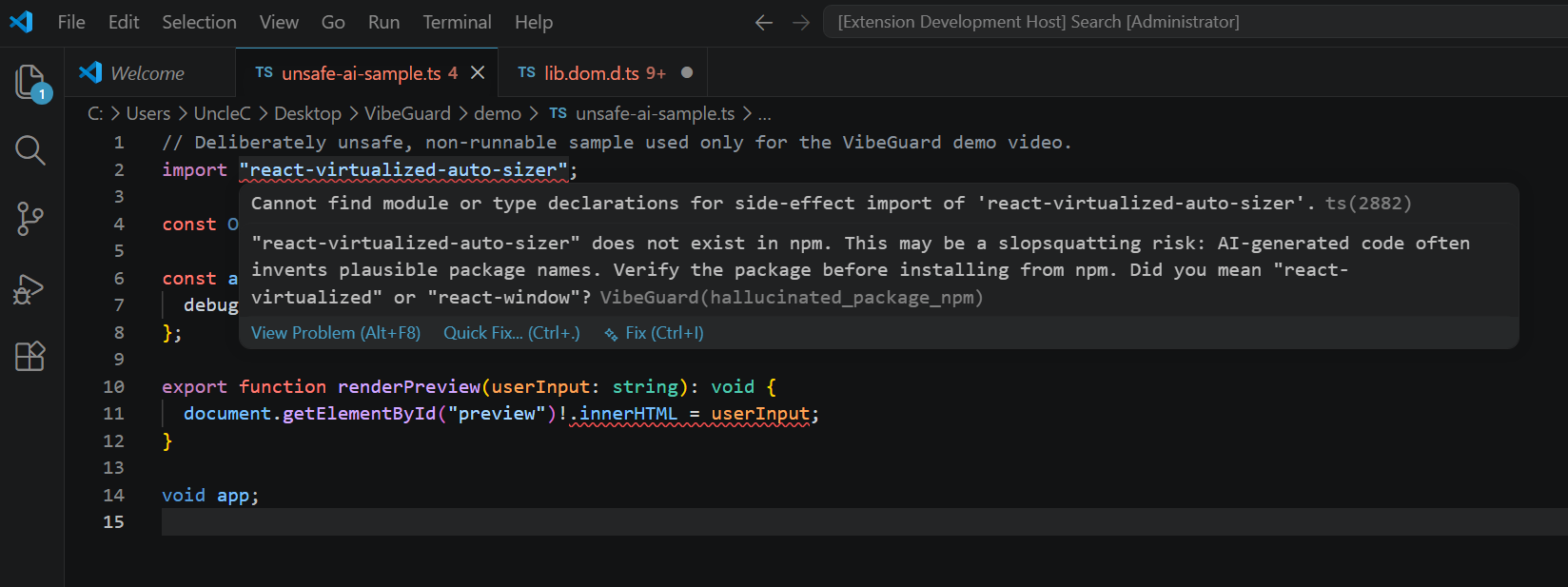
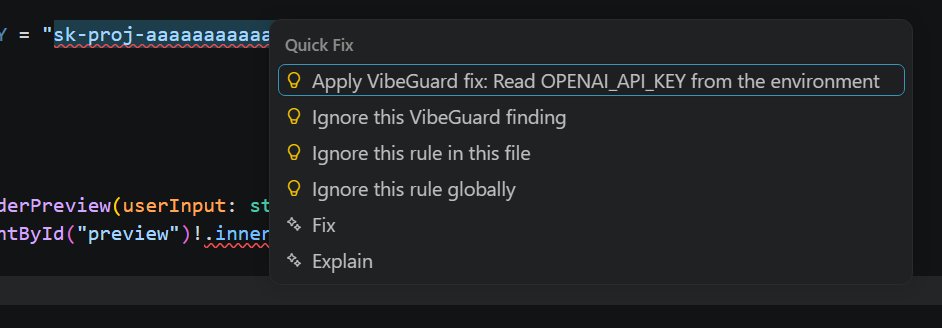
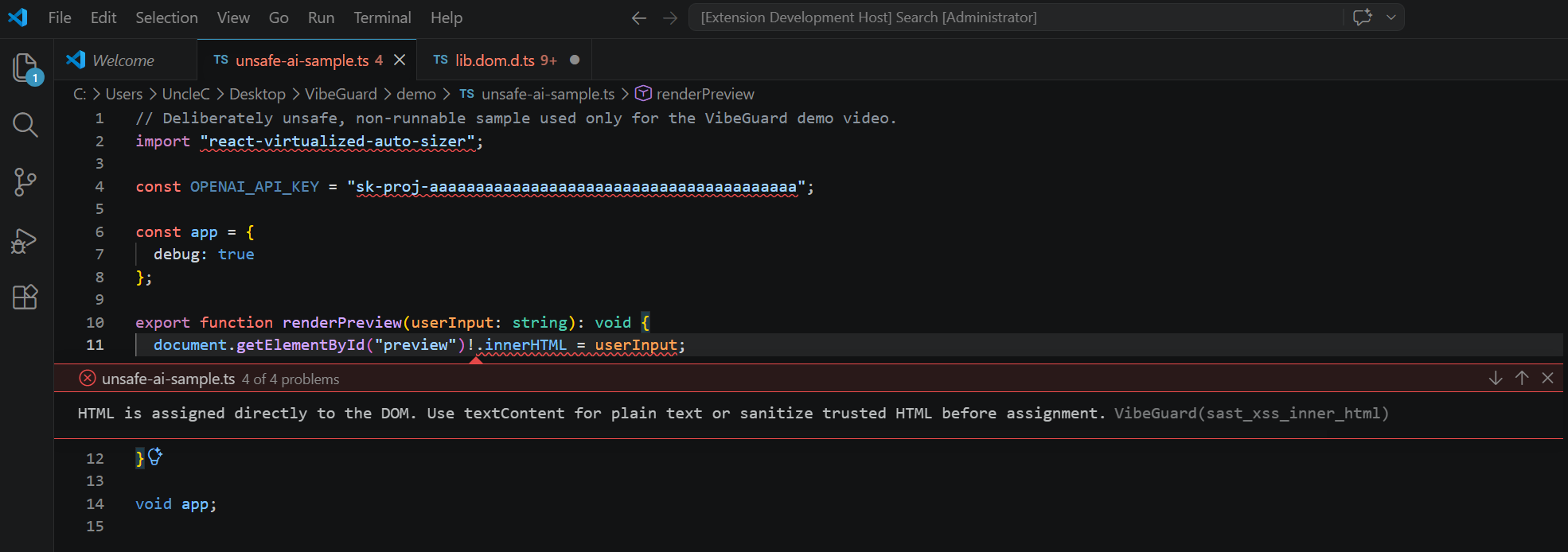
Screenshots
| Real-time diagnostics | Hover for details |
 |
 |
| Quick Fix menu | Problems panel |
 |
 |
Architecture
DeepSec is a multi-language project:
| Component | Language | Files | LOC | Purpose |
|---|---|---|---|---|
| Python Core | Python 3.10+ | 153 | 43,500+ | Shield scanner, Spear engine, CLI, MCP Server, role/tool system |
| IDE Plugin | TypeScript | 53 | 21,000+ | VSCode extension, LSP Server, Tree-sitter SAST |
| TUI | Rust | 22 | 2,470+ | ratatui terminal workbench |
| Rust LSP | Rust | 5 | 7,800+ | Native L1 LSP preview |
Project Structure
deepsec/                 # Python core
├── cli/                 # Typer CLI entry (shield/spear/snapshot/config/scope)
├── config/              # Unified YAML config + Pydantic schema
├── core/                # Config adapter, LLM client, authorization, snapshots, roles
├── shield/              # L1/L2/L3 scanners, supply chain security, dedup, ignore rules
├── spear/               # Penetration engine (agent/intel/skills/report/warstories)
├── roles/               # YAML role definitions (pentester/redteam/auditor/blueteam/ctf_player)
├── tools/               # YAML tool catalog (nmap/dirsearch/nuclei/sqlmap/...)
├── mcp/                 # MCP Server (lifecycle/registry/router/diagnostics)
├── report/              # Report generation + attack chain visualization
├── kb/                  # Knowledge base
├── plugins/             # Plugin system
└── traffic/             # Traffic replay and normalization

src/                     # TypeScript IDE plugin
├── extension.ts         # VSCode extension entry
├── lspServer.ts         # LSP Server (Node)
├── scanner.ts           # L1/L2 scanner
├── deepsecBridge.ts     # Python core bridge
└── ...

tui/                     # Rust TUI terminal workbench
├── src/
│   ├── app.rs           # App state + command dispatch
│   ├── events.rs        # Keyboard event handling
│   ├── ui/              # Three-panel layout (transcript/findings/layout)
│   ├── views/           # Skills Manager sidebar
│   ├── theme.rs         # CodeWhale dark theme
│   ├── sessions.rs      # Session persistence
│   └── skills/          # Skill tree catalog
└── Cargo.toml

rust-lsp/                # Rust native L1 LSP preview
jetbrains/               # JetBrains plugin (Kotlin)
docs/                    # Usage guides
Configuration
DeepSec uses a unified YAML config file at ~/.deepsec/config.yaml:
deepsec config init      # Initialize config
deepsec config show      # Show config
deepsec config set llm.provider deepseek  # Set config option
LLM Configuration
DeepSec supports 13+ LLM providers:
| Provider | Base URL | Default Model |
|---|---|---|
| DeepSeek | api.deepseek.com/v1 | deepseek-chat |
| Anthropic Claude | api.anthropic.com/v1 | claude-sonnet-5 |
| OpenAI | api.openai.com/v1 | gpt-4o |
| Zhipu GLM | open.bigmodel.cn/api/paas/v4 | glm-4.7 |
| Kimi (Moonshot) | api.moonshot.cn/v1 | kimi-k2.6 |
| Tongyi Qianwen | dashscope.aliyuncs.com/compatible-mode/v1 | qwen3-max |
| SiliconFlow | api.siliconflow.cn/v1 | deepseek-ai/DeepSeek-V4-Flash |
| Doubao (ByteDance) | ark.cn-beijing.volces.com/api/v3 | Doubao-Seed-2.0-Pro |
| Baichuan | api.baichuan-ai.com/v1 | Baichuan4-Turbo |
| MiniMax | api.minimaxi.com/v1 | MiniMax-M3 |
| StepFun | api.stepfun.com/v1 | step-3.5-flash |
| SenseTime | api.sensenova.cn/v1 | SenseNova-6.7-Flash-Lite |
| Yi (01.AI) | api.lingyiwanwu.com/v1 | yi-lightning |
| Custom | Custom | Custom |
# Set API Key
deepsec config set llm.provider deepseek
deepsec config set llm.api_key "sk-xxx"

# Or via environment variable
export DEEPSEC_LLM_API_KEY="sk-xxx"
Spear Authorization
Spear uses an authorization allow-list as its core gate: only targets explicitly listed in scope.json's targets array can be attacked; all others are rejected.
Signing is now optional: Earlier versions required HMAC-SHA256 signing of
scope.jsonwithDEEPSEC_SCOPE_SIGNING_KEY. This has been relaxed —signature/signerfields are retained but ignored; authorization only checks thetargetsallow-list (optional time windows are still validated). This means you no longer need toexporta key, re-sign, or restart TUI — just manage the allow-list via TUI/scopecommands (see "TUI Walkthrough" above).
Scope file format (~/.deepsec/targets/scope.json):
{
  "version": 1,
  "targets": ["https://your-authorized-domain.com"],
  "valid_from": "2026-07-26T00:00:00Z",
  "valid_until": "2026-08-25T00:00:00Z",
  "prohibited_cidrs": ["10.0.0.0/8", "172.16.0.0/12", "192.168.0.0/16", "127.0.0.0/8", "169.254.0.0/16"],
  "signer": "UncleC",
  "signature": "0000000000000000000000000000000000000000000000000000000000000000",
  "signature_algorithm": "hmac-sha256"
}
targets: List of targets allowed for penetration. Supportshttps://domain,domain,*.domainwildcards, and raw IP/CIDR. Matching auto-strips trailing/, lowercases, and aligns schemes.prohibited_cidrs: Blocks private/loopback/link-local addresses by default to prevent hitting internal networks.- To retain strong verification, manually run
deepsec scope sign ./scope.json(requiresDEEPSEC_SCOPE_SIGNING_KEY); not signing doesn't affect usage.
# (Optional) Manual signing
export DEEPSEC_SCOPE_SIGNING_KEY="your-secret"
deepsec scope sign ./scope.json

# Verify scope structure / time window / optional signature
deepsec scope verify ./scope.json
IDE Integration
VSCode
The VSCode extension provides real-time diagnostics, Quick Fix, and Findings sidebar:
| Setting | Default | Description |
|---|---|---|
deepsec.enabled | true | Enable/disable scanning |
deepsec.scanOnChange | true | Scan on edit |
deepsec.scanOnSave | true | Scan on save |
deepsec.enableL2 | true | Enable L2 SAST |
deepsec.l2DebounceMs | 500 | L2 debounce |
deepsec.enableL3 | false | Enable L3 semantic analysis |
deepsec.l3DebounceMs | 2000 | L3 debounce |
deepsec.llmProvider | — | LLM provider |
deepsec.deepsecPythonPath | — | DeepSec Python path |
deepsec.dedupWithExistingTools | true | Dedup with SonarQube/Snyk/Semgrep/CodeQL |
Quick Fixes:
- Hallucinated package → suggest alternative package name
- Hardcoded secret → environment variable read
yaml.load()→yaml.safe_load()- SQL f-string → parameterized query
innerHTML→textContent- Debug/CORS/host check → mechanical fix
JetBrains
The JetBrains plugin reuses DeepSec diagnostics via LSP protocol, supporting JetBrains 2025.2+:
cd jetbrains
./gradlew buildPlugin
# Output: build/distributions/deepsec-*.zip
Rust LSP Preview
A standalone Rust native L1 LSP Server for lower-latency baseline detection:
cargo run --manifest-path rust-lsp/Cargo.toml -- --stdio
CLI Reference
# Shield commands
deepsec shield scan <path> [--layer all|l1|l2|l3] [--format text|json|sarif|markdown|html] [--stream]
deepsec shield agent-audit <path>
deepsec shield watch <path> [--interval 1.0]
deepsec shield supply-chain check <path> [--private-package pkg]

# Spear commands
deepsec spear run <target> --authorized <scope.json> [--scope full|web|api|mobile] [--mode quick|standard|deep]
deepsec spear recon <target> --authorized <scope.json>
deepsec spear roles
deepsec spear tools [--role pentester]

# Snapshot commands
deepsec snapshot create <path> [--mode shield|spear] [--description "..."]
deepsec snapshot list <path>

# Config commands
deepsec config init
deepsec config set <key> <value>
deepsec config show

# Scope commands
deepsec scope sign <scope.json>      # (Optional) Sign scope, requires DEEPSEC_SCOPE_SIGNING_KEY
deepsec scope verify <scope.json>    # Verify scope structure / time window / optional signature

# Other
deepsec tui                          # Launch TUI
deepsec chat                         # Interactive Spear workbench
deepsec tools                        # List all tools
deepsec report <result.json> [--format markdown|json|sarif|html] [--chain]
deepsec restore <snapshot-id>
Roles & Tools
Built-in Roles
| Role | Mode | Description |
|---|---|---|
pentester | standard | Standard penetration testing |
redteam | deep | Red team deep attack |
auditor | standard | Security audit (read-only) |
blueteam | quick | Blue team quick verification |
ctf_player | quick | CTF competition mode |
Built-in Tools
| Tool | Category | Install Check |
|---|---|---|
| nmap | network | nmap --version |
| dirsearch | web | dirsearch --version |
| subfinder | recon | subfinder -version |
| httpx | web | httpx -version |
| feroxbuster | web | feroxbuster --version |
| ffuf | web | ffuf -V |
| nuclei | web | nuclei -version |
| sqlmap | web | sqlmap --version |
Add custom tools via deepsec/tools/*.yaml and custom roles via deepsec/roles/*.yaml.
MCP Server
DeepSec includes a built-in MCP (Model Context Protocol) Server that can be called by Claude Desktop, Cursor, and other MCP clients:
from deepsec.mcp import MCPServer

server = MCPServer()
server.run()
Supported tools include Shield scanning, Spear reconnaissance, report generation, and more.
Testing
# Python tests
python -m pytest tests/deepsec/ -v

# TypeScript tests
npm test

# Rust TUI tests
cargo test --manifest-path tui/Cargo.toml

# Rust LSP tests
cargo test --manifest-path rust-lsp/Cargo.toml
Current status: 23 Python tests passed · 41 Rust TUI tests passed · TypeScript clean
Docker
docker build -t deepsec:local .
docker run --rm -v "$PWD:/workspace" deepsec:local shield scan /workspace
Contributing
git clone https://github.com/Unclecheng-li/DeepSec.git
cd DeepSec

# Python dev environment
pip install -e .[dev]

# Node.js IDE plugin development
nvm use  # Node.js 22 LTS
npm install
npm run build

# Rust TUI development
cargo build --manifest-path tui/Cargo.toml
- Report bugs — Open an issue
- Request features — Start a discussion
- Submit PRs — Fork, feature branch, pull request
Documentation
- Architecture — System architecture details
- Shield Guide — Code audit guide
- Spear Guide — Penetration testing guide
- Skill Development — Skill pack development
- Tool Config — Tool configuration
- DeepSeek Optimization — DeepSeek model optimization
- Migration Design — VibeGuard to DeepSec migration design
- TUI Dev Guide — TUI development guide
License
MIT © 2026 DeepSec contributors
Built for developers who ship AI-generated code — and need to break it before attackers do.
If DeepSec helps you, consider starring the repo or sponsoring.