Agent Maestro
July 31, 2025 · View on GitHub
Unlock the full potential of best-in-class AI agents in VS Code via one unified RESTful API. Designed for pros who need fine‑grained programmatic control, enabling seamless agent integration into custom workflows, CI/CD pipelines, and external applications.
Built entirely by AI agents — yes, they coded themselves.
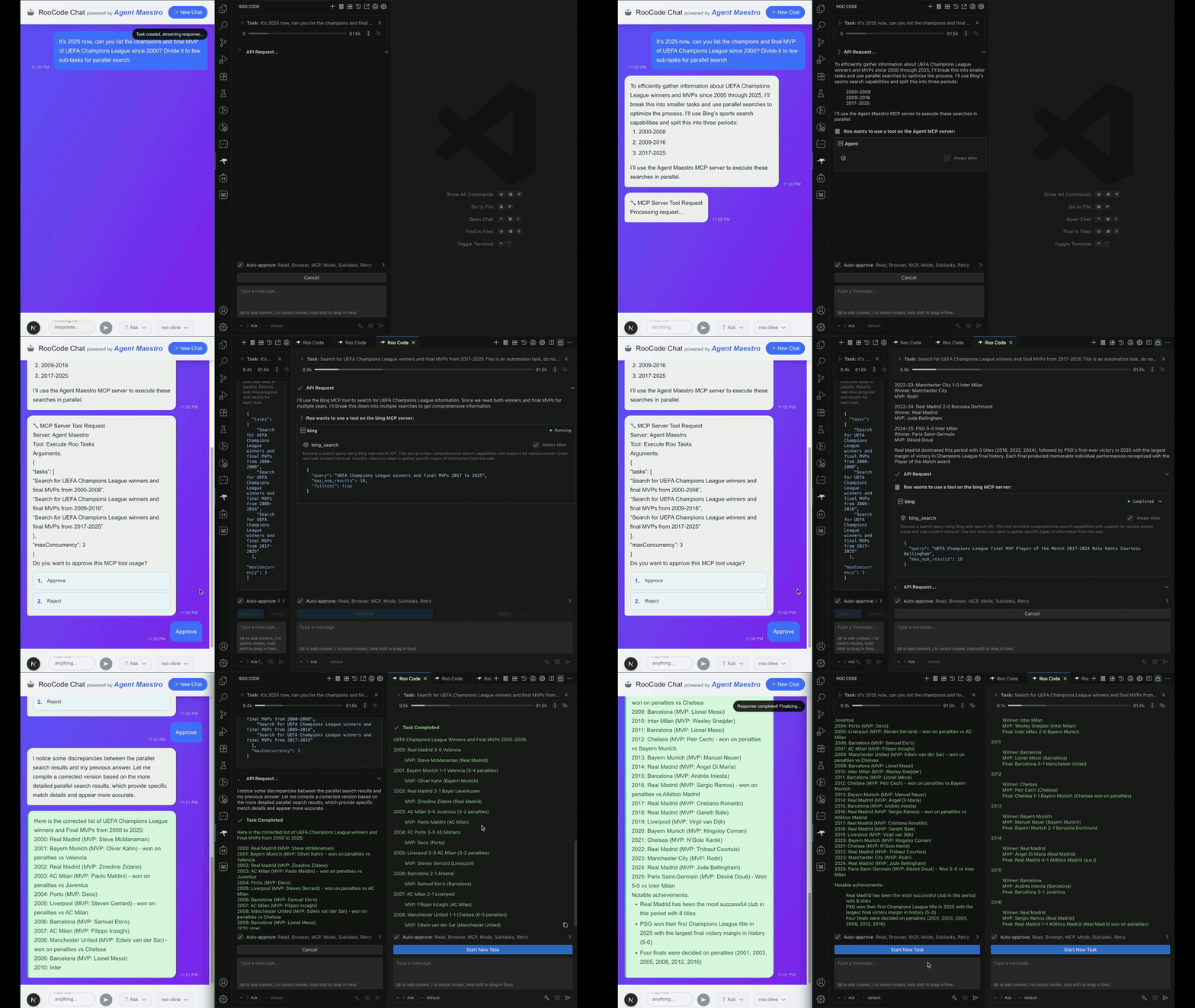
Why Agent Maestro
AI Agents mark a transformative shift—from simple LLM calls to autonomous collaborators: employees, partners, or entire dev teams at your command. While open‑source agent frameworks offer flexible, powerful building blocks, customizing and fine‑tuning them still requires time and effort.
VS Code extensions like GitHub Copilot Chat, Cline, and Roo Code have collectively surpassed tens of millions of downloads, offering battle‑tested, out‑of‑the‑box agent experiences. Agent Maestro taps into this maturity as among the first headless bridges to VS Code’s best‑in‑class AI agents: no custom framework setup, no GUI dependencies. Leverage VS Code’s unified APIs and rich model catalog (including free tiers) to assist tasks, automate workflows, and generate solutions across any environment—from CI pipelines and scripts to your terminal—effortlessly.
Key Features
Agent Maestro is a VS Code extension that provides a unified API interface for managing and controlling popular AI coding agents directly within your development environment. Key capabilities include:
- Parallel Task Execution: Execute up to 20 concurrent AI coding tasks through built-in MCP server integration. And support install MCP server config to the Roo extensions via command.
- Unified API Gateway: Single RESTful API interface to control multiple AI coding agents through a standardized endpoint
- Multi-Agent Support: Currently supports RooCode (and its variants like Kilo Code) and Cline extensions with plans for GitHub Copilot
- Real-time Event Streaming: Server-Sent Events (SSE) support for live task monitoring and message streaming
- Task Management: Comprehensive task lifecycle management including creation, execution, monitoring, and completion tracking
- Profile Management: Advanced configuration management for different AI provider settings and profiles
- OpenAPI Documentation: Auto-generated API documentation accessible via
/openapi.json - Extension Auto-Discovery: Automatic detection and activation of installed AI coding extensions
Note on Cline Support: While Cline integration is included, its support is currently limited due to the extension's low extensibility and restricted API surface. RooCode offers significantly better integration capabilities and is the recommended primary agent.
Quick Start
Prerequisites
Install RooCode or its variants from the VS Code marketplace to ensure full functionality.
Installation
Install the Agent Maestro extension from the VS Code Marketplace. Once activated, Agent Maestro automatically starts its API server on startup.
Usage
-
Check API Capabilities: When the extension starts, you can explore all available API endpoints by accessing the OpenAPI specification at the local server endpoint.
-
VS Code Commands: Access Agent Maestro functionality through the Command Palette:
Agent Maestro: Get Extensions Status- Check the status of supported AI extensionsAgent Maestro: Start API Server- Start the proxy API serverAgent Maestro: Stop API Server- Stop the proxy API serverAgent Maestro: Restart API Server- Restart the proxy API serverAgent Maestro: Get API Server Status- Check current server statusAgent Maestro: Start MCP Server- Start the Model Context Protocol serverAgent Maestro: Stop MCP Server- Stop the MCP serverAgent Maestro: Get MCP Server Status- Check current MCP server statusAgent Maestro: Install MCP Configuration- Install MCP configuration for supported extensions
-
Development Resources:
- API Documentation: Complete reference in docs/roo-code/ for all Roo Code interfaces, events, and message structures
- Type Definitions: Explore the @roo-code/types package for detailed event structures and data models
- Examples: The
examples/demo-sitedirectory is intended for internal testing purposes only. You may reference its implementation of Roo Code event handling as an example, but note that this sub-project is not officially supported.
How it Works
The following diagram illustrates the basic workflow for task creation and conversation in Agent Maestro:
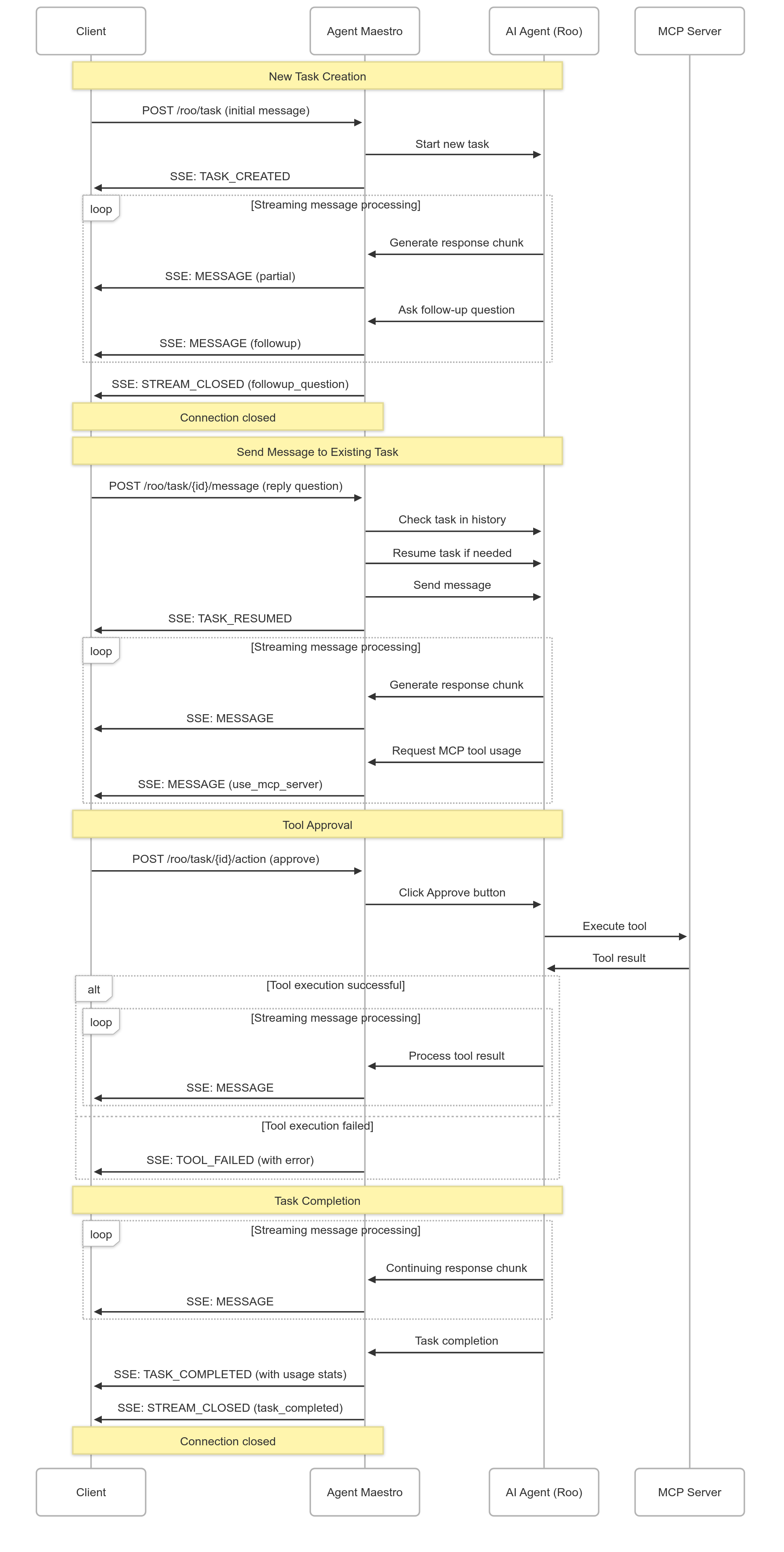
This workflow shows how tasks are created, how messages flow between the client and AI agents, and how the system handles real-time communication through Server-Sent Events (SSE).
Another workflow to introduce parallel Roo tasks execution will be added soon.
API Overview
Agent Maestro exposes a RESTful API that abstracts the complexity of different AI coding agents into a unified interface.
Note: For latest API documentation, always refer to /openapi.json.
Base URLs:
- REST API:
http://localhost:23333/api/v1 - MCP Server:
http://localhost:23334
RooCode Agent Routes:
POST /api/v1/roo/task- Create new RooCode task with SSE streamingPOST /api/v1/roo/task/{taskId}/message- Send message to existing task with SSE streamingPOST /api/v1/roo/task/{taskId}/action- Perform actions (pressPrimaryButton, pressSecondaryButton)
Server-Sent Events (SSE):
The RooCode routes provide real-time streaming updates through Server-Sent Events, delivering live task progress and status information. For detailed documentation on:
- SSE Event Types & Flows: RooRoutes Events Documentation
- Message Data Structures: Roo Code API Events
- Complete API Reference: Roo Code API Documentation
Cline Agent Routes:
POST /api/v1/cline/task- Create new Cline task (basic support)
Documentation Routes:
GET /openapi.json- Complete OpenAPI v3 specification
Roo Code API Documentation
Agent Maestro provides comprehensive documentation for understanding and working with Roo Code API messages, events, and data structures. These resources help developers integrate effectively with the Roo Code extension.
📚 Complete API Documentation
Comprehensive documentation covering all Roo Code API interfaces:
- API Overview: Core interfaces, task management, and configuration
- Event System: Event-driven architecture and message handling
- Provider Configuration: AI provider settings and profile management
- Tools & Data Types: Tool usage, message structures, and IPC communication
These documents provide detailed schemas, examples, and implementation guidance for all messages emitted by the Roo Code extension.
Roadmap
Our development roadmap includes several exciting enhancements:
- Production usage: Explore the scenario that running on code-server for containerization and deployment.
- GitHub Copilot Integration: Native support for GitHub Copilot and GitHub Copilot Chat
- VS Code LM API: Optional direct access to VS Code Language Model API for users preferring lower-level control
- Enhanced Extensibility: Improved plugin architecture for third-party agent integrations
Contributions Welcome: We encourage community contributions to help expand Agent Maestro's capabilities and support for additional AI coding agents. We recommend using AI coding agents themselves to accelerate your development workflow when contributing to this project.
License
This project is licensed under the terms specified in the LICENSE file.