Magento 2 Admin Restriction
April 8, 2025 · View on GitHub
Protect your Magento backend by restricting access based on IP addresses.
This module provides comprehensive admin security by working with Magento's Two-Factor Authentication (2FA) system:
- Without 2FA enabled: Access is only allowed from whitelisted IPs
- With 2FA enabled:
- Users on whitelisted IPs can login without using 2FA
- Users from non-whitelisted IPs are prompted for 2FA verification
Originally forked from magespecialist/m2-MSP_AdminRestriction
Why this fork?
This fork is maintained by Vendic to:
- Add compatibility with Magento's Two-Factor Authentication
- Provide ongoing maintenance and updates
- Ensure the module continues to work with recent Magento 2 versions
Installation
1. Install using composer
composer require vendic/magento2-adminrestriction
2. Enable and configure from your Magento backend config
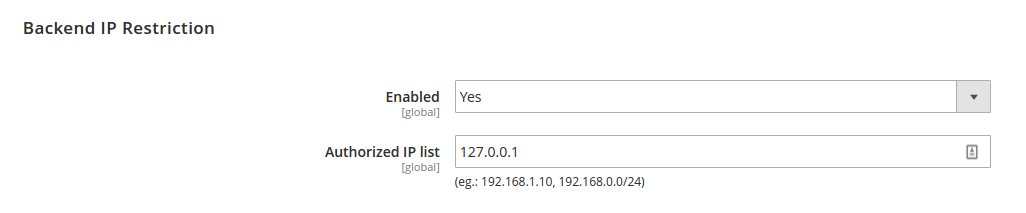
Configuration
The module allows you to:
- Enable/disable IP restrictions
- Define a comma-separated list of allowed IPs or CIDR notations (e.g.,
127.0.0.1,192.168.0.0/24)
Two-Factor Authentication Integration
This module intelligently integrates with Magento's 2FA capabilities:
| IP Status | 2FA Status | Behavior |
|---|---|---|
| On whitelist | 2FA disabled | Access granted |
| On whitelist | 2FA enabled | Access granted without 2FA prompt |
| Not on whitelist | 2FA disabled | Access denied |
| Not on whitelist | 2FA enabled | 2FA verification required |
Emergency Command Line Access
If you've accidentally locked yourself out of the admin panel, you can use these commands:
Disable IP restrictions completely:
php bin/magento msp:security:admin_restriction:ip disable
Add new IP addresses to the whitelist:
php bin/magento msp:security:admin_restriction:ip 127.0.0.1,192.168.0.0/24
Maintenance
This module is actively maintained by Vendic. Issues and pull requests are welcome on our GitHub repository.