dsh-plugin-background-image
August 16, 2026 · View on GitHub
English | 简体中文
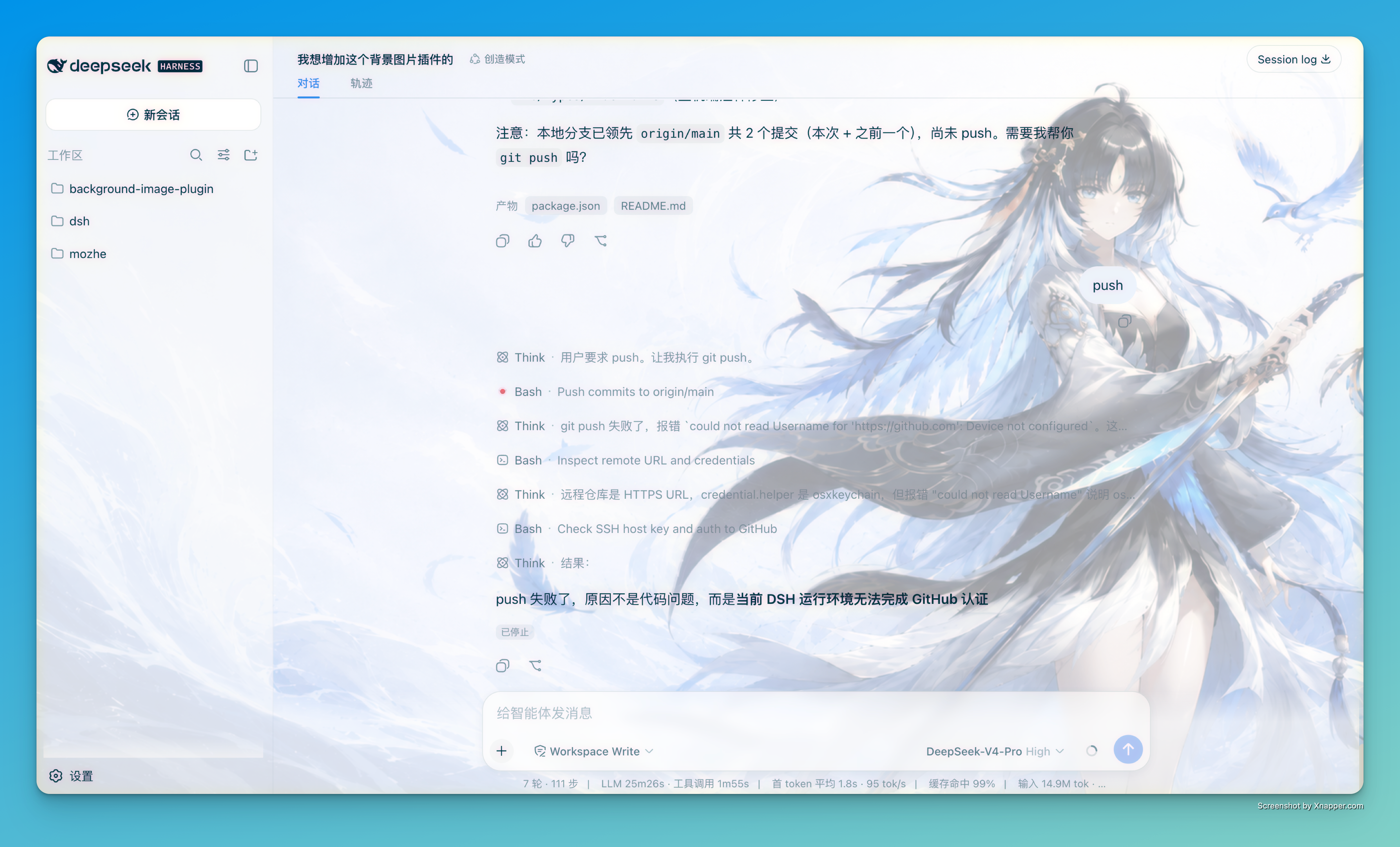
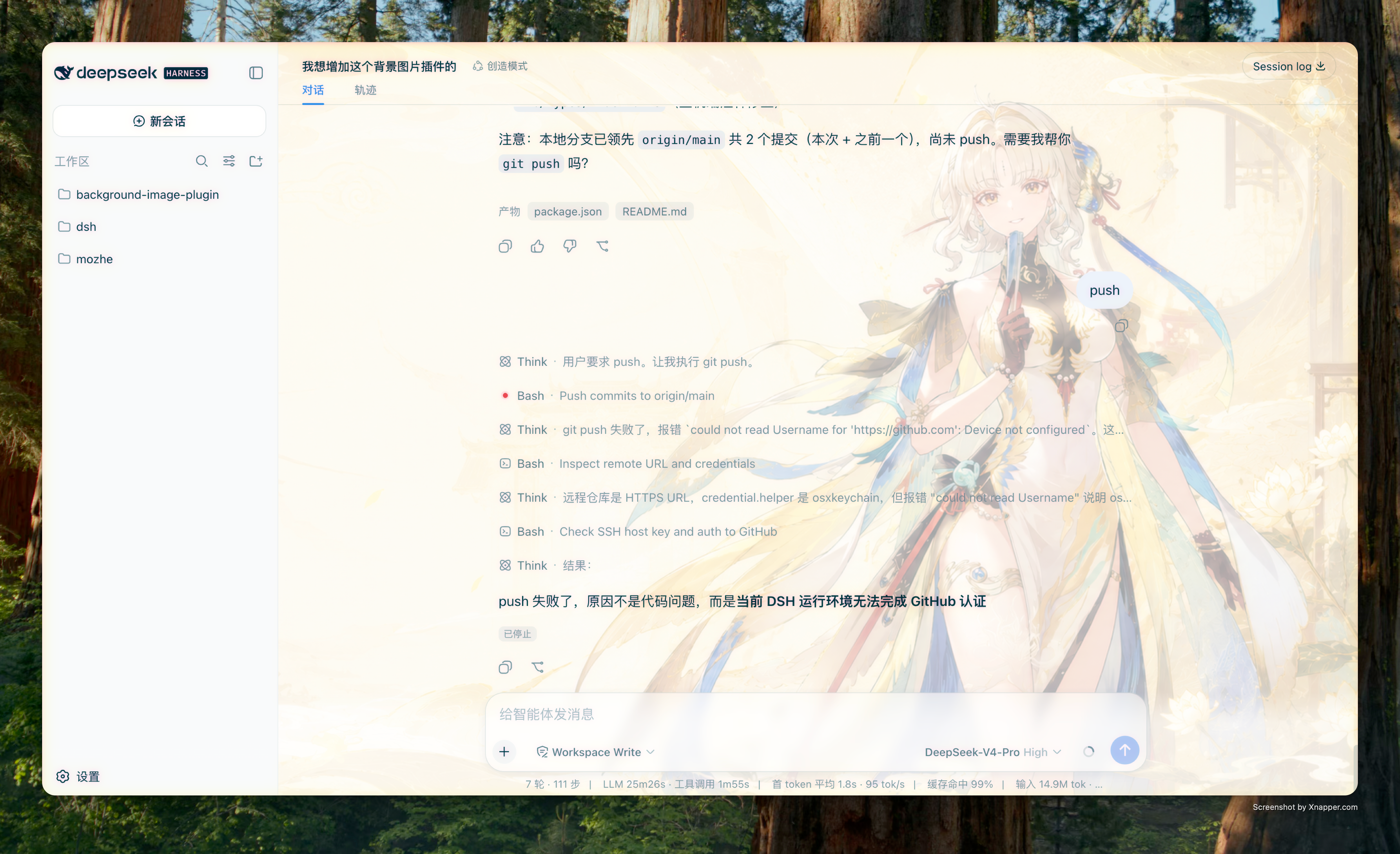
A background image plugin for DeepSeek Harness (DSH): set a web image, local image, or preset gradient as the interface background, with image opacity, display scope, frosted-glass blur, per-region opacity, and chat-content offset for a more immersive interface.
Features
- Web images (
http(s)://), local images (absolute paths), anddata:image/data URLs - Local image invalidation hint: the referenced local file is probed automatically on page load and whenever the settings page opens; if it has been moved or deleted, a prominent hint asks you to re-pick it
- Preset gradient palettes (Aurora / Sky / Sakura / Sunset / Mint / Ocean)
- Image opacity adjustment
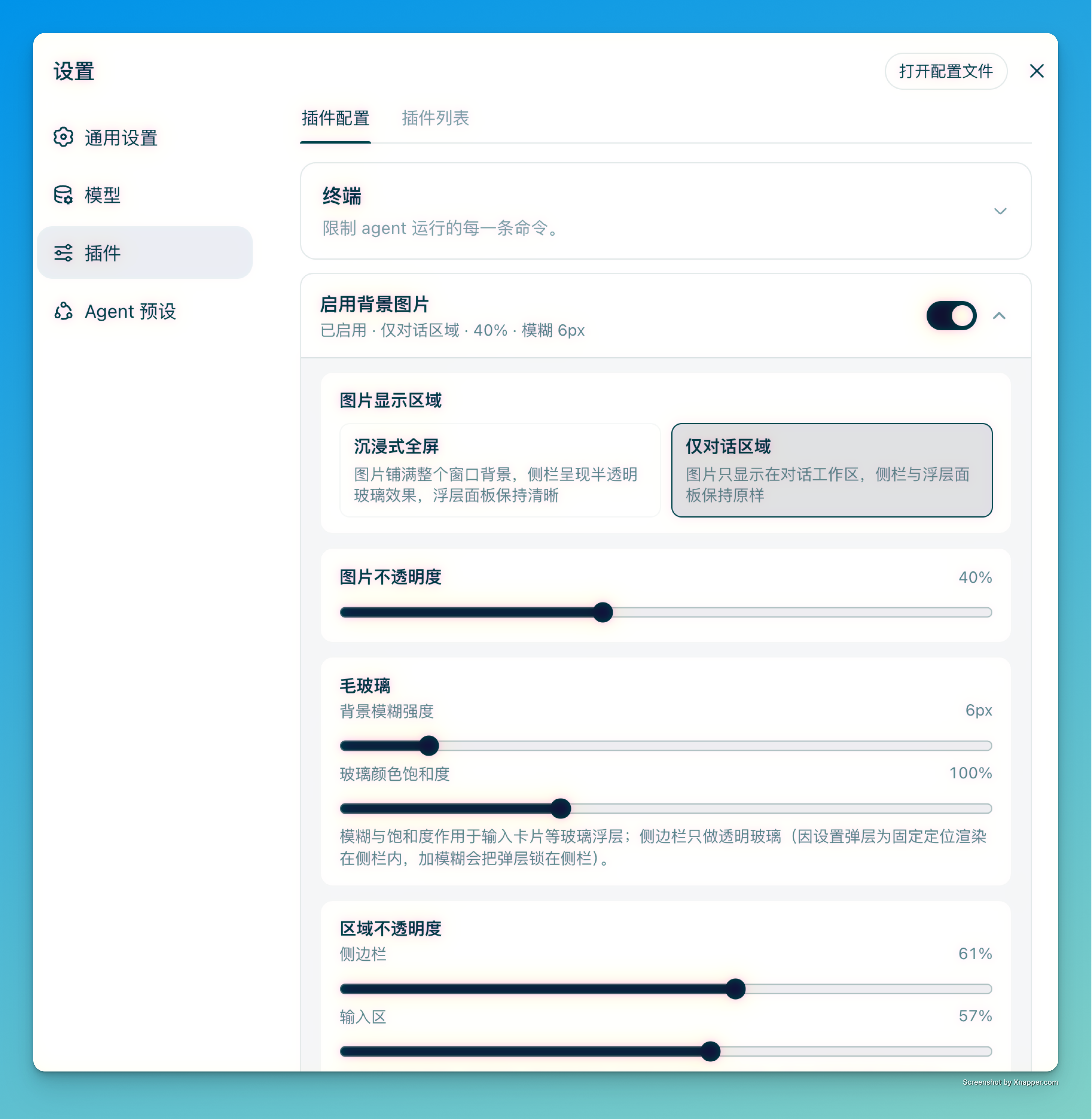
- Display scope: Immersive fullscreen / Conversation area only
- Frosted-glass blur + color saturation (applied to the sidebar and glass panels such as the composer card)
- Per-region opacity: sidebar and composer can be tuned independently (the sidebar only takes effect in immersive fullscreen)
- Chat content offset: shift the chat content (message list + composer card, ±320px, column width unchanged) left or right while the header stays in place, to better showcase the background
- Clean disable: turning the plugin off removes every theme-token and internal-style override, fully restoring the native DSH look
- Settings persist to
settings.yamland are restored automatically after a page refresh or a DSH restart
Demo
Installation
From a local directory
npx @deepseek-ai/dsh plugin --profile <profile> add \
  dsh-plugin-background-image@file:/path/to/background-image-plugin
For example:
npx @deepseek-ai/dsh plugin --profile web add \
  dsh-plugin-background-image@file:/Users/your-name/projects/background-image-plugin
From npm
npx @deepseek-ai/dsh plugin --profile <profile> add dsh-plugin-background-image
Start DSH with the same profile after installation and the plugin will load.
Usage
- Open DSH.
- Go to Settings → Plugins → Plugin Settings.
- Find Background Image Settings.
- Enable the background, then choose a web image, a local image, or a preset gradient. For local images, clicking "Choose Local Image" opens the native system file dialog; the selected absolute path is recorded (the file stays where it is — never copied or moved).
- Adjust the image opacity, display scope, frosted glass (blur strength and glass color saturation, applied to the sidebar and composer card), per-region opacity (sidebar, composer), and chat content offset as needed. Lower opacity values are more transparent and more immersive; the sidebar shows frosted glass in immersive fullscreen, while the composer takes effect in both modes.
Configuration Storage
The background toggle, display scope, image opacity, frosted glass, per-region opacity, and chat content offset are persisted by the DSH settings system into the config directory (default ~/.dsh/settings.yaml), like this:
background-image:
  enabled: true
  mode: fullscreen
  opacity: 0.9
  image: https://example.com/background.webp
  blur: 12             # frosted-glass blur strength (px, sidebar & composer card, 0 = off)
  saturation: 1.4      # glass color saturation (1 = as-is, >1 = more vivid)
  sidebarOpacity: 0.5  # sidebar opacity (fullscreen mode only, via the pseudo-element glass)
  composerOpacity: 0.72 # composer opacity
  contentOffset: 120   # chat content horizontal offset (px, positive = right, negative = left, 0 = centered)
- Everything is restored automatically after a page refresh or a DSH restart.
- Local images are recorded as absolute paths — never copied or moved; the file stays where it is:
background-image:
  enabled: true
  mode: fullscreen
  opacity: 0.9
  image: /Users/you/Pictures/background.png
  blur: 0
  saturation: 1
  sidebarOpacity: 0.5
  composerOpacity: 0.72
  contentOffset: 0
Browsers cannot load
file://resources directly due to security policies, so the plugin registers a read-only file-serving route on the host (GET /plugins/background-image/file?path=<absolute-path>) that serves the local image referenced by the configuration to the page over same-origin http. The route only accepts loopback origins and only serves the exact path currently referenced by theimagefield in settings.yaml ("reference-as-authorization", the same model as the officialsession.attachment). If the image file is moved or deleted, the background stops working and the path must be set again.
Dependencies
Runtime dependencies
@deepseek-ai/schemastery: host-side settings schema definition and validation.react(peer, optional): client-side settings panel UI.- Node.js built-ins:
node:child_process,node:fs/promises,node:path.
Native file picker (optional)
"Choose Local Image" invokes the native system file dialog, which depends on the following commands per platform:
| Platform | Required command |
|---|---|
| macOS | osascript (bundled with the system) |
| Linux | zenity or kdialog (either one is enough) |
| Windows | powershell |
When none of these is available, you can still type the local absolute path manually.
Known Limitations and Possible Impact
This plugin works by overriding DSH theme tokens and injecting CSS, which changes the global interface appearance. Keep the following in mind:
- Overrides the global background token
--dsw-alias-bg-base: every interface region referencing this token will show the background image. The plugin forces known panels/buttons back to surface colors (--dsw-alias-bg-layer-2) via CSS, but elements added by future DSH updates that reference the token may need follow-up rules. - Depends on DSH internal hashed class names: the continuous background, glass effects, and chat content offset rely on internal class names such as
.pI_x6G_frame,.wSkVaW_root,.ydkMvW_root,.hHd-Xa_root,.pI_x6G_sidebarCol,.uV2eYG_card,.wSkVaW_composerSeat,.wSkVaW_viewArea, and.wSkVaW_composerHero. If a DSH update renames them, the corresponding effects break or misalign. - Sidebar frosted glass relies on a pseudo-element approach: the sidebar glass is not applied to the sidebar ancestor itself but to the
.pI_x6G_sidebarCol::beforepseudo-element (an absolutely positioned overlay carrying the translucent fill andbackdrop-filter). This waybackdrop-filterlands on a pseudo-element withoutfixeddescendants, so the sidebar ancestor never becomes the containing block for fixed descendants — theposition: fixedsettings overlay (.VOzbGW_overlay) is not trapped inside the sidebar. The approach still depends on internal class names such as.pI_x6G_sidebarColand.hHd-Xa_root; if a DSH update renames them, the sidebar glass breaks or misaligns. - Local image route: local images depend on the host-side read-only route (loopback only, reference-as-authorization). If the image file is moved or deleted, the background stops working until the path is set again. The plugin probes silently with HEAD requests on page load and whenever the settings page opens (no file content is transferred), and shows a hint at the top of the settings page and in the status line when invalid.
- Clean disable: the token overrides and internal-class styles above exist on the page only while the plugin is enabled (sidebar rules additionally require immersive fullscreen mode). Turning the plugin off or switching to "Conversation area only" removes the corresponding stylesheets entirely, fully restoring native DSH styles without leftover
!importantoverrides.
Update and Uninstall
Update to the latest version:
npx @deepseek-ai/dsh plugin --profile <profile> add dsh-plugin-background-image@latest
Uninstall the plugin:
npx @deepseek-ai/dsh plugin --profile <profile> remove dsh-plugin-background-image
Requirements
- Node.js 18 or later
- A working DeepSeek Harness installation