nlgrep
September 20, 2026 · View on GitHub



Search code, docs, logs, and text by meaning, even when you forget the exact words.
| nlgrep vs. grep | nlgrep vs. Semgrep |
|---|---|
 | 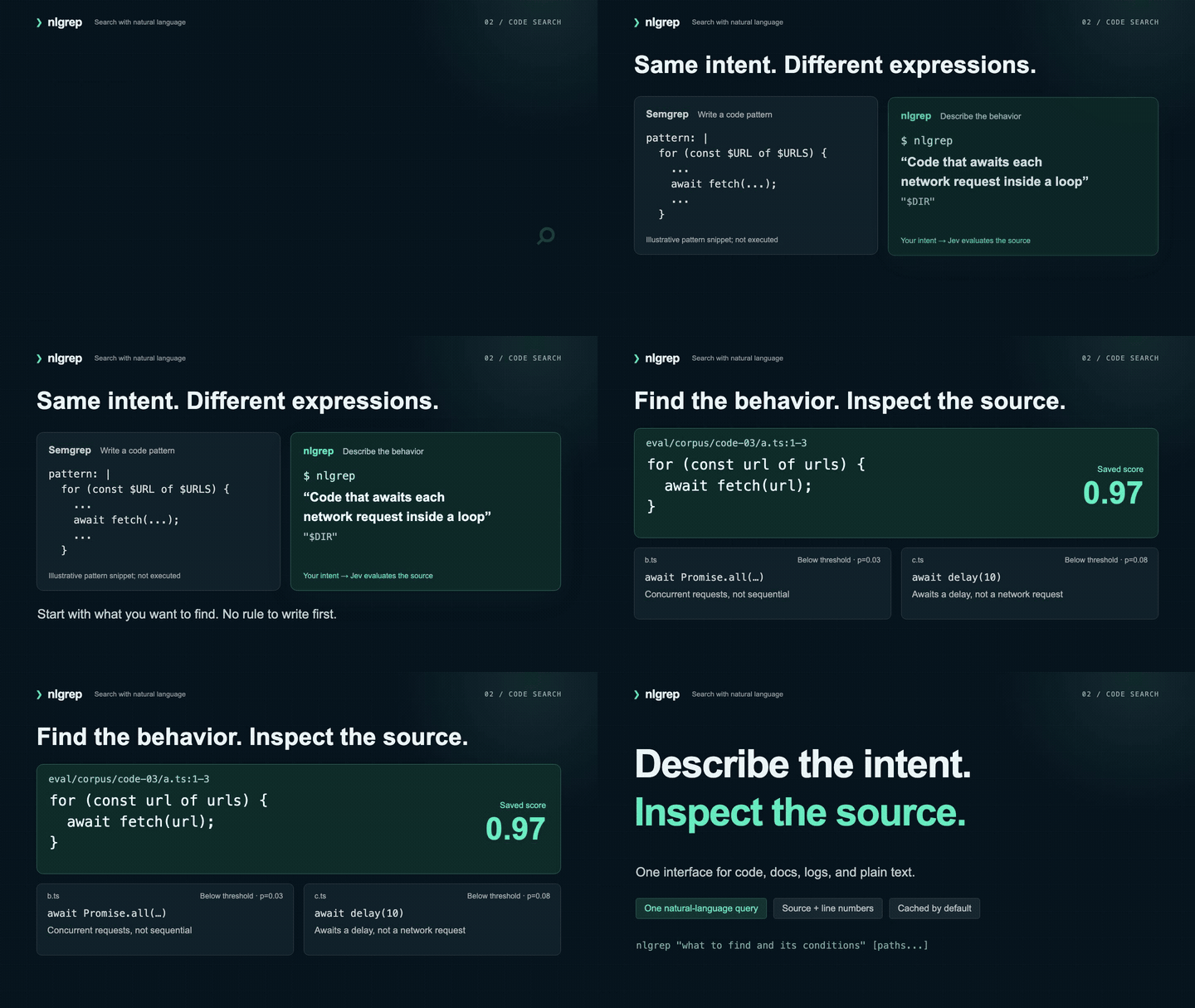 |
| Search scenario | grep | Semgrep CE | nlgrep |
|---|---|---|---|
| Natural-language queries | ☐ | ☐ | ✅ |
| Find paraphrases by meaning | ☐ | ☐ | ✅ |
| Text, case, and format conditions | ✅ | ✅ | ✅ |
| Code structure and local data-flow conditions | ☐ | ✅ | ✅ |
| Describe code behavior without rules | ☐ | ☐ | ✅ |
nlgrep uses Jev for every match: judgments depend on the supplied context and are probabilistic. Evaluation and limits.
Install and get started
Requires Node.js 22+.
npm install --global nlgrep
nlgrep --help
Configure JEV_KEY below, then search your project:
# Preview the plan without calling Jev
nlgrep "Retry logic after a failed request" ./src --dry-run

# Search with a request limit; retries count toward it
nlgrep "Retry logic after a failed request" ./src --max-requests 30
For a one-off run: npx nlgrep "what to find" ./path. To work from source, see Contributing.
Configure the Jev API
-
Sign in to the TypeSafe API Keys console and create an API key. See the official quickstart.
-
Create or edit
.envin the working directory where you run nlgrep, adding the entry below. If.envalready exists, update only this entry and preserve the other settings:JEV_KEY=your_typesafe_api_key -
Run a local preflight check. This neither validates the key nor calls the API:
nlgrep "Contains ECONNRESET" ./src --dry-run -
To validate the key, send a short synthetic input with a limit of one request:
printf 'ECONNRESET\n' | nlgrep "Contains the literal string ECONNRESET, case-sensitive" \
  - --no-cache --max-requests 1
You can also set JEV_KEY or TYPESAFE_API_KEY through your shell or CI environment. Precedence is: process JEV_KEY → process TYPESAFE_API_KEY → current-directory .env JEV_KEY → current-directory .env TYPESAFE_API_KEY. Empty values are ignored. Parent directories are not searched for .env. Global installs also load configuration from the invocation directory.
| Setting | Default behavior |
|---|---|
| API endpoint | https://api.typesafe.ai/v1/systemone, configured in the CLI |
| Model | Pinned to jev-1.13.0; override with --model <id> |
| Request limit | Set with --max-requests <n>; includes retries |
| Zero-call execution | --dry-run only plans; --max-requests 0 only accepts cached judgments |
For missing_key, check the working directory and variable name. For HTTP 401/403, check the key and account permissions. Keep keys out of command arguments and Git. .env is ignored by Git, and scanning always excludes .env and .env.*. Uncached searches send the query and included source content to TypeSafe.
How it relates to grep and Semgrep
nlgrep adds semantic search: describe the meaning you remember to find a passage that uses different words. Suppose you want the request to postpone a meeting until next week. You remember postpone, but the actual text is:
Could we move our meeting to next week? I am unavailable this week.
# No occurrence of postpone in these samples: no matches
grep -ni 'postpone' eval/corpus/text-04/*.txt

# Describe the intent: a.txt matches with a saved evaluation score of 0.97
nlgrep "An explicit request to postpone a meeting until next week" eval/corpus/text-04
Broadening the keyword to meeting matches all three files, including a request to keep the original time and a promise to send meeting notes. In this example, nlgrep retains the postponement request and excludes those two alternatives. grep can find the target with a different or broader pattern; nlgrep adds a way to search by meaning when you cannot recall the exact words, code names, or complete snippet.
The same natural-language interface also accepts conditions about text formats, code structure, and behavior.
For example, the intent of grep -E '^ORD-[0-9]{6}$' can be expressed as “an entire line consisting of ORD- followed by exactly six digits.” A search for sequential requests can be phrased as “code that awaits fetch calls one by one inside a loop.” Natural language can express these intents, but the current implementation does not guarantee equivalence to arbitrary regexes or Semgrep rules. Use the corresponding tools when exact pattern semantics are required.
This project has no BRE/ERE/PCRE interpreter, Semgrep rule compatibility layer, AST, or call graph. Judgments use windows of up to 40 lines; they cannot prove that an entire function lacks a check or guarantee cross-file data-flow analysis. Semgrep's rule management, autofix, and scanning platform are outside this project's file-search scope.
References: GNU grep manual, Semgrep repository, rules, and taint analysis.
Usage
# Multiple paths and file filters; quote globs to prevent shell expansion
nlgrep "How to configure the production database connection" ./src ./docs -g '*.ts' -g '*.md'
nlgrep "Calls to fetch with method POST, excluding comments" ./src -g '!**/*.test.ts'

# stdin contains text; search starts after EOF
tail -n 2000 app.log | nlgrep "Database authentication failures, excluding network timeouts" -

# Script-friendly output
nlgrep "Reads environment variables" ./src --json
nlgrep "Permission checks" ./src -l -0 --top 0

# Change the threshold or result count without repeating cached API calls
nlgrep "Permission checks" ./src --threshold 0.8 --top 10 --max-requests 0
If paths are omitted, nlgrep searches the current directory when stdin is a terminal, or reads stdin otherwise. Explicit paths take precedence. - cannot be combined with file paths. Chinese queries can search English material; quality depends on the condition and context. See the evaluation report.
Example default output (illustrative probability):
src/retry.ts:42-44  p=0.93
42 | for (const url of urls) {
43 |   await fetch(url);
44 | }
Line numbers identify the evaluated window, not individual line-level matches. p is the model's estimate that the condition is satisfied. Files are ranked by their highest-scoring window. Version 0.2 uses JSON schema 2 (state.files and per-window paths for custom evaluators). JSON retains all matching windows, source text, byte ranges, snapshot hashes, and execution statistics. Each match also includes the other windows supplied to Jev in context; these are evaluation inputs, not a model-generated proof. evidenceScope is provided-context. --top limits display only; every included window is evaluated.
| Option | Default | Purpose |
|---|---|---|
-g, --glob <pattern> | None | Repeatable; positive patterns form a union, exclusions beginning with ! take precedence; patterns without / match basenames |
--hidden | false | Include hidden entries |
--no-ignore | false | Disable ignore files and built-in generated-directory exclusions |
--threshold <n> | 0.8 | Match when the probability reaches this threshold; range 0–1 |
--top <n> | 20 | Maximum files displayed; 0 means all |
-l / -0 | false | Paths only; -l -0 uses NUL separators |
--json | false | JSON on stdout; mutually exclusive with -l |
--dry-run | false | Show the scan plan, cache hits, and pending calls without network access |
--no-cache | false | Disable the local judgment cache |
--concurrency <n> | 4 | Concurrent requests; range 1–16 |
--max-bytes <size> | 20MiB | Limit deduplicated source input bytes; supports B/KiB/MiB |
--max-requests <n> | 1000 | Limit HTTP attempts, including retries; 0 requires cached judgments |
--model <id> | jev-1.13.0 | Pinned versions support persistent caching; floating aliases disable it |
stdout contains results only; statistics and errors go to stderr. Exit codes: 0 complete with matches, 1 complete without matches, 2 error or incomplete, and 130 interrupted. Successful help/version/dry-run commands return 0. File-read, API, or budget errors set complete=false; outputLimited separately indicates that --top truncated the display.
Minimize API usage
Judgments in .nlgrep/cache-v1/ are reused by default. Cache keys include the complete evaluation input, query, model, and prompt version. Stored entries contain only hashes, probabilities, and model names—not source text, queries, paths, or keys. Changing the threshold, result count, or output format reuses the same judgments. File edits invalidate every batch using the changed content, including judgments on other files sharing that context. --max-requests 0 guarantees no API calls and fails before sending anything if required cache entries are missing.
Files up to 12 KiB are evaluated whole when the serialized request fits. Larger files use overlapping 40-line / 8 KiB windows. Selected files are packed in path order into shared batches: at most eight windows and 24 KiB per complete request. Each window gets its own Jev judgment, using visibly connected evidence from other windows in that batch. This works for code, docs, logs, and text without a parser or a separate matching engine.
Cross-file evidence is limited to the supplied batch; imports are not automatically followed, and dependencies in another batch are unavailable. Narrow paths to the relevant files and inspect --dry-run --json (contextFiles) to see what can be considered together. Complete files preserve long functions and records within the size limit; larger scopes can still be incomplete. There is only one retry layer; SDK retries are disabled. Narrow the scope with paths, globs, ignore files, or a bounded tail first. --dry-run reports deduplicated source bytes and uncached request bytes; neither is presented as tokens or dollars.
As of 2026-09-20, the official price for pinned model jev-1.13.0 is $0.042 per million input tokens, with free output. Actual charges follow server-side billing; failed requests may not return usage. See the official models and pricing.
Live evaluations have a separate cumulative $5 ceiling. Before each attempt, the runner persistently reserves $0.01. The default cumulative limit is 200 attempts, reserving at most $2; --max-attempts on the evaluation runner can raise it up to 500 while retaining the $5 hard ceiling; failures and retries count toward the limit. A lock prevents parallel evaluations from bypassing the ledger at .nlgrep/eval-budget.json. Do not delete it to reset the budget. This guard applies to npm run eval -- --live; ordinary searches use --max-requests to cap attempts.
Files and data handling
Supports UTF-8, BOM, CRLF, very long lines, and files without a trailing newline. By default, scanning skips hidden entries, binary files, invalid UTF-8, symbolic links, and node_modules/dist/build/coverage/.venv, while applying nested .gitignore and .nlgrepignore files. --no-ignore does not enable hidden files.
.git/, .nlgrep/, .env, .env.*, *.pem, *.key, id_rsa*, and id_ed25519* are always excluded, even when explicitly specified. Uncached searches send included paths, source text, and queries to TypeSafe. Filename exclusions are not general-purpose secret detection. The model returns judgments only. The program does not execute searched content or let the model generate paths or line numbers.
Development and verification
See Contributing for setup and Releasing for automatic npm publishing from main.
npm run check                       # Type checking, offline tests, build; no Jev calls
npm run eval                        # Local plan for synthetic evaluations; no Jev calls
npm run eval -- --live --split development --max-attempts 250
npm run eval -- --live --split holdout --max-attempts 250
npm run eval -- --live --context --max-attempts 250  # Long functions and cross-file cases
Live evaluations send only synthetic material from eval/corpus/ and reuse cached judgments. The 40 queries are grouped by content type, English/Chinese language, and development/holdout split. Raw results are written to eval/results/. Reports include condition-violation rates: topical similarity alone does not count as satisfying the condition. Evaluation scripts do not execute sample code.
See SPEC.md for the design contract, SCENARIOS.md for scenarios and counterexamples, and EVALUATION.md for current results and limitations. These supporting documents are currently in Chinese.