Download 2D features
August 3, 2026 · View on GitHub
Multimodality Helps Few-shot 3D Point Cloud Semantic Segmentation
Zhaochong An
·
Guolei Sun†
·
Yun Liu†
·
Runjia Li
·
Min Wu
Ming-Ming Cheng
·
Ender Konukoglu
·
Serge Belongie
ICLR 2025 Spotlight (Paper)
🌟 Highlights
We introduce:
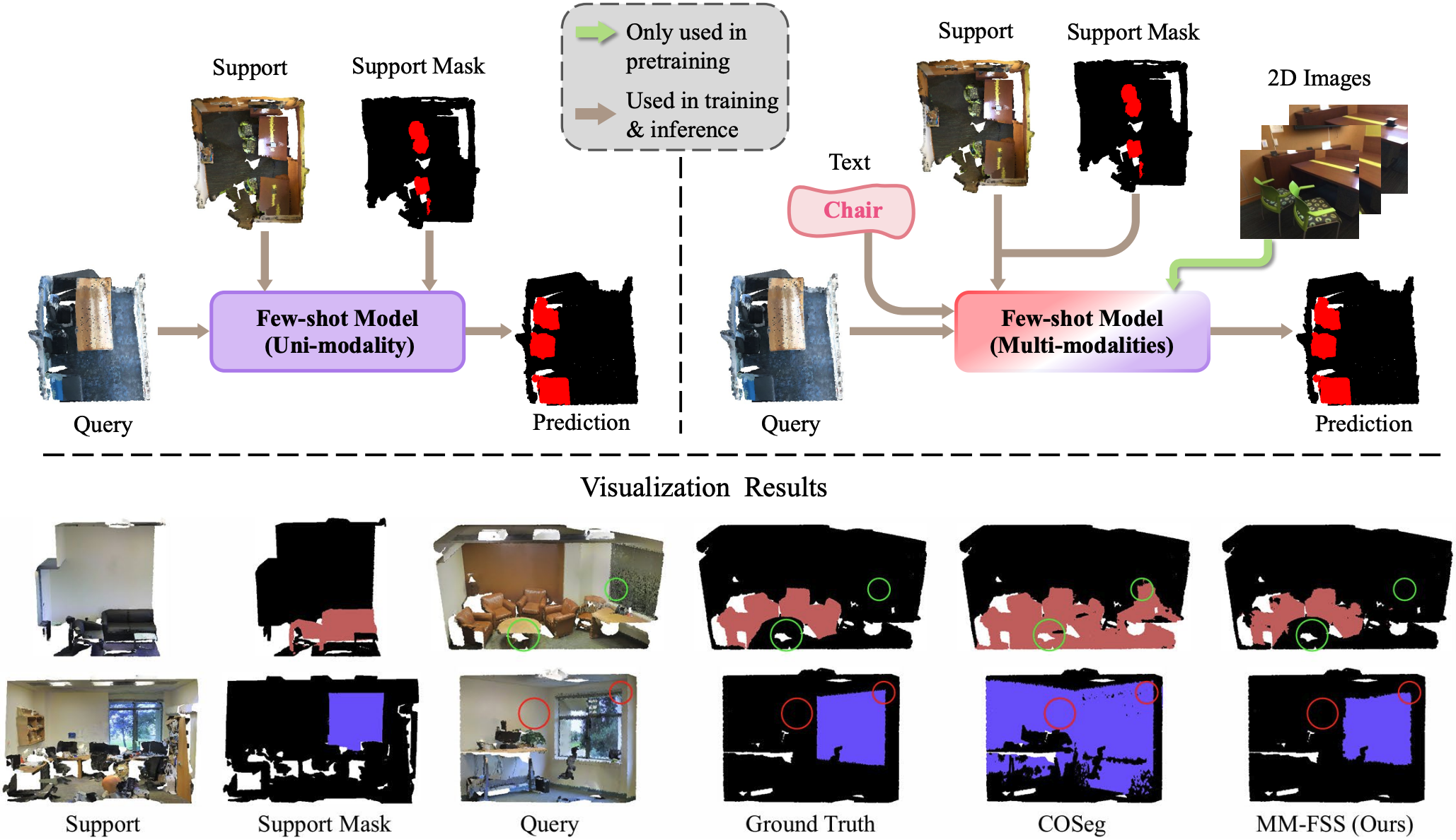
- A novel cost-free multimodal few-shot 3D point cloud segmentation (FS-PCS) setup that integrates textual category names and 2D image modality
- MM-FSS: The first multimodal FS-PCS model that explicitly utilizes textual modality and implicitly leverages 2D modality
- Superior performance on novel class generalization through effective multimodal integration
- Valuable insights into the importance of commonly-ignored free modalities in FS-PCS
📝 Citation
If you find our code or paper useful, please cite:
@inproceedings{an2025generalized,
  title={Generalized few-shot 3d point cloud segmentation with vision-language model},
  author={An, Zhaochong and Sun, Guolei and Liu, Yun and Li, Runjia and Han, Junlin and Konukoglu, Ender and Belongie, Serge},
  booktitle={2025 IEEE/CVF Conference on Computer Vision and Pattern Recognition (CVPR)},
  pages={16997--17007},
  year={2025},
  organization={IEEE}
}

@inproceedings{an2025multimodality,
  title={Multimodality helps few-shot 3d point cloud semantic segmentation},
  author={An, Zhaochong and Sun, Guolei and Liu, Yun and Li, Runjia and Wu, Min and Cheng, Ming-Ming and Konukoglu, Ender and Belongie, Serge},
  booktitle={International Conference on Learning Representations},
  volume={2025},
  pages={55414--55435},
  year={2025}
}


@inproceedings{an2024rethinking,
  title={Rethinking few-shot 3d point cloud semantic segmentation},
  author={An, Zhaochong and Sun, Guolei and Liu, Yun and Liu, Fayao and Wu, Zongwei and Wang, Dan and Van Gool, Luc and Belongie, Serge},
  booktitle={2024 IEEE/CVF Conference on Computer Vision and Pattern Recognition (CVPR)},
  pages={3996--4006},
  year={2024},
  organization={IEEE}
}
🛠️ Environment Setup
Our environment has been tested on:
- RTX 3090 GPUs
- GCC 6.3.0
Follow the COSeg installation guide for detailed setup.
📦 Dataset Preparation
Pretraining Stage Data
Follow OpenScene instructions, you can directly download the following ScanNet 3D dataset and 2D features for pretraining:
# Download ScanNet 3D dataset
wget https://cvg-data.inf.ethz.ch/openscene/data/scannet_processed/scannet_3d.zip
unzip scannet_3d.zip

# Download 2D features
wget https://cvg-data.inf.ethz.ch/openscene/data/scannet_multiview_lseg.zip
unzip scannet_multiview_lseg.zip
You should put the unpacked data into the folder ./pretraining/data/ or link to the corresponding data folder with the symbolic link:
ln -s /PATH/TO/DOWNLOADED/FOLDER ./pretraining/data
Few-shot Stage Data
Option 1: Direct Download (Recommended)
Download our preprocessed datasets:
| Dataset | Few-shot Stage Data |
|---|---|
| S3DIS | Download |
| ScanNet | Download |
Option 2: Manual Preprocessing
Follow COSeg preprocessing instructions.
The processed data will be in [PATH_to_DATASET_processed_data]/blocks_bs1_s1/data. Make sure to update the data_root entry in the .yaml
config file to [PATH_to_DATASET_processed_data]/blocks_bs1_s1/data.
🔄 Training Pipeline
1. Backbone and IF Head Pretraining
Option A: Download our pretrained weights from Google Drive
Option B: Train from scratch:
cd pretraining
bash run/distill_strat.sh PATH_to_SAVE_BACKBONE config/scannet/ours_lseg_strat.yaml
2. Meta-learning Stage
Set config config/[CONFIG_FILE] to be s3dis_COSeg_fs.yaml or scannetv2_COSeg_fs.yaml for training on S3DIS or ScanNet respectively.
Adjust cvfold, n_way, and k_shot according to your few-shot task:
# For 1-way tasks
python3 main_fs.py --config config/[CONFIG_FILE] \
    save_path [PATH_to_SAVE_MODEL] \
    pretrain_backbone [PATH_to_SAVED_BACKBONE] \
    cvfold [CVFOLD] \
    n_way 1 \
    k_shot [K_SHOT] \
    num_episode_per_comb 1000

# For 2-way tasks
python3 main_fs.py --config config/[CONFIG_FILE] \
    save_path [PATH_to_SAVE_MODEL] \
    pretrain_backbone [PATH_to_SAVED_BACKBONE] \
    cvfold [CVFOLD] \
    n_way 2 \
    k_shot [K_SHOT] \
    num_episode_per_comb 100
Note: Following COSeg,
num_episode_per_combdefaults to 1000 for 1-way and 100 for 2-way tasks to maintain consistency in test set size.
📊 Evaluation & Visualization
Model Evaluation
Modify cvfold, n_way, k_shot and num_episode_per_comb accordingly and run:
python3 main_fs.py --config config/[CONFIG_FILE] \
    test True \
    eval_split test \
    weight [PATH_to_SAVED_MODEL] \
    [vis 1]  # Optional: Enable W&B visualization
Note: Performance may vary by 1.0% due to potential randomness in the training process. ScanNetv2 typically shows less variance than S3DIS.
Visualization
Follow COSeg visualization guide for high-quality visualization results.
🎯 Model Zoo
| Model | Dataset | CVFOLD | N-way K-shot | Weights |
|---|---|---|---|---|
| s30_1w1s | S3DIS | 0 | 1-way 1-shot | Download |
| s30_1w5s | S3DIS | 0 | 1-way 5-shot | Download |
| s30_2w1s | S3DIS | 0 | 2-way 1-shot | Download |
| s30_2w5s | S3DIS | 0 | 2-way 5-shot | Download |
| s31_1w1s | S3DIS | 1 | 1-way 1-shot | Download |
| s31_1w5s | S3DIS | 1 | 1-way 5-shot | Download |
| s31_2w1s | S3DIS | 1 | 2-way 1-shot | Download |
| s31_2w5s | S3DIS | 1 | 2-way 5-shot | Download |
| sc0_1w1s | ScanNet | 0 | 1-way 1-shot | Download |
| sc0_1w5s | ScanNet | 0 | 1-way 5-shot | Download |
| sc0_2w1s | ScanNet | 0 | 2-way 1-shot | Download |
| sc0_2w5s | ScanNet | 0 | 2-way 5-shot | Download |
| sc1_1w1s | ScanNet | 1 | 1-way 1-shot | Download |
| sc1_1w5s | ScanNet | 1 | 1-way 5-shot | Download |
| sc1_2w1s | ScanNet | 1 | 2-way 1-shot | Download |
| sc1_2w5s | ScanNet | 1 | 2-way 5-shot | Download |
Contact
For any questions or issues, feel free to reach out!
- Email: anzhaochong@outlook.com
- Join in our Communication Group (WeChat):