🍺 bar.wezterm
September 10, 2026 · View on GitHub
A tab bar configuration for wezterm, this configuration is heavily inspired by rose-pine/tmux.
📷
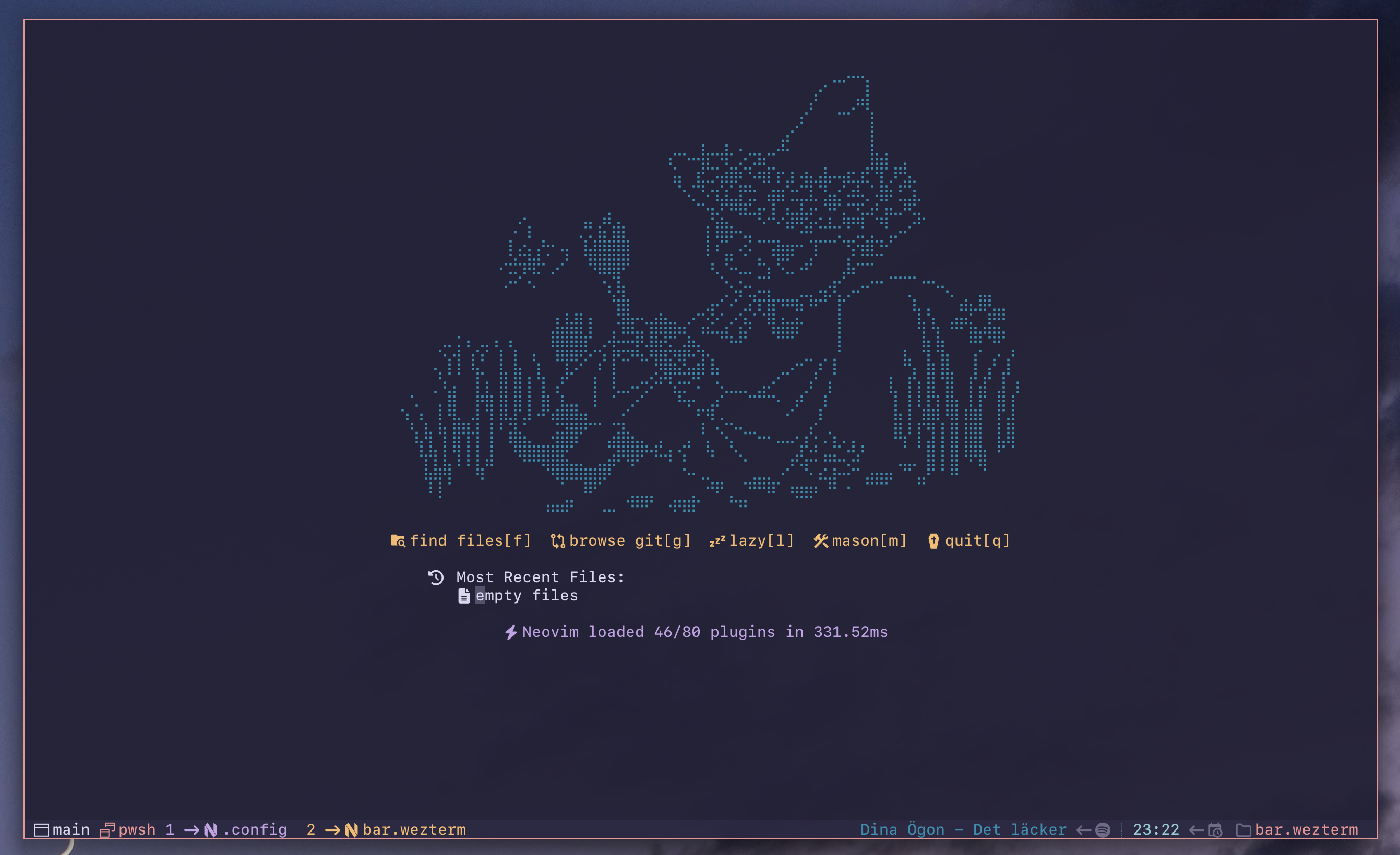
🌷 Rosé Pine

😸 Catppuccin Mocha

📋 Prerequisites
Important
The plugin will not work if config.enable_tab_bar is set to false. Make sure the tab bar is enabled (this is the default wezterm behavior, so you only need to act if you have explicitly disabled it).
🔐 SSH
The SSH module detects when the active pane is running an SSH session and displays an indicator in the right status bar. When enabled, it automatically hides the cwd module during SSH sessions, since the remote working directory is not available to WezTerm without OSC 7 configuration on the remote host.
Note
bar.wezterm ships with this module disabled, please check example in Configuration on how to enable it.
🎵Spotify
In order for the spotify integration to work you need to have spotify-tui installed on you system. Follow their installation instructions on how to set it up.
Note
bar.wezterm ships with this module disabled, please check example in Configuration on how to enable it.
🚀 Installation
This is a wezterm plugin. It can be installed by importing the repo and calling the apply_to_config-function. It is important that the apply_to_config-function is called after color_scheme has been set.
local bar = wezterm.plugin.require("https://github.com/adriankarlen/bar.wezterm")
bar.apply_to_config(config)
Note
This assumes that you have imported the wezterm module and initialized the config-object.
🛠️ Configuration
The apply_to_config-function takes a second param opts. To override any options simply pass a table of the desired changes.
-- example enable spotify module
bar.apply_to_config(
  config,
  {
    modules = {
      spotify = {
        enabled = true,
      },
    },
  }
)
🏭 Default configuration
Important
The default config requires that you are using a Nerd Font or has "Symbols Nerd Font" installed on your system so wezterm can default to it.
local config = {
  position = "bottom",
  max_width = 32,
  padding = {
    left = 1,
    right = 1,
    tabs = {
      left = 0,
      right = 2,
    },
  },
  separator = {
    space = 1,
    left_icon = wez.nerdfonts.fa_long_arrow_right,
    right_icon = wez.nerdfonts.fa_long_arrow_left,
    field_icon = wez.nerdfonts.indent_line,
  },
  modules = {
    tabs = {
      active_tab_fg = 4,
      active_tab_bg = "transparent",
      inactive_tab_fg = 6,
      inactive_tab_bg = "transparent",
      new_tab_fg = 2,
      new_tab_bg = "transparent",
      rules = {},
    },
    workspace = {
      enabled = true,
      icon = wez.nerdfonts.cod_window,
      color = 8,
    },
    leader = {
      enabled = true,
      icon = wez.nerdfonts.oct_rocket,
      color = 2,
    },
    zoom = {
      enabled = false,
      icon = wez.nerdfonts.md_fullscreen,
      color = 4,
    },
    pane = {
      enabled = true,
      icon = wez.nerdfonts.cod_multiple_windows,
      color = 7,
    },
    username = {
      enabled = true,
      icon = wez.nerdfonts.fa_user,
      color = 6,
    },
    hostname = {
      enabled = true,
      icon = wez.nerdfonts.cod_server,
      color = 8,
    },
    clock = {
      enabled = true,
      icon = wez.nerdfonts.md_calendar_clock,
      format = "%H:%M",
      color = 5,
    },
    cwd = {
      enabled = true,
      icon = wez.nerdfonts.oct_file_directory,
      color = 7,
    },
    ssh = {
      enabled = false,
      icon = wez.nerdfonts.md_ssh,
      color = 5,
    },
    spotify = {
      enabled = false,
      icon = wez.nerdfonts.fa_spotify,
      color = 3,
      max_width = 64,
      throttle = 15,
    },
  },
}
🎨 Colors
Every ansi color used is configurable, to change a color, pass in the desired
ansi code to use for a specific setting. You can use either an ansi color index
(number) or a hex color string (e.g., "#c6a0f6").
Tab background colors can be configured via the modules.tabs options:
bar.apply_to_config(config, {
  modules = {
    tabs = {
      active_tab_fg = 1,
      active_tab_bg = 6,           -- ansi color index
      -- or use a hex color:
      -- active_tab_bg = "#c6a0f6",
    },
  },
})
🖌️ Color table
| Config option | Default |
|---|---|
active_tab_fg | 4 |
active_tab_bg | transparent |
inactive_tab_fg | 6 |
inactive_tab_bg | transparent |
new_tab_fg | 2 |
new_tab_bg | transparent |
🎯 Dynamic tab customization rules
You can override tab's color and icon based on its domain and active pane's directory:
bar.apply_to_config(config, {
  modules = {
    tabs = {
      rules = {
        {
          -- check domain name; requires exact, case-sensitive matchs
          domain = "WSL:Ubuntu",
          -- you can override tab's color or icon
          active_tab_fg = 3,
          inactive_tab_fg = 3
        },
        {
          -- check domain name using pattern (see lua's string.match)
          domain = { pattern = "^SSH" },
          active_tab_fg = 1,
          inactive_tab_fg = 1,
          icon = wez.nerdfonts.md_ssh
        },
        {
          -- check domain name using a custom predicate
          domain = function(name) return name:find "prod" ~= nil end,
          active_tab_bg = "#eb6f92",
          inactive_tab_bg = "#eb6f92"
        },
        {
          -- check cwd, same syntax as with domain names; paths compare with a
          -- trailing "/", so this matches /home/pet-projects itself as well
          cwd = { pattern = "^/home/pet-projects/" },
          -- when cwd and domain are given at the same time, both should match
          domain = "local",
          active_tab_fg = 6,
          inactive_tab_fg = 6
        },
      },
    },
  },
})
Rules are evaluated in list order. Each matching rule overrides the properties it
names. For example, domain SSH:prod-01 will be matched by two rules from above;
first will set tab's icon and foreground, second will override foreground only.
📜 License
This project is licensed under the MIT License - see the LICENSE file