README.md
April 19, 2026 · View on GitHub
🫙 Zerobox
Sandbox any command with file, network, and credential controls.




Lightweight, cross-platform process sandboxing powered by OpenAI Codex's sandbox runtime.
- Deny by default: Writes, network, and environment variables are blocked unless you allow them
- Credential injection: Pass API keys that the process never sees. Zerobox injects real values only for approved hosts
- File access control: Allow or deny reads and writes to specific paths
- Network filtering: Allow or deny outbound traffic by domain
- Clean environment: Only essential env vars (PATH, HOME, etc.) are inherited by default
- SDKs for Rust, TypeScript, and Python with a consistent API across languages
- Cross-platform: macOS and Linux. Windows support planned
- Single binary: No Docker, no VMs, ~10ms overhead

Install
| Channel | Command |
|---|---|
| Shell (macOS / Linux) | curl -fsSL https://raw.githubusercontent.com/afshinm/zerobox/main/install.sh | sh |
| npm | npm install -g zerobox |
| PyPI | pip install zerobox |
| Cargo | cargo install zerobox |
| From source | git clone https://github.com/afshinm/zerobox && cd zerobox && ./scripts/sync.sh && cargo build --release -p zerobox |
Quick start
Run a command with no writes and no network access:
zerobox -- node -e "console.log('hello')"
Allow writes to a specific directory:
zerobox --allow-write=. -- node script.js
Allow network to a specific domain:
zerobox --allow-net=api.openai.com -- node agent.js
Pass a secret to a specific host and the inner process never sees the real value:
zerobox --secret OPENAI_API_KEY=sk-proj-123 --secret-host OPENAI_API_KEY=api.openai.com -- node agent.js
Record filesystem changes and undo them after execution:
zerobox --restore --allow-write=. -- npm install
Or record without restoring, then inspect and undo later:
zerobox --snapshot --allow-write=. -- npm install
zerobox snapshot list
zerobox snapshot diff <session-id>
zerobox snapshot restore <session-id>
For programmatic usage jump to the SDK that matches your stack:
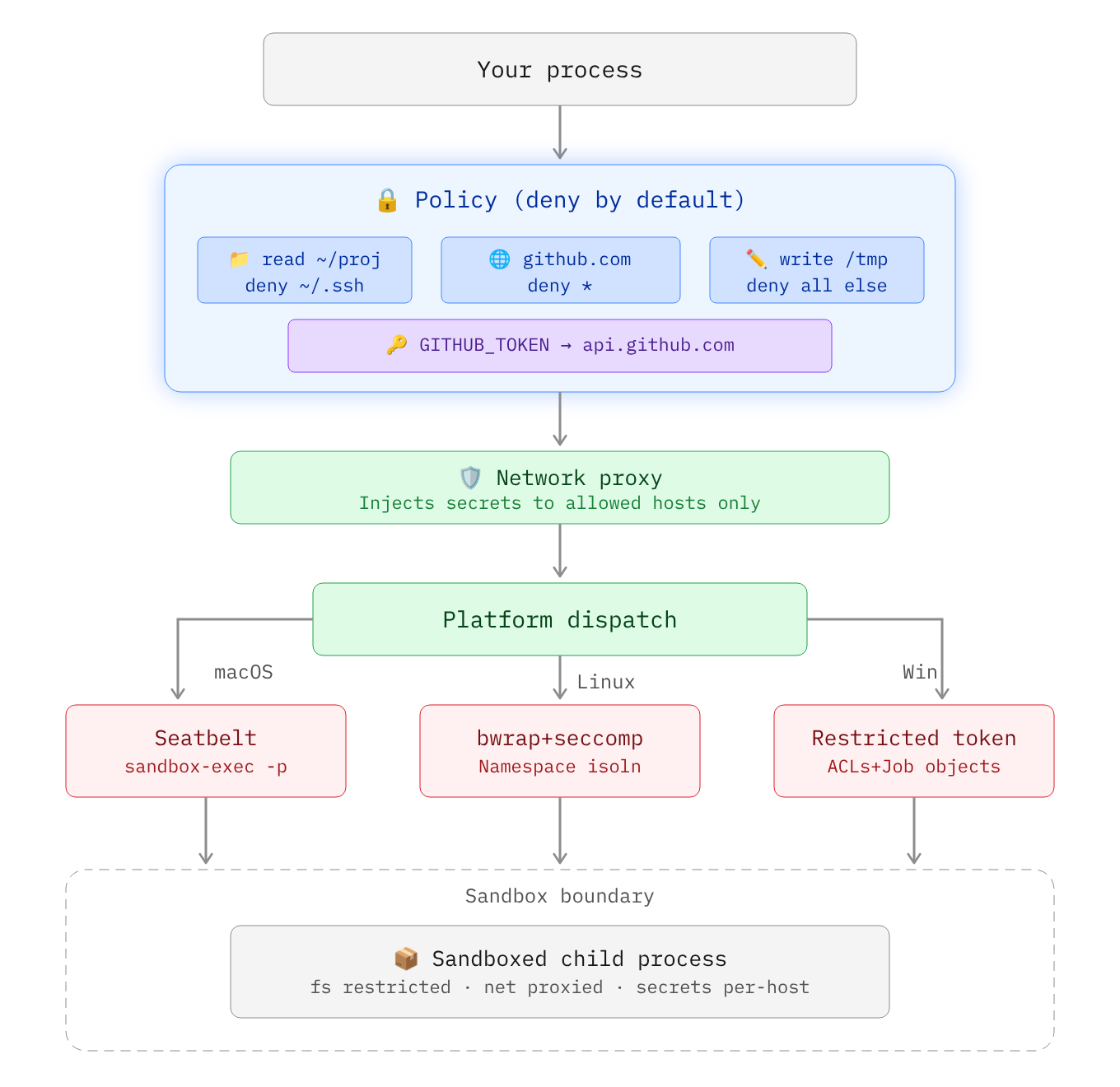
Architecture
Secrets
Secrets are API keys, tokens, or credentials that should never be visible inside the sandbox. The sandboxed process sees a placeholder in the environment variable and the real value is substituted at the network proxy level only for requested hosts.
sandbox process: echo $OPENAI_API_KEY
  -> ZEROBOX_SECRET_a1b2c3d4e5...  (placeholder)

sandbox process: curl -H "Authorization: Bearer $OPENAI_API_KEY" https://api.openai.com/...
  -> proxy intercepts, replaces placeholder with real key
  -> server receives: Authorization: Bearer sk-proj-123
Pass a secret with --secret and restrict it to a specific domain with --secret-host:
zerobox --secret OPENAI_API_KEY=sk-proj-123 --secret-host OPENAI_API_KEY=api.openai.com -- node app.js
Without --secret-host, the secret is passed to all domains:
zerobox --secret TOKEN=abc123 -- node app.js
Multiple secrets with different hosts:
zerobox \
  --secret OPENAI_API_KEY=sk-proj-123 --secret-host OPENAI_API_KEY=api.openai.com \
  --secret GITHUB_TOKEN=ghp-456 --secret-host GITHUB_TOKEN=api.github.com \
  -- node app.js
Node.js
fetchdoes not respectHTTPS_PROXYby default. When running Node.js inside a sandbox with secrets, make sure to pass the--use-env-proxyargument.
For SDK code examples, see the Rust, TypeScript, or Python README.
Environment variables
By default only essential variables are passed to the sandbox, e.g. PATH, HOME, USER, SHELL, TERM, LANG.
Inherit all parent env vars:
zerobox --allow-env -- node app.js
Inherit specific env vars only:
zerobox --allow-env=PATH,HOME,DATABASE_URL -- node app.js
Block specific env vars:
zerobox --allow-env --deny-env=AWS_SECRET_ACCESS_KEY -- node app.js
Or set explicit variables:
zerobox --env NODE_ENV=production --env DEBUG=false -- node app.js
Examples
Run AI-generated code safely
Run AI-generated code without risking file corruption or data leaks:
zerobox -- python3 /tmp/task.py
Or allow writes only to an output directory:
zerobox --allow-write=/tmp/output -- python3 /tmp/task.py
Restrict LLM tool calls
Each AI tool call can be sandboxed individually. The parent agent process runs normally and only some operations are sandboxed. Full working examples:
examples/ai-agent-sandboxedwraps the entire agent process with secrets so the API key is never visibleexamples/ai-agentuses the Vercel AI SDK with per-tool sandboxing and secretsexamples/workflowruns Vercel Workflow with sandboxed durable steps
Protect your repo during builds
Run a build with network access but writes confined to ./dist:
zerobox --allow-write=./dist --allow-net -- npm run build
Run tests with no network and catch accidental external calls:
zerobox --allow-write=/tmp -- npm test
Performance
Sandbox overhead is minimal, typically ~10ms and ~7MB:
| Command | Bare | Sandboxed | Overhead | Bare Mem | Sandbox Mem |
|---|---|---|---|---|---|
echo hello | <1ms | 10ms | +10ms | 1.2 MB | 8.4 MB |
node -e '...' | 10ms | 20ms | +10ms | 39.3 MB | 39.1 MB |
python3 -c '...' | 10ms | 20ms | +10ms | 12.9 MB | 13.0 MB |
cat 10MB file | <1ms | 10ms | +10ms | 1.9 MB | 8.4 MB |
curl https://... | 50ms | 60ms | +10ms | 7.2 MB | 8.4 MB |
Best of 10 runs with warmup on Apple M5 Pro. Run ./bench/run.sh to reproduce.
Platform support
| Platform | Backend | Status |
|---|---|---|
| macOS | Seatbelt (sandbox-exec) | Fully supported |
| Linux | Bubblewrap + Seccomp + Namespaces | Fully supported |
| Windows | Restricted Tokens + ACLs + Firewall | Planned |
CLI reference
| Flag | Example | Description |
|---|---|---|
--allow-read <paths> | --allow-read=/tmp,/data | Restrict readable user data to listed paths. System libraries remain accessible. Default: all reads allowed. |
--deny-read <paths> | --deny-read=/secret | Block reading from these paths. Takes precedence over --allow-read. |
--allow-write [paths] | --allow-write=. | Allow writing to these paths. Without a value, allows writing everywhere. Default: no writes. |
--deny-write <paths> | --deny-write=./.git | Block writing to these paths. Takes precedence over --allow-write. |
--allow-net [domains] | --allow-net=example.com | Allow outbound network. Without a value, allows all domains. Default: no network. |
--deny-net <domains> | --deny-net=evil.com | Block network to these domains. Takes precedence over --allow-net. |
--env <KEY=VALUE> | --env NODE_ENV=prod | Set env var in the sandbox. Can be repeated. |
--allow-env [keys] | --allow-env=PATH,HOME | Inherit parent env vars. Without a value, inherits all. Default: only PATH, HOME, USER, SHELL, TERM, LANG. |
--deny-env <keys> | --deny-env=SECRET | Drop these parent env vars. Takes precedence over --allow-env. |
--secret <KEY=VALUE> | --secret API_KEY=sk-123 | Pass a secret. The process sees a placeholder. The real value is injected at the proxy for approved hosts. |
--secret-host <KEY=HOSTS> | --secret-host API_KEY=api.openai.com | Restrict a secret to specific hosts. Without this, the secret is substituted for all hosts. |
-A, --allow-all | -A | Grant all filesystem and network permissions. Env and secrets still apply. |
--no-sandbox | --no-sandbox | Disable the sandbox entirely. |
--strict-sandbox | --strict-sandbox | Require full sandbox (bubblewrap). Fail instead of falling back to weaker isolation. |
--debug | --debug | Print sandbox config and proxy decisions to stderr. |
--snapshot | --snapshot | Record filesystem changes during execution. |
--restore | --restore | Record and restore tracked files to pre-execution state after exit. Implies --snapshot. |
--snapshot-path <paths> | --snapshot-path=./src | Paths to track for snapshots (default: cwd). |
--snapshot-exclude <patterns> | --snapshot-exclude=build | Exclude patterns from snapshots. |
-C <dir> | -C /workspace | Set working directory for the sandboxed command. |
-V, --version | --version | Print version. |
-h, --help | --help | Print help. |
Snapshot subcommands
| Command | Description |
|---|---|
zerobox snapshot list | List recorded sessions. |
zerobox snapshot diff <id> | Show changes from a session. |
zerobox snapshot restore <id> | Restore filesystem to a session's baseline. |
zerobox snapshot clean --older-than=<days> | Remove old snapshot sessions. |
SDKs
| Language | Package | README |
|---|---|---|
| Rust | zerobox on crates.io | crates/zerobox/README.md |
| TypeScript / Node | zerobox on npm | packages/zerobox/README.md |
| Python | zerobox on PyPI | sdks/python/README.md |
License
Apache-2.0