AlbumentationsX
August 14, 2026 · View on GitHub



📣 Stay updated! Subscribe to our newsletter for the latest releases, tutorials, and tips.







AlbumentationsX is a Python library for image augmentation. It provides high-performance, robust implementations and cutting-edge features for computer vision tasks. Image augmentation is used in deep learning and computer vision to increase the quality of trained models. The purpose of image augmentation is to create new training samples from the existing data.
Citing
If AlbumentationsX supports your research, please cite AlbumentationsX: One Augmentation Pipeline for Images and Related Annotations. Your citation makes the project's research impact visible to funders and helps sustain maintenance.
@article{iglovikov2026albumentationsx,
    title = {AlbumentationsX: One Augmentation Pipeline for Images and Related Annotations},
    author = {Iglovikov, Vladimir},
    journal = {arXiv preprint arXiv:2608.11123},
    year = {2026},
    doi = {10.48550/arXiv.2608.11123},
    url = {https://arxiv.org/abs/2608.11123}
}
📢 Licensing: commercial use is allowed
AlbumentationsX can be used in commercial projects under the AGPL. The current public repository is available under AGPL-3.0-only, an open-source license. The AGPL permits commercial use subject to its terms.
Albumentations, LLC also offers separately negotiated commercial licenses with alternative, scope-specific permissions for the versions and uses covered by an executed agreement. A commercial license is an option when a team needs terms different from the AGPL. It is not automatically required because a project is commercial, proprietary, in production, or internal.
Which terms fit depends on the deployment facts, including modification, combination, copying or conveyance, and network interaction. Support, warranties, maintenance, and service levels are included only when an executed agreement or order form expressly says so. See the AGPL text, licensing details and history, and third-party notices.
Quick Start
# Install the PyTorch build for your platform first. For Linux CPU-only:
pip install "torch>=2.13.0" --index-url https://download.pytorch.org/whl/cpu

# Then install AlbumentationsX with OpenCV.
pip install "albumentationsx[headless]"
import albumentations as A

# Create your augmentation pipeline
transform = A.Compose([
    A.RandomCrop(width=256, height=256),
    A.HorizontalFlip(p=0.5),
    A.RandomBrightnessContrast(p=0.2),
])
For commercial licensing inquiries, please visit our pricing page.
Here is an example of how you can apply some pixel-level augmentations to create new images from the original one:

Why AlbumentationsX
- Complete Computer Vision Support: Works with all major CV tasks
- Simple, Unified API: One consistent interface for all data types - RGB/grayscale/multispectral images, masks, bounding boxes, and keypoints.
- Rich Augmentation Library: 70+ high-quality augmentations to enhance your training data.
- Fast: Consistently benchmarked as the fastest augmentation library also shown below section, with optimizations for production use.
- Deep Learning Integration: Works with PyTorch, TensorFlow, and other frameworks. Part of the PyTorch ecosystem.
- Created by Experts: Built by developers with deep experience in computer vision and machine learning competitions.
Table of contents
- AlbumentationsX
Authors
Current Maintainer
Vladimir I. Iglovikov | Kaggle Grandmaster
Emeritus Core Team Members
Mikhail Druzhinin | Kaggle Expert
Alexander Buslaev | Kaggle Master
Eugene Khvedchenya | Kaggle Grandmaster
Installation
AlbumentationsX requires Python 3.10 or higher. To install the latest version from PyPI:
Basic Installation
Install the PyTorch build for your CPU, CUDA, or MPS environment before installing AlbumentationsX. For a Linux CPU-only environment:
pip install "torch>=2.13.0" --index-url https://download.pytorch.org/whl/cpu
For CUDA or macOS (MPS), use the matching command from the PyTorch installation selector. AlbumentationsX does not choose or install a PyTorch accelerator build.
If you already have OpenCV installed (any variant), install AlbumentationsX:
pip install -U albumentationsx
Installation with OpenCV
If you don't have OpenCV installed yet, choose the appropriate variant:
# For servers/Docker (no GUI support, lighter package)
pip install -U "albumentationsx[headless]"

# For local development with GUI support (cv2.imshow, etc.)
pip install opencv-python && pip install -U albumentationsx

# For OpenCV with extra algorithms (contrib modules)
pip install opencv-contrib-python && pip install -U albumentationsx

# For contrib + headless
pip install -U "albumentationsx[contrib-headless]"
Note: AlbumentationsX works with any OpenCV variant:
opencv-python(full version with GUI)opencv-python-headless(no GUI, smaller size)opencv-contrib-python(with extra modules)opencv-contrib-python-headless(contrib + headless)
Choose the one that fits your needs. The library will detect whichever is installed.
pip install albumentationsx installs the base dependency set without PyTorch. It is useful for dependency-only
consumers such as documentation builds. Importing albumentations requires the PyTorch build you selected above.
Other installation options are described in the documentation.
Documentation
The full documentation is available at https://albumentations.ai/docs/.
For AI-assisted augmentation review, AlbumentationsX can also be used through MCP-capable hosts such as Claude Desktop, Cursor, Claude Code, and Codex. The community AlbumentationsX MCP integration lets assistants inspect transforms, validate pipelines, render bounded local preview batches, compare preview runs, collect concrete feedback, and export reproducible AlbumentationsX pipelines.
A simple example
import albumentations as A
import cv2

# Declare an augmentation pipeline
transform = A.Compose([
    A.RandomCrop(width=256, height=256),
    A.HorizontalFlip(p=0.5),
    A.RandomBrightnessContrast(p=0.2),
])

# Read an image with OpenCV and convert it to the RGB colorspace
image = cv2.imread("image.jpg")
image = cv2.cvtColor(image, cv2.COLOR_BGR2RGB)

# Augment an image
transformed = transform(image=image)
transformed_image = transformed["image"]
AlbumentationsX collects anonymous usage statistics to improve the library. This can be disabled with ALBUMENTATIONS_OFFLINE=1 or ALBUMENTATIONS_NO_TELEMETRY=1.
List of augmentations
Pixel-level transforms
Pixel-level transforms will change just an input image and will leave any additional targets such as masks, bounding boxes, and keypoints unchanged. For volumetric data (a volume and 3D masks), these transforms are applied independently to each slice along the Z-axis (depth dimension), maintaining consistency across the volume. The list of pixel-level transforms:
- AdditiveNoise
- AdvancedBlur
- AnnotationArtifacts
- AtmosphericFog
- AutoContrast
- Blur
- CLAHE
- ChannelDropout
- ChannelShuffle
- ChannelSwap
- ChromaticAberration
- ColorJitter
- Colorize
- Defocus
- Dithering
- Downscale
- Emboss
- Enhance
- Equalize
- ExposureMatching
- FDA
- FancyPCA
- FilmGrain
- FromFloat
- GaussNoise
- GaussianBlur
- GlassBlur
- HEStain
- Halftone
- HistogramMatching
- HueSaturationValue
- ISONoise
- Illumination
- ImageCompression
- InvertImg
- LensFlare
- MedianBlur
- ModeFilter
- MotionBlur
- MultiplicativeNoise
- Normalize
- PhotoMetricDistort
- PixelDistributionAdaptation
- PlanckianJitter
- PlasmaBrightnessContrast
- PlasmaShadow
- Posterize
- RGBShift
- RandomBrightnessContrast
- RandomFog
- RandomGamma
- RandomGravel
- RandomRain
- RandomShadow
- RandomSnow
- RandomSunFlare
- RandomToneCurve
- RingingOvershoot
- SaltAndPepper
- Sharpen
- ShotNoise
- Solarize
- Spatter
- Superpixels
- TextImage
- ToFloat
- ToGray
- ToRGB
- ToSepia
- UnsharpMask
- Vignetting
- ZoomBlur
Spatial-level transforms
Spatial-level transforms will simultaneously change both an input image as well as additional targets such as masks, bounding boxes, and keypoints. For volumetric data (a volume and 3D masks), these transforms are applied independently to each slice along the Z-axis (depth dimension), maintaining consistency across the volume. The following table shows which additional targets are supported by each transform:
- Volume: 3D array of shape (D, H, W) or (D, H, W, C) where D is depth, H is height, W is width, and C is number of channels (optional)
- Mask3D: Binary or multi-class 3D mask of shape (D, H, W) where each slice represents segmentation for the corresponding volume slice
3D transforms
3D transforms operate on volumetric data. Spatial transforms can also modify associated 3D masks and keypoints, while volume-intensity transforms leave those targets unchanged.
Where:
- Volume: 3D array of shape (D, H, W) or (D, H, W, C) where D is depth, H is height, W is width, and C is number of channels (optional)
- Mask3D: Binary or multi-class 3D mask of shape (D, H, W) where each slice represents segmentation for the corresponding volume slice
| Transform | Volume | Mask3D | Keypoints |
|---|---|---|---|
| Affine3D | ✓ | ✓ | ✓ |
| Anisotropy3D | ✓ | ||
| CenterCrop3D | ✓ | ✓ | ✓ |
| CoarseDropout3D | ✓ | ✓ | ✓ |
| CubicSymmetry | ✓ | ✓ | ✓ |
| Flip3D | ✓ | ✓ | ✓ |
| GridShuffle3D | ✓ | ✓ | ✓ |
| Pad3D | ✓ | ✓ | ✓ |
| PadIfNeeded3D | ✓ | ✓ | ✓ |
| RandomCrop3D | ✓ | ✓ | ✓ |
| RandomRotate90_3D | ✓ | ✓ | ✓ |
| Resize3D | ✓ | ✓ | ✓ |
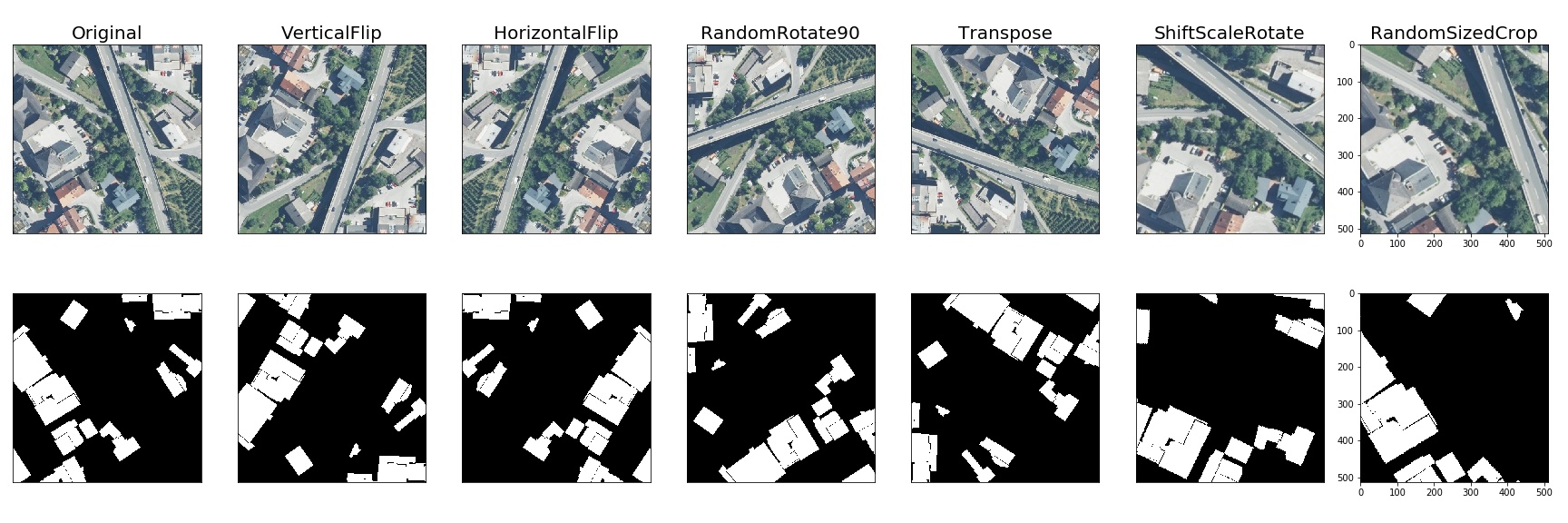
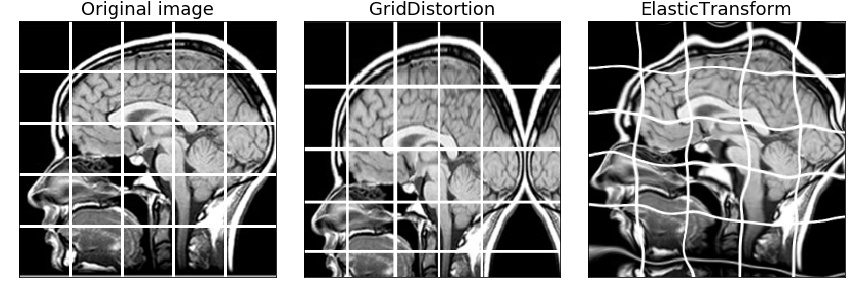
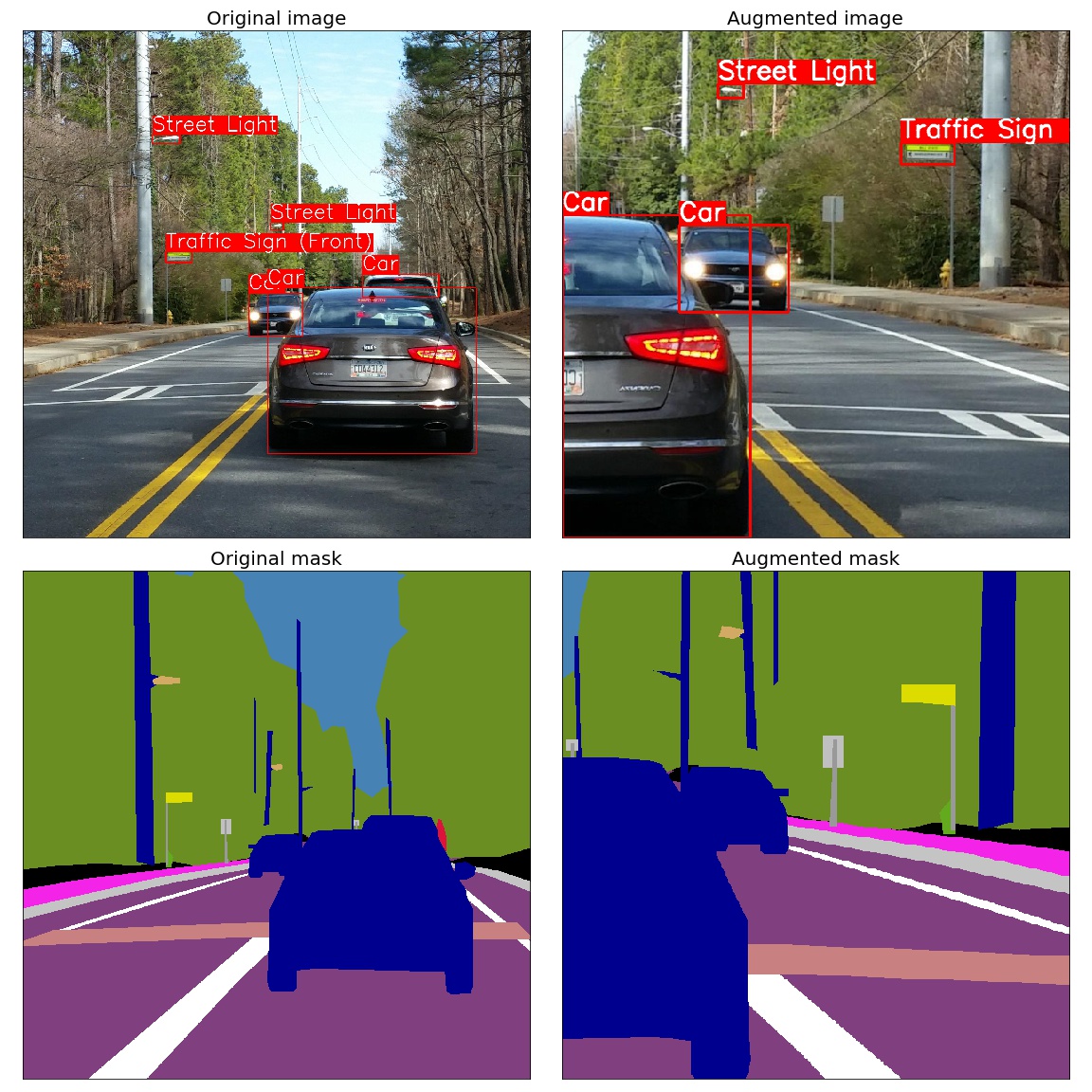
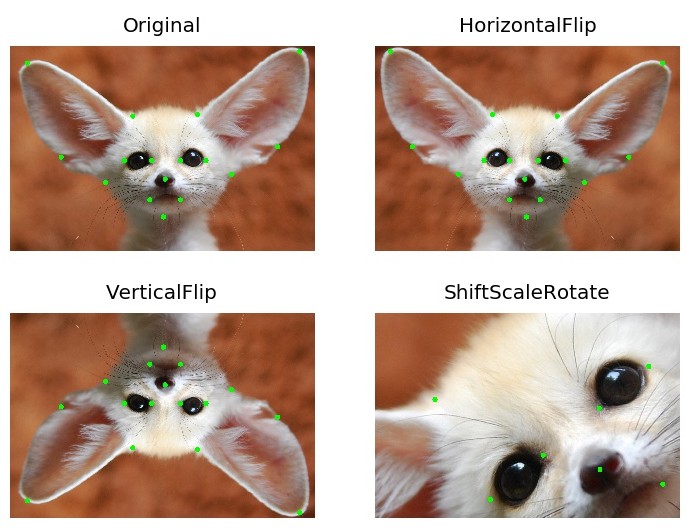
A few more examples of augmentations
Semantic segmentation on the Inria dataset
Medical imaging
Object detection and semantic segmentation on the Mapillary Vistas dataset
Keypoints augmentation
Benchmark Results
Image Benchmark Results
System Information
- Platform: macOS-15.1-arm64-arm-64bit
- Processor: arm
- CPU Count: 16
- Python Version: 3.12.8
Benchmark Parameters
- Number of images: 2000
- Runs per transform: 5
- Max warmup iterations: 1000
Library Versions
- albumentationsx: 2.0.8
- augly: 1.0.0
- imgaug: 0.4.0
- kornia: 0.8.0
- torchvision: 0.20.1
Performance Comparison
Number shows how many uint8 images per second can be processed on one CPU thread. Larger is better. The Speedup column shows how many times faster AlbumentationsX is compared to the fastest other library for each transform.
| Transform | albumentationsx 2.0.8 | augly 1.0.0 | imgaug 0.4.0 | kornia 0.8.0 | torchvision 0.20.1 | Speedup (AlbX/fastest other) |
|---|---|---|---|---|---|---|
| Affine | 1445 ± 9 | - | 1328 ± 16 | 248 ± 6 | 188 ± 2 | 1.09x |
| AutoContrast | 1657 ± 13 | - | - | 541 ± 8 | 344 ± 1 | 3.06x |
| Blur | 7657 ± 114 | 386 ± 4 | 5381 ± 125 | 265 ± 11 | - | 1.42x |
| Brightness | 11985 ± 455 | 2108 ± 32 | 1076 ± 32 | 1127 ± 27 | 854 ± 13 | 5.68x |
| CLAHE | 647 ± 4 | - | 555 ± 14 | 165 ± 3 | - | 1.17x |
| CenterCrop128 | 119293 ± 2164 | - | - | - | - | N/A |
| ChannelDropout | 11534 ± 306 | - | - | 2283 ± 24 | - | 5.05x |
| ChannelShuffle | 6772 ± 109 | - | 1252 ± 26 | 1328 ± 44 | 4417 ± 234 | 1.53x |
| CoarseDropout | 18962 ± 1346 | - | 1190 ± 22 | - | - | 15.93x |
| ColorJitter | 1020 ± 91 | 418 ± 5 | - | 104 ± 4 | 87 ± 1 | 2.44x |
| Contrast | 12394 ± 363 | 1379 ± 25 | 717 ± 5 | 1109 ± 41 | 602 ± 13 | 8.99x |
| CornerIllumination | 484 ± 7 | - | - | 452 ± 3 | - | 1.07x |
| Elastic | 374 ± 2 | - | 395 ± 14 | 1 ± 0 | 3 ± 0 | 0.95x |
| Equalize | 1236 ± 21 | - | 814 ± 11 | 306 ± 1 | 795 ± 3 | 1.52x |
| Erasing | 27451 ± 2794 | - | - | 1210 ± 27 | 3577 ± 49 | 7.67x |
| GaussianBlur | 2350 ± 118 | 387 ± 4 | 1460 ± 23 | 254 ± 5 | 127 ± 4 | 1.61x |
| GaussianIllumination | 720 ± 7 | - | - | 436 ± 13 | - | 1.65x |
| GaussianNoise | 315 ± 4 | - | 263 ± 9 | 125 ± 1 | - | 1.20x |
| Grayscale | 32284 ± 1130 | 6088 ± 107 | 3100 ± 24 | 1201 ± 52 | 2600 ± 23 | 5.30x |
| HSV | 1197 ± 23 | - | - | - | - | N/A |
| HorizontalFlip | 14460 ± 368 | 8808 ± 1012 | 9599 ± 495 | 1297 ± 13 | 2486 ± 107 | 1.51x |
| Hue | 1944 ± 64 | - | - | 150 ± 1 | - | 12.98x |
| Invert | 27665 ± 3803 | - | 3682 ± 79 | 2881 ± 43 | 4244 ± 30 | 6.52x |
| JpegCompression | 1321 ± 33 | 1202 ± 19 | 687 ± 26 | 120 ± 1 | 889 ± 7 | 1.10x |
| LinearIllumination | 479 ± 5 | - | - | 708 ± 6 | - | 0.68x |
| MedianBlur | 1229 ± 9 | - | 1152 ± 14 | 6 ± 0 | - | 1.07x |
| MotionBlur | 3521 ± 25 | - | 928 ± 37 | 159 ± 1 | - | 3.79x |
| Normalize | 1819 ± 49 | - | - | 1251 ± 14 | 1018 ± 7 | 1.45x |
| OpticalDistortion | 661 ± 7 | - | - | 174 ± 0 | - | 3.80x |
| Pad | 48589 ± 2059 | - | - | - | 4889 ± 183 | 9.94x |
| Perspective | 1206 ± 3 | - | 908 ± 8 | 154 ± 3 | 147 ± 5 | 1.33x |
| PlankianJitter | 3221 ± 63 | - | - | 2150 ± 52 | - | 1.50x |
| PlasmaBrightness | 168 ± 2 | - | - | 85 ± 1 | - | 1.98x |
| PlasmaContrast | 145 ± 3 | - | - | 84 ± 0 | - | 1.71x |
| PlasmaShadow | 183 ± 5 | - | - | 216 ± 5 | - | 0.85x |
| Posterize | 12979 ± 1121 | - | 3111 ± 95 | 836 ± 30 | 4247 ± 26 | 3.06x |
| RGBShift | 3391 ± 104 | - | - | 896 ± 9 | - | 3.79x |
| Rain | 2043 ± 115 | - | - | 1493 ± 9 | - | 1.37x |
| RandomCrop128 | 111859 ± 1374 | 45395 ± 934 | 21408 ± 622 | 2946 ± 42 | 31450 ± 249 | 2.46x |
| RandomGamma | 12444 ± 753 | - | 3504 ± 72 | 230 ± 3 | - | 3.55x |
| RandomResizedCrop | 4347 ± 37 | - | - | 661 ± 16 | 837 ± 37 | 5.19x |
| Resize | 3532 ± 67 | 1083 ± 21 | 2995 ± 70 | 645 ± 13 | 260 ± 9 | 1.18x |
| Rotate | 2912 ± 68 | 1739 ± 105 | 2574 ± 10 | 256 ± 2 | 258 ± 4 | 1.13x |
| SaltAndPepper | 629 ± 6 | - | - | 480 ± 12 | - | 1.31x |
| Saturation | 1596 ± 24 | - | 495 ± 3 | 155 ± 2 | - | 3.22x |
| Sharpen | 2346 ± 10 | - | 1101 ± 30 | 201 ± 2 | 220 ± 3 | 2.13x |
| Shear | 1299 ± 11 | - | 1244 ± 14 | 261 ± 1 | - | 1.04x |
| Snow | 611 ± 9 | - | - | 143 ± 1 | - | 4.28x |
| Solarize | 11756 ± 481 | - | 3843 ± 80 | 263 ± 6 | 1032 ± 14 | 3.06x |
| ThinPlateSpline | 82 ± 1 | - | - | 58 ± 0 | - | 1.41x |
| VerticalFlip | 32386 ± 936 | 16830 ± 1653 | 19935 ± 1708 | 2872 ± 37 | 4696 ± 161 | 1.62x |
🤝 Contribute
We thrive on community collaboration! AlbumentationsX wouldn't be the powerful augmentation library it is without contributions from developers like you. Please see our Contributing Guide to get started. A huge Thank You 🙏 to everyone who contributes!
We look forward to your contributions to help make the AlbumentationsX ecosystem even better!
📜 License
The current public repository is licensed under AGPL-3.0-only. Earlier AlbumentationsX releases retain the license terms recorded in the licensing details and history. The AGPL permits commercial use subject to its terms.
For alternative, scope-specific terms from Albumentations, LLC, visit the pricing page. The AGPL text, licensing details, and third-party notices contain the complete repository-level details.
📞 Contact
For bug reports and feature requests related to AlbumentationsX, please visit GitHub Issues. For questions, discussions, and community support, join our active communities on Discord, Twitter, LinkedIn, and Reddit. We're here to help with all things AlbumentationsX!
📫 Stay Connected
Never miss updates, tutorials, and tips from the AlbumentationsX team! Subscribe to our newsletter.