OpenSSL binaries for AWS Lambda
November 6, 2024 · View on GitHub
A layer
for AWS Lambda that allows your functions to use openssl binaries.
This repository contains the code needed to create an AWS Lambda Layer that adds the OpenSSL binary and related files to a Lambda container.
This is useful because Lambda Runtimes based on Amazon Linux 2 and newer do not include this binary.
How to build
To build the zip, just run
cd src
./build.sh
Then, log in to AWS Console, navigate to Lambda, and find the Layers subsection in the sidebar.
There you can create a new layer, fill in the required details, and upload the zip you just created. After finishing this process, the new layer is available to be used in you lambda functions!
Using a Lambda Layer
You can add this layer to any Lambda function you want.
PATH already includes /opt/bin in Lambda, which is where it will be mounted.
In some Runtimes, you may still need to alter the LD_LIBRARY_PATH environment
variable, prepending /opt/lib64 to override the .so files already present in
the image.
In AWS Lambda console, find your function, then scroll down to Layers and choose "Add a layer", then select your layer.
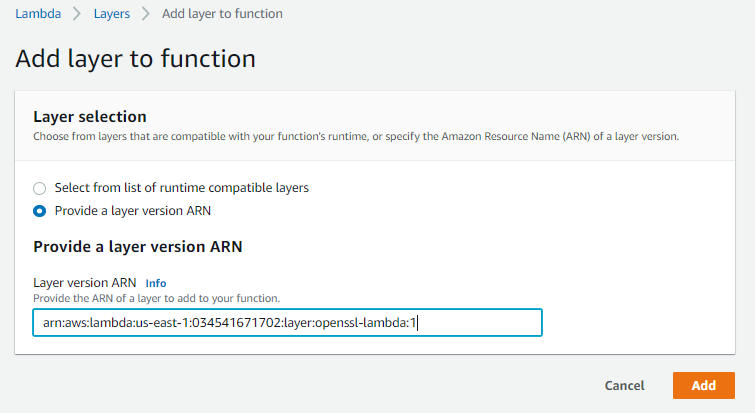
Then click Add, save your lambda and test it out!

Simple example on Node.js
const { execSync } = require('child_process')

exports.handler = async(event) => {
  execSync(' openssl genrsa -out testCert.key 2048', { encoding: 'utf8', stdio: 'inherit' })
}
Simple example on Python
import os
import subprocess

def handler(event, context):
    subprocess.run("openssl genrsa 2048", env={'PATH': os.environ['PATH']})