Plugins
July 1, 2022 · View on GitHub
panel
Install
npm install butterfly-dag
Usage
Resigter
import panelPlugins from 'butterfly-dag/plugins/panel/dist';
import 'butterfly-dag/plugins/panel/dist/index.css';

import pika from '../img/pikatest.jpg';

panelPlugins.register(
  [
    {
      root: document.getElementById('dnd'),
      canvas: this.canvas,
      type: 'uml',
      width: 40,
      height: 40,
      data: [
        {
          id: 'user-1',
          type: 'png',
          content: pika,
          with: 40,
          height: 40,
        },
        {
          id: 'user-baidu-1',
          type: 'png',
          content: 'https://www.baidu.com/img/PCtm_d9c8750bed0b3c7d089fa7d55720d6cf.png',
          with: 100,
          height: 40,
        }
      ]
    },
  ],() => {
    console.log('finish')
  }
);
Iitialization
import panelPlugins from 'butterfly-dag/plugins/panel/dist';
import {Canvas} from 'butterfly-dag';

import 'butterfly-dag/plugins/panel/dist/index.css';

import pika from '../img/pikatest.jpg';

let PanelNode = panelPlugins.PanelNode;

let root = document.getElementById('dag-canvas');

this.canvas = new BaseCanvas({
  root: root,
  disLinkable: true, // enable disConnect edge
  linkable: true,    // enable connect edges
  draggable: true,   // enable drag nodes
  zoomable: true,    // enable zoom canvas
  moveable: true,    // enable move canvas
});

panelPlugins.register(
  [
    {
      root: document.getElementById('dnd'),
      canvas: this.canvas,
      type: 'uml',
      width: 40,
      height: 40,
      data: [
        {
          id: 'user-1',
          type: 'png',
          content: pika,
          with: 40,
          height: 40,
        },
        {
          id: 'user-baidu-1',
          type: 'png',
          content: 'https://www.baidu.com/img/PCtm_d9c8750bed0b3c7d089fa7d55720d6cf.png',
          with: 100,
          height: 40,
        }
      ]
    },
  ],() => {
    console.log('finish')
  }
);

this.canvas.draw(
  {
    nodes: [{
      id: '1',
      top: 10,
      left: 100,
      width: 40,
      height: 40,
      rotate: 45,
      content: 'System-Uml-ClassDiagram-1',
      Class: PanelNode,
    },{
      id: '2',
      top: 10,
      left: 20,
      width: 40,
      height: 40,
      rotate: 30,
      content: 'user-baidu-1',
      Class: PanelNode,
    }]
  },
  () => {
    console.log(this.canvas.getDataMap());
});
// Use System UML picture (System 'UML' picture 'ID')

this.canvas.draw(
  {
    nodes: [{
      id: '1',
      top: 10,
      left: 20,
      content: 'System-Uml-ClassDiagram-1',
      Class: PanelNode,
    }]
  }
);

// Method 1 (recommended): use custom
// The initialization here can use the previously registered ID as the content

panelPlugins.register(
  [
    {
      root: document.getElementById('dnd'),
      canvas: this.canvas,
      type: 'uml',
      width: 40,
      height: 40,
      data: [
        {
          id: 'user-1',
          type: 'png',
          content: pika,
          with: 40,
          height: 40,
        }
      ]
    },
  ],() => {
    console.log('finish')
  }
);

this.canvas.draw(
  {
    nodes: [{
      id: '1',
      top: 10,
      left: 20,
      content: 'user-1',
      Class: PanelNode,
    }]
  }
);

// Method 2: use custom

this.canvas.draw(
  {
    nodes: [{
      id: '1',
      top: 10,
      left: 20,
      content: 'https://www.baidu.com/img/PCtm_d9c8750bed0b3c7d089fa7d55720d6cf.png',
      Class: PanelNode,
    }]
  }
);

// Method 3: use custom

import pika from '../img/pikatest.jpg';

this.canvas.draw(
  {
    nodes: [{
      id: '1',
      top: 10,
      left: 20,
      content: pika,
      Class: PanelNode,
    }]
  }
);
System Module
System UML Module

the file name is id:such as: System-Uml-ClassDiagram-1
System General Module
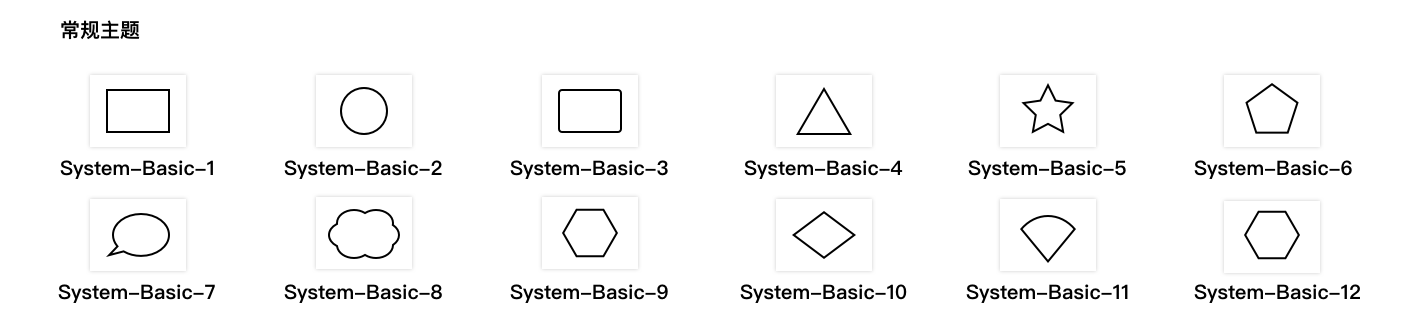
the file name is id:such as: System-Basic-1
Attribute
root <dom> (Require)
the container for pannel rendering dom
canvas <Object> (Require)
the canvas instance of butterfly-dag
type <String> (Optional)
System 'panel' library type: uml or basic
width <Number> (Optional)
render the width of the element in the root container. Default value 36
height <Number> (Optional)
render the height of the element in the root container. Default value 36
data <Array> (Optional)
custom panel, it will append to the bottom of root; configuration :
-
id
<String>(Require) unique id used to add to the canvas and uesd to id prefix; (note: do not duplicate with the system itself) -
content
<String>(Require) the content ofPanelNode(<img src="content" />or System picture ofID) -
type
<String>(Optional) content type, types used to mark images -
width
<Number>(Optional) render the width of the element in the root container. Default value36 -
height
<Number>(Optional) render the height of the element in the root container. Default value36
API
panelPlugins.register(data, callback)
descripition:register panel to root
params
{Array} data里面包含panel数据{function} calllback(可选) 注册完毕后的回调
// Use System uml theme
panelPlugins.register(
  [
    {
      root: document.getElementById('dnd'),
      canvas: this.canvas,
      type: 'uml',
    }
  ],()=>{
    console.log('finish');
  }
);

// Custom
panelPlugins.register(
  [
    {
      root: document.getElementById('dnd'),
      canvas: this.canvas,
      type: 'uml',
      data: [
        {
          id: 'user-1',
          type: 'png',
          content: pika,
          with: 40,
          height: 40,
        }
      ]
    }
  ]
);

// combination
panelPlugins.register(
  [
    {
      root: document.getElementById('dnd'),
      canvas: this.canvas,
      type: 'uml',
    },
    {
      root: document.getElementById('dnd1'),
      canvas: this.canvas,
      type: 'custom',
      data: [
        {
          id: 'user-1',
          type: 'png',
          content: pika,
          with: 40,
          height: 40,
        }
      ]
    }
  ]
);
PanelNode
- Extend
Nodefrombutterfly-dag
attribute
actived <Boolean>
controls whether the state is activated (activates the control point displaying the node)
rotatorDeg <Number>
rotation angle of current node
API
panelNode.focus ()
descripition: node becomes selected
panelNode.focus();
panelNode.unFocus ()
descripition: Node becomes unselected
panelNode.unFocus();
panelNode.rotate (angle)
descripition: rotate the node
params
angle<Number>set the rotation angle of the node (clockwise)
panelNode.rotate(45);