Echoes
July 28, 2026 · View on GitHub
Echoes is an adaptive care companion for people who need calm, familiar support through the day. A caregiver uploads a care plan PDF, the system turns it into a personalized experience, and the patient sees a simple, reassuring interface that changes with their needs.
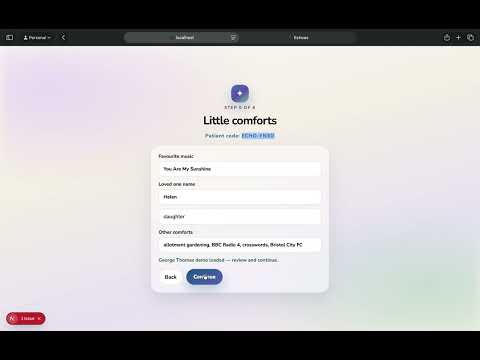
Click to watch Echoes in action.
It combines:
- CopilotKit + AG-UI for live agent-to-UI streaming
- A2UI for declarative generative UI cards
- FastAPI for the Python agents
- Next.js for the app shell
- Linkup for research and music discovery
- ElevenLabs for calming voice output
- Google Gemini 3.5 Flash as the frozen model behind the agents
Tags
generative-ui a2ui copilotkit ag-ui nextjs fastapi langgraph gemini elevenlabs linkup accessibility healthtech hackathon
Description
This project is built for a London hackathon demo, but the idea is practical: one uploaded care plan becomes a tailored patient screen, a family monitoring view, and a caregiver research assistant.
The core flow is:
- Caregiver uploads a PDF care plan on
/setup - The setup agent extracts a structured patient profile
- The patient page renders one A2UI card at a time on
/patient - Panic mode switches the interface into a calming flow with voice and music
- The family page shows activity history and live status on
/family - The research page provides cited guidance on
/research
Screenshots
Landing screen

Patient experience

|

|
Family monitoring

|

|

|

|
Features
- Care plan PDF upload and profile extraction
- Personalized patient onboarding and adaptive home screen
- One-card-at-a-time A2UI rendering for better cognitive accessibility
- Memory prompts, daily tasks, and medication reminders
- Panic mode with calming language and voice playback
- Music discovery for reassurance and grounding
- Research assistant with cited guidance
- Family dashboard with activity log and live status
Tech Stack
- Frontend: Next.js 15, React 19, TypeScript
- Backend: FastAPI, Python, LangGraph
- Agent transport: CopilotKit v2, AG-UI
- UI system: A2UI
- AI services: Google Gemini 3.5 Flash, Linkup, ElevenLabs
- Utilities: pdfjs-dist, Redis support, Zod
Project Structure
src/
├── app/
│   ├── setup/page.tsx
│   ├── patient/page.tsx
│   ├── family/page.tsx
│   └── research/page.tsx
├── a2ui/
│   ├── theme.css
│   └── catalog/
├── components/
└── lib/

agent/
├── main.py
└── src/
    ├── patient_agent.py
    ├── research_agent.py
    ├── setup_agent.py
    └── catalog.py
Getting Started
pnpm install
cp .env.example .env.local
pnpm doctor
pnpm dev
For local development without external model calls:
OFFLINE=1 pnpm dev
Environment Variables
Create a .env.local file with the keys you need:
GEMINI_API_KEY=your_key_here
LINKUP_API_KEY=your_key_here
ELEVENLABS_API_KEY=your_key_here

PATIENT_AGENT_URL=http://localhost:8123/patient
RESEARCH_AGENT_URL=http://localhost:8123/research
SETUP_AGENT_URL=http://localhost:8123/setup
Commands
| Command | Purpose |
|---|---|
pnpm dev | Start Next.js and the Python agent together |
pnpm dev:web | Start only the Next.js app |
pnpm agent | Start only the Python agent |
pnpm doctor | Run the environment preflight check |
pnpm smoke | Run the full smoke test gate |
pnpm typecheck | TypeScript typecheck |
pnpm test | Run runtime tests |
pnpm validate-widget <path> | Validate an A2UI component |
Demo Flow
- Open
/setupand upload the demo care plan PDF. - Review the extracted profile and approve it.
- Open
/patientto show the personalized briefing and memory cards. - Trigger panic mode to demonstrate calming voice and music.
- Open
/researchand ask a clinical or family support question. - Open
/familyto show the live activity log and status panel.
Notes
- The patient experience is intentionally simple, warm, and low-friction.
- The A2UI catalog is the source of truth for all patient-facing cards.
- The screenshots in
/imgare meant to be committed and displayed in the README. - If a layout issue appears in an A2UI component, run
pnpm validate-widget <path>and thenpnpm smoke.
Sponsor Footer
Built for the London A2A + Generative UI hackathon with:
- CopilotKit + AG-UI for the live agent stream
- A2UI for declarative generated UI
- Linkup for research and music discovery
- ElevenLabs for calming voice output
- Google Gemini 3.5 Flash as the model behind the agents