deepseek-harness-rtl
September 17, 2026 · View on GitHub
إضافة للمتصفح (Cordis client plugin) تجعل النصوص العربية تُعرض صحيحة في واجهة DeepSeek Harness: محاذاة RTL، جمل مختلطة بدون تشويش، محرر يبدأ من اليمين، وأكواد تبقى LTR.
A browser-side Cordis client plugin that makes Arabic (RTL) text render correctly in the DeepSeek Harness web UI: RTL alignment, clean mixed-sentence punctuation, an RTL composer, and code areas that stay left-to-right.


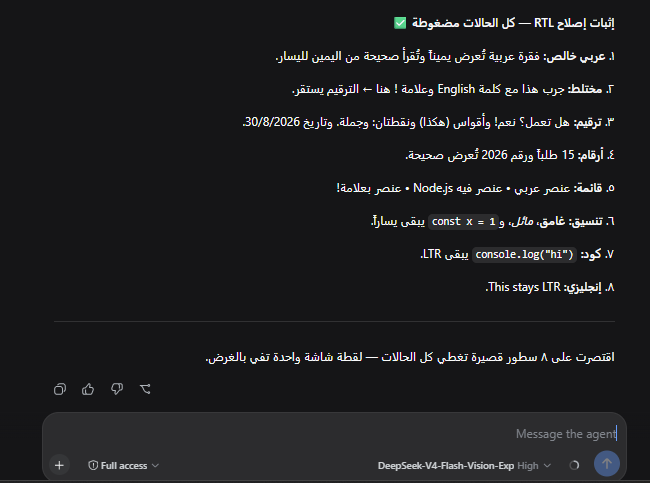
الواجهة بعد تفعيل الإصلاح: فقرات RTL، ترقيم سليم في الجمل المختلطة، وكود يبقى LTR.
The UI with the fix on: RTL paragraphs, correct punctuation in mixed sentences, code still LTR.
التوافق / Verified against:
@deepseek-ai/dsh0.1.5-rc.2. محددات الطبقة 2 مأخوذة من هذا البناء بالضبط؛ الطبقة 1 تعمل بمعزل عن تغيّر الهاشات.
How it works / كيف تعمل
عند تحميل الصفحة، تحقن هذه الإضافة ورقة أنماط CSS على المحادثة: On page load it injects a stylesheet that:
| المنطقة | Area | السلوك | Behavior |
|---|---|---|---|
| فقاعات رسائل | User bubbles | direction: rtl + فكّ العزل | RTL + un-isolate |
| فقرات الردود | Assistant prose | direction: rtl | RTL paragraph |
| جسم التفكير | Thinking body | direction: rtl | RTL |
| المحرر | Composer | direction: rtl | RTL typing |
| الأكواد | Code | unicode-bidi: plaintext | auto-detect (LTR for code) |
The plugin is dual-face, like every DSH client plugin:
| File | Runs in | Role |
|---|---|---|
index.js | Node (the host) | main entry — a no-op apply(). It must never touch window. |
client.js | The browser | exports["./client"] — the real work: injects the stylesheet. |
package.json declares dsh.client.platform: "web", which is what makes the
host's client-modules node publish client.js into the browser boot graph
(window.__DSH_BOOT__).
مسارات الحزم: يخدم المضيف حزم الإضافات عبر مسار combo فقط، وليس عبر مسار مستقل لكل إضافة: Bundle URLs are combo routes only — there is no served per-plugin path in current builds:
/plugins/??deepseek-harness-rtl/client.js&rev=<rev>
لذلك GET /plugins/deepseek-harness-rtl/client.js وحده يرجع 404 بطبيعته،
وليس لأن التثبيت فشل. راجع قسم التحقق.
So a bare GET /plugins/deepseek-harness-rtl/client.js returns 404 by
design — not because the install failed. See Verify below.
Install / التثبيت
المتطلبات / Requirements
- DeepSeek Harness running the
webprofile (the browser GUI). pnpmon PATH (not needed with-PatchOnly).- A different profile name? pass
-Profile <name>.
الطريقة ١ — سكربت التثبيت (الأسهل) / Method 1 — one command
powershell -File install.ps1
# another profile:
powershell -File install.ps1 -Profile myweb
# link this folder instead of installing from npm (for development):
powershell -File install.ps1 -Local
# rewrite only cordis.patch.yml (no dependency change):
powershell -File install.ps1 -PatchOnly
It runs pnpm add inside the profile and writes the ui-rtl-fix row into
cordis.patch.yml (idempotent).
ملاحظة: التعريف الجديد يبدأ بطبقة رقع فارغة []، ولصق عنصر قائمة بعدها يُنتج
YAML غير صالح. السكربت يستبدل [] بالكتلة بدل الإلحاق بها، ويكتب الملف بترميز
UTF-8 بلا BOM.
A freshly initialized profile ships an empty patch layer ([]); appending a
list item after it yields invalid YAML. The script replaces [] instead of
appending, and writes BOM-free UTF-8.
الطريقة ٢ — يدوياً / Method 2 — manual
cd ~/.dsh/profiles/web        # $DSH_HOME defaults to ~/.dsh
pnpm add deepseek-harness-rtl
ثم أضف الكتلة التالية إلى cordis.patch.yml في نفس المجلد — واستبدل [] بها إن
كان الملف ما زال فارغاً:
Then add this block to cordis.patch.yml in the same folder — replacing the
[] if the layer is still empty:
- insert:
    - id: ui-rtl-fix
      name: 'deepseek-harness-rtl'
id معرّف حرّ، أما name فيجب أن يطابق اسم الحزمة المثبّتة.
id is a free-form row id; name must match the installed package name.
التفعيل / Activation
الملف الشخصي web المُسلَّم يعلن patchReload: live، فالـ loader يعيد تركيب
التكوين عند كل تعديل صالح لملف الرقع — بلا إعادة تشغيل؛ يكفي تحديث تبويب
المتصفح.
The shipped web profile declares patchReload: live: the loader recomposes on
every valid patch edit — no restart needed, just reload the browser tab.
أما تعريف بـ patchReload: startup فيقرأ التكوين مرة واحدة عند الإقلاع، ويحتاج
إعادة تشغيل واحدة لتطبيق الرقعة.
A patchReload: startup profile reads the composition once at start and needs
one web-app restart.
للتحقق من تعريفك / check your profile:
dsh.profile.patchReload in $DSH_HOME/profiles/<profile>/package.json.
Verify / التحقق
١) الرسم الحي للإضافات — لا يحتاج إعادة تشغيل ولا مصادقة 1) The live plugin graph — no restart, no auth:
curl -s -m 3 http://127.0.0.1:3080/plugins/events | grep -o '"id":"deepseek-harness-rtl"'
curl.exe -s -m 3 http://127.0.0.1:3080/plugins/events | Select-String 'deepseek-harness-rtl'
/plugins/events قناة SSE تبثّ إطار graph أولاً ثم تُبقي الاتصال مفتوحاً، و-m 3
يوقف القراءة بعد ثلاث ثوانٍ. يجب أن يظهر الصف بمعرّف الحزمة.
/plugins/events is an SSE channel: it emits a graph frame first and then
keeps the connection open; -m 3 stops reading after three seconds. The row
must appear under the package id.
٢) الحزمة نفسها عبر مسار combo — انسخ url من إطار graph
2) The bundle over its combo route — copy url from the graph frame:
curl -s -o /dev/null -w "%{http_code}\n" \
  'http://127.0.0.1:3080/plugins/??deepseek-harness-rtl/client.js&rev=<rev>'   # expect 200
٣) وفي أدوات مطوّري المتصفح / and in the browser devtools console:
document.querySelector('style[data-plugin="deepseek-harness-rtl"]')  // not null
getComputedStyle(document.querySelector('[data-composer-input]')).direction  // "rtl"
Troubleshooting / حل المشكلات
| العَرَض / Symptom | السبب / Cause | الحل / Fix |
|---|---|---|
window is not defined عند الإقلاع | الحزمة تشير بـ main إلى client.js — الـ loader يستوردها في Node | main يجب أن يكون index.js، وclient.js تحت exports["./client"] |
| الحزمة تُحمَّل لكن لا شيء يتغيّر | الصف موجود لكن dsh.client.platform غير مُعلَن | أضف dsh.client إلى package.json |
| الإصلاح يختفي بعد إعادة التشغيل | نسخة معدّلة يدوياً داخل node_modules يدهسها pnpm install | ثبّت عبر pnpm add (تبعية حقيقية)، لا بالنسخ إلى node_modules |
404 على /plugins/<name>/client.js | لا وجود لمسار مستقل لكل إضافة؛ الحزم تُخدَم بمسار combo فقط | افحص /plugins/events وخُذ url منه، أو افحص وسم style في المتصفح |
YAML غير صالح في cordis.patch.yml أو فشل إقلاع | لصق - insert: بعد [] | استبدل [] بالكتلة (يفعلها install.ps1 تلقائياً) |
| الرقعة لا تُطبَّق بلا إعادة تشغيل | التعريف يعلن patchReload: startup | أعد تشغيل تطبيق الويب مرة، أو بدّل التعريف إلى live |
| لا تغيير مرئي بعد ترقية Harness | هاشات الطبقة 2 تغيّرت في البناء الجديد | حدّث الطبقة 2 (انظر أسفل)؛ الطبقة 1 تبقى فعّالة |
| الإصلاح لا يظهر في المحرر | المحرر صار div[contenteditable] بدل textarea منذ 0.1.5 | تأكد من وجود [data-composer-input] في client.js المثبّت |
CSS layers / طبقتا الأنماط
-
Layer 1 (portable) targets build-stable anchors:
[data-chat-flow-kind="user" | "steering" | "assistant-step"]for the chat flow (bubbles, prose runs);[data-composer-input]for the composer (a Lexicalcontenteditablediv since dsh 0.1.5;textarea.uV2eYG_input,[data-input-mirror]and[data-input-backdrop]stay for older builds);- structural elements (
p,li,h1–h6,blockquote,pre,code).
-
Layer 2 (per-build) targets the CSS-module hashes this deployment ships — verified against
@deepseek-ai/dsh0.1.5-rc.2:العنصر / Element المحدد / Selector الوحدة / Module فقاعة المستخدم / User bubble .Sixlwa_bubbledsh-client-ui-chatChatFlow.module.cssفقرات الرد / Assistant prose .hWmORq_rootdsh-client-ui-chatAssistantMarkdown.module.cssجسم التفكير / Reasoning body .lcKema_thinkBodydsh-client-ui-chatReasoningRow.module.cssالمحرر / Composer .uV2eYG_input(+[data-composer-input])dsh-client-ui-conversationInputBar.module.cssهاشات الأبنية الأقدم (
.gdEzaW_bubble،[class*="Sxvs8a_root"]،.QWLzlG_thinkBody) أُزيلت بعد ترقية 0.1.5. Older-build hashes (.gdEzaW_bubble,[class*="Sxvs8a_root"],.QWLzlG_thinkBody) were dropped with the 0.1.5 refresh.تُحدَّث هذه القواعد عند تغيّر بناء الواجهة؛ وإن نسيتَها، تسكت القواعد وحدها بينما تستمر الطبقة 1 بالعمل. These rules refine the result; if a future upgrade renames them, they silently stop matching while Layer 1 keeps the main behavior.
مساهمات محدّثة للطبقة الثانية مرحّب بها عند تغيّر بناء الواجهة. PRs refreshing Layer 2 for a newer build are welcome.
Contributing / المساهمة
git clone https://github.com/almezaniy/Deepseek-Harness-RTL.git
cd Deepseek-Harness-RTL
powershell -File install.ps1 -Local   # links this checkout into your profile
Edit client.js, reload the tab — with patchReload: live the host rewrites the
bundle and the browser HMR channel swaps it in; a startup profile needs the one
restart.
Notes / ملاحظات
- غير تدخّلية: تحقن CSS فقط، بلا أثر جانبي.
- Non-intrusive: it only injects CSS, nothing else.
License
MIT — see LICENSE.