FlexiCodec: A Dynamic Neural Audio Codec for Low Frame Rates
August 6, 2026 · View on GitHub




About
Neural audio codecs are foundational to speech language models. Recent studies have developed 12.5Hz low-frame-rate audio codecs, but even lower frame rate codecs remain underexplored.
In this work, we develop FlexiCodec. FlexiCodec improves semantic preservation with a dynamic frame rate approach and introduces a novel architecture featuring an ASR feature-assisted dual stream encoding and Transformer bottlenecks. With dynamic frame rates, it uses less frames at information-sparse regions through adaptively merging semantically similar frames. A dynamic frame rate also allows FlexiCodec to support inference-time controllable frame rates between 3Hz and 12.5Hz.

Installation
To install FlexiCodec for inference, you need to properly install torch and torchaudio in your environment first, and then run:
pip install flexicodec
Alternatively, you can clone the repository and install locally:
git clone https://github.com/AmphionTeam/FlexiCodec.git
cd FlexiCodec
pip install -e .
News
- 2026-07-01: We release FlexiSLM
, applying FlexiCodec to a speech-in-speech-out spoken language model, enabling dynamic and controllable frame rate.
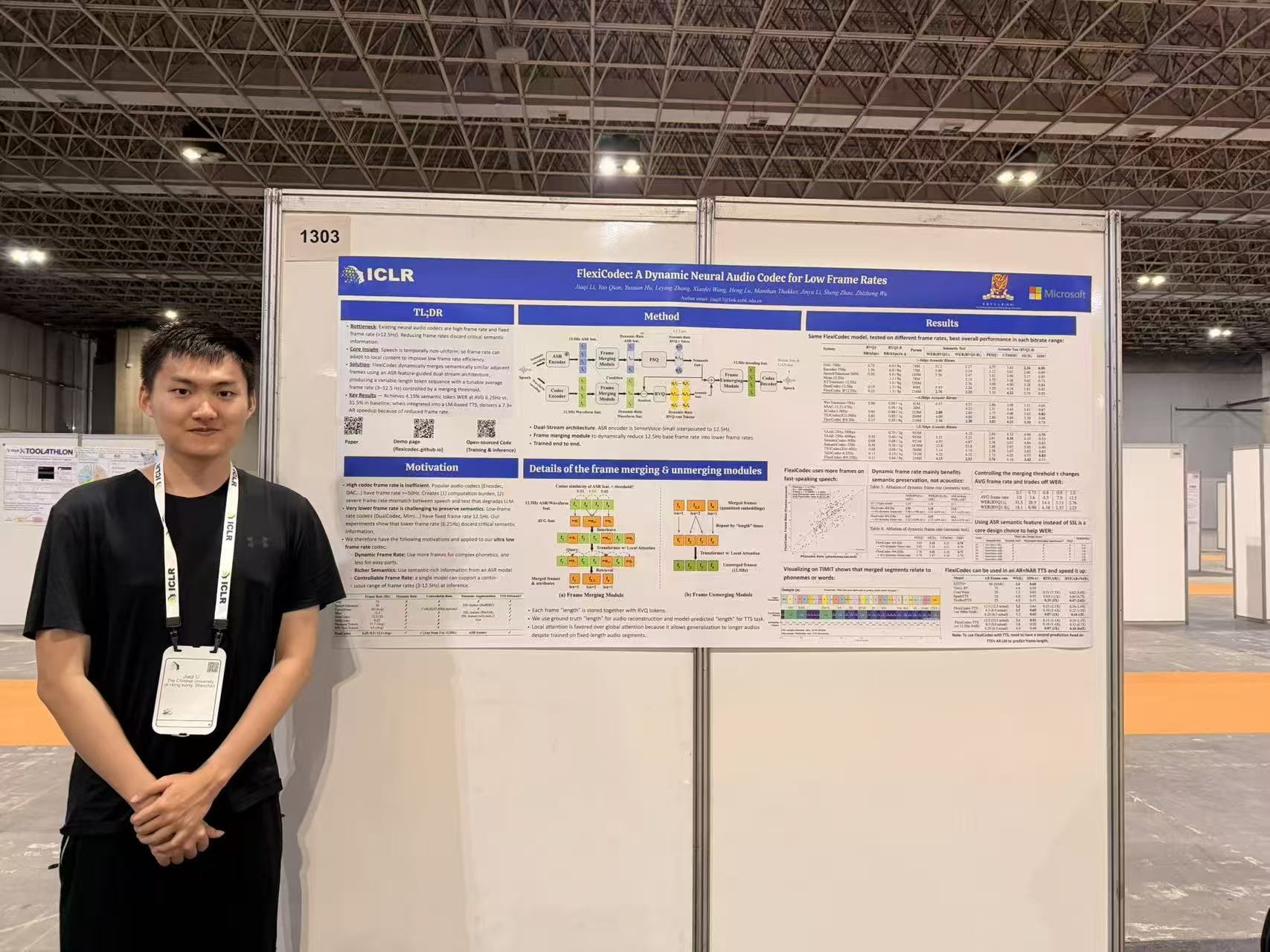
- 2026-04-26: FlexiCodec is presented in ICLR2026 poster (picture)
- 2026-03-21: We release the training code of FlexiCodec in a separate repo

FlexiCodec
Inference example (automatically downloads checkpoint from huggingface)
This code automatically downloads checkpoint from huggingface. If you prefer to download the checkpoint manually, there is another example below.
import torch
import torchaudio
import soundfile as sf
from flexicodec.infer import prepare_model, encode_flexicodec

model_dict = prepare_model()

# Load a real audio file
audio_path = "./audio_examples/audio1.wav" # or replace with your own audio file
audio_np, sample_rate = sf.read(audio_path, dtype="float32", always_2d=True)
audio = torch.from_numpy(audio_np.T)
# If this doesn't work, use `audio, sample_rate = torchaudio.load(audio_path)`

with torch.no_grad():
    encoded_output = encode_flexicodec(audio, model_dict, sample_rate, num_quantizers=8, merging_threshold=0.91)

    reconstructed_audio = model_dict['model'].decode_from_codes(
        semantic_codes=encoded_output['semantic_codes'],
        acoustic_codes=encoded_output['acoustic_codes'],
        token_lengths=encoded_output['token_lengths'],
    )

duration = audio.shape[-1] / sample_rate
output_path = 'decoded_audio.wav'
sf.write(output_path, reconstructed_audio.cpu().squeeze(1).T.numpy(), 16000)

print(f"Saved decoded audio to {output_path}")
print(f"This sample avg frame rate: {encoded_output['token_lengths'].shape[-1] / duration:.4f} frames/sec")
Notes:
-
You may tune the
num_quantizers=xxx(min 1, max 24),merging_threshold=xxx(maximum 1.0) parameters. If you setmerging_threshold=1.0, it will be a standard 12.5Hz neural audio codec. All of itstoken_lengthsitems will be 1. -
Batched input is supported. You can directly pass audios shaped [B,T] to the script above, but the audio length information will be unavailable. To resolve this, you can additionally pass an
audio_lensparameter toencode_flexicodec, and you can crop the output for each audio inencoded_output[speech_token_len]. -
To extract continuous features from the semantic tokens, use:
feat = model_dict['model'].get_semantic_feature(encoded_output['semantic_codes'])
Troubleshooting:
- If you have huggingface connection issue, for mainland China users, you might need to execute
export HF_ENDPOINT=https://hf-mirror.comin terminal, before running the code.
Alternative inference example (manually download checkpoint)
Run the following commands to download the checkpoint manually:
hf download FunAudioLLM/SenseVoiceSmall --local-dir ./checkpoints/SenseVoiceSmall
hf download jiaqili3/flexicodec 12hz_v1_half.safetensors --local-dir ./checkpoints/flexicodec
hf download jiaqili3/flexicodec 12hz_v1_half_config.yaml --local-dir ./checkpoints/flexicodec
Then, you can use the following code to do inference:
import torch
import torchaudio
import soundfile as sf
from flexicodec.infer import prepare_model, encode_flexicodec

model_dict = prepare_model(sensevoice_small_path='./checkpoints/SenseVoiceSmall', ckpt_path='./checkpoints/flexicodec/12hz_v1_half.safetensors', config_path='./checkpoints/flexicodec/12hz_v1_half_config.yaml')

# Load a real audio file
audio_path = "./audio_examples/audio1.wav" # or replace with your own audio file
audio_np, sample_rate = sf.read(audio_path, dtype="float32", always_2d=True)
audio = torch.from_numpy(audio_np.T)
# If this doesn't work, use `audio, sample_rate = torchaudio.load(audio_path)`

with torch.no_grad():
    encoded_output = encode_flexicodec(audio, model_dict, sample_rate, num_quantizers=8, merging_threshold=0.91)

    reconstructed_audio = model_dict['model'].decode_from_codes(
        semantic_codes=encoded_output['semantic_codes'],
        acoustic_codes=encoded_output['acoustic_codes'],
        token_lengths=encoded_output['token_lengths'],
    )

duration = audio.shape[-1] / sample_rate
output_path = 'decoded_audio.wav'
sf.write(output_path, reconstructed_audio.cpu().squeeze(1).T.numpy(), 16000)

print(f"Saved decoded audio to {output_path}")
print(f"This sample avg frame rate: {encoded_output['token_lengths'].shape[-1] / duration:.4f} frames/sec")
FlexiCodec-TTS
First, install additional dependencies:
sudo apt install espeak-ng
pip install cached_path phonemizer openai-whisper
FlexiCodec-based AR+NAR TTS Inference
The AR+NAR TTS system generates speech tokens from text using an autoregressive transformer model, and then uses the Voicebox NAR system to decode the tokens into audio.
To perform complete text-to-speech with both AR generation and NAR decoding:
import torch
import torchaudio
from flexicodec.ar_tts.inference_tts import tts_synthesize
from flexicodec.ar_tts.modeling_artts import prepare_artts_model
from flexicodec.nar_tts.inference_voicebox import prepare_voicebox_model
from cached_path import cached_path

# Prepare both AR and NAR models
ar_checkpoint = cached_path('hf://jiaqili3/flexicodec/artts.safetensors')
nar_checkpoint = cached_path('hf://jiaqili3/flexicodec/nartts.safetensors')

ar_model_dict = prepare_artts_model(ar_checkpoint)
nar_model_dict = prepare_voicebox_model(nar_checkpoint)

# Full TTS synthesis
output_audio, output_sr, duration_classes = tts_synthesize(
    ar_model_dict=ar_model_dict,
    nar_model_dict=nar_model_dict,
    text="Hello, this is a complete text to speech example.",
    language="en",
    ref_audio_path="./audio_examples/1089-134686-0030.flac",  # Reference voice
    ref_text="be ware of making that mistake",  # Optional reference text
    merging_threshold=0.91,  # Frame rate control. Only two options supported: 0.91 or 0.86. If you set it to 0.91, the output is roughly 8Hz. The other option is about 6Hz.
    beam_size=1,
    top_k=25,
    temperature=1.0,
    predict_duration=True,
    duration_top_k=1,
    n_timesteps=15,  # NAR diffusion steps
    cfg=2.0,  # NAR classifier-free guidance
    rescale_cfg=0.75,  # NAR CFG rescaling
    use_nar=True,  # Set to False for AR-only decoding
)

# Save output
output_path = "output.wav"
torchaudio.save(output_path, output_audio.unsqueeze(0) if output_audio.dim() == 1 else output_audio, output_sr)

# Calculate and print frame rate
duration = output_audio.shape[-1] / output_sr
avg_frame_rate = duration_classes.shape[-1] / duration
print(f"Saved output to {output_path}")
print(f"This sample avg frame rate: {avg_frame_rate:.4f} frames/sec")
Troubleshooting:
- If you see error messages like "RuntimeError: Could not Load Libtorchcodec" or "TorchCodec is required for load_with_torchcodec. Please install torchcodec to use this function.", this means torchcodec is not installed properly. You can either (1) install the torchcodec compatible with your PyTorch by following link, and make sure you have
ffmpeginstalled (e.g.,apt install ffmpeg), or (2) usesoundfilepackage to load and save audio.
Notes:
- The FlexiCodec checkpoint used in our FlexiCodec-TTS and VoiceBox is an older FlexiCodec checkpoint (https://huggingface.co/jiaqili3/flexicodec/blob/main/nartts_flexicodec_only.safetensors). FlexiSLM uses this
nartts_flexicodec_only.safetensorsso that it can reuse this released Voicebox model and checkpoint. tts_synthesizeperforms the full pipeline: AR generation + NAR decoding to audio- The function returns a tuple:
(output_audio, sample_rate, duration_classes) duration_classescontains the token durations which can be used to calculate the average frame rate- Reference audio (
ref_audio_path) provides the voice/style characteristics - Reference text (
ref_text) is optional and can help with prosody alignment - Set
use_nar=Falseintts_synthesizeto use AR-only decoding (faster but lower quality) merging_thresholdcontrols the frame rate: 0.91 gives ~8.3Hz, 0.86 gives ~6.25Hz
FlexiCodec-based Voicebox NAR Inference
The VoiceBox NAR system can decode FlexiCodec's RVQ-1 tokens into speech. It is used as the second stage in FlexiCodec-TTS, but can also be used standalone. To run NAR TTS inference using FlexiCodec-Voicebox:
import torch
import torchaudio
from flexicodec.nar_tts.inference_voicebox import (
    prepare_voicebox_model,
    infer_voicebox_tts
)
from cached_path import cached_path

# Prepare VoiceBox model (loads model and vocoder)
checkpoint_path = cached_path('hf://jiaqili3/flexicodec/nartts.safetensors')
model_dict = prepare_voicebox_model(
    checkpoint_path,
    n_timesteps=15,          # Number of diffusion steps (default: 15)
    cfg=2.0,                 # Classifier-free guidance scale (default: 2.0)
    rescale_cfg=0.75,        # CFG rescaling factor (default: 0.75)
)

# Load ground truth audio (target content) and extract semantic tokens via FlexiCodec
from flexicodec.infer import prepare_model as prepare_flexicodec_model, encode_flexicodec

flexicodec_dict = prepare_flexicodec_model()
gt_audio_path = "audio_examples/1089-134686-0030.flac"  # Ground truth (target content)
gt_audio, gt_sr = torchaudio.load(gt_audio_path)

# Extract semantic tokens and length_ids from ground truth audio
with torch.no_grad():
    encoded_output = encode_flexicodec(gt_audio, flexicodec_dict, gt_sr, merging_threshold=0.9) # You can use any merging threshold value here.
    audio_tokens = encoded_output['semantic_codes'].squeeze()  # [T] semantic token indices
    length_ids = encoded_output['token_lengths'].squeeze()     # [T] duration classes

# Load prompt audio (reference voice/style)
prompt_audio_path = "audio_examples/1089-134686-0032.flac"  # Reference audio (voice/style)
prompt_audio, _ = torchaudio.load(prompt_audio_path)

# Run VoiceBox NAR inference
output_audio, output_sr = infer_voicebox_tts(
    model_dict=model_dict,
    audio_tokens=audio_tokens,     # [T] semantic token indices from FlexiCodec
    length_ids=length_ids,         # [T] duration classes from FlexiCodec
    prompt_audio=prompt_audio,     # [1, T_audio] prompt audio tensor
    prompt_audio_path=prompt_audio_path,  # Optional: for feature caching
    framerate=1.0                  # Frame rate control (default: 1.0, max: 1.0)
                                   # Lower values (e.g., 0.87, 0.91) enable dynamic merging
)

# Save output
output_path = "output_nar.wav"
torchaudio.save(output_path, output_audio.unsqueeze(0) if output_audio.dim() == 1 else output_audio, output_sr)

# Calculate and print frame rate
duration = output_audio.shape[-1] / output_sr
avg_frame_rate = length_ids.shape[-1] / duration
print(f"Saved output to {output_path}")
print(f"This sample avg frame rate: {avg_frame_rate:.4f} frames/sec")
Notes:
- The FlexiCodec checkpoint used in our FlexiCodec-TTS and VoiceBox is an older FlexiCodec checkpoint (https://huggingface.co/jiaqili3/flexicodec/blob/main/nartts_flexicodec_only.safetensors). FlexiSLM uses this
nartts_flexicodec_only.safetensorsso that it can reuse this released Voicebox model. - The model automatically detects and uses CUDA, MPS (Apple Silicon), or CPU devices
audio_tokensare semantic token indices extracted from ground truth audio via FlexiCodec encoding (as shown above) or generated by an AR modellength_idsare duration classes for each token extracted from FlexiCodec encoding (optional, defaults to 1 for each token)prompt_audiodetermines the voice/style characteristics of the output- The ground truth audio determines the semantic content of the output through its extracted tokens
- Output sample rate is typically 16000 Hz or 24000 Hz depending on the model configuration
- You can reuse
model_dictfor multiple inference calls to avoid reloading the model frameratecontrols FlexiCodec's dynamic frame rate: lower values (e.g., 0.87, 0.91) enable merging for lower average frame rates, while 1.0 disables merging (standard 12.5Hz)
Training reference implementations
- For FlexiCodec: see https://github.com/jiaqili3/flexicodec_training_share
- For FlexiCodec-TTS:
Inside
flexicodec/ar_tts/modeling_artts.pyandflexicodec/nar_tts/modeling_voicebox.pythere aretraining_forwardmethods that receive audios and prepared sensevoice-small input "FBank" features. (dl_outputdictionary containingx(thefeature_extractoroutput),x_lens(length of each x before padding),audio(the 16khz audio tensor)). Training can be replicated by passing the same data to thetraining_forwardmethods.
If you need more code for training FlexiCodec-TTS, you can contact me or create an issue.
Acknowledgements & Citation
- Our codebase setup is based on DualCodec
- We thank the Mimi Codec for transformer implementations
If you find our works useful, please consider citing as:
@article{li2025flexicodec,
  title={FlexiCodec: A Dynamic Neural Audio Codec for Low Frame Rates},
  author={Li, Jiaqi and Qian, Yao and Hu, Yuxuan and Zhang, Leying and Wang, Xiaofei and Lu, Heng and Thakker, Manthan and Li, Jinyu and Zhao, Shang and Wu, Zhizheng},
  journal={arXiv preprint arXiv:2510.00981},
  year={2025}
}

@article{li2025dualcodec,
  title={Dualcodec: A low-frame-rate, semantically-enhanced neural audio codec for speech generation},
  author={Li, Jiaqi and Lin, Xiaolong and Li, Zhekai and Huang, Shixi and Wang, Yuancheng and Wang, Chaoren and Zhan, Zhenpeng and Wu, Zhizheng},
  journal={Interspeech 2025},
  year={2025}
}