Caught your AI in a lie? Share the moment.
June 15, 2026 · View on GitHub
The shareable on-ramp. You ran
dos verify, an agent's "done" came backNOT_SHIPPED, and you caught it. That's a good screenshot. This page is how to make it yours, post it, and — if you wire the check into your repo — wear the mark that says you do.
This is packaging, not a new feature. Every command below is one you can already run; every image is one already in this repo. Nothing here asks you to sign up for anything or run a service.
The thing worth sharing
An agent told you it shipped two features. Git backs one. dos verify reads
the commits — not the agent's word — and the false "done" exits 1:
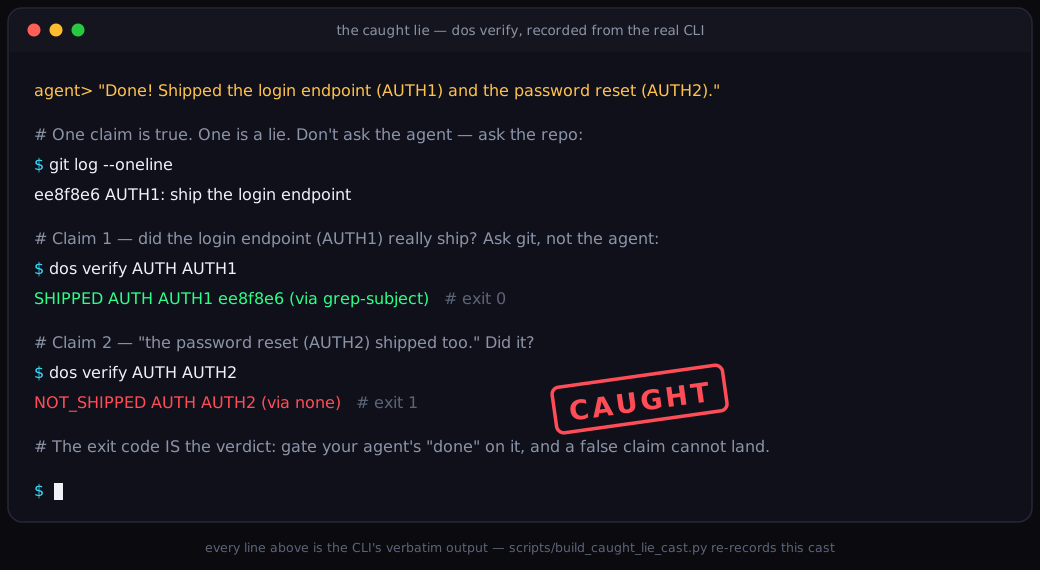
That cast is a recording of the real CLI — every line is verbatim output,
re-recorded by scripts/build_caught_lie_cast.py
whenever the output changes. You don't have to use our recording, though. The
whole point is that you can make the same moment on your own machine, with
your own repo, in under a minute — and that screenshot is the one worth
posting, because it's real and it's yours.
Make your own caught-lie screenshot (90 seconds, honest by construction)
You can't fake this, and that's the feature. The verdict comes from your git history, so the screenshot is a receipt, not a mock-up.
The fastest path — a throwaway repo
pip install dos-kernel      # PyYAML is the only runtime dep
dos quickstart              # builds a throwaway repo, makes one real commit, verifies twice
It prints the two verdicts you saw above — one SHIPPED (git backs it), one
NOT_SHIPPED (nothing landed for it) — then cleans up after itself.
Screenshot the two dos verify lines. That contrast is the product:
$ dos verify AUTH AUTH1
  SHIPPED AUTH AUTH1 1160a0d (via grep-subject)
  exit=0  (0 = the verdict is SHIPPED)

$ dos verify AUTH AUTH2
  NOT_SHIPPED AUTH AUTH2 (via none)
  exit=1  (1 = NOT_SHIPPED — the claim is contradicted by the artifacts)
(No install? uvx --from dos-kernel dos quickstart runs the same demo and
leaves nothing behind.)
The better path — catch your agent, on your repo
The screenshot lands harder when it's your real work. Point verify at a phase
your agent claimed to ship but didn't:
dos verify --workspace . PLAN PHASE
#   → NOT_SHIPPED PLAN PHASE (via none)   exit 1   — the claim, refuted by your own git history
If you don't use the (plan, phase) ship grammar yet, the floor needs no
vocabulary at all — commit-audit grades whether a commit's subject is
witnessed by its own diff:
dos commit-audit HEAD
#   catches a `fix:` that touched only a README, an `--allow-empty "shipped"`, …
Either way, the verdict is computed from artifacts you didn't author, so the picture you post is a fact. Caption suggestions that stay honest:
"Asked my agent to ship the password reset. It said done.
dos verifychecked the commits. It did not."
"My AI's 'done' has an exit code now."
Stay honest in the caption too. A NOT_SHIPPED means no commit backs this
phase — it's a claim-vs-artifact mismatch, not a verdict on whether the agent
is "bad" or the code is wrong. Say what the tool says: the claim didn't land.
Wear the mark — the "verified by DOS" badge
Caught one lie and want the check standing guard from now on? Wire dos verify
(or commit-audit) into your repo's gate and paste the badge. It tells the
world your repo checks its agents' ship-claims against git, not the agent's
word:

[](https://github.com/anthony-chaudhary/dos-kernel)
This is the shields.io static endpoint — a fixed label and colour, nothing
to host, nothing to break. Prefer to depend on no one? Vendor the hand-built
docs/assets/verified-by-dos.svg into your tree
and reference it locally. Both forms, plus how to earn it and the honesty rung
below, live on the full badge page: docs/BADGE.md.

One honesty rule, carried from the badge page: the static badge asserts your
process ("this repo gates ship-claims on dos verify"), not a live
per-commit verdict — it shows the same green whether your last verify answered
SHIPPED or NOT_SHIPPED. Only wear it once the check actually runs in your
gate. The live, per-commit form (a CI workflow badge whose colour is the last
gate run) is documented on docs/BADGE.md under "the live badge".
Where the social card comes from (for link unfurls)
Share a link to your repo and the platform unfurls a preview card — that's the
Open Graph image, a separate asset from the badge. DOS ships one for its own
repo: docs/assets/social-card.png (1280×640, the
caught-lie money-moment), also rendered from the real CLI. If you adopt DOS and
want your own repo to unfurl with a caught-lie card, that image is yours to
reuse or adapt — it's CC-friendly like the rest of the assets.
Installing a social-preview image on GitHub is a one-time manual step (GitHub
exposes no API for it): Repo → Settings → Social preview → upload.

What this page is not
On-ramp only, on purpose. There is no hosted "share your verdict" service, no web playground, no upload endpoint, no new command. The receipt is your own terminal; the badge is a static pill or your own CI workflow; the share button is whatever you already use to post a screenshot. DOS adds the verdict — you own the moment.
- New here? Start at the README or docs/QUICKSTART.md.
- Want the badge and how to earn it? docs/BADGE.md.
- The assets used above: docs/assets/README.md.
The kernel is the part that doesn't believe the agents.