Mini Climate Card
February 22, 2024 · View on GitHub


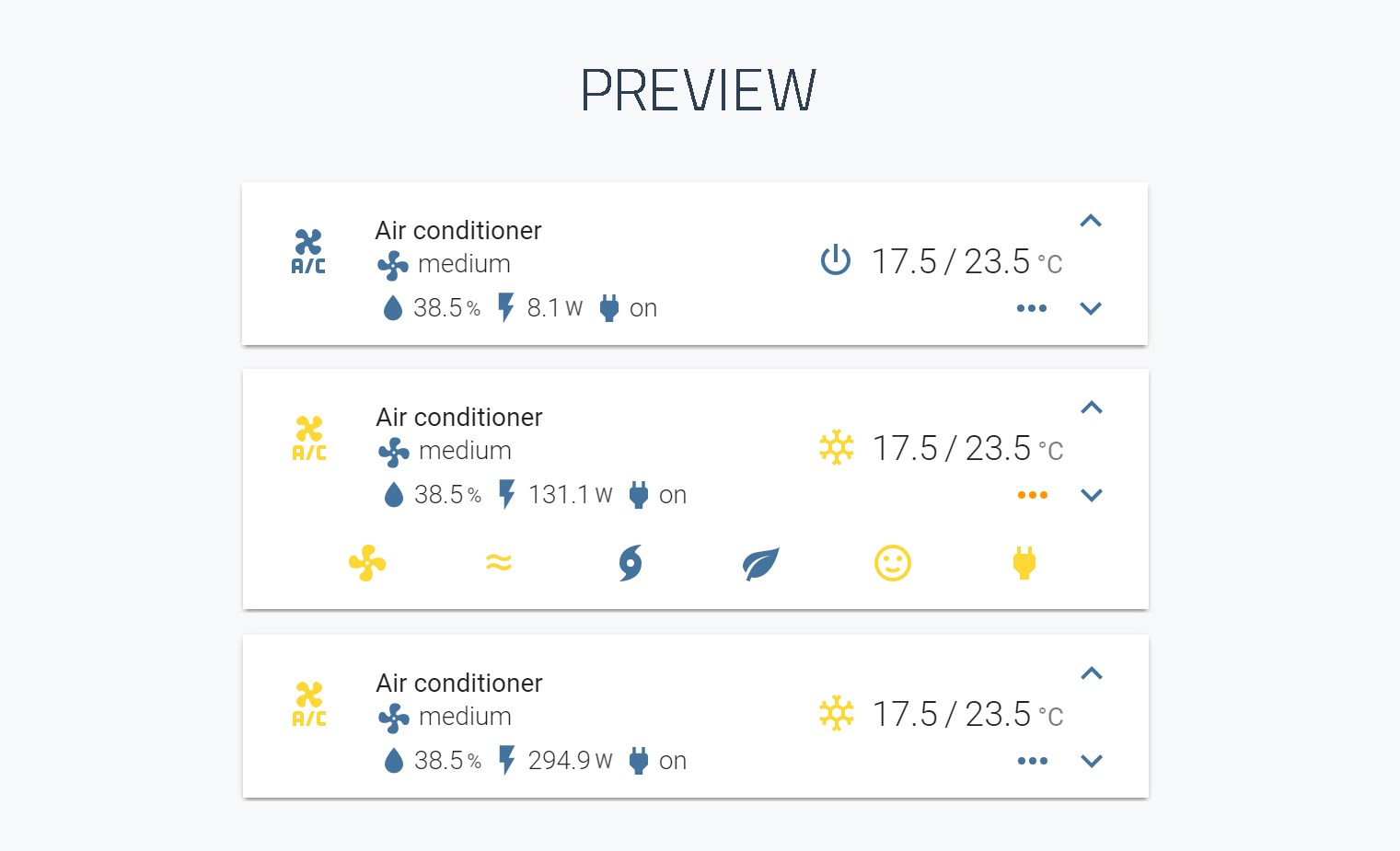
A minimalistic yet customizable climate card for Home Assistant Lovelace UI.
Please ⭐️ this repo if you find it useful
Notice
v2 is only compatible from version 2022.11 onwards
Install
This card is available in HACS (Home Assistant Community Store)
Simple install
-
Download and copy
mini-climate-card-bundle.jsfrom the latest release into yourconfig/wwwdirectory. -
Add a reference to
mini-climate-card-bundle.jsinside yourui-lovelace.yaml.
resources:
  - url: /local/mini-climate-card-bundle.js?v=2.21
    type: module
CLI install
-
Move into your
config/wwwdirectory -
Grab
mini-climate-card-bundle.js
$ wget https://github.com/artem-sedykh/mini-climate-card/releases/download/v2.2.1/mini-climate-card-bundle.js
- Add a reference to
mini-climate-card-bundle.jsinside yourui-lovelace.yaml.
resources:
  - url: /local/mini-climate-card-bundle.js?v=2.2.1
    type: module
Updating
-
Find your
mini-climate-card-bundle.jsfile inconfig/wwwor wherever you ended up storing it. -
Replace the local file with the latest one attached in the latest release.
-
Add the new version number to the end of the cards reference url in your
ui-lovelace.yamllike below.
resources:
  - url: /local/mini-climate-card-bundle.js?v=2.2.1
    type: module
You may need to empty the browsers cache if you have problems loading the updated card.
Using the card
Options
Card options
| Name | Type | Default | Since | Description |
|---|---|---|---|---|
| type | string | required | v1.0.1 | custom:mini-climate |
| entity | string | required | v1.0.1 | An entity_id from an entity within the climate domain |
| name | string | optional | v1.0.1 | Override the entities friendly name |
| group | boolean | optional | v1.0.2 | Removes border, paddings, background color and box-shadow |
| icon | string | optional | v1.0.1 | Specify a custom icon from any of the available mdi icons |
| swap_temperatures | boolean | optional | V2.1.1 | Swap the current and the target temperature in the card |
| hide_current_temperature | boolean | optional | V2.1.2 | Hide the current temperature in the card |
| hide_current_temperature | function | optional | V2.5.0 | Custom hide the current temperature in the card function |
| toggle | object | optional | v1.0.2 | Show/hide bottom buttons toggle button |
toggle: icon | string | optional | v1.0.2 | Custom icon, default value mdi:dots-horizontal |
toggle: hide | boolean | optional | v1.0.2 | Hide toggle button, default value False |
toggle: hide | function | optional | v2.5.0 | Custom hide toggle button function |
toggle: default | boolean | optional | v1.0.2 | Default toggle button state, default value False |
| secondary_info | object | optional | v1.1.0 | secondary_info config. secondary info examples |
secondary_info: type | string | optional | v1.1.0 | Available types: last-changed, last-updated (v2.2.0), fan-mode, fan-mode-dropdown, hvac-mode, hvac-action |
secondary_info: icon | string | optional | v1.1.0 | Icon for types: fan-mode, fan-mode-dropdown, hvac-mode, hvac-action |
secondary_info: hide | boolean | optional | v2.3.0 | Hide secondary_info, default value False |
secondary_info: hide | function | optional | v2.5.0 | Custom hide secondary_info function. |
secondary_info: source | object | optional | v1.2.1 | Source available types: hvac-action |
secondary_info: source:{item_name} | object | optional | v1.2.1 | Source item name |
secondary_info: source:{item_name}:icon | object | optional | v1.2.1 | Specify a custom icon from any of the available mdi icons |
secondary_info: source:{item_name}:name | object | optional | v1.2.1 | Display name |
| temperature | object | optional | v1.0.1 | Current temperature configuration. temperature examples |
temperature: unit | string | optional | v1.0.1 | Display unit, default °C |
temperature: round or fixed | number | optional | v1.2.2 | Rounding or fixed value, default round: 1 |
temperature: source | object | optional | v1.0.1 | Data source for target temperature |
temperature: source:entity | string | optional | v1.0.1 | entity_id, default current climate entity_id |
temperature: source:attribute | string | optional | v1.0.1 | Default current_temperature |
| target_temperature | object | optional | v1.0.1 | Target temperature configuration. target_temperature examples |
target_temperature: icons | object | optional | v1.0.1 | Icons for temperature change buttons |
target_temperature: icons:up | string | optional | v1.0.1 | Up icon, default mdi:chevron-up |
target_temperature: icons:down | string | optional | v1.0.1 | Down icon, default mdi:chevron-down |
target_temperature: unit | string | optional | v1.0.1 | Display unit, default °C |
target_temperature: min | number | optional | v1.0.1 | Minimum temperature, the default value is taken from the attribute min_temp of the given entity |
target_temperature: max | number | optional | v1.0.1 | Maximum temperature, the default value is taken from the attribute max_temp of the given entity |
target_temperature: step | number | optional | v1.0.1 | Temperature change step, the default value is taken from the attribute target_temp_step of the given entity |
target_temperature: source | object | optional | v1.0.1 | Data source for target temperature |
target_temperature: source:entity | string | optional | v1.0.1 | entity_id, default current climate entity_id |
target_temperature: source:attribute | string | optional | v1.0.1 | Default temperature |
target_temperature: change_action | function | optional | v1.0.1 | Custom temperature change function |
| hvac_mode | object | optional | v1.0.1 | HVAC mode. hvac_mode examples |
hvac_mode: style | function | optional | v1.0.1 | Custom style |
hvac_mode: change_action | function | optional | v1.0.1 | Custom hvac_mode change function |
hvac_mode: state | object | optional | v1.0.1 | Config to get hvac_mode state |
hvac_mode: hide | boolean | optional | v1.2.3 | Hide hvac_mode, default value False |
hvac_mode: hide | function | optional | v2.5.0 | Custom hide hvac_mode function |
hvac_mode: state:entity | string | optional | v1.1.0 | hvac_mode entity_id |
hvac_mode: state:attribute | string | optional | v1.1.0 | hvac_mode attribute |
hvac_mode: state:mapper | function | optional | v1.1.0 | State processing function |
hvac_mode: active | function | optional | v1.1.0 | Active function |
hvac_mode: source | object | optional | v1.0.1 | Data |
hvac_mode: source:__filter | function | optional | v1.1.0 | Filter function |
hvac_mode: source:item | object | optional | v1.0.1 | item - mode name e.g. cool, heat, off, etc. |
hvac_mode: source:item:icon | string | optional | v1.0.1 | Specify a custom icon from any of the available mdi icons |
hvac_mode: source:item:name | string | optional | v1.0.1 | Display name |
hvac_mode: source:item:hide | boolean | optional | v2.5.0 | Hide source, default value False |
hvac_mode: source:item:order | number | optional | v1.2.5 | Sort order |
| fan_mode | object | optional | v1.0.1 | Fan operation for climate device. fan_mode examples |
fan_mode: icon | string | optional | v1.0.1 | Specify a custom icon from any of the available mdi icons |
fan_mode: order | number | optional | v1.0.1 | Sort order, default value 0 |
fan_mode: location | string | optional | v1.0.1 | Allows you to display buttons on the main panel, types main, bottom, default bottom |
fan_mode: hide | number | optional | v1.0.1 | Hide button, default value False |
fan_mode: hide | function | optional | v2.5.0 | Custom hide button function |
fan_mode: style | function | optional | v1.0.1 | Style |
fan_mode: disabled | function | optional | v1.0.1 | Disabled function |
fan_mode: active | function | optional | v1.0.1 | Active |
fan_mode: change_action | function | optional | v1.0.1 | Custom fan_mode change function |
fan_mode: state | object | optional | v1.0.1 | Config to get fan_mode state |
fan_mode: state:entity | string | optional | v1.0.1 | fan_mode entity_id |
fan_mode: state:attribute | string | optional | v1.0.1 | fan_mode attribute, default fan_mode |
fan_mode: source | object | optional | v1.0.1 | Source for drop down list |
fan_mode: source:item | string | optional | v1.0.1 | item - mode name e.g. auto, low, medium... |
fan_mode: source:__filter | function | optional | v1.0.1 | Source filter |
| indicators | object | optional | v1.0.1 | Any indicators, examples |
indicators: name | object | optional | v1.0.1 | The name of your indicator see examples |
indicators: name:icon | string | optional | v1.0.1 | Specify a custom icon from any of the available mdi icons |
indicators: name:icon | object | optional | v1.0.1 | Icon object |
indicators: name:icon:template | function | optional | v1.0.1 | Icon template function |
indicators: name:icon:style | function | optional | v1.0.1 | Styles |
indicators: name:value | object | optional | v1.0.1 | Value object |
indicators: name:value:style | function | optional | v1.0.1 | Styles |
indicators: name:unit | string | optional | v1.0.1 | Display unit |
indicators: name:unit | string | optional | v1.0.1 | Display unit |
indicators: name:round | number | optional | v1.0.1 | Rounding number value |
indicators: name:hide | boolean | optional | v2.5.0 | Hide indicator, default value False |
indicators: name:hide | function | optional | v2.5.0 | Custom hide indicator function |
indicators: name:source | number | optional | v1.0.1 | Data source |
indicators: name:source:entity | string | optional | v1.0.1 | Indicator entity_id |
indicators: name:source:attribute | string | optional | v1.0.1 | Entity attribute |
indicators: name:source:mapper | function | optional | v1.0.1 | Value processing function |
indicators: name:tap_action | action object | true | v1.1.0 | Action on click/tap |
| buttons | object | optional | v1.0.1 | Any buttons, example |
buttons: name | object | optional | v1.0.1 | The name of your button see examples |
buttons: name:icon | string | optional | v1.0.1 | Specify a custom icon from any of the available mdi icons |
buttons: name:type | string | optional | v1.0.1 | dropdown or button default button |
buttons: name:order | number | optional | v1.0.1 | Sort order |
buttons: name:location | string | optional | v1.2.1 | Allows you to display buttons on the main panel, types main, bottom, default bottom |
buttons: name:state | object | optional | v1.0.1 | Config to get button state |
buttons: name:state:entity | string | optional | v1.0.1 | Button entity_id |
buttons: name:state:attribute | string | optional | v1.0.1 | Entity attribute |
buttons: name:state:mapper | function | optional | v1.0.1 | State processing function |
buttons: name:disabled | function | optional | v1.0.1 | Calc disabled button |
buttons: name:hide | boolean | optional | v2.5.0 | Hide button, default value False |
buttons: name:hide | function | optional | v2.5.0 | Custom hide button function |
buttons: name:active | function | optional | v1.0.1 | For type dropdown |
buttons: name:source | object | optional | v1.0.1 | For type dropdown |
buttons: name:source:item | string | optional | v1.0.1 | Source item, format horizontal: horizontal |
buttons: name:source:__filter | function | optional | v1.0.1 | Filter function |
buttons: name:change_action | function | optional | v1.0.1 | For type dropdown |
buttons: name:toggle_action | function | optional | v1.0.1 | For type button |
buttons: name:style | function | optional | v1.0.1 | Styles |
| tap_action | action object | true | v1.0.4 | Action on click/tap, tap_action |
| scale | number | optional | v1.0.1 | UI scale modifier, default is 1 |
temperature
Functions available:
| Name | Type | execution context | arguments | return type |
|---|---|---|---|---|
hide_current_temperature | function | value, entity, target_entity, climate_entity, hvac_mode | boolean |
value - temperature value
entity - temperature entity
target_entity - target temperature entity
climate_entity - climate entity
hvac_mode - current hvac_mode
Configuration example for the temperature:
type: custom:mini-climate
entity: climate.my_ac
hide_current_temperature: >
  (value) => value < 20
temperature:
  unit: '°C'
  round: 1
  # use an external temperature sensor
  source:
    entity: sensor.temperature
target_temperature
Functions available for the target_temperature:
| Name | Type | execution context | arguments | return type |
|---|---|---|---|---|
change_action | function | target_temperature config | value, entity, climate_entity | promise |
value - target_temperature value
entity - target_temperature entity
climate_entity - climate entity
execution context methods:
| Name | arguments | description | return type |
|---|---|---|---|
toggle_state | state | toggle state, example: this.toggle_state('on') => off | string |
call_service | domain, service, options, | call Home Assistant service | promise |
Configuration example for the target_temperature:
type: custom:mini-climate
entity: climate.my_ac
target_temperature:
  icons:
    up: mdi:chevron-up
    down: mdi:chevron-down
  unit: '°C'
  min: 16
  max: 31
  step: 0.5
  change_action: >
    (value, entity) => this.call_service('climate', 'set_temperature', { entity_id: entity.entity_id, temperature: value })
hvac_mode
Functions available for the hvac_mode:
| Name | Type | execution context | arguments | return type |
|---|---|---|---|---|
state:mapper | function | hvac_mode config | state, entity, climate_entity | any |
active | function | hvac_mode config | state, entity, climate_entity | boolean |
change_action | function | hvac_mode config | selected, entity, climate_entity | any |
style | function | hvac_mode config | value, entity, climate_entity | object |
source:__filter | function | hvac_mode config | source, state, entity, climate_entity | object({ id..., name...,... }) array |
hide | function | hvac_mode config | state, entity, climate_entity | boolean |
state - current hvac state
selected - selected value
entity - hvac entity
climate_entity - current climate entity
execution context methods:
| Name | arguments | description | return type |
|---|---|---|---|
toggle_state | state | toggle state, example: this.toggle_state('on') => off | string |
call_service | domain, service, options, | call Home Assistant service | promise |
Configuration example for the hvac_mode:
type: custom:mini-climate
entity: climate.my_ac
hvac_mode:
  style: "(value, entity) => ({ color: 'black !important' })"
  hide: >
    (state) => state === 'dry'
  source:
    'off':
      icon: mdi:power
      name: 'off'
    heat:
      icon: mdi:weather-sunny
      name: heat
    auto:
      icon: mdi:cached
      name: auto
    cool:
      icon: mdi:snowflake
      name: cool
    dry:
      icon: mdi:water
      name: dry
    fan_only:
      icon: mdi:fan
      name: fan
  change_action: >
    (selected, entity) => this.call_service('climate', 'set_hvac_mode', { entity_id: entity.entity_id, hvac_mode: selected })
fan_mode
Functions available for the fan_mode:
| Name | Type | execution context | arguments | return type |
|---|---|---|---|---|
state:mapper | function | button config | state, entity, climate_entity, hvac_mode | any |
source:__filter | function | button config | source, state, entity, climate_entity, hvac_mode | object({ id..., name... }) array |
active | function | button config | value, entity, climate_entity, hvac_mode | boolean |
disabled | function | button config | value, entity, climate_entity, hvac_mode | boolean |
style | function | button config | value, entity, climate_entity, hvac_mode | object |
change_action | function | button config | selected_value, entity, climate_entity, hvac_mode | promise |
hide | function | button config | state, entity, climate_entity, hvac_mode | boolean |
state - current button state value
entity - button entity
climate_entity - climate entity
hvac_mode - current hvac_mode
source - dropdown source object array: [ { id: 'id', name: 'name' }, ... ]
selected_value - selected dropdown value
execution context methods:
| Name | arguments | description | return type |
|---|---|---|---|
toggle_state | sate | toggle state, example: this.toggle_state('on') => off | string |
call_service | domain, service, options, | call Home Assistant service | promise |
Configuration example for the fan_mode:
type: custom:mini-climate
entity: climate.my_ac
fan_mode:
  hide: >
    (state) => state === 'low'
  icon: mdi:fan
  order: 0
  active: (state, entity) => entity.state !== 'off'
  source:
    auto: auto
    low: low
    medium: medium
    high: high
    # filter usage example
    __filter: >
      (source, state, entity) => entity.attributes
        .fan_modes_al.map(fan_mode => source.find(s => s.id === fan_mode))
        .filter(fan_mode=>fan_mode)
  change_action: >
    (selected, state, entity) => this.call_service('climate', 'set_fan_mode', { entity_id: entity.entity_id, fan_mode: selected })
Indicators
The indicators display additional information on the card, for example, you can display humidity, consumption, etc.
Adding a simple indicator:
type: custom:mini-climate
entity: climate.my_ac
indicators:
  humidity:
    icon: mdi:water
    unit: '%'
    round: 1
    source:
      entity: sensor.humidity
indicator functions
Consider configuring an indicator using javascript Functions available for the indicator:
| Name | Type | execution context | arguments | return type |
|---|---|---|---|---|
source:mapper | function | indicator config | value, entity, climate_entity, hvac_mode | any |
icon:template | function | indicator config | value, entity, climate_entity, hvac_mode | string |
icon:style | function | indicator config | value, entity, climate_entity, hvac_mode | object |
value:style | function | indicator config | value, entity, climate_entity, hvac_mode | object |
hide | function | indicator config | value, entity, climate_entity, hvac_mode | boolean |
value - current indicator value
entity - indicator entity
climate_entity - climate entity
hvac_mode - current hvac_mode
source mapper
Using the mapper function, you can change the indicator value:
type: custom:mini-climate
entity: climate.my_ac
indicators:
  power:
    icon: mdi:power-plug
    source:
      values:
        'on': 'power is on!'
        'off': 'power is off!'
      entity: switch.ac_power
      # since the current execution context is an indicator config, we can use this.source.values to get values
      mapper: value => this.source.values[value]
      # example of using all function arguments
      # mapper: >
      #   (value, entity, climate_entity, hvac_mode) => {
      #     console.log(value);
      #     console.log(entity);
      #     console.log(climate_entity);
      #     console.log(hvac_mode);
      #     console.log(this);
      #     return ...
      #   }
icon template
The indicator icon can be calculated dynamically for example:
type: custom:mini-climate
entity: climate.my_ac
indicators:
  humidity:
    icon:
      template: >
        (value) => (value > 30 ? 'mdi:weather-rainy' : 'mdi:water')
    unit: '%'
    round: 1
    source:
      entity: sensor.humidity
icon style
You can also set custom styles. for example:
type: custom:mini-climate
entity: climate.my_ac
indicators:
  humidity:
    icon:
      template: () => 'mdi:water'
      style: >
        (value) => (value > 30 ? { color: 'red'} : {})
    unit: '%'
    round: 1
    source:
      entity: sensor.humidity
value style
You can also set custom styles. for example:
type: custom:mini-climate
entity: climate.my_ac
indicators:
  humidity:
    value:
      style: >
        (value) => (value > 30 ? { color: 'red'} : {})
    unit: '%'
    round: 1
    source:
      entity: sensor.humidity
Hide
You can also hide based on state. for example:
type: custom:mini-climate
entity: climate.my_ac
indicators:
  humidity:
    hide: >
      (value) => value < 20
    unit: '%'
    round: 1
    source:
      entity: sensor.humidity
Buttons
You can add various buttons, supported types: button and dropdown
buttons functions
| Name | Type | execution context | arguments | return type |
|---|---|---|---|---|
state:mapper | function | button config | state, entity, climate_entity, hvac_mode | any |
source:__filter | function | button config | source, state, entity, climate_entity, hvac_mode | object({ id..., name... }) array |
active | function | button config | value, entity, climate_entity, hvac_mode | boolean |
disabled | function | button config | value, entity, climate_entity, hvac_mode | boolean |
style | function | button config | value, entity, climate_entity, hvac_mode | object |
toggle_action | function | button config | state, entity, climate_entity, hvac_mode | promise |
change_action | function | button config | selected_value, entity, climate_entity, hvac_mode | promise |
hide | function | button config | state, entity, climate_entity, hvac_mode | boolean |
state - current button state value
entity - button entity
climate_entity - climate entity
hvac_mode - current hvac_mode
source - dropdown source object array: [ { id: 'id', name: 'name' }, ... ]
selected_value - selected dropdown value
execution context methods:
| Name | arguments | description | return type |
|---|---|---|---|
toggle_state | sate | toggle state, example: this.toggle_state('on') => off | string |
call_service | domain, service, options, | call Home Assistant service | promise |
dropdown
Consider an example swing_mode configuration:
type: custom:mini-climate
entity: climate.my_ac
buttons:
  swing_mode:
    type: dropdown
    icon: mdi:approximately-equal
    state:
      attribute: swing_mode
    active: state => state !== 'off'
    source:
      'off': Off
      horizontal: On
    change_action: >
      (selected, state, entity) => this.call_service('climate', 'set_swing_mode', { entity_id: entity.entity_id, swing_mode: selected })
button
Consider the example of adding buttons:
type: custom:mini-climate
entity: climate.my_ac
buttons:
  power:
    icon: mdi:power-plug
    state:
      entity: switch.ac_power
# for the button type, if no toggle_action is specified, the switch.toggle method is called
type: custom:mini-climate
entity: climate.my_ac
buttons:
  turbo:
    icon: mdi:weather-hurricane
    hide: >
      (state, entity) => !entity.attributes.turbo_al
    state:
      attribute: turbo
      mapper: "state => (state ? 'on': 'off')"
    disabled: (state, entity) => !entity.attributes.turbo_al
    toggle_action: >
      (state) => this.call_service('mqtt', 'publish', { payload: this.toggle_state(state), topic: 'my_ac/turbo/set', retain: false, qos: 1 })
tap action object
| Name | Type | Default | Options | Description |
|---|---|---|---|---|
| action | string | more-info | more-info / navigate / call-service / fire-dom-event / url / none | Action to perform. |
| entity | string | Any entity id | Override default entity of more-info, when action is defined as more-info. | |
| service | string | Any service | Service to call (e.g. fan.turn_on) when action is defined as call-service | |
| service_data | object | Any service data | Service data to include with the service call. | |
| navigation_path | string | Any path | Path to navigate to (e.g. /lovelace/0/) when action is defined as navigate. | |
| url | string | Any URL | URL to open when action is defined as url. |
tap action example
# toggle example
# call-service example
type: custom:mini-climate
entity: climate.my_ac
tap_action:
  action: call-service
  service: climate.set_hvac_mode
  service_data:
    entity_id: climate.my_ac
    hvac_mode: 'off'

# fire-dom-event + browser mod example
type: custom:mini-climate
entity: climate.my_ac
tap_action:
  action: fire-dom-event
  browser_mod:
    service: browser_mod.popup
    data:
      title: My title
      content: test

# navigate example
type: custom:mini-climate
entity: climate.my_ac
tap_action:
  action: navigate
  navigation_path: '/lovelace/4'

# navigate example
type: custom:mini-climate
entity: climate.my_ac
tap_action:
  action: url
  url: 'https://www.google.com/'

# none example
type: custom:mini-climate
entity: climate.my_ac
tap_action: none

# more-info for custom entity example
type: custom:mini-climate
entity: climate.my_ac
tap_action:
  action: more-info
  entity: sensor.humidity
secondary info
secondary info functions
| Name | Type | execution context | arguments | return type |
|---|---|---|---|---|
hide | function | secondary info config | climate_entity, hvac_mode | boolean |
climate_entity - climate entity
hvac_mode - current hvac_mode
type: custom:mini-climate
entity: climate.dahatsu
secondary_info: last-changed

type: custom:mini-climate
entity: climate.dahatsu
secondary_info:
  type: fan-mode
  icon: 'mdi:fan'
  hide: >
    (climate_entity) => !climate_entity.attributes.turbo_al

type: custom:mini-climate
entity: climate.dahatsu
secondary_info: hvac-mode
toggle
toggle functions
| Name | Type | execution context | arguments | return type |
|---|---|---|---|---|
hide | function | toggle config | climate_entity, hvac_mode | boolean |
climate_entity - climate entity
hvac_mode - current hvac_mode
type: custom:mini-climate
entity: climate.dahatsu
toggle:
  default: true
  icon: 'mdi:fan'
  hide: >
    (climate_entity) => !climate_entity.attributes.turbo_al
hvac-action type
By default, translations from ha frontend
type: custom:mini-climate
entity: climate.dahatsu
secondary_info:
  type: hvac-action
but you can customize your translations
type: custom:mini-climate
entity: climate.dahatsu
secondary_info:
  type: hvac-action
  source:
    cooling: Охлаждение
You can set your own icon for each hvac-action
type: custom:mini-climate
entity: climate.dahatsu
secondary_info:
  type: hvac-action
  source:
    cooling:
      icon: 'mdi:snowflake'
      name: Охлаждение
You can set your own icon for each hvac-action
type: custom:mini-climate
entity: climate.dahatsu
secondary_info:
  type: hvac-action
  source:
    cooling:
      icon: 'mdi:snowflake'
      name: Охлаждение
Or you can use one permanent icon
type: custom:mini-climate
entity: climate.dahatsu
secondary_info:
  type: hvac-action
  icon: 'mdi:cached'
fan-mode-dropdown
type: custom:mini-climate
entity: climate.dahatsu
secondary_info: fan-mode-dropdown

Theme variables
The following variables are available and can be set in your theme to change the appearence of the card. Can be specified by color name, hexadecimal, rgb, rgba, hsl, hsla, basically anything supported by CSS.
| name | Default | Description |
|---|---|---|
| mini-climate-name-font-weight | 400 | Font weight of the entity name |
| mini-climate-info-font-weight | 300 | Font weight of the states |
| mini-climate-icon-color | --mini-humidifier-base-color, var(--paper-item-icon-color, #44739e) | The color for icons |
| mini-climate-button-color | --mini-humidifier-button-color, var(--paper-item-icon-color, #44739e) | The color for buttons icons |
| mini-climate-accent-color | var(--accent-color) | The accent color of UI elements |
| mini-climate-base-color | var(--primary-text-color) & var(--paper-item-icon-color) | The color of base text |
| mini-climate-background-opacity | 1 | Opacity of the background |
| mini-climate-scale | 1 | Scale of the card |
| mini-climate-card-box-shadow | var(--ha-card-box-shadow, none) | The card shadow |
My configuration
I originally wrote a plugin for my air conditioner implementation using esphome if interested, you can source esphome-mqtt-climate the following is a configuration example for my air conditioner
type: custom:mini-climate
entity: climate.dahatsu
name: Кондиционер
fan_mode:
  source:
    auto: Авто
    low: Слабый
    medium: Средний
    high: Сильный
    # for my implementation fan_modes_al is an array of available fan modes of the selected hvac mode
    __filter: >
      (source, state, entity) => entity.attributes
        .fan_modes_al.map(fan_mode => source.find(s => s.id === fan_mode))
        .filter(fan_mode => fan_mode)
buttons:
  swing_mode:
    type: dropdown
    icon: mdi:approximately-equal
    state:
      attribute: swing_mode
    # the drop-down list will remain active until swing_mode is off
    active: state => state !== 'off'
    source:
      'off': Выкл
      horizontal: Вкл
    change_action: >
      (selected, state, entity) => this.call_service('climate', 'set_swing_mode', { entity_id: entity.entity_id, swing_mode: selected })
  # turbo air conditioning button
  turbo:
    icon: mdi:weather-hurricane
    # control topic
    topic: 'dahatsu/turbo/set'
    state:
      attribute: turbo
      # for my device, the turbo attribute returns boolean type, convert it to on or off
      mapper: "(state, entity) => state ? 'on': 'off'"
    # turbo button is not available for all modes, block it when it is not available
    disabled: (state, entity) => !entity.attributes.turbo_al
    # when you click on the button, send the event to mqtt
    toggle_action: >
      (state) => this.call_service('mqtt', 'publish', { payload: this.toggle_state(state), topic: this.topic, retain: false, qos: 1 })
  # eco button configuration is the same as for turbo button
  eco:
    icon: mdi:leaf
    topic: 'dahatsu/eco/set'
    state:
      attribute: eco
      mapper: "(state, entity) => state ? 'on': 'off'"
    disabled: (state, entity) => !entity.attributes.eco_al
    toggle_action: >
      (state) => this.call_service('mqtt', 'publish', { payload: this.toggle_state(state), topic: this.topic, retain: false, qos: 1 })
  # health button configuration is the same as for turbo button
  health:
    icon: mdi:emoticon-happy-outline
    topic: 'dahatsu/health/set'
    state:
      attribute: health
      mapper: "(state, entity) => state ? 'on': 'off'"
    disabled: (state, entity) => !entity.attributes.health_al
    toggle_action: >
      (state) => this.call_service('mqtt', 'publish', { payload: this.toggle_state(state), topic: this.topic, retain: false, qos: 1  })
  # power off button
  power_switch:
    icon: mdi:power-plug
    state:
      entity: switch.air_conditioner_kitchen_switch_l1
indicators:
  # humidity indicator
  humidity:
    icon: mdi:water
    unit: '%'
    round: 1
    source:
      entity: sensor.sensor_temp_hum_pre_kitchen_humidity
  # power consumption indicator
  power_consumption:
    icon: mdi:flash
    unit: 'W'
    round: 1
    source:
      entity: sensor.dahatsu_power
  # power indicator
  power:
    icon: mdi:power-plug
    source:
      entity: switch.air_conditioner_kitchen_switch_l1
      values:
        'on': 'вкл'
        'off': 'выкл'
    # localization of values
    mapper: value => this.source.values[value]
Development
If you plan to contribute back to this repo, please fork & create the PR against the dev branch.
Clone this repository into your config/www folder using git.
$ git clone https://github.com/artem-sedykh/mini-climate-card.git
Add a reference to the card in your ui-lovelace.yaml.
resources:
  - url: /local/mini-humidifier/dist/mini-climate-card-bundle.js
    type: module
Instructions
Requires nodejs & npm
- Move into the
mini-climate-cardrepo, checkout the dev branch & install dependencies.
$ cd mini-climate-card-dev && git checkout dev && npm install
-
Make changes to the source
-
Build the source by running
$ npm run build
-
Refresh the browser to see changes
Make sure cache is cleared or disabled
-
(Optional) Watch the source and automatically rebuild on save
$ npm run watch
The new mini-climate-card-bundle.js will be build and ready inside /dist.
Getting errors?
Make sure you have javascript_version: latest in your configuration.yaml under frontend:.
Make sure you have the latest version of mini-climate-card-bundle.js.
If you have issues after updating the card, try clearing your browsers cache or restart Home Assistant.
If you are getting "Custom element doesn't exist: mini-climate" or running older browsers try replacing type: module with type: js in your resource reference, like below.
resources:
  - url: ...
    type: js
License
This project is under the MIT license.