Click CSS
May 6, 2026 · View on GitHub
Inline-authored CSS DSL — write CSS directly in
classattributes with zero build steps.
An extremely optimized library (≈6KB, ≈2.6KB gzip) that parses class tokens at runtime and converts them to CSS instantly. If you know basic CSS, this README is all you need.
Getting Started
<script src="./lib/click-css.min.js"></script>
<script src="./src/main.js" type="module"></script>
<html class="hello=click!">Hello Click!</html>
Editor Support (VSCode)
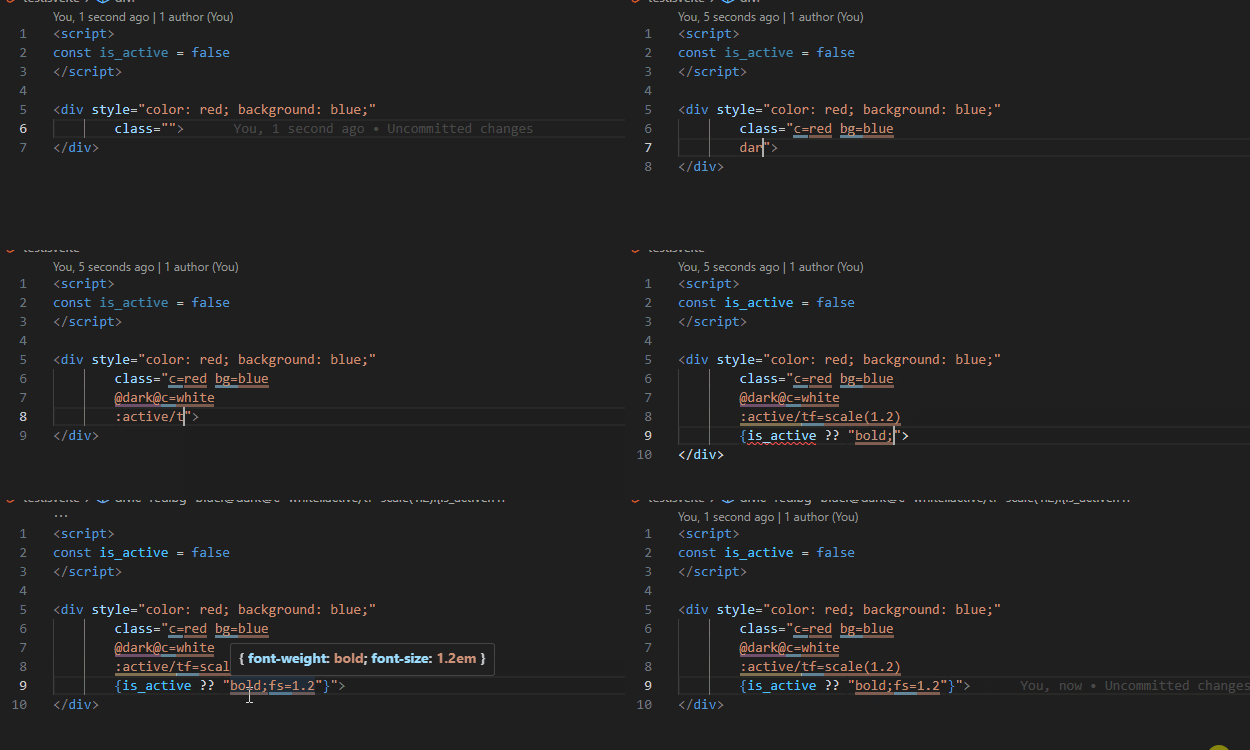
Intellisense Click CSS — syntax highlighting, hover CSS preview, shorthand autocomplete.
Grammar
Any class starting with - or a lowercase letter a–z is parsed and injected into a <style> tag. Classes without : or =, or with unbalanced ', ", (), or a trailing \, are silently ignored.
| Syntax | Meaning |
|---|---|
_ | space |
= | : |
trailing ! | boost specificity (stackable: !!, !!!, …) |
<selector>/<style> | selector-scoped rule |
@<query>@<style> | media query (@media prepended automatically) |
@@<at-rule>@<style> | raw at-rule |
& in query | and |
<key>=<value> in query | (<key>:<value>) |
--var in value | var(--var) |
calc(a+b) | spaces auto-inserted around + / - |
Basic styles
<html class="color:red;background:blue new-property:new-value">
.color\:red;background\:blue { color: red; background: blue }
.new-property\:new-value { new-property: new-value }
Space and colon aliasing
<html class="margin=1px_5px">
.margin\=1px_5px { margin: 1px 5px }
Selectors
Use / as a delimiter in the format <selector>/<style>. Classes starting with a special character (not - or a–z) trigger selector-scoped rules. Note that > is escaped as > in HTML streaming — Click CSS handles this transparently.
<html class=":hover:after/width=100px _[type=number]/font-size=2em >div/color=#000">
.\:hover\:after\/width\=100px:hover:after { width: 100px }
._\[type\=number\]\/font-size\=2em [type=number] { font-size: 2em }
.\>div\/color\=\#000>div { color: #000 }
Priority (!)
Appending ! stacks [class] selectors to boost specificity — no !important needed, and overridable any number of times.
<html class="width=100px!! width=200px">
[class][class].width\=100px\!\! { width: 100px }  /* wins */
.width\=200px { width: 200px }
Media queries
<html class="@max-width=200px&min-width=100px@width=100px">
@media (max-width: 200px) and (min-width: 100px) {
  .\@max-width\=200px\&min-width\=100px\@width\=100px { width: 100px }
}
Use @@ to write a raw at-rule without the automatic @media prefix:
<html class="@@media_(max-width=200px)@width=100px">
@media (max-width: 200px) {
  .\@\@media_\(max-width\=200px\)\@width\=100px { width: 100px }
}
Dark mode via localStorage
<html class="@prefers-color-scheme=dark@color=white color=black">
<script>
  localStorage.setItem("THEME", "DARK") // replaces "prefers-color-scheme:dark" with "color"
  click() // rebuild styles
</script>
.color\=black { color: black }
@media (color) {
  .\@prefers-color-scheme\=dark\@color\=white { color: white }
}
CSS custom properties
<html class="background=--bgc">
.background\=--bgc { background: var(--bgc) }
calc() spacing
<html class="width=calc(100%-16px)">
.width\=calc\(100\%-16px\) { width: calc(100% - 16px) }
Shorthands
Click CSS ships with three categories of predefined shorthands. Value-only shorthands are the only ones parsed without requiring : or =.
<html class="flex @dark@c=white">
.flex { display: flex }
@media (prefers-color-scheme: dark) {
  .\@dark\@c\=white { color: white }
}
- Properties:
w→width,h→height,c→color,d→display, … - Values:
flex,grid,block,absolute,relative, … - Media conditions:
dark,sm,md,lg,xl,hover, …
Numeric values for dimension properties (e.g. border, width, gap) automatically append px. Change default_unit to switch to rem or any other unit.
<html class="w=100"><!-- width: 100px -->
CSS Reset
Click CSS injects a built-in reset at startup. Customize it via pure_style.
Performance
Click CSS achieves engine-level performance through three design choices:
1. Staged regex pipeline CSS parsing is composed as a series of O(n) string transformations — no backtracking, no complex capture groups. Each stage runs through the browser regex engine natively, bypassing the JS interpreter entirely.
2. Dual MutationObserver
Class attribute mutations directly iterate classList. Subtree mutations serialize the changed root to outerHTML and extract all class tokens in a single regex pass — no recursive DOM walking, no querySelectorAll.
3. Parse-phase execution
A <script> in <head> without defer or type="module" runs during HTML parsing. Initial CSS generation finishes before layout, absorbed into the browser's first style calculation — no extra reflow or repaint.
Runtime overhead is minimal: tokens are deduplicated with a Set, and the <style> element is only updated when new tokens appear.