Grey Hack Terminal UI
January 26, 2026 · View on GitHub
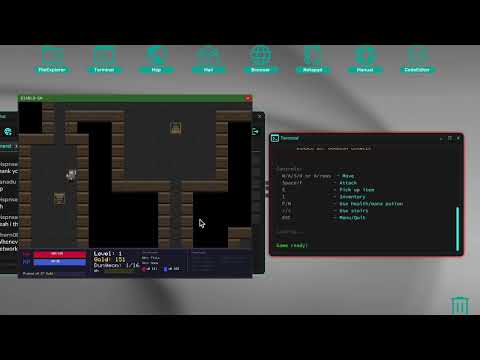
A BepInEx mod for Grey Hack that extends the terminal with a programmable pixel canvas and browser windows, controlled from GreyScript via #UI{ ... } blocks.
Each terminal gets its own scripting VM with persistent state, enabling games, visualizations, and custom UIs entirely from GreyScript.
Features
Canvas System
- Per-terminal pixel canvas windows with drawing primitives (pixels, lines, rectangles, circles, text)
- Persistent VM state across
printcalls - Built-in scripting language with variables, arithmetic, conditionals, and loops
Sound System
- MIDI-style note sequencing with sine wave synthesis
- Named sound instances with play/stop/loop controls
- Multiple sounds per terminal
Browser Integration (Optional)
- Ultralight-based HTML5/CSS3/JS browser windows
- Can replace the game's built-in PowerUI browser for better web compatibility
- Hardware-accelerated rendering on a dedicated background thread
Security
- Limits on variables, string length, loop iterations, and execution time
- Cooldowns on resource-intensive operations
- Sandboxed execution per terminal
Requirements
- Grey Hack (Steam)
- BepInEx 5 or 6
- .NET 6 SDK (for building from source)
Installation
- Install BepInEx for Grey Hack
- Copy the mod DLL to
[Grey Hack]/BepInEx/plugins/ - For browser features, ensure the native Ultralight libraries are present (included in release packages)
- Start Grey Hack
Quick Start
From GreyScript, print a #UI{ ... } block to control the canvas:
print("#UI{
    Canvas.setSize(200, 150)
    Canvas.setTitle(""Hello Canvas"")
    Canvas.show()
    Canvas.clear(""black"")
    Canvas.fillRect(""red"", 10, 10, 50, 50)
    Canvas.render()
}")
The scripting language inside #UI{ ... } supports variables, arithmetic, if/else, while loops, and math functions.
Canvas API
Window Control
| Function | Description |
|---|---|
Canvas.show() | Show the canvas window |
Canvas.hide() | Hide the canvas window |
Canvas.setSize(w, h) | Set canvas dimensions |
Canvas.setTitle(title) | Set window title |
Canvas.clear([color]) | Clear canvas (optional color) |
Canvas.render() | Flush drawing commands to display |
Drawing
| Function | Description |
|---|---|
Canvas.setPixel(color, x, y) | Draw a single pixel |
Canvas.drawLine(color, x1, y1, x2, y2) | Draw a line |
Canvas.drawRect(color, x, y, w, h) | Draw rectangle outline |
Canvas.fillRect(color, x, y, w, h) | Draw filled rectangle |
Canvas.drawCircle(color, x, y, r) | Draw circle outline |
Canvas.fillCircle(color, x, y, r) | Draw filled circle |
Canvas.drawText(color, x, y, text[, size]) | Draw text |
Properties
Canvas.width- current canvas widthCanvas.height- current canvas height
Colors can be named ("red"), hex ("#FF0000"), or RGB ("255,0,0").
Sound API
Create and manage MIDI-style sound sequences:
print("#UI{
    s = Sound.create(""melody"")
    s.addNote(60, 0.5)   // C4, 0.5 seconds
    s.addNote(64, 0.5)   // E4
    s.addNote(67, 0.5)   // G4
    s.setLoop(true)
    s.play()
}")
Manager Functions
| Function | Description |
|---|---|
Sound.create(name) | Create or get a sound instance |
Sound.get(name) | Get existing instance |
Sound.exists(name) | Check if instance exists |
Sound.destroy(name) | Remove an instance |
Instance Methods
| Method | Description |
|---|---|
s.addNote(pitch, duration[, velocity]) | Add a note (MIDI pitch 0-127, duration in seconds) |
s.play() | Start playback |
s.stop() | Stop playback |
s.clear() | Remove all notes |
s.setLoop(enabled) | Enable/disable looping |
s.isPlaying | Read-only: playback state |
s.loop | Read-only: loop state |
Browser API
Spawn browser windows from GreyScript (requires native libraries):
print("#UI{
    Browser.show()
    Browser.setSize(800, 600)
    Browser.setTitle(""My Browser"")
    Browser.loadHtml(""<html><body><h1>Hello</h1></body></html>"")
}")
| Function | Description |
|---|---|
Browser.show() | Show browser window |
Browser.hide() | Hide browser window |
Browser.setSize(w, h) | Set window dimensions |
Browser.setTitle(title) | Set window title |
Browser.loadHtml(html) | Load HTML content |
Browser.executeJs(code) | Execute JavaScript |
PowerUI Replacement
When enabled, the mod patches the game's HtmlBrowser to use Ultralight instead of PowerUI, providing better CSS3/JS support for in-game web pages (banks, shops, etc.).
Configure via BepInEx config:
Browser Enabled- master toggleBrowser UI Enabled- standalone browser APIPowerUI Replacement Enabled- replace game's built-in browser
Examples
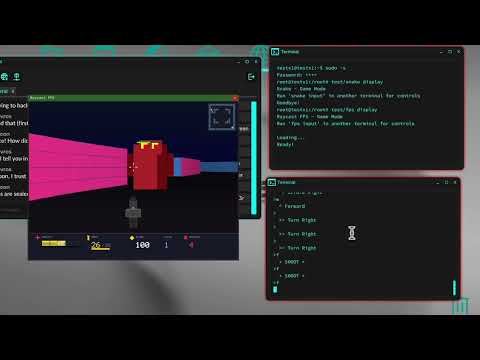
The examples directory contains complete game implementations:
- todo-app - Terminal-based todo list with state persistence
- snake-game - Classic snake with real-time rendering and dual-terminal input
- raycast-fps - 2.5D raycasting FPS with enemy AI
Building
From the src directory:
# BepInEx 5
dotnet build -c Release-BepInEx5

# BepInEx 6
dotnet build -c Release-BepInEx6
Run tests from the tests directory:
dotnet test
License
MIT License. See LICENSE for details.