ODIN: A Single Model for 2D and 3D Segmentation
September 14, 2026 · View on GitHub

ODIN: A Single Model for 2D and 3D Segmentation
Authors: Ayush Jain, Pushkal Katara, Nikolaos Gkanatsios, Adam W. Harley, Gabriel Sarch, Kriti Aggarwal, Vishrav Chaudhary, Katerina Fragkiadaki.
Official implementation of "ODIN: A Single Model for 2D and 3D Segmentation", CVPR 2024 (Highlight).
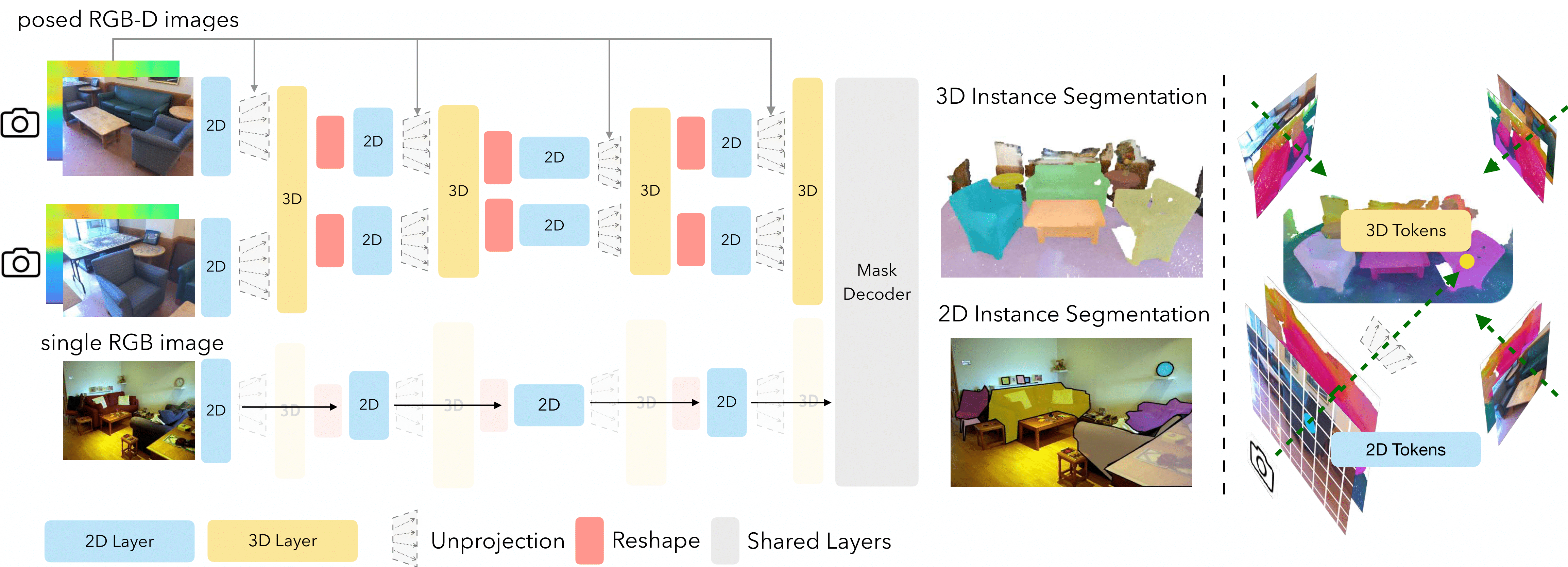
Installation
Make sure you are using a newer version of GCC>=9.2.0
export TORCH_CUDA_ARCH_LIST="6.0 6.1 6.2 7.0 7.2 7.5 8.0 8.6"
conda create -n odin python=3.10
conda activate odin
pip install torch==2.2.0+cu118 torchvision==0.17.0+cu118 --extra-index-url https://download.pytorch.org/whl/cu118
pip install torch-scatter -f https://data.pyg.org/whl/torch-2.2.0+cu118.html
pip install -r requirements.txt
sh init.sh
Data Preparation
Please refer to README in data_preparation folder for individual datasets. For eg. ScanNet data preparation README
Usage
We provide training scripts for various datasets in scripts folder. Please refer to these scripts for training ODIN.
- Modify
DETECTRON2_DATASETSto the path where you store the Posed RGB-D data. You might also need to change 3D Mesh point cloud paths (likeSCANNET_DATA_DIR) for each script. You may want to find these variables inodin/config.pyand permanently modify these paths. - If you want to train a model on 3D datasets, modify MODEL.WEIGHTS to load pre-trained 2D weights. We use weights from Mask2Former. You can download the Mask2Former-ResNet and Mask2Former-Swin Weights. MODEL.WEIGHTS can also accept link to the checkpoint as well, so you can directly supply these links as the argument value.
- ODIN Pre-trained weights are provided below in the Model-Zoo. Simply point to these weights using the MODEL.WEIGHTS to run inference. You would also need to add
--eval-onlyflag for running evaluation. SOLVER.IMS_PER_BATCHcontrols the batch size. This is effective batch size i.e. if you are running on 2 GPUs and the batch size is set to 6, you are using bs=3 per GPU.SOLVER.TEST_IMS_PER_BATCHcontrols the (effective) test batch size. Since, there are variable number of images in a scene, we use bs=1 per GPU at test time.MAX_FRAME_NUM=-1means that it loads all images in a scene for inference, which is our usual strategy. In some datasets, the images can simply be too large, thus there we actually set a maximum limit on images.INPUT.SAMPLING_FRAME_NUMcontrols the number of images we sample at test time -- for eg. in ScanNet, we train on 25 image chunks at training time.CHECKPOINT_PERIODis the number of iterations after which a checkpoint is saved.EVAL_PERIODspecifies the number of steps after which the eval is run.OUTPUT_DIRstores the checkpoints and the tensorboard logs.--resumeresumes the training from the last checkpoint stored inOUTPUT_DIR. If no checkpoint is present, it loads the weights fromMODEL.WEIGHTS
Model Zoo
ScanNet Instance Segmentation
| Dataset | mAP | mAP@25 | Config | Checkpoint |
|---|---|---|---|---|
| ScanNet val (ResNet50) | 47.8 | 83.6 | config | checkpoint |
| ScanNet val (Swin-B) | 50.0 | 83.6 | config | checkpoint |
| ScanNet test (Swin-B) | 47.7 | 86.2 | config | checkpoint |
ScanNet Semantic Segmentation
| Dataset | mIoU | Config | Checkpoint |
|---|---|---|---|
| ScanNet val (ResNet50) | 73.3 | config | checkpoint |
| ScanNet val (Swin-B) | 77.8 | config | checkpoint |
| ScanNet test (Swin-B) | 74.4 | config | checkpoint |
Joint 2D-3D on ScanNet and COCO
| Model | mAP (ScanNet) | mAP25 (ScanNet) | mAP (COCO) | Config | Checkpoint |
|---|---|---|---|---|---|
| ODIN | 49.1 | 83.1 | 41.2 | config | checkpoint |
ScanNet200 Instance Segmentation
| Dataset | mAP | mAP@25 | Config | Checkpoint |
|---|---|---|---|---|
| ScanNet200 val (ResNet50) | 25.6 | 36.9 | config | checkpoint |
| ScanNet200 val (Swin-B) | 31.5 | 45.3 | config | checkpoint |
| ScanNet200 test (Swin-B) | 27.2 | 39.4 | config | checkpoint |
ScanNet200 Semantic Segmentation
| Dataset | mIoU | Config | Checkpoint |
|---|---|---|---|
| ScanNet200 val (ResNet50) | 35.8 | config | checkpoint |
| ScanNet200 val (Swin-B) | 40.5 | config | checkpoint |
| ScanNet test (Swin-B) | 36.8 | config | checkpoint |
AI2THOR Semantic and Instance Segmentation
| Dataset | mAP | mAP@25 | mIoU | Config | Checkpoint |
|---|---|---|---|---|---|
| AI2THOR val (ResNet) | 63.8 | 80.2 | 71.5 | config | checkpoint |
| AI2RHOR val (Swin) | 64.3 | 78.6 | 71.4 | config | checkpoint |
Matterport3D Instance Segmentation
| Dataset | mAP | mAP@25 | Config | Checkpoint |
|---|---|---|---|---|
| Matterport3D val (ResNet) | 11.5 | 27.6 | config | checkpoint |
| Matterport val (Swin) | 14.5 | 36.8 | config | checkpoint |
Matterport3D Semantic Segmentation
| Dataset | mIoU | mAcc | Config | Checkpoint |
|---|---|---|---|---|
| Matterport3D val (ResNet) | 22.4 | 28.5 | config | checkpoint |
| Matterport3D val (Swin) | 28.6 | 38.2 | config | checkpoint |
S3DIS Instance Segmentation
| Dataset | mAP | mAP@25 | Config | Checkpoint |
|---|---|---|---|---|
| S3DIS Area5 (ResNet50-Scratch) | 36.3 | 61.2 | config | checkpoint |
| S3DIS Area5 (ResNet50-Fine-Tuned) | 44.7 | 67.5 | config | checkpoint |
| S3DIS Area5 (Swin-B) | 43.0 | 70.0 | config | checkpoint |
S3DIS Semantic Segmentation
| Dataset | mIoU | Config | Checkpoint |
|---|---|---|---|
| S3DIS (ResNet50) | 59.7 | config | checkpoint |
| Swin-B | 68.6 | config | checkpoint |
Training Logs:
Please find training logs for all models here
Citing ODIN
If you find ODIN useful in your research, please consider citing:
@inproceedings{jain2024odin,
  title={Odin: a single model for 2D and 3D segmentation},
  author={Jain, Ayush and Katara, Pushkal and Gkanatsios, Nikolaos and Harley, Adam W and Sarch, Gabriel and Aggarwal, Kriti and Chaudhary, Vishrav and Fragkiadaki, Katerina},
  booktitle={Proceedings of the IEEE/CVF Conference on Computer Vision and Pattern Recognition},
  pages={3564--3574},
  year={2024}
}
License
Shield: 
The majority of ODIN is licensed under a MIT License.
Acknowledgement
Parts of this code were based on the codebase of Mask2Former and Mask3D.