Azure Maps Leaflet plugin
March 6, 2026 · View on GitHub
A leafletjs plugin that makes it easy to overlay tile layers from the Azure Maps tile services.
Features:
- Authenticate using an Azure Maps subscription key or Azure Active Directory.
- Works with with Azure Public and Government clouds.
- Supports over 30 languages
- Supported layers:
- Road maps
- Main (
microsoft.base.road) - All layers with our main style. - Labels (
microsoft.base.labels.road) - Label data in our main style. - Hybrid (
microsoft.base.hybrid.road) - Road, boundary and label data in our main style. - Dark grayscale (
microsoft.base.darkgrey) - All layers with our dark grayscale style.
- Main (
- Imagery (
microsoft.imagery) - Traffic Flow
- absolute (
microsoft.traffic.flow.absolute) - reduced-sensitivity (
microsoft.traffic.flow.reduced-sensitivity) - relative (
microsoft.traffic.flow.relative) - relative-delay (microsoft.traffic.flow.relative-delay`)
- absolute (
- Traffic Incident
- night (
microsoft.traffic.incident.night) - s1 (
microsoft.traffic.incident.s1) - s2 (
microsoft.traffic.incident.s2) - s3 (
microsoft.traffic.incident.s3)
- night (
- Weather
- Infrared (
microsoft.weather.infrared.main) - Latest Infrared Satellite images shows clouds by their temperature. - Radar (
microsoft.weather.radar.main) - Latest weather radar images including areas of rain, snow, ice and mixed conditions.
- Infrared (
- Road maps
- Use time stamps with weather layers to get recent and forecast data.
- Adjust the line thickness in traffic flow layers.
Currently supports raster (i.e PNG) tiles, support for vector tiles is planned.
Samples
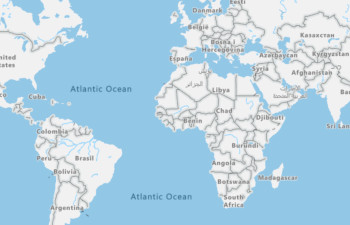
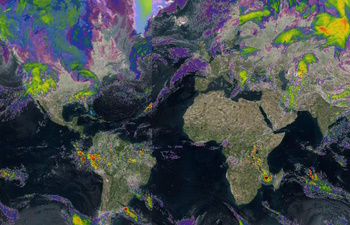
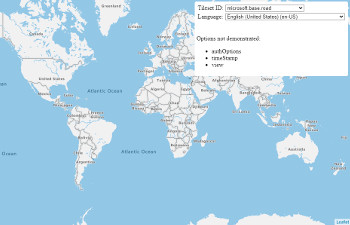
Show Azure Maps in Leaflet layer control
Getting started
Download the project and copy the azure-maps-leaflet JavaScript file from the dist folder into your project.
Usage
<!DOCTYPE html>
<html lang="en">
<head>
    <title></title>

    <meta charset="utf-8" />
    <meta http-equiv="x-ua-compatible" content="IE=Edge" />
    <meta name="viewport" content="width=device-width, initial-scale=1, shrink-to-fit=no" />

    <!-- Add references to the Leaflet JS map control resources. -->
    <link rel="stylesheet" href="https://unpkg.com/leaflet@1.3.1/dist/leaflet.css" integrity="sha512-Rksm5RenBEKSKFjgI3a41vrjkw4EVPlJ3+OiI65vTjIdo9brlAacEuKOiQ5OFh7cOI1bkDwLqdLw3Zg0cRJAAQ==" crossorigin="" />
    <script src="https://unpkg.com/leaflet@1.3.1/dist/leaflet.js" integrity="sha512-/Nsx9X4HebavoBvEBuyp3I7od5tA0UzAxs+j83KgC8PU0kgB4XiK4Lfe4y4cgBtaRJQEIFCW+oC506aPT2L1zw==" crossorigin=""></script>

    <!-- Add reference to the Azure Maps Leaflet plugin. -->
    <script src="../dist/azure-maps-leaflet.js"></script>

    <script type='text/javascript'>
        var map;

        function GetMap() {
            //Create a map instance.
            map = L.map('myMap', {
                center: [0, 0],
                zoom: 2
            });

           //Add authentication details for connecting to Azure Maps.
            var authOptions = {
                //Use Azure Active Directory authentication.
                authType: "anonymous",
                clientId: "04ec075f-3827-4aed-9975-d56301a2d663", //Your Azure Active Directory client id for accessing your Azure Maps account.
                getToken: function (resolve, reject, map) {
                    //URL to your authentication service that retrieves an Azure Active Directory Token.
                    var tokenServiceUrl = "https://azuremapscodesamples.azurewebsites.net/Common/TokenService.ashx";

                    fetch(tokenServiceUrl).then(r => r.text()).then(token => resolve(token));
                }

                //Alternatively, use an Azure Maps key. Get an Azure Maps key at https://azure.com/maps. NOTE: The primary key should be used as the key.
                //authType: 'subscriptionKey',
                //subscriptionKey: '<Your Azure Maps Key>'
            };

            //Use the static function for creating Azure Maps tile layer easily.
            L.tileLayer.azureMaps({ authOptions: authOptions }).addTo(map)

            /*
                //Alternatively, create an instance of the Azure Maps Tile Layer and add it to the map.
               var layer = new L.TileLayer.AzureMaps({
                    authOptions: authOptions,
                    tilesetId: 'microsoft.base.road',
                    language: 'fr-FR'
                });
                map.addLayer(layer);
            */
        }
    </script>
</head>
<body onload="GetMap()">
    <div id="myMap" style="position:relative;width:100%;height:600px;"></div>
</body>
</html>
If using Azure Government cloud, set the Azure Maps domain to 'atlas.azure.us' when creating the layer.
//When using the static function to create a layer.
L.tileLayer.azureMaps({
    authOptions: {
        azMapsDomain: 'atlas.azure.us'
        //Your other authentication options.
    }
}).addTo(map);

//When creating an instance of the Azure Maps tile layer class.
var layer = new L.TileLayer.AzureMaps({
    authOptions: {
        azMapsDomain: 'atlas.azure.us'
        //Your other authentication options.
    }
}});
More details on authentication options for Azure Maps is documented here.
API Reference
Static AzureMaps function
| Name | Return type | Description |
|---|---|---|
L.tileLayer.AzureMaps(options?: AzureMapsTileLayerOptions) | AzureMaps | Static function to create a tile layer that connects to the Azure Maps Render V2 service. |
AzureMaps class
Extends: L.TileLayer
Namespace: L.TileLayer
A tile layer that connects to the Azure Maps Render V2 service.
Contstructor
AzureMaps(options?: AzureMapsTileLayerOptions)
Methods
| Name | Return type | Description |
|---|---|---|
createTile(coords: leaflet.Coords, done: leaflet.DoneCallback) | Creates a map tile for the layer. | |
getAttribution() | string | Gets the attributions for the tile layer. |
getLanguage() | string | Gets the language code used by the layer. |
getTilesetId() | string | Gets the tileset ID of the layer. |
getTileUrl(coords: leaflet.Coords) | string | Gets the tile URL for the specified map tile coordinates. |
getTimeStamp() | string | Date | Gets the time stamp value setting. |
getTrafficFlowThickness() | number | Gets the traffic flow thickness setting. |
getView() | string | Gets the geopolitical view setting of the layer. |
setLanguage(language: string) | Sets the language code to append to the request. | |
setTilesetId(tilesetId: string) | Sets the tileset ID of the layer. | |
setTimeStamp(timeStamp: string | Date) | Sets the time stamp option of the request. | |
setTrafficFlowThickness(thickness: number) | Sets the traffic flow thickness setting. | |
setView(view: string) | Sets the geopolitical view setting of the layer. |
AuthenticationOptions interface
Authentication options for connecting to the Azure Maps tile services.
Properties
| Name | Type | Description |
|---|---|---|
aadAppId | string | The Azure AD registered app ID. This is the app ID of an app registered in your Azure AD tenant. Must be specified for AAD authentication type. |
aadInstance | string | The AAD instance to use for logging in. Can be optionally specified when using the AAD authentication type. By default the https://login.microsoftonline.com/ instance will be used. |
aadTenant | string | The AAD tenant that owns the registered app specified by aadAppId. Must be specified for AAD authentication type. |
authContext | AuthenticationContext | Optionally provide an existing AuthenticationContext from the ADAL.js library. This authentication context will be used to acquire the AAD token. Only used with the AAD authentication type. This auth context must be configured to use the same AAD app ID as this.aadAppId. If this is not provided all map instances will share their own private auth context. |
authType | 'subscriptionKey' | 'aad' | 'anonymous' | The authentication mechanism to be used. |
azMapsDomain | string | A URL string pointing to the domain of the Azure Maps service, default is 'atlas.microsoft.com'. Set to 'atlas.azure.us' if using the US Azure Government cloud. |
clientId | string | The Azure Maps client ID, This is an unique identifier used to identify the maps account. Preferred to always be specified, but must be specified for AAD and anonymous authentication types. |
getToken | (resolve: (value?: string) => void, reject: (reason?: any) => void) => void | A callback to use with the anonymous authentication mechanism. This callback will be responsible for resolving to a authentication token. E.g. fetching a CORS protected token from an endpoint. |
subscriptionKey | string | Subscription key from your Azure Maps account. Must be specified for subscription key authentication type. |
AzureMapsTileLayerOptions interface
Extends: L.TileLayerOptions
Options for an Azure Maps tile layer.
Properties
| Name | Type | Description |
|---|---|---|
authOptions | AuthenticationOptions | Required. Authentication options for connecting to Azure Maps. |
language | string | Language code. Supported languages Default: 'en-US' |
tilesetId | string | The tile set ID layer to load from the Azure Maps Render V2 service. Supported values:'microsoft.base.road','microsoft.base.darkgrey''microsoft.imagery''microsoft.weather.infrared.main''microsoft.weather.radar.main''microsoft.base.hybrid.road''microsoft.base.labels.road''microsoft.traffic.incident.night''microsoft.traffic.incident.s1''microsoft.traffic.incident.s2''microsoft.traffic.incident.s3''microsoft.traffic.flow.absolute''microsoft.traffic.flow.reduced-sensitivity''microsoft.traffic.flow.relative''microsoft.traffic.flow.relative-delay' Custom tileset ID's that return raster tiles that are 256x256 pixels in size can also be specified as a string. Default 'microsoft.base.road' |
timeStamp | string | Date | The desired date and time of the requested tile. This parameter must be specified in the standard date-time format (e.g. 2019-11-14T16:03:00-08:00), as defined by ISO 8601. This parameter is only supported when tilesetId parameter is set to microsoft.weather.infrared.main or microsoft.weather.radar.main. |
trafficFlowThickness | number | The thickness of lines when using the traffic flow tilesets. Default: 5 |
view | string | Geopolitical view of the map. Supported views Default: 'Auto' |
Alternative Option for Leaflet
This Leaflet plugin makes it easy to overlay tile layers from Azure Maps using any of the supported authentication methods available in Azure Maps; subscription key or Azure Active Directory (recommended). If you are only using a subscription key and don't plan to use Azure Active Directory, the following code can be used instead to easily overlay Azure Maps tile layers on a leaflet map without having to use this plugin.
<!DOCTYPE html>
<html lang="en">
<head>
    <title></title>

    <meta charset="utf-8" />
    <meta http-equiv="x-ua-compatible" content="IE=Edge" />
    <meta name="viewport" content="width=device-width, initial-scale=1, shrink-to-fit=no" />

    <!-- Add references to the Leaflet JS map control resources. -->
    <link rel="stylesheet" href="https://unpkg.com/leaflet@1.3.1/dist/leaflet.css"
          integrity="sha512-Rksm5RenBEKSKFjgI3a41vrjkw4EVPlJ3+OiI65vTjIdo9brlAacEuKOiQ5OFh7cOI1bkDwLqdLw3Zg0cRJAAQ=="
          crossorigin="" />

    <script src="https://unpkg.com/leaflet@1.3.1/dist/leaflet.js"
            integrity="sha512-/Nsx9X4HebavoBvEBuyp3I7od5tA0UzAxs+j83KgC8PU0kgB4XiK4Lfe4y4cgBtaRJQEIFCW+oC506aPT2L1zw=="
            crossorigin=""></script>

    <script type='text/javascript'>
        var map;

        function GetMap() {
            map = L.map('myMap').setView([0, 0], 2);

            //Create a tile layer that points to the Azure Maps tiles.
            L.tileLayer('https://atlas.microsoft.com/map/tile?subscription-key={subscriptionKey}&api-version=2.0&tilesetId={tilesetId}&zoom={z}&x={x}&y={y}&tileSize=256&language={language}&view={view}', {
                attribution: `© ${new Date().getFullYear()} TomTom, Microsoft`,

                //Add your Azure Maps key to the map SDK. Get an Azure Maps key at https://azure.com/maps. NOTE: The primary key should be used as the key.
                subscriptionKey: '<Your Azure Maps Key>',

                /*
                    Tileset ID specifies which data layers to render in the tiles. Can be:

                    'microsoft.base.road',
                    'microsoft.base.darkgrey',
                    'microsoft.imagery',
                    'microsoft.weather.infrared.main',
                    'microsoft.weather.radar.main',
                    'microsoft.base.hybrid.road',
                    'microsoft.base.labels.road '
                */
                tilesetId: 'microsoft.base.road',

                //The language of labels. Supported languages: https://docs.microsoft.com/en-us/azure/azure-maps/supported-languages
                language: 'en-US',

                //The regional view of the map. Supported views: https://aka.ms/AzureMapsLocalizationViews
                view: 'Auto'

            }).addTo(map);
        }
    </script>
</head>
<body onload="GetMap()">
    <div id="myMap" style="position:relative;width:100%;height:600px;"></div>
</body>
</html>
Related Projects
- Azure Maps Web SDK Open modules - A collection of open source modules that extend the Azure Maps Web SDK.
- Azure Maps Web SDK Samples
- Azure Maps Gov Cloud Web SDK Samples
- Azure Maps & Azure Active Directory Samples
- List of open-source Azure Maps projects
Additional Resources
Contributing
We welcome contributions. Feel free to submit code samples, file issues and pull requests on the repo and we'll address them as we can. Learn more about how you can help on our Contribution Rules & Guidelines.
You can reach out to us anytime with questions and suggestions using our communities below:
This project has adopted the Microsoft Open Source Code of Conduct. For more information, see the Code of Conduct FAQ or contact opencode@microsoft.com with any additional questions or comments.
License
MIT
See License for full license text.