Ballerina Gmail Connector
May 9, 2025 · View on GitHub




Gmail is a widely-used email service provided by Google LLC, enabling users to send and receive emails over the internet.
The ballerinax/googleapis.gmail package offers APIs to connect and interact with Gmail API endpoints, specifically based on Gmail API v1.
Setup guide
To use the Gmail connector, you must have access to the Gmail REST API through a Google Cloud Platform (GCP) account and a project under it. If you do not have a GCP account, you can sign up for one here.
Step 1: Create a Google Cloud Platform project
-
Open the Google Cloud Platform Console.
-
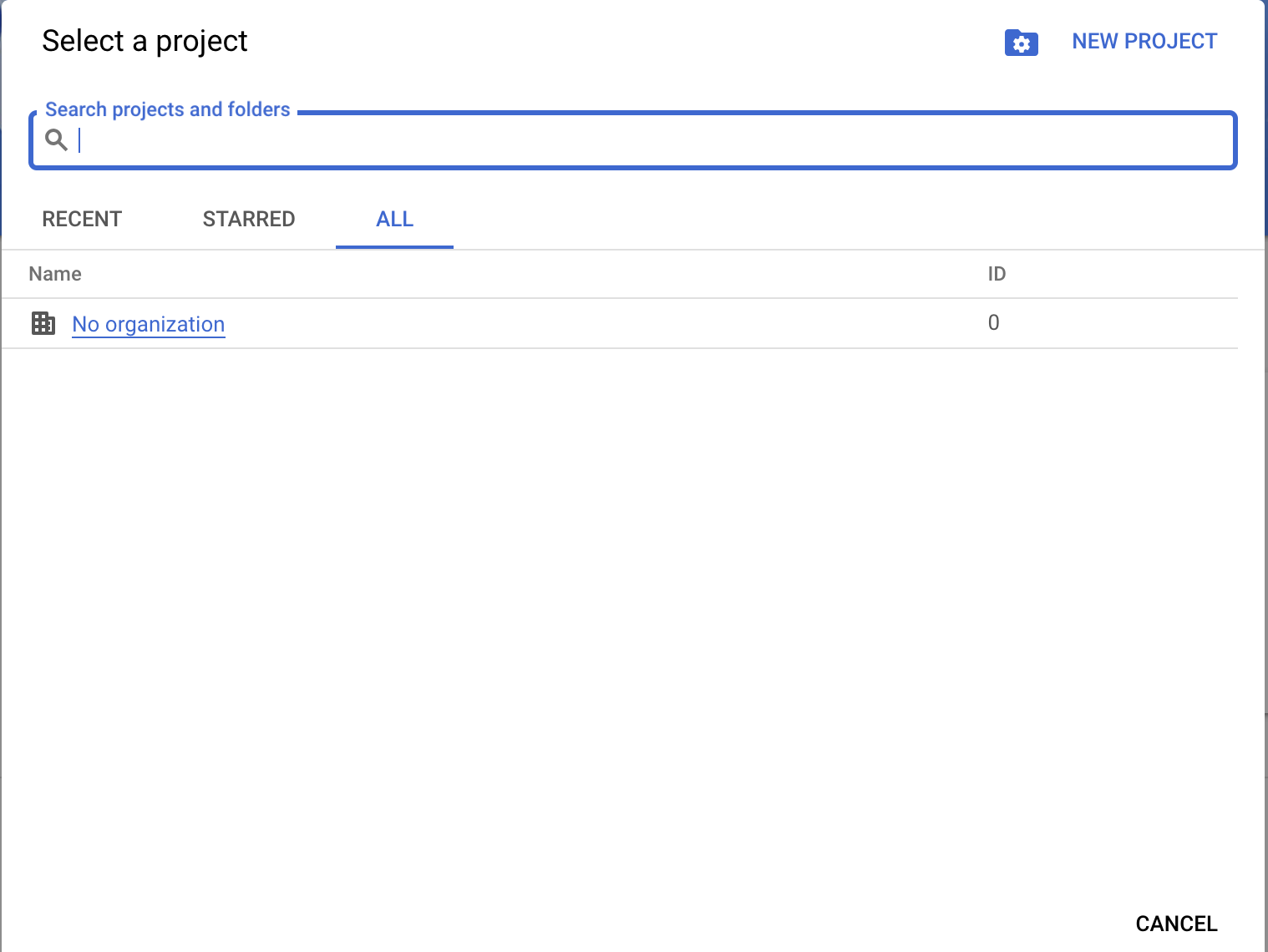
Click on the project drop-down menu and select an existing project or create a new one for which you want to add an API key.
<img src=https://raw.githubusercontent.com/ballerina-platform/module-ballerinax-googleapis.gmail/master/docs/setup/resources/gcp-console-project-view.png alt="GCP Console Project View" width="50%">
Step 2: Enable Gmail API
-
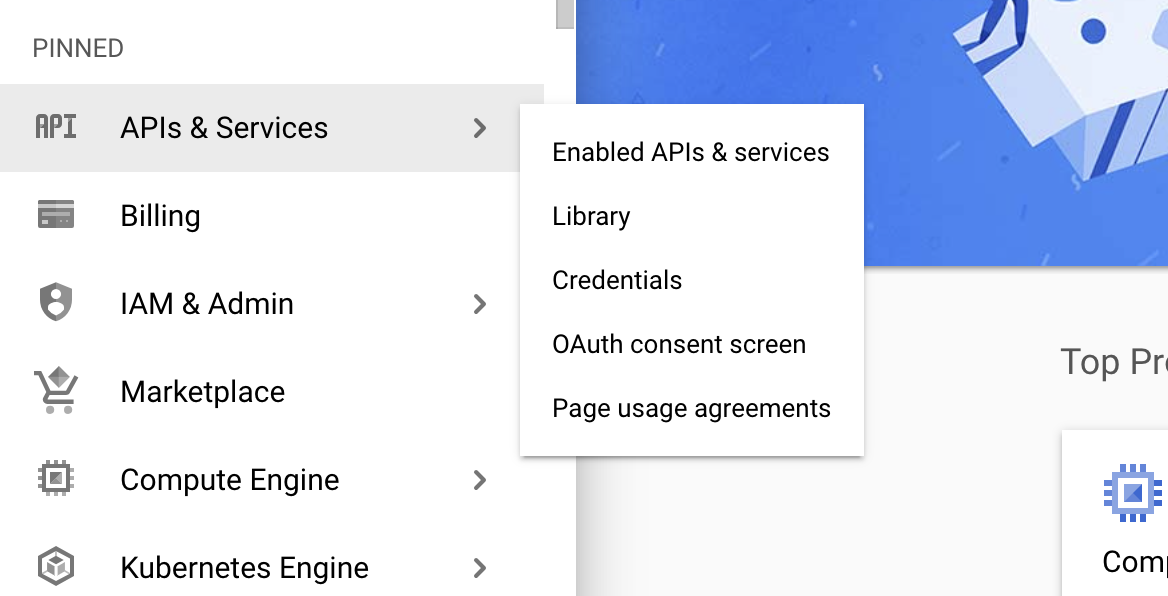
Navigate to the Library tab and enable the Gmail API.
<img src=https://raw.githubusercontent.com/ballerina-platform/module-ballerinax-googleapis.gmail/master/docs/setup/resources/enable-gmail-api.png alt="Enable Gmail API" width="50%">
Step 3: Configure OAuth consent
-
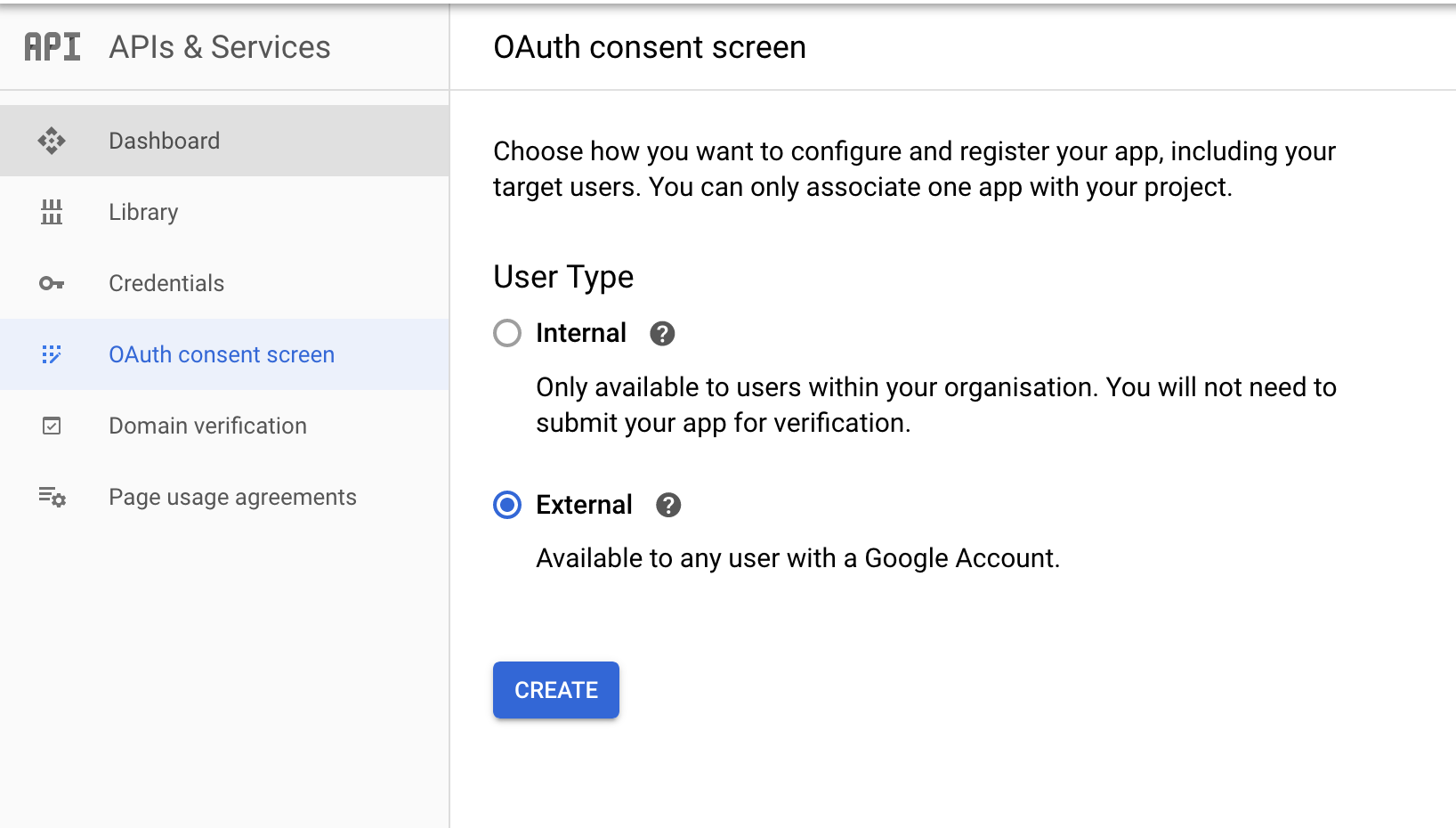
Click on the OAuth consent screen tab in the Google Cloud Platform console.
<img src=https://raw.githubusercontent.com/ballerina-platform/module-ballerinax-googleapis.gmail/master/docs/setup/resources/consent-screen.png alt="Consent Screen" width="50%">
-
Provide a name for the consent application and save your changes.
Step 4: Create OAuth client
-
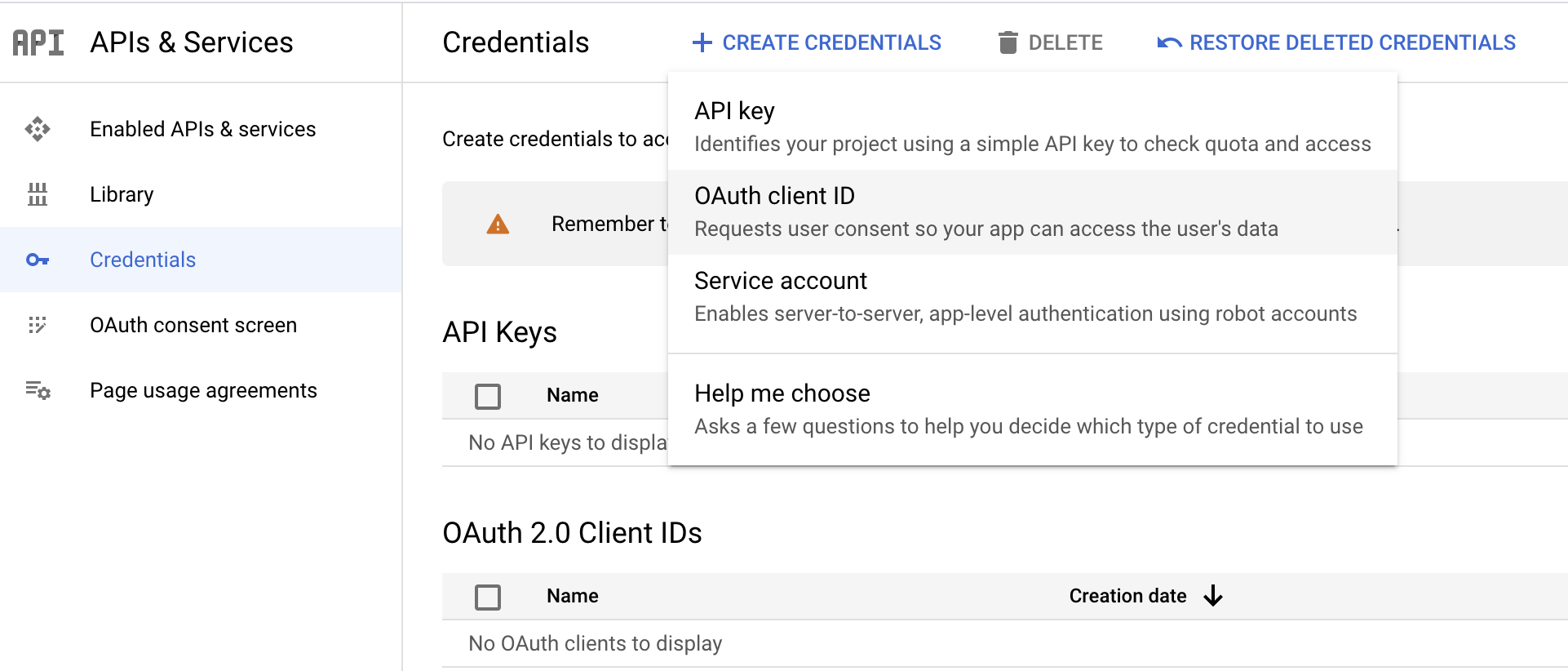
Navigate to the Credentials tab in your Google Cloud Platform console.
-
Click on Create credentials and select OAuth client ID from the dropdown menu.
<img src=https://raw.githubusercontent.com/ballerina-platform/module-ballerinax-googleapis.gmail/master/docs/setup/resources/create-credentials.png alt="Create Credentials" width="50%">
-
You will be directed to the Create OAuth client ID screen, where you need to fill in the necessary information as follows:
Field Value Application type Web Application Name GmailConnector Authorized Redirect URIs https://developers.google.com/oauthplayground -
After filling in these details, click on Create.
-
Make sure to save the provided Client ID and Client secret.
Step 5: Get the Access and Refresh token
Note: It is recommended to use the OAuth 2.0 playground to obtain the tokens.
-
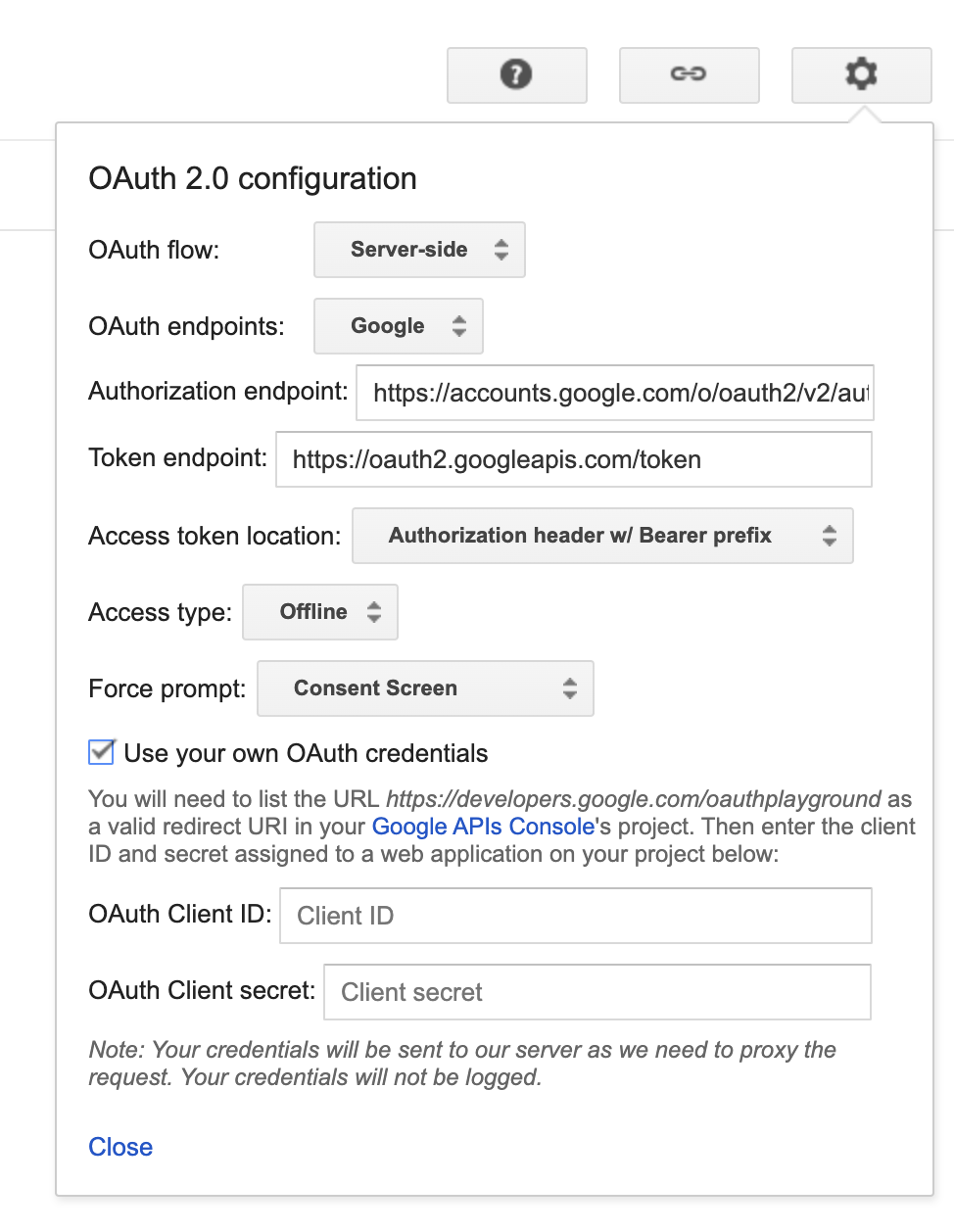
Configure the OAuth playground with the OAuth client ID and client secret.
<img src=https://raw.githubusercontent.com/ballerina-platform/module-ballerinax-googleapis.gmail/master/docs/setup/resources/oauth-playground.png alt="OAuth Playground" width="50%">
-
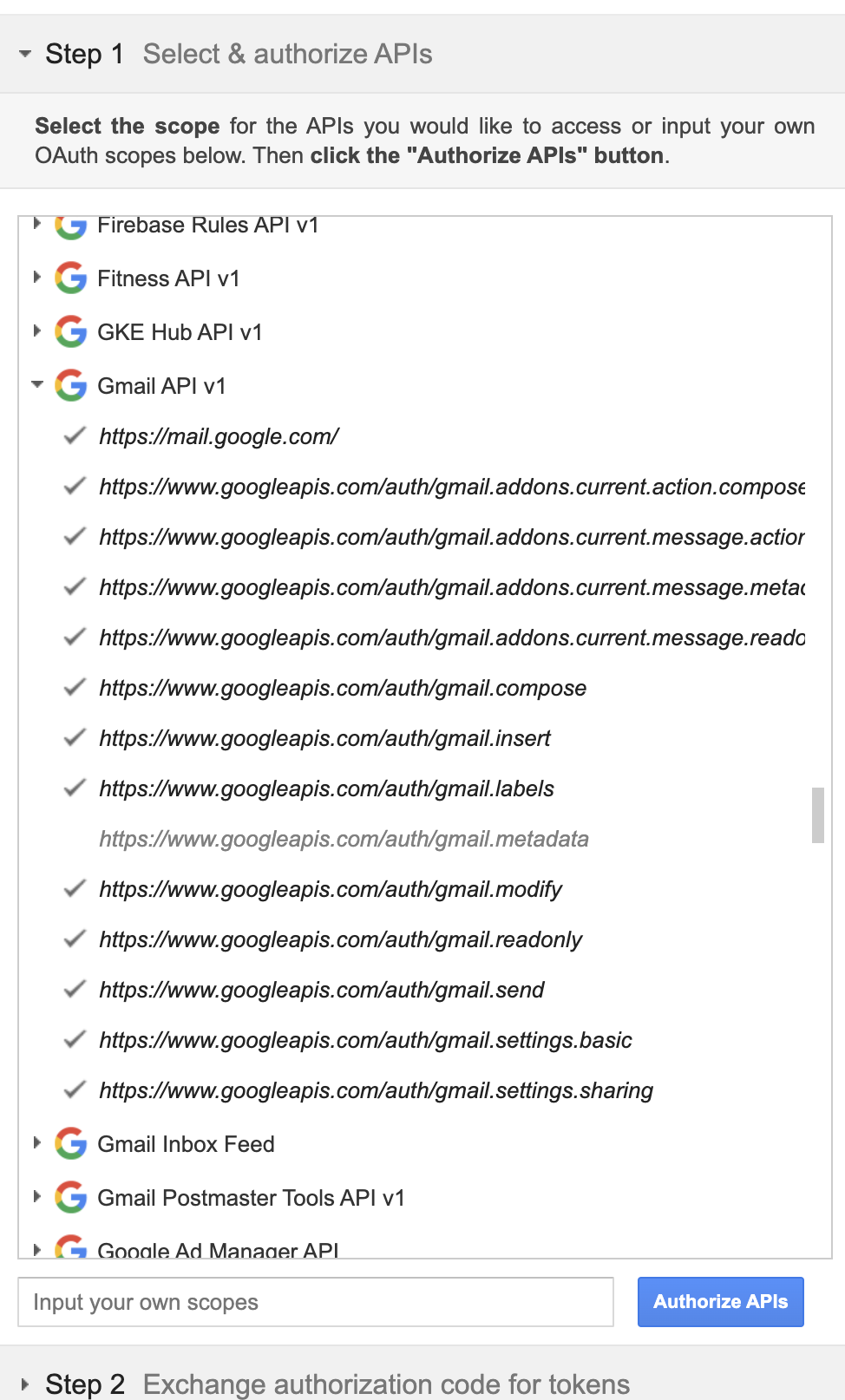
Authorize the Gmail APIs (Select all except the metadata scope).
<img src=https://raw.githubusercontent.com/ballerina-platform/module-ballerinax-googleapis.gmail/master/docs/setup/resources/authorize-apis.png alt="Authorize APIs" width="50%">
-
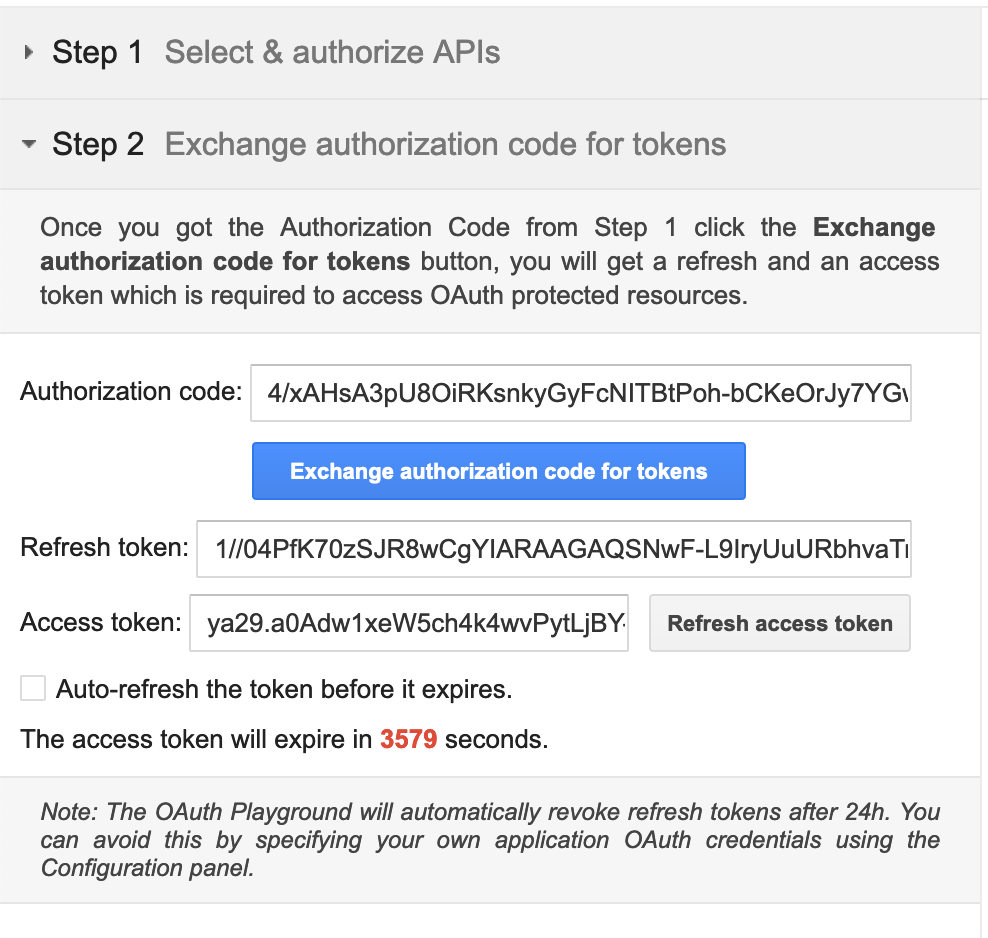
Exchange the authorization code for tokens.
<img src=https://raw.githubusercontent.com/ballerina-platform/module-ballerinax-googleapis.gmail/master/docs/setup/resources/exchange-tokens.png alt="Exchange Tokens" width="50%">
Quickstart
To use the gmail connector in your Ballerina application, modify the .bal file as follows:
Step 1: Import the module
Import the gmail module.
import ballerinax/googleapis.gmail;
Step 2: Instantiate a new connector
Create a gmail:ConnectionConfig with the obtained OAuth2.0 tokens and initialize the connector with it.
configurable string refreshToken = ?;
configurable string clientId = ?;
configurable string clientSecret = ?;

gmail:Client gmail = check new gmail:Client(
    config = {
        auth: {
            refreshToken,
            clientId,
            clientSecret
        }
    }
);
Step 3: Invoke the connector operation
Now, utilize the available connector operations.
Get unread emails in INBOX
gmail:MessageListPage messageList = check gmail->/users/me/messages(q = "label:INBOX is:unread");
Send email
gmail:MessageRequest message = {
    to: ["<recipient>"],
    subject: "Scheduled Maintenance Break Notification",
    bodyInHtml: string `<html>
                            <head>
                                <title>Scheduled Maintenance</title>
                            </head>
                        </html>`;
};

gmail:Message sendResult = check gmail->/users/me/messages/send.post(message);
Step 4: Run the Ballerina application
bal run
Examples
The gmail connector provides practical examples illustrating usage in various scenarios. Explore these examples, covering use cases like sending emails, retrieving messages, and managing labels.
-
Process customer feedback emails - Manage customer feedback emails by processing unread emails in the inbox, extracting details, and marking them as read.
-
Send maintenance break emails - Send emails for scheduled maintenance breaks
-
Automated Email Responses - Retrieve unread emails from the Inbox and subsequently send personalized responses.
-
Email Thread Search Search for email threads based on a specified query.
Issues and projects
The Issues and Projects tabs are disabled for this repository as this is part of the Ballerina library. To report bugs, request new features, start new discussions, view project boards, etc., visit the Ballerina library parent repository.
This repository only contains the source code for the package.
Build from the source
Prerequisites
-
Download and install Java SE Development Kit (JDK) version 17. You can download it from either of the following sources:
Note: After installation, remember to set the
JAVA_HOMEenvironment variable to the directory where JDK was installed. -
Download and install Ballerina Swan Lake.
-
Download and install Docker.
Note: Ensure that the Docker daemon is running before executing any tests.
Build options
Execute the commands below to build from the source.
-
To build the package:
./gradlew clean build -
To run the tests:
./gradlew clean test -
To build the without the tests:
./gradlew clean build -x test -
To run tests against different environment:
./gradlew clean test -Pgroups=<Comma separated groups/test cases>Tip: The following groups of test cases are available.
Groups Environment mock Mock server gmail Gmail API -
To debug package with a remote debugger:
./gradlew clean build -Pdebug=<port> -
To debug with the Ballerina language:
./gradlew clean build -PbalJavaDebug=<port> -
Publish the generated artifacts to the local Ballerina Central repository:
./gradlew clean build -PpublishToLocalCentral=true -
Publish the generated artifacts to the Ballerina Central repository:
./gradlew clean build -PpublishToCentral=true
Contribute to Ballerina
As an open-source project, Ballerina welcomes contributions from the community.
For more information, go to the contribution guidelines.
Code of conduct
All the contributors are encouraged to read the Ballerina Code of Conduct.
Useful links
- For more information go to the
googleapis.gmailpackage. - For example demonstrations of the usage, go to Ballerina By Examples.
- Chat live with us via our Discord server.
- Post all technical questions on Stack Overflow with the #ballerina tag.