Ballerina Salesforce Connector
April 20, 2026 · View on GitHub






Salesforce Sales Cloud is a widely used CRM software provided by Salesforce Inc. Sales Cloud offers various APIs that enable developers to extend and integrate the platform with other applications, services, and systems.
Ballerina Salesforce connector utilizes the Salesforce REST API, Bulk API, Bulk API V2, APEX REST API, and SOAP API for convenient data manipulation. The Salesforce connector allows you to perform CRUD operations for SObjects, query using SOQL, search using SOSL, and describe SObjects and organizational data through the Salesforce REST API and SOAP API. Also, it supports accessing APEX endpoints using the APEX REST API and adding bulk data jobs and batches via the Salesforce Bulk and Bulk V2 APIs. For more information about configuration and operations, go to the module(s).
- salesforce
- Perform Salesforce operations programmatically through the Salesforce REST API. Users can perform CRUD operations for SObjects, query using SOQL, search using SOSL and describe SObjects and organizational data. Accessing APEX endpoints and Bulk V2 jobs and operations can also be done using this module.
- salesforce.bulk
- Perform Salesforce bulk operations programmatically through the Salesforce Bulk API. Users can perform CRUD operations in bulk for Salesforce.
- salesforce.soap
- Perform Salesforce operations programmatically through the Salesforce SOAP API, which is not supported by the Salesforce REST API. The connector is comprised of limited operations on SOAP API.
- salesforce (Listener / RTR)
- Refresh Token Rotation (RTR): Automatically captures and stores rotated refresh tokens issued by Salesforce on every token exchange, preventing
invalid_grantfailures in long-running integrations. Implements a proactive reconnect scheduler that refreshes the CometD connection before the access token expires, and exposes a pluggableTokenStoreinterface for multi-replica coordination.
- Refresh Token Rotation (RTR): Automatically captures and stores rotated refresh tokens issued by Salesforce on every token exchange, preventing
Setup guide
-
Create a Salesforce account with the REST capability.
-
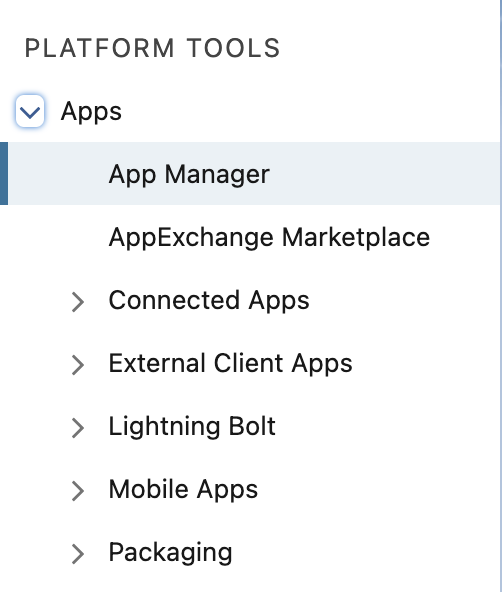
Go to Setup --> Apps --> App Manager
<img src=https://raw.githubusercontent.com/ballerina-platform/module-ballerinax-salesforce/master/docs/setup/resources/side-panel.png alt="Setup Side Panel" style="border:1px solid #000000; width:40%">
-
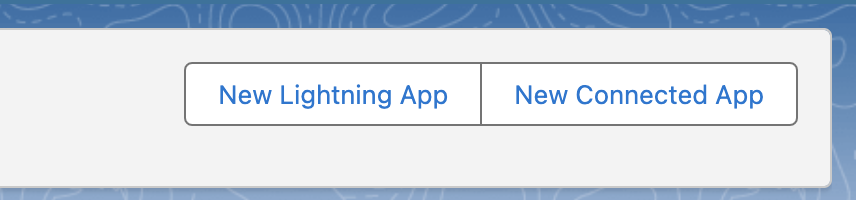
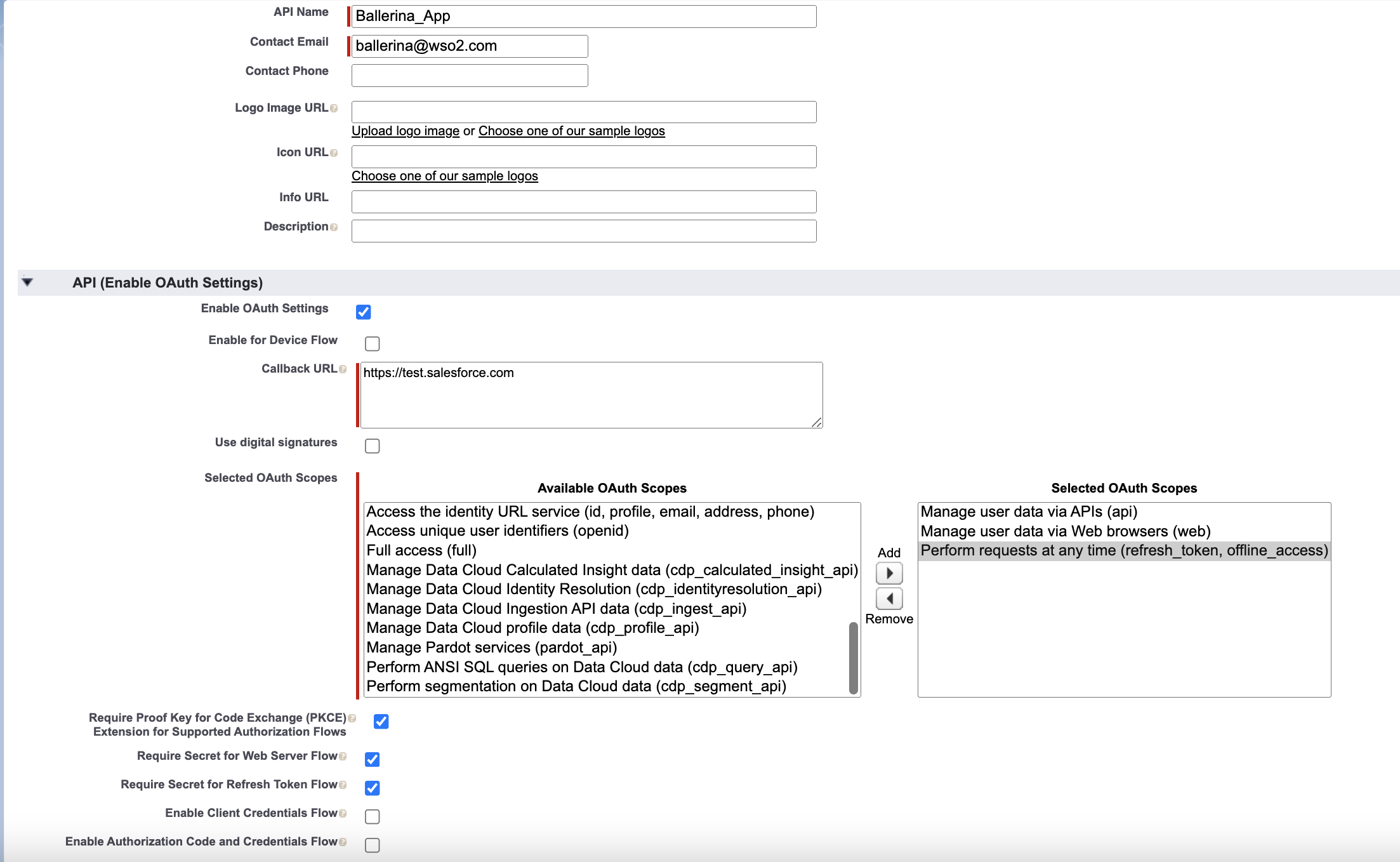
Create a New Connected App.
<img src=https://raw.githubusercontent.com/ballerina-platform/module-ballerinax-salesforce/master/docs/setup/resources/create-connected-apps.png alt="Create Connected Apps" style="border:1px solid #000000; width:50%">
- Here we will be using https://test.salesforce.com as we are using sandbox enviorenment. Users can use https://login.salesforce.com for normal usage.
<img src=https://raw.githubusercontent.com/ballerina-platform/module-ballerinax-salesforce/master/docs/setup/resources/create_connected%20_app.png alt="Create Connected Apps" style="border:1px solid #000000; width:100%">
-
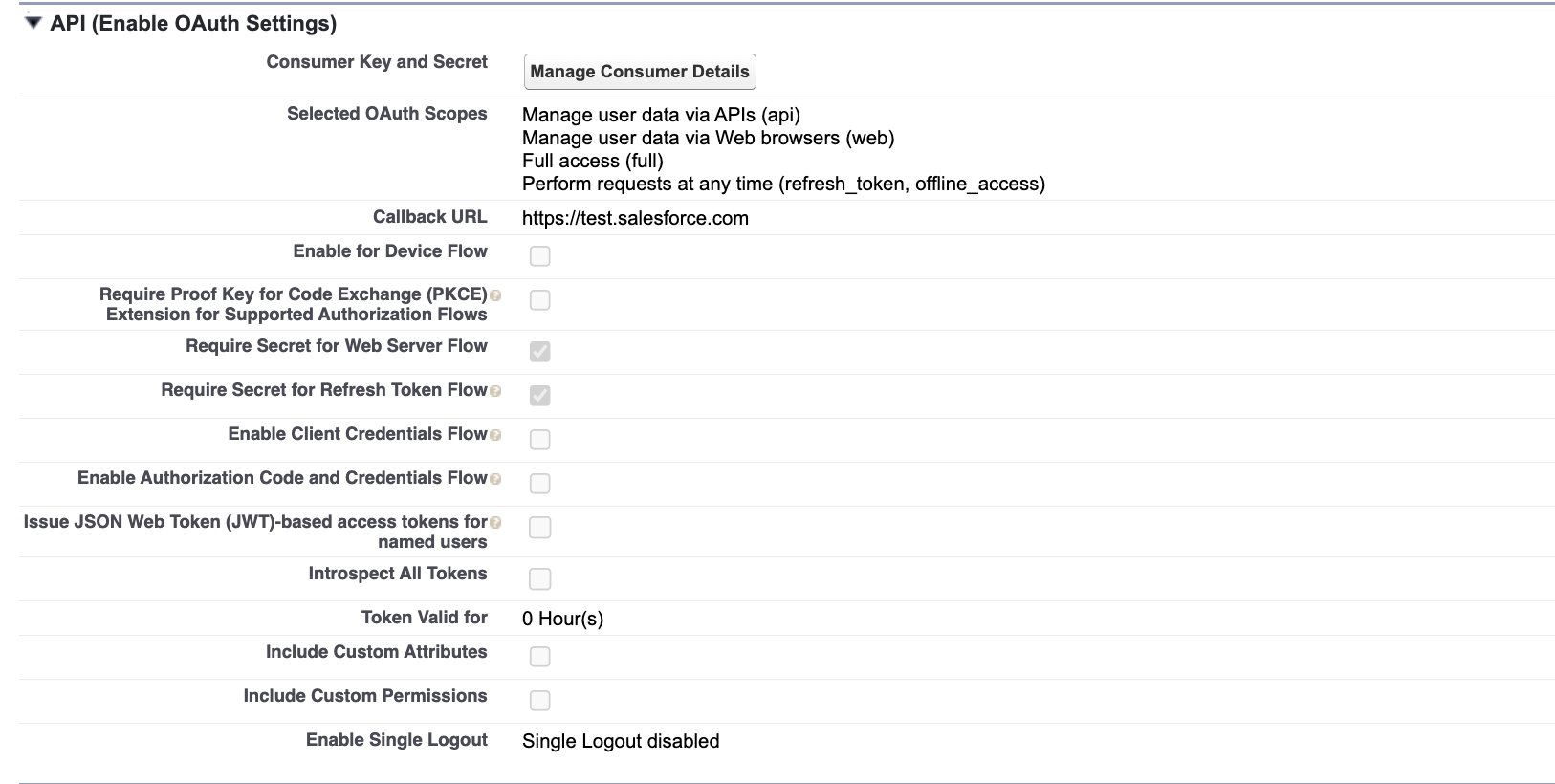
After the creation user can get consumer key and secret through clicking on the
Manage Consume Detailsbutton.<img src=https://raw.githubusercontent.com/ballerina-platform/module-ballerinax-salesforce/master/docs/setup/resources/crdentials.png alt="Consumer Secrets" style="border:1px solid #000000; width:100%">
-
Next step would be to get the token.
- Log in to salesforce in your prefered browser and enter the following url.
https://<YOUR_INSTANCE>.salesforce.com/services/oauth2/authorize?response_type=code&client_id=<CONSUMER_KEY>&redirect_uri=<REDIRECT_URL>
-
Allow access if an alert pops up and the browser will be redirected to a Url like follows.
https://login.salesforce.com/?code=<ENCODED_CODE> -
The code can be obtained after decoding the encoded code
- Get Access and Refresh tokens
-
Following request can be sent to obtain the tokens.
curl -X POST https://<YOUR_INSTANCE>.salesforce.com/services/oauth2/token?code=<CODE>&grant_type=authorization_code&client_id=<CONSUMER_KEY>&client_secret=<CONSUMER_SECRET>&redirect_uri=https://test.salesforce.com/ -
Tokens can be obtained from the response.
-
Quickstart
To use the Salesforce connector in your Ballerina application, modify the .bal file as follows:
Step 1: Import connector
Import the ballerinax/salesforce package into the Ballerina project.
import ballerinax/salesforce;
The TokenStore, TokenData, and InMemoryTokenStore types are all part of the root ballerinax/salesforce package — no additional import is needed.
Step 2: Create a new connector instance
Create a salesforce:ConnectionConfig with the obtained OAuth2 tokens and initialize the connector with it.
salesforce:ConnectionConfig config = {
    baseUrl: baseUrl,
    auth: {
        clientId: clientId,
        clientSecret: clientSecret,
        refreshToken: refreshToken,
        refreshUrl: refreshUrl
    }
};

salesforce:Client salesforce = new(config);
Step 3: Invoke connector operation
- Now you can utilize the available operations. Note that they are in the form of remote operations.
Following is an example on how to create a record using the connector.
salesforce:CreationResponse response = check
    baseClient->create("Account", {
                        "Name": "IT World",
                        "BillingCity": "New York"
                        });
- To integrate the Salesforce listener into your Ballerina application, update the .bal file as follows:
Create an instance of salesforce:Listener using your Salesforce username, password, security token, and subscribe channel name.
import ballerinax/salesforce;

salesforce:ListenerConfig listenerConfig = {
    auth: {
        username: "username",
        password: "password" + "security token"
    }
};
listener salesforce:Listener eventListener = new (listenerConfig);
Implement the listener’s remote functions and specify the channel name to be subscribed to as the service name.
import ballerina/io;
import ballerinax/salesforce;

salesforce:ListenerConfig listenerConfig = {
    auth: {
        username: "username",
        password: "password" + "security token"
    }
};
listener salesforce:Listener eventListener = new (listenerConfig);

service "/data/ChangeEvents" on eventListener {
    remote function onCreate(salesforce:EventData payload) {
        io:println("Created " + payload.toString());
    }

    remote isolated function onUpdate(salesforce:EventData payload) {
        io:println("Updated " + payload.toString());
    }

    remote function onDelete(salesforce:EventData payload) {
        io:println("Deleted " + payload.toString());
    }

    remote function onRestore(salesforce:EventData payload) {
        io:println("Restored " + payload.toString());
    }
}
Alternatively, to use OAuth2 with the REST-based listener (recommended for long-running integrations with Refresh Token Rotation):
import ballerina/http;
import ballerinax/salesforce;

salesforce:RestBasedListenerConfig listenerConfig = {
    baseUrl: "<SALESFORCE_BASE_URL>",
    auth: <http:OAuth2RefreshTokenGrantConfig>{
        clientId: "<CLIENT_ID>",
        clientSecret: "<CLIENT_SECRET>",
        refreshToken: "<REFRESH_TOKEN>",
        refreshUrl: "<TOKEN_URL>",
        defaultTokenExpTime: 3600  // Match your org's Session Timeout setting
    }
    // Optional: plug in a custom TokenStore for multi-replica deployments
    // tokenStore: myRedisTokenStore
};
listener salesforce:Listener eventListener = new (listenerConfig);
- Integrate custom SObject types
To seamlessly integrate custom SObject types into your Ballerina project, you have the option to either generate a package using the Ballerina Open API tool or utilize the ballerinax/salesforce.types module. Follow the steps given here based on your preferred approach.
import ballerinax/salesforce.types;

public function main() returns error? {
    types:AccountSObject accountRecord = {
        Name: "IT World",
        BillingCity: "New York"
    };

    salesforce:CreationResponse res = check salesforce->create("Account", accountRecord);
}
- Use following command to compile and run the Ballerina program.
bal run
Refresh Token Rotation (RTR)
When Salesforce is configured with Refresh Token Rotation, each token exchange invalidates the previous refresh token and issues a new one. The connector handles this automatically — no code changes required for single-replica deployments.
What the connector does automatically:
- Captures the new refresh token from every Salesforce token response
- Proactively refreshes the CometD connection before the access token expires
- Detects permanent failures (
invalid_grant) and shuts down cleanly with a clear error log
Salesforce org configuration required:
- Enable Refresh Token Rotation on your Connected App (Setup → App Manager → Your App → Edit Policies → Enable Refresh Token Rotation)
- Set the refresh token policy to "Expire refresh token if not used for N" (idle/sliding window) — this allows the connector to run indefinitely. The "Expire after N" (absolute) policy will stop the connector at the configured deadline regardless of activity.
- Set
defaultTokenExpTimein your config to match your org's Session Timeout value (Setup → Security → Session Settings → Timeout Value). Salesforce does not returnexpires_inin its token response — this value is required for the connector to calculate expiry correctly.
For multi-replica deployments, implement the salesforce:TokenStore interface to share token state across replicas:
import ballerinax/salesforce;

isolated class MyRedisTokenStore {
    *salesforce:TokenStore;
    // implement acquireLock, releaseLock, getTokenData, setTokenData, clearTokenData
}
Then pass your store to the listener config:
salesforce:RestBasedListenerConfig listenerConfig = {
    baseUrl: "<SALESFORCE_BASE_URL>",
    auth: <http:OAuth2RefreshTokenGrantConfig>{ ... },
    tokenStore: new MyRedisTokenStore()
};
For a complete reference implementation and architectural guide, see examples/listener_usecases.
Cloud-Native Listener: Multi-Replica Deployments
Salesforce CDC listeners running in Kubernetes or any horizontally-scaled environment face a critical reliability hazard known as the Token Replay Attack. When Salesforce is configured with Refresh Token Rotation (RTR), each token exchange invalidates the previous refresh token and issues a new one. If two replicas attempt to refresh at the same time using the same refresh token, the second request will arrive after the token has already been rotated — Salesforce returns 400 invalid_grant and permanently revokes the entire token family, killing all replicas.
How the connector solves this
The salesforce:Listener uses a distributed double-checked locking protocol coordinated through a pluggable salesforce:TokenStore:
- Acquire an advisory lock (Redis
SETNX, database row lock, etc.) before calling the Salesforce token endpoint. - Double-check the shared store — a peer replica may have already refreshed while you were waiting for the lock. If so, adopt its result and skip the HTTP call entirely.
- Refresh (only one replica), write the new token data to the shared store, then release the lock.
- Proactively reconnect CometD before the access token expires using an internal
task:scheduleOneTimeJob, eliminating the reactive 401 cycle.
Deployment models
| Deployment | Configuration |
|---|---|
| Single replica / local dev | No tokenStore required — uses the built-in InMemoryTokenStore |
| Multi-replica (K8s) | Set tokenStore to a salesforce:TokenStore backed by Redis, a relational database, or any shared store |
TokenStore contract
public type TokenStore isolated object {
    public isolated function acquireLock(string lockKey, int ttlSeconds) returns boolean|error;
    public isolated function releaseLock(string lockKey) returns error?;
    public isolated function getTokenData(string key) returns salesforce:TokenData?|error;
    public isolated function setTokenData(string key, salesforce:TokenData data) returns error?;
    public isolated function clearTokenData(string key) returns error?;
};
See examples/listener_usecases for a fully annotated single-node and distributed listener example.
Examples
The salesforce connector provides practical examples illustrating usage in various scenarios. Explore these examples below, covering use cases like creating sObjects, retrieving records, and executing bulk operations.
-
Salesforce REST API use cases - How to employ REST API of Salesforce to carryout various tasks.
-
Salesforce Bulk API use cases - How to employ Bulk API of Salesforce to execute Bulk jobs.
-
Salesforce Bulk v2 API use cases - How to employ Bulk v2 API to execute an ingest job.
-
Salesforce APEX REST API use cases - How to employ APEX REST API to create a case in Salesforce.
-
Salesforce Listener use cases - How to use the CDC Listener with Refresh Token Rotation for single-node and multi-replica Kubernetes deployments.
Report Issues
To report bugs, request new features, start new discussions, view project boards, etc., go to the Ballerina library parent repository.
Building from the source
Setting up the prerequisites
-
Download and install Java SE Development Kit (JDK) version 21. You can install either OpenJDK or Oracle JDK.
Note: Set the JAVA_HOME environment variable to the path name of the directory into which you installed JDK.
-
Download and install Ballerina Swan Lake
Building the source
Execute the commands below to build from the source.
- To build Java dependency
./gradlew build -
- To build the package:
bal build ./ballerina- To run tests after build:
bal test ./ballerina
Build options
Execute the commands below to build from the source.
-
To build the package:
./gradlew clean build -
To run the tests:
./gradlew clean test -
To build the without the tests:
./gradlew clean build -x test -
To debug package with a remote debugger:
./gradlew clean build -Pdebug=<port> -
To debug with the Ballerina language:
./gradlew clean build -PbalJavaDebug=<port> -
Publish the generated artifacts to the local Ballerina Central repository:
./gradlew clean build -PpublishToLocalCentral=true -
Publish the generated artifacts to the Ballerina Central repository:
./gradlew clean build -PpublishToCentral=true
Contributing to Ballerina
As an open source project, Ballerina welcomes contributions from the community.
For more information, go to the contribution guidelines.
Code of conduct
All contributors are encouraged to read the Ballerina Code of Conduct.
Useful links
- Discuss code changes of the Ballerina project in ballerina-dev@googlegroups.com.
- Chat live with us via our Discord server.
- Post all technical questions on Stack Overflow with the #ballerina tag.