Slickflow
March 3, 2026 · View on GitHub
Current Version: NET8




1. 🤖 AI-Powered Workflow Automation
SlickFlow: Intelligent Workflow Automation with Large Language Models
Slickflow integrates cutting-edge Large Language Model (LLM) nodes directly into BPMN workflows, enabling advanced conversational reasoning, RAG (Retrieval-Augmented Generation), image understanding and other AI capabilities as first-class workflow steps.
This transforms traditional workflow systems into dynamic, AI-driven orchestration platforms.
1.1 Native LLM Node Integration
- Add LLM / RAG / Agent nodes into your process diagrams as easily as traditional service tasks.
- Orchestrate multi-step AI pipelines: prompt construction, tool calls, knowledge base retrieval, post-processing, persistence, notification, etc.
1.2 Multi-Provider LLM Support
Flexible integration with leading AI services:
- OpenAI API (GPT-4, GPT-3.5, and beyond)
- QianWen (Alibaba’s large language model)
- Extensible architecture for additional providers (DeepSeek, custom gateways, etc.)
1.3 Image Understanding & RAG
- Image classification & analysis directly through LLM nodes
- Retrieval-Augmented Generation (RAG): combine vector search / knowledge bases with LLM reasoning to provide grounded, up-to-date answers
1.4 AI Feature Reference
- Detailed article: Slickflow.AI – Large Language Model Integration
1.5 AI Demo (Key GIF)
AI Image Classification Process Demo

2. 🚀 Code-Defined Auto-Execution Engine
Besides designer-based processes, Slickflow provides a code-first auto-execution model based on Slickflow.Graph and WorkflowExecutor.
You can define workflows in C#, run them fully in memory, and let the engine automatically execute all steps without human interaction.
2.1 Code-First Workflow Definition
Use Slickflow.Graph.Model.Workflow to build BPMN-style flows programmatically:
using Slickflow.Graph.Model;

var wf = new Workflow("Order Process", "OrderProcess_Code");

wf.Start("Start")
  .ServiceTask("Validate Order", "Validate001", "ValidateOrder")   // LocalMethod
  .ServiceTask("Calculate Amount", "Calc001", "CalcAmount")       // LocalMethod
  .RagService("RAG Reply", "RAG001")                              // RAG AI node
  .LlmService("LLM Enrich", "LLM001")                             // General LLM node
  .ServiceTask<SaveOrderService>("Save Order", "Save001")         // Local service class
  .End("End");
Key points:
Workflowsupports rich node types:Start,Task,ServiceTask,RagService,LlmService,Agent,Parallels,Branch,End, etc.BuildInMemory()produces an in-memoryProcessEntitywithout touching the database.WorkflowExecutorExtensions.UseProcess(Workflow)binds this in-memory model to the runtime engine and caches it byProcessId:Version.
2.2 Auto-Execution with WorkflowExecutor
Auto-execution loop (conceptual):
- Start the process and create an instance.
- While there are executable activities:
- Collect next activities.
- Execute each activity (local method, service class, AI/RAG/LLM, external API, etc.).
- Move the process forward to the next activity.
- Return execution result (status, message, variables, AI response, etc.).
Typical code pattern:
using Slickflow.Engine.Executor;
using Slickflow.Engine.Core.Result;

var result = await new WorkflowExecutor()
    .UseApp("OrderApp-001", "OrderApp")
    .UseProcess(wf)                      // Use code-defined workflow
    .AddVariable("OrderId", "ORD-2025-001")
    .AddVariable("Quantity", "3")
    .AddVariable("UnitPrice", "99.50")
    .Run();
This mode is ideal for:
- ETL and data pipelines
- Backend batch / microservice orchestration
- AI agents and chat workflows
- Unit tests and demos (no DB dependency)
2.3 Engine Capabilities (.NET8 Core)
- .NET, cross-platform: works on Windows, Linux, macOS.
- BPMN2-style diagrams with an HTML5 designer for visual modeling.
- High performance with Dapper.NET micro-ORM.
- Multi-database support: SQL Server, Oracle, MySQL, PostgreSQL and others (via Dapper / EF Core).
3. ✅ Human Approval Workflows (BPM)
On top of AI and auto-execution, Slickflow remains a full-featured human-centric workflow engine for traditional BPM scenarios: approvals, reviews, multi-level routing, etc.
3.1 Workflow Patterns (Key GIFs/Images)
Supported patterns (BPMN-style):
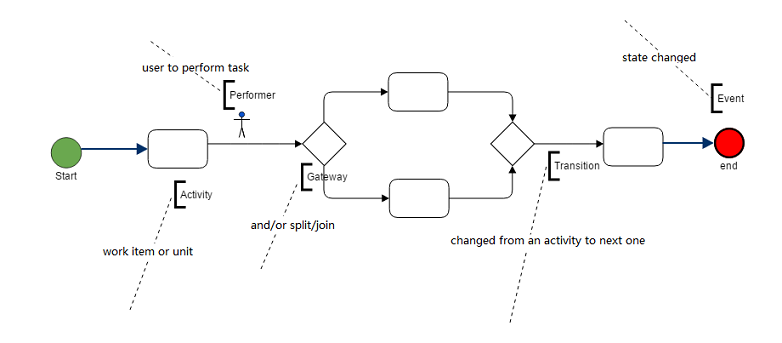
- Sequence – the most common pattern
- Split / Merge – AND / OR gateways with conditions on transitions
- Sub-process – start a child process from the main flow
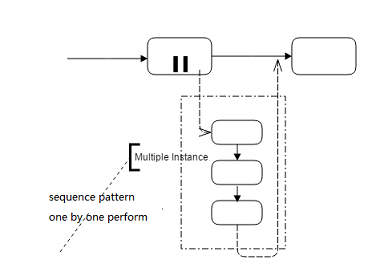
- Multi-instance – multiple performers handle the same task (sequence or parallel), with count/percentage thresholds
3.2 Core Human-Task Operations (Brief)
Slickflow manages human tasks with features such as:
- Start / Run – launch and move a process instance to the next step
- Withdraw – pull back a task you just sent to the next user
- SendBack – send a task back to the previous step
- Resend / Reverse / Jump – advanced control for exception handling and special routing
Code style (simplified):
// Start a process instance
IWorkflowService wfService = new WorkflowService();
var startResult = wfService.CreateRunner("10", "Jack")
    .UseApp("DS-100", "Book-Order", "DS-100-LX")
    .UseProcess("PriceProcessCode")
    .Start();

// Run to next step
var runResult = wfService.CreateRunner("10", "Jack")
    .UseApp("DS-100", "Book-Order", "DS-100-LX")
    .UseProcess("PriceProcessCode")
    .NextStepInt("20", "Alice")
    .Run();
3.3 Code-Style Modeling for Human Approval
You can also define simple approval processes purely in code (sequence example) using Workflow:
using Slickflow.Graph.Model;

// create a simple sequence process diagram by hand code rather than an HTML designer
var wf = new Workflow("simple-process-name", "simple-process-code");

wf.Start("Start")
  .Task("Task1")
  .Task("Task2")
  .End("End");

This gives developers both designer-based and code-based options for modeling human approval workflows.
4. 📦 Demos, Target Users and License
4.1 Demo Projects
WebDemo,MvcDemo,WinformDemo– example integration with different enterprise application types.
4.2 Target Users
- Software teams or companies who want to embed a workflow engine into their products.
- Developers who prefer combining AI orchestration, auto-execution, and human approval in one engine.
4.3 License & Support
- License: Slickflow follows the MIT open source license and can be used in commercial projects.
- Technical Support: Enterprise, Ultimate and Universe editions can be provided with technical support and upgrade services.
If you have any further inquiry, please feel free to contact:
- Email (Support): support@ruochisoft.com
5. 📚 Resources & Docker Deployment
5.1 Documentation
- English: http://doc.slickflow.net
- 中文: http://doc.slickflow.com
5.2 Wiki
5.3 CodeProject Articles
5.4 Official Website
- English: http://www.slickflow.net
- 中文: http://www.slickflow.com
5.5 Online Demo
- Demo: http://www.slickflow.com/demo/index
- Designer Demo: http://demo.slickflow.com/sfd/
5.6 Docker Hub
Pre-built Docker images are available on Docker Hub. Get started in minutes without building from source.
All-in-One Image (Recommended)
The easiest way to get started – pull one image and run all three services:
docker pull besley2096/slickflow-all:latest
docker run -d \
  -p 5000:5000 \
  -p 5001:5001 \
  -p 8090:8090 \
  -e WfDBConnectionType=PGSQL \
  -e WfDBConnectionString="Server=host.docker.internal;Port=5432;Database=wfdbbpmn2;User Id=postgres;Password=your-password;TimeZone=UTC;" \
  --name slickflow-all \
  besley2096/slickflow-all:latest
Access:
- Frontend Designer: http://localhost:8090
- Backend API: http://localhost:5000
- WebTest: http://localhost:5001
Docker Hub: https://hub.docker.com/r/besley2096/slickflow-all
Separate Images
For better isolation and scaling, use separate images:
Backend API
docker pull besley2096/slickflow-api:latest
docker run -d -p 5000:5000 \
  -e WfDBConnectionType=PGSQL \
  -e WfDBConnectionString="Server=host.docker.internal;Port=5432;Database=wfdbbpmn2;User Id=postgres;Password=your-password;TimeZone=UTC;" \
  --name slickflow-api \
  besley2096/slickflow-api:latest
Frontend Designer
docker pull besley2096/slickflow-designer:latest
docker run -d -p 8090:8090 \
  --name slickflow-designer \
  besley2096/slickflow-designer:latest
WebTest
docker pull besley2096/slickflow-webtest:latest
docker run -d -p 5001:5001 \
  -e WfDBConnectionType=PGSQL \
  -e WfDBConnectionString="Server=host.docker.internal;Port=5432;Database=wfdbbpmn2;User Id=postgres;Password=your-password;TimeZone=UTC;" \
  --name slickflow-webtest \
  besley2096/slickflow-webtest:latest
Docker Compose
Use docker-compose.hub.yml from this repository:
docker-compose -f docker-compose.hub.yml pull
docker-compose -f docker-compose.hub.yml up -d
Image Tags
Available tags for each image:
latest– Latest stable versionv3.5.0– Version 3.5.0
Docker Hub Links
- https://hub.docker.com/r/besley2096/slickflow-all
- https://hub.docker.com/r/besley2096/slickflow-api
- https://hub.docker.com/r/besley2096/slickflow-designer
- https://hub.docker.com/r/besley2096/slickflow-webtest
Database Configuration
API and WebTest containers require database configuration. Supported databases: PostgreSQL, MySQL, SQL Server, Oracle.
Database on Host Machine
-e WfDBConnectionString="Server=host.docker.internal;Port=5432;Database=wfdbbpmn2;User Id=postgres;Password=your-password;TimeZone=UTC;"
Database in Docker Container
-e WfDBConnectionString="Server=postgres;Port=5432;Database=wfdbbpmn2;User Id=postgres;Password=your-password;TimeZone=UTC;"
Remote Database
-e WfDBConnectionString="Server=192.168.1.100;Port=5432;Database=wfdbbpmn2;User Id=postgres;Password=your-password;TimeZone=UTC;"
6. 📞 Contact & 💰 Donation
6.1 Contact
- Email: sales@ruochisoft.com
- QQ (Author): 47743901
- WeChat (Author): besley2008
6.2 Donation
Your donation will be used for the continuous research and development of the product and community building.
您的捐赠将用于产品的持续研发和社区建设。
