NoPowerShell
November 4, 2025 · View on GitHub
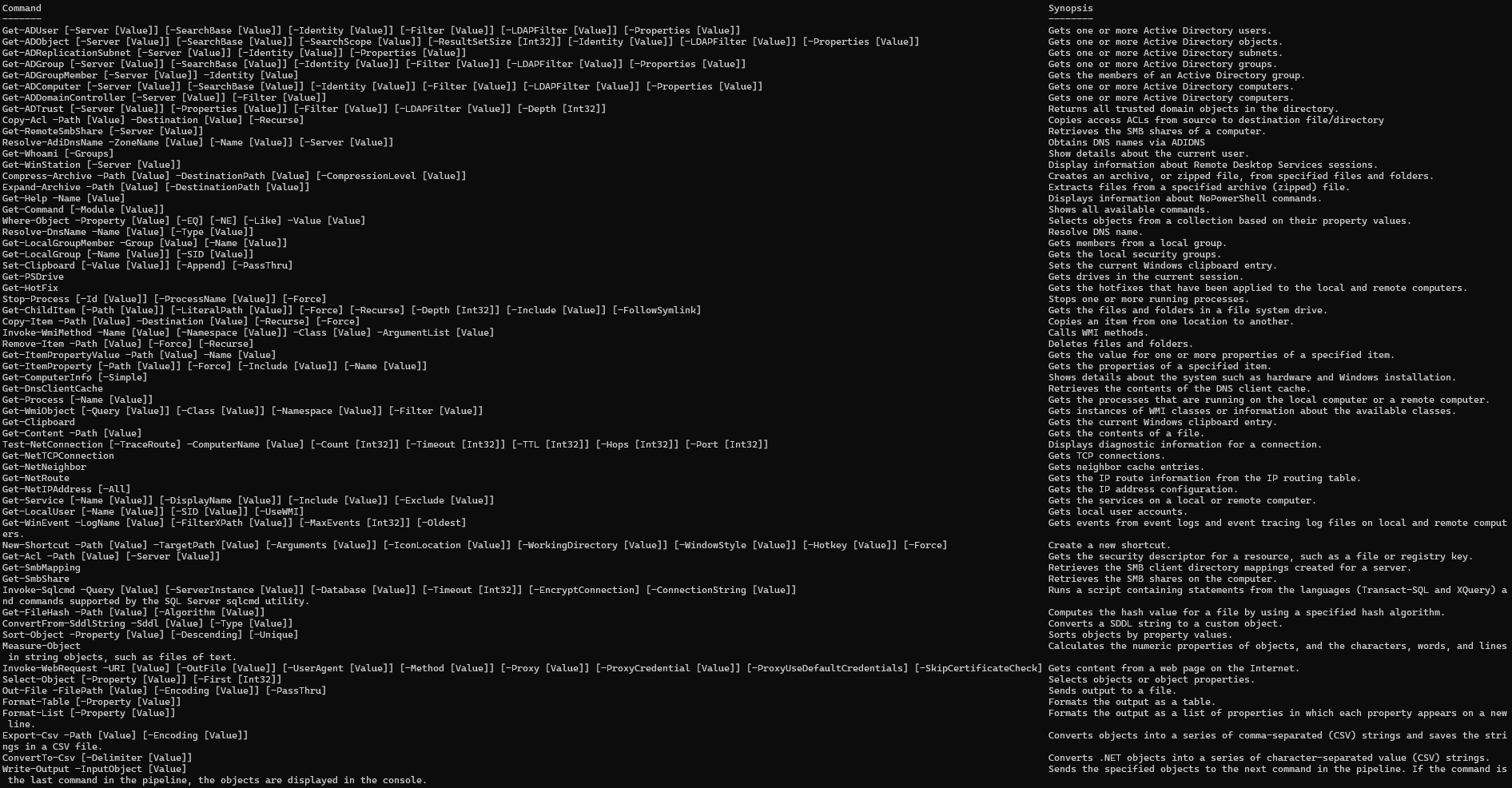
NoPowerShell is a tool implemented in C# which supports executing PowerShell-like commands while remaining invisible to any PowerShell logging mechanisms. This .NET Framework 2 compatible binary can be loaded in Cobalt Strike to execute commands in-memory. No System.Management.Automation.dll is used; only native .NET libraries. An alternative usecase for NoPowerShell is to launch it as a DLL via rundll32.exe in a restricted environment: rundll32 NoPowerShell.dll,main.
This project makes it easy for everyone to extend its functionality using only a few lines of C# code. For more info, see CONTRIBUTING.md.
Latest binaries available from the Releases page. The MASTER branch is not updated very regularly; the latest code and cmdlets are available in the DEV branch. To kickstart your NoPowerShell skills, make sure to also check out the cmdlet Cheatsheet.
Screenshots
Running in Cobalt Strike
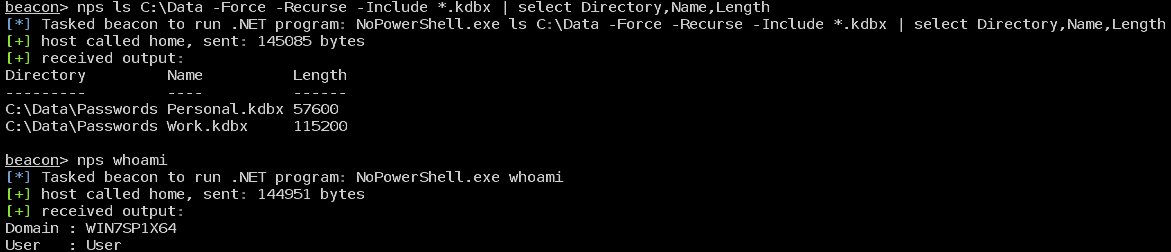
Sample execution of commands
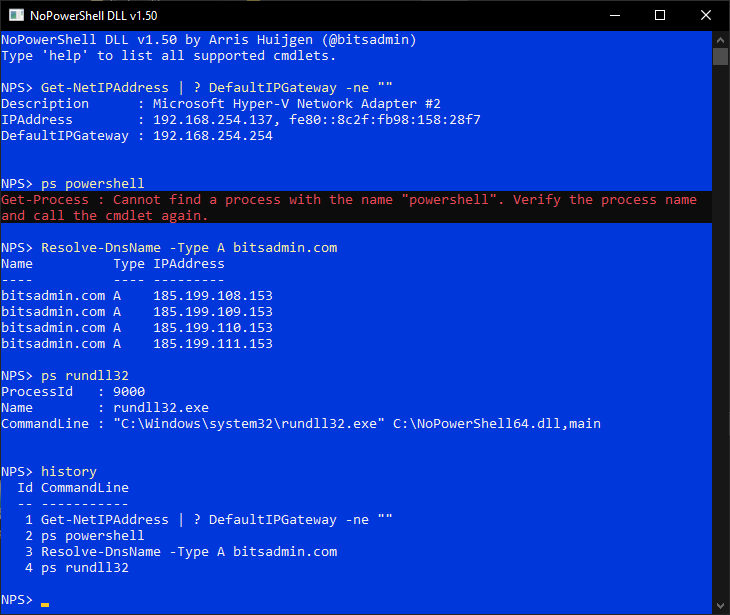
Rundll32 version
Why NoPowerShell
NoPowerShell is developed to be used with the execute-assembly command of Cobalt Strike or in a restricted environment using rundll32.exe.
Reasons to use NoPowerShell:
- Executes pretty stealthy
- Powerful functionality
- Provides the cmdlets you are already familiar with in PowerShell, so no need to learn yet another tool
- If you are not yet very familiar with PowerShell, the cmd.exe aliases are available as well (e.g.
pinginstead ofTest-NetConnection) - In case via
powerpickorpowershellcmdlets are not available, they are available innps(e.g. cmdlets from the ActiveDirectory module) - Easily extensible with only a few lines of C#
Usage
Examples
See CHEATSHEET.md.
Use in Cobalt Strike via execute-assembly
Use Cobalt Strike's execute-assembly command to launch the NoPowerShell.exe. For example execute-assembly /path/to/NoPowerShell.exe Get-Command.
Optionally NoPowerShell.cna can be used to add the nps alias to Cobalt Strike.
Use in Cobalt Strike via BOF.NET
- Install the BOF.NET BOF from https://github.com/CCob/BOF.NET
- Load the BOF.NET runtime:
bofnet_init - Load the NoPowerShell module:
bofnet_load /path/to/NoPowerShell.dll - Execute NoPowerShell cmdlets:
bofnet_execute NoPowerShell.Program Get-Command
Use in Cobalt Strike using @williamknows fork of BOF.NET
This fork allows running regular .NET executables
- Obtain and compile @williamknows' fork of the BOF.NET from https://github.com/williamknows/BOF.NET
- Load the BOF.NET runtime:
bofnet_init - Load the NoPowerShell module:
bofnet_load /path/to/NoPowerShell.exe - Execute NoPowerShell cmdlets:
bofnet_executeassembly NoPowerShell Get-Command
Launch via rundll32
- Create a new shortcut to
NoPowerShell.dllfile (drag using right click -> Create shortcuts here) - Update the shortcut prefixing the filename with
rundll32and appending,main - The shortcut will now look like
rundll32 C:\Path\to\NoPowerShell.dll,main - Double click the shortcut
Note
When using NoPowerShell from cmd.exe or PowerShell, you need to escape the pipe character (|) with respectively a caret (^) or a backtick (`), e.g.:
- cmd.exe:
ls ^| select Name - PowerShell:
ls `| select Name
Known issues
- Pipeline characters need to be surrounded by spaces
- TLS 1.1+ is not supported by .NET Framework 2, so any site enforcing it will result in a connection error
Improvements
- Fix above issues
- Support for parameter groups
- Add support for .NET code in commandline, e.g.:
[System.Security.Principal.WindowsIdentity]::GetCurrent().Name
Requested NoPowerShell cmdlets
| Cmdlet | Description |
|---|---|
| Invoke-Command | Using PSRemoting execute a command on a remote machine (which in that case will of course be logged) |
| * | More *-Item* commands |
| Search-ADAccount | |
| Get-ADPrincipalGroupMembership | |
| Get-ADOrganizationalUnits | |
| * | More commands from the ActiveDirectory PowerShell module |
| * | Sysinternals utilities like pipelist and sdelete |
Contributed NoPowerShell cmdlets
Authors of additional NoPowerShell cmdlets are added to the table below. Moreover, the table lists commands that are requested by the community to add. Together we can develop a powerful NoPowerShell toolkit!
| Cmdlet | Contributed by | GitHub | Description | |
|---|---|---|---|---|
Included NoPowerShell cmdlets
| Cmdlet | Module | Notes |
|---|---|---|
| Get-ADUser | ActiveDirectory | |
| Get-ADObject | ActiveDirectory | |
| Get-ADReplicationSubnet | ActiveDirectory | |
| Get-ADGroup | ActiveDirectory | |
| Get-ADGroupMember | ActiveDirectory | |
| Get-ADComputer | ActiveDirectory | |
| Get-ADDomainController | ActiveDirectory | |
| Get-ADTrust | ActiveDirectory | |
| Copy-Acl | Additional | |
| Get-RemoteSmbShare | Additional | |
| Resolve-AdiDnsName | Additional | |
| Get-Whoami | Additional | |
| Get-WinStation | Additional | |
| Compress-Archive | Archive | Requires .NET 4.5+ |
| Expand-Archive | Archive | Requires .NET 4.5+ |
| Get-Help | Core | |
| Get-Command | Core | |
| Where-Object | Core | |
| Resolve-DnsName | DnsClient | |
| Get-LocalGroupMember | LocalAccounts | |
| Get-LocalGroup | LocalAccounts | |
| Set-Clipboard | Management | |
| Get-PSDrive | Management | |
| Get-HotFix | Management | |
| Stop-Process | Management | |
| Get-ChildItem | Management | |
| Copy-Item | Management | |
| Invoke-WmiMethod | Management | |
| Remove-Item | Management | |
| Get-ItemPropertyValue | Management | |
| Get-ItemProperty | Management | |
| Get-ComputerInfo | Management | |
| Get-DnsClientCache | Management | |
| Get-Process | Management | |
| Get-WmiObject | Management | |
| Get-Clipboard | Management | |
| Get-Content | Management | |
| Test-NetConnection | NetTCPIP | |
| Get-NetTCPConnection | NetTCPIP | |
| Get-NetNeighbor | NetTCPIP | No support for IPv6 yet |
| Get-NetRoute | NetTCPIP | |
| Get-NetIPAddress | NetTCPIP | |
| Get-Service | NoPowerShell.Commands | |
| Get-LocalUser | NoPowerShell.Commands | |
| Get-WinEvent | NoPowerShell.Commands | |
| New-Shortcut | NoPowerShell.Commands | |
| Get-Acl | Security | |
| Get-SmbMapping | SmbShare | |
| Get-SmbShare | SmbShare | |
| Invoke-Sqlcmd | SQLPS | |
| Get-FileHash | Utility | |
| ConvertFrom-SddlString | Utility | |
| Sort-Object | Utility | |
| Measure-Object | Utility | |
| Invoke-WebRequest | Utility | |
| Select-Object | Utility | |
| Out-File | Utility | |
| Format-Table | Utility | |
| Format-List | Utility | |
| Export-Csv | Utility | |
| ConvertTo-Csv | Utility | |
| Write-Output | Utility |
Also make sure to check out the Cheatsheet for examples on how to use these cmdlets.
Acknowledgements
Various NoPowerShell cmdlets and NoPowerShell DLL include code created by other developers.
| Who | Website | Notes |
|---|---|---|
| Contributors of pinvoke.net | https://www.pinvoke.net/ | Various cmdlets use snippets from pinvoke |
| Michael Conrad | https://github.com/MichaCo/ | Parts of the Resolve-Dns cmdlet are based on the code of the DnsClient.Net project |
| Rex Logan | https://stackoverflow.com/a/1148861 | Most code of the Get-NetNeighbor cmdlet originates from his StackOverflow post |
| PowerShell developers | https://github.com/PowerShell/ | Code of NoPowerShell DLL is largely based on the code handling the console input of PowerShell |
| Benjamin Delpy | https://github.com/gentilkiwi/ | Code of Get-WinStation is inspired by the code of Mimikatz' ts::sessions command |
| Dan Ports | https://github.com/danports/ | Marshalling code of Get-Winstation is partially copied from the Cassia project |
| Mazdak | https://www.codeproject.com/Articles/2937/Getting-local-groups-and-member-names-in-C | Native function calls for the Get-LocalGroupMember cmdlet |
| Rex Logan | https://stackoverflow.com/a/1148861 | Code of Get-NetNeighbor cmdlet |
Authored by Arris Huijgen (@bitsadmin - https://github.com/bitsadmin/)