or
November 11, 2021 · View on GitHub
#+TITLE:BlaCk Void Zsh
Awesome Zsh Setting.
[[https://i.imgur.com/043POEf.png]]

[[https://github.com/black7375/BlaCk-Void-Zsh/wiki/Error][Wiki:Error]]
[[https://black7375.tistory.com/59][Korean Docs]]
Notice!! :goggles::test_tube::alembic:
We are experimenting with a big change in [[https://github.com/black7375/BlaCk-Void-Zsh/issues/23][#23]].
- Table of Contents :PROPERTIES: :TOC: :include all :depth 3 :ignore (this) :END:
:CONTENTS:
- [[#1-feature][1. Feature.]]
- [[#11-powerful-view][1.1 Powerful View.]]
- [[#prompt][Prompt.]]
- [[#git][Git.]]
- [[#12-easy-command-input][1.2 Easy Command Input.]]
- [[#auto-pair][Auto Pair.]]
- [[#fix][Fix.]]
- [[#display-info][Display Info.]]
- [[#integration-with-fzf][Integration with Fzf.]]
- [[#git][Git.]]
- [[#etc][Etc.]]
- [[#13-terminal-utility][1.3 Terminal Utility.]]
- [[#internet-tools][Internet Tools.]]
- [[#terminal-image-viewer][Terminal Image Viewer.]]
- [[#weather][Weather.]]
- [[#map][Map.]]
- [[#11-powerful-view][1.1 Powerful View.]]
- [[#2-install][2. Install.]]
- [[#21-supported-platforms][2.1 Supported Platforms.]]
- [[#22-docker][2.2 Docker]]
- [[#23-manual-install-others][2.3 Manual Install (Others).]]
- [[#24-update][2.4 Update.]]
- [[#3-info][3. Info.]]
- [[#31-theme][3.1 Theme.]]
- [[#32-plugins][3.2 Plugins.]]
- [[#33-my-terminal-environment][3.3 My Terminal Environment.]] :END:
-
- Feature. [[https://black7375.tumblr.com/post/188158544989][Sample Video]]
![https://black7375.tumblr.com/post/188158544989][https://user-images.githubusercontent.com/25581533/66270473-11e99980-e88f-11e9-83ac-3838bc0d6a56.png](https://black7375.tumblr.com/post/188158544989%5D%5Bhttps://user-images.githubusercontent.com/25581533/66270473-11e99980-e88f-11e9-83ac-3838bc0d6a56.png)
** 1.1 Powerful View. More Theme, More Information: [[https://github.com/black7375/BlaCk-Void-Zsh/wiki/Customize][Wiki:Customize]] *** Prompt. Powerline Theme [[https://user-images.githubusercontent.com/25581533/53680999-40fec200-3d26-11e9-8ca5-5c3723e6acdf.png]] The prompt consists of two lines.\ The upper line is for displaying information, and the lower line is for writing commands.

-
Upper Line
- Left: account info, root user, using ssh, directory lotation, write permission, vcs info
- Right: result status, background job, command execution time, history, zsh load time
-
Lower Line
- Syntax highlight, Auto Suggestion.
- When auto suggestion comes up, you can complete with right(→) arrow key.
Simple Theme [[https://user-images.githubusercontent.com/25581533/55165124-306c2b00-51b0-11e9-9871-9ee998ed5bbd.png]]

-
Upper Line
- directory lotation, vcs info, account info, write permission, root user, command execution time
-
Lower Line
- Left: prompt conditional , writing commands
- Syntax highlight, Auto Suggestion.
- When auto suggestion comes up, you can complete with right(→) arrow key.
- Right: background job, result status
- Left: prompt conditional , writing commands
[Experimental]How to cutomize or switch?
- Copy file to your home.
- =cp $BVZSH/BlaCk-Void.ztheme ~/.ztheme= && Customize!!
- =export= BVZSH_THEME='THEME MODE'
- Restrictions: Work only in =~/.ztheme=
- =THEME MODE= list: =auto=, =powerline=, =simple=, =powerline-single=, =simple-single=
- =auto=: Default is =powerline=. \ When not support xterm or 256 color, =simple= theme Activate.
- =COLOR MODE= list: =auto=, =flex=, =fixed=
- =auto=: Deafault is =fixed=. \ When not support xterm or 256 color, =flex= color Activate.
- =Icon MODE= list: =auto=, =nerd=, =powerline=
- =auto=: Deafault is =nerd=. \ When ssh or root, =powerline= icon Activate.
- FAQ: Why do not you support =zsh-theme= anymore? || Can not change during use? \ This isn't supported by [[https://github.com/romkatv/powerlevel10k#i-am-getting-an-error-zsh-bad-math-expression-operand-expected-at-end-of-string][powerlevel10k]].
*** Git. The interaction with Git is easy compared to the file manager.
| [[https://user-images.githubusercontent.com/25581533/53680863-67236280-3d24-11e9-826b-ae88fc345177.png]] | [[https://user-images.githubusercontent.com/25581533/53680866-6ab6e980-3d24-11e9-8ad1-3cd6b087ee36.png]] | [[https://user-images.githubusercontent.com/25581533/53680870-6c80ad00-3d24-11e9-8a1e-0171231299d9.png]] | |------------------------------------------------------------------------------------------------------+------------------------------------------------------------------------------------------------------+------------------------------------------------------------------------------------------------------| | [[https://user-images.githubusercontent.com/25581533/53680872-6ee30700-3d24-11e9-9e77-36707397151a.png]] | [[https://user-images.githubusercontent.com/25581533/53680874-74d8e800-3d24-11e9-804d-9f2eb16c370f.png]] | [[https://user-images.githubusercontent.com/25581533/53680876-76a2ab80-3d24-11e9-8d72-56c85a3e8bf2.png]] |


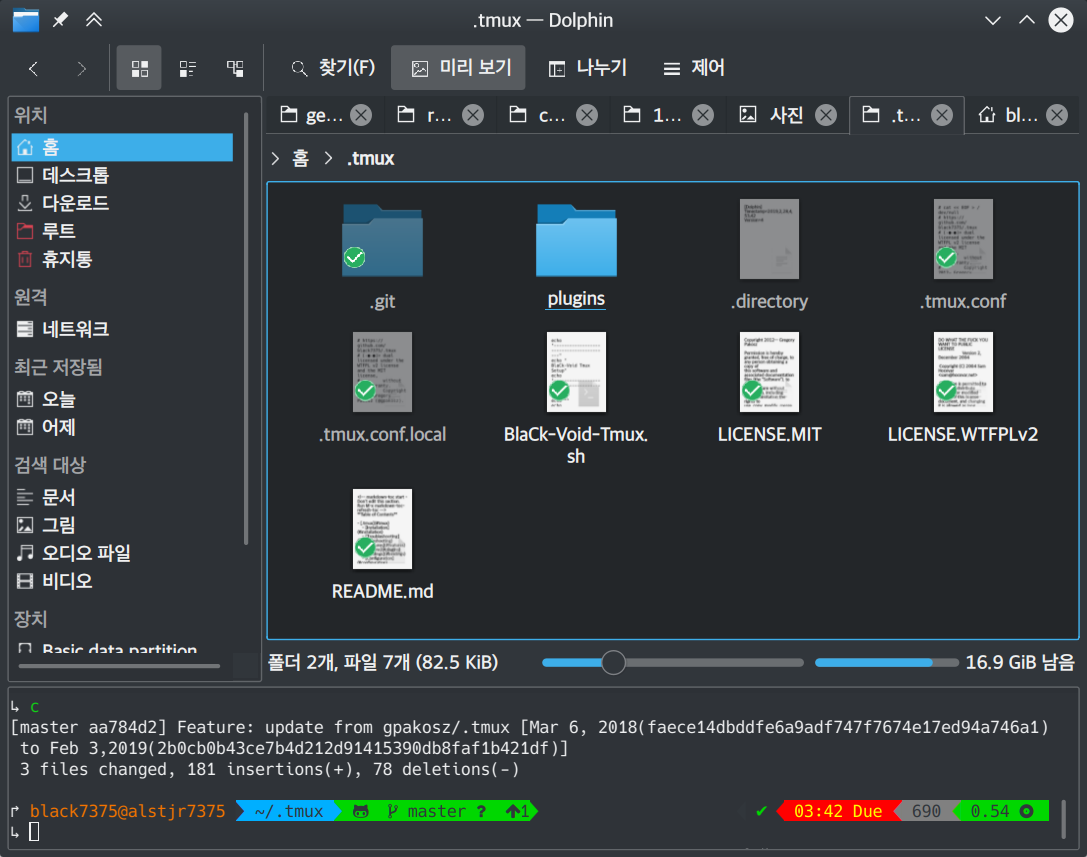
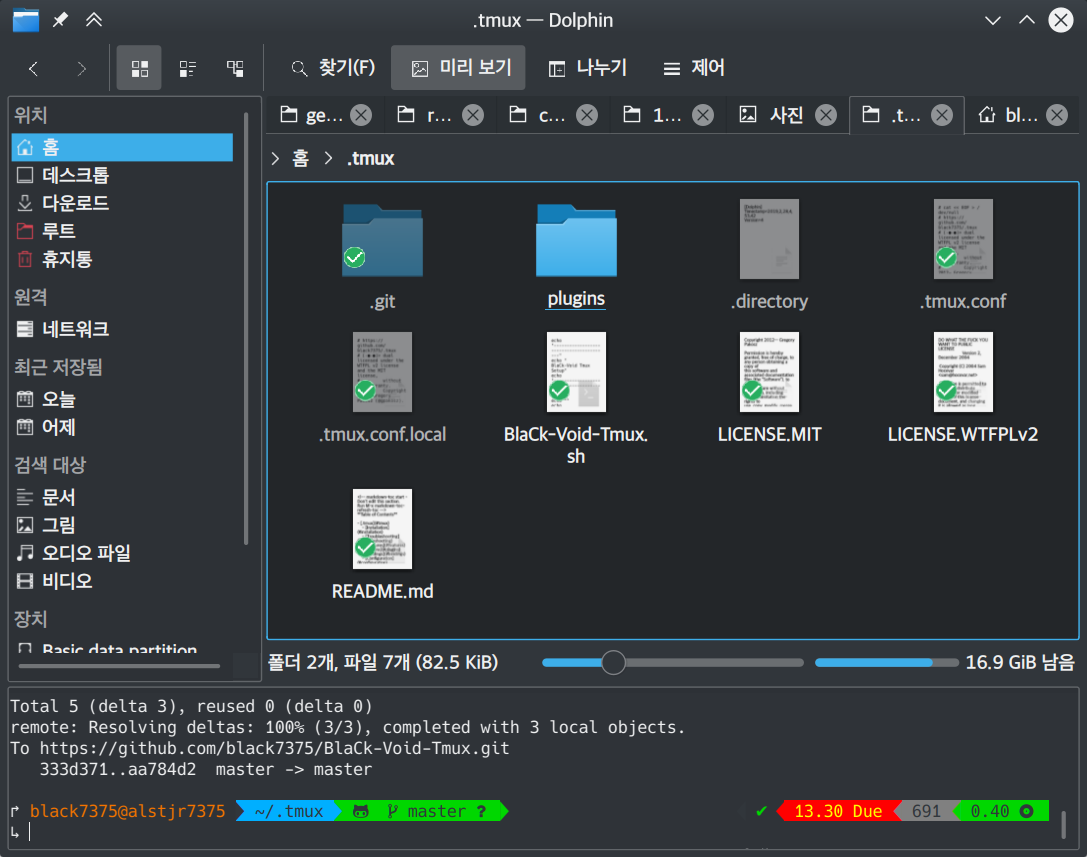
In turn
Source - Add any file - Modify file \ Staging - Commit - Push
** 1.2 Easy Command Input. More Features: [[https://github.com/black7375/BlaCk-Void-Zsh/wiki/Features][Wiki:Features]] *** Auto Pair. [[https://user-images.githubusercontent.com/25581533/53681046-f29df300-3d26-11e9-8299-cdf4d189fa1d.png]] Match parentheses, quotes, etc.

*** Fix. [[https://user-images.githubusercontent.com/25581533/53681092-96879e80-3d27-11e9-80ca-73bc56150ec9.png]] If you can't find the command, suggest a correction.\ If the execution is not done properly, just typing '=fuck='. It will suggest.

*** Display Info.
[[https://user-images.githubusercontent.com/25581533/53681099-b4ed9a00-3d27-11e9-9388-cde276b64686.png]]
Commands that can be abbreviated are indicated by a =Alias tip=.\
If you press '

|[[https://user-images.githubusercontent.com/25581533/53681069-3db80600-3d27-11e9-8e6c-89f8cb71bd96.png]]|[[https://user-images.githubusercontent.com/25581533/53681119-0564f780-3d28-11e9-9afd-35c7e0e03044.png]]| You can search history by pressing the up(↑) arrow key.
![https://user-images.githubusercontent.com/25581533/53681069-3db80600-3d27-11e9-8e6c-89f8cb71bd96.png]]|[[https://user-images.githubusercontent.com/25581533/53681119-0564f780-3d28-11e9-9afd-35c7e0e03044.png]]|](https://user-images.githubusercontent.com/25581533/53681069-3db80600-3d27-11e9-8e6c-89f8cb71bd96.png%5D%5D%7C%5B%5Bhttps://user-images.githubusercontent.com/25581533/53681119-0564f780-3d28-11e9-9afd-35c7e0e03044.png%5D%5D%7C)
*** Integration with [[https://github.com/junegunn/fzf][Fzf]]. [[https://user-images.githubusercontent.com/25581533/53681129-334a3c00-3d28-11e9-97b1-b0cd56aac3af.png]]

- Ctrl+t: File, Directory select.(Multiple selecting use
) - Ctrl+r: History select.
- Alt+c: Directory select.
- =Command **= +
: Select after =vi **= as input. - =ssh=, =telnet=, =kill=, =unset=, =export=..etc with integration.
Please refer to [[https://github.com/junegunn/fzf#key-bindings-for-command-line][fzf]] for more information.
*** Git. Very simple to use git.
- =c=: commit
- =a=: add
- =p=: push
- =u=: pull
- =r=: remote
- =s=: status
Git X Fzf [[https://user-images.githubusercontent.com/25581533/57051067-a0436900-6cba-11e9-93bb-df84b795d0b2.png]] =glo= screenshot.

- =ga=: git add
- =glo=: git log
- =gi=: gitignore
- =gd=: git diff
- =gcf=: git checkout
- =gss=: git stash
- =gclean=: git clean
*** Etc. [[https://user-images.githubusercontent.com/25581533/53681139-4ceb8380-3d28-11e9-8e92-9549302afdc0.png]]

- =bookmark [mark]=:Bookmark to [mark].
- =jump [mark]=:Move to [mark].
- =showmarks [mark]=:Show [mark]'s directory.
- =deletemark [mark]=:Delete [mark].
- =cd
=: Move to the upper directory by the number of . - =j [keyword]=: Move to [keyword] similar directory.
** 1.3 Terminal Utility. *** Internet Tools. [[https://user-images.githubusercontent.com/25581533/53681148-6ee50600-3d28-11e9-909c-674b0b359ebb.png]]

- =prettyping=: Show pretty ping.
- =ip-info=: Show ip info.
*** Terminal Image Viewer. [[https://user-images.githubusercontent.com/25581533/53681154-80c6a900-3d28-11e9-8510-385e49f173f2.png]] Show image like preview.\ You can use with command =img=

Useage:
=img FILE_NAME TIME=\
(TIME default 2s)
=img= Feature
- Supported: Konsole, Xterm, Urxvt, Terminology, Yakuake, Terminal.app
- Unsupported: Terminator, Hyper, Tilix, gnome terminal, Guake, LXterminal, Putty, Alacritty
for unsupported Terminals\ use [[https://github.com/radare/tiv][tiv]] or [[https://www.nongnu.org/fbi-improved/][fim]]
*** Weather. [[https://user-images.githubusercontent.com/25581533/53681166-a6ec4900-3d28-11e9-80d3-a010cba7fa83.png]] Useage:\ =weather= or =weather LOCALE LANGUAGE(option)=
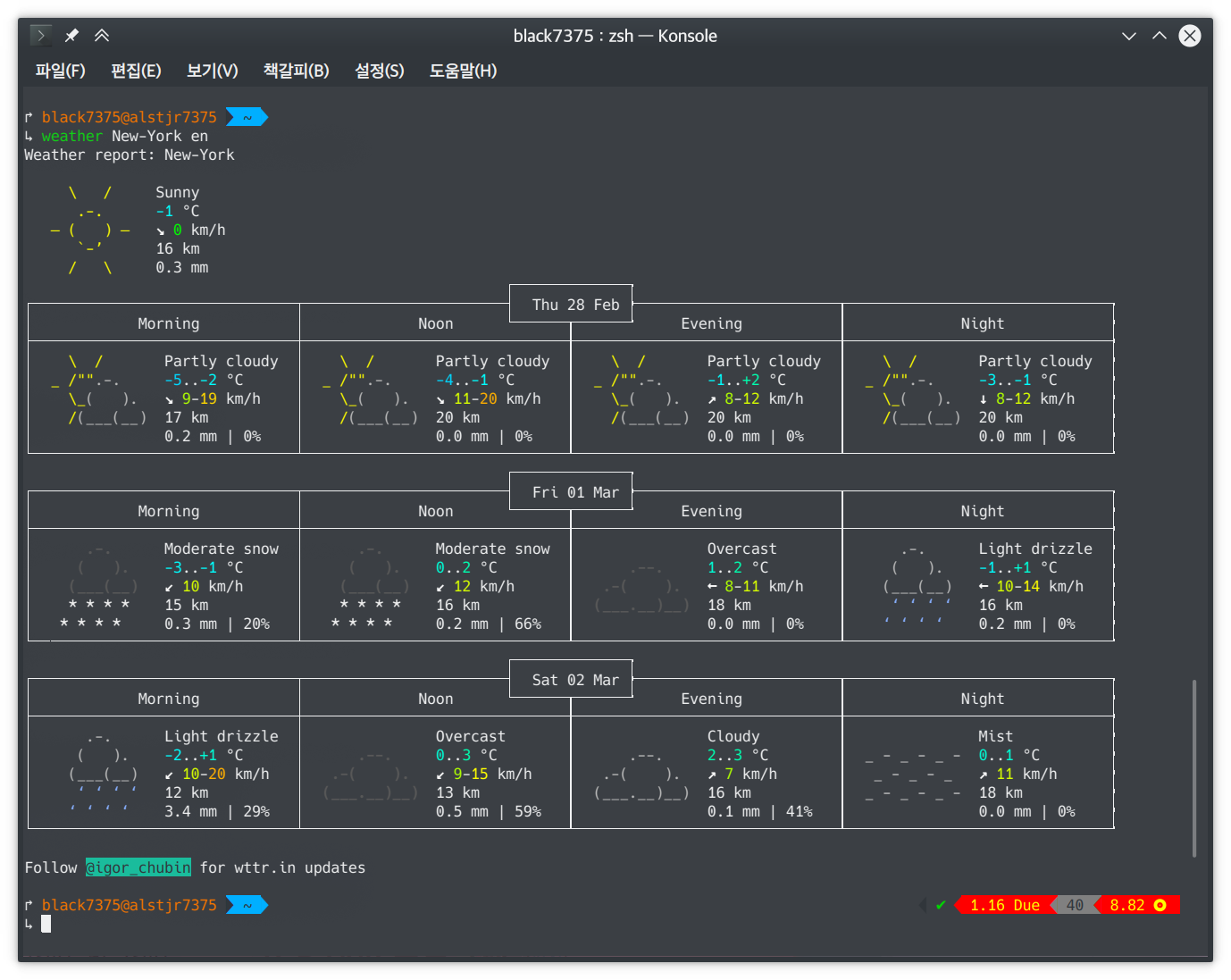
Default Language: Your system's language
*** Map. [[https://user-images.githubusercontent.com/25581533/53681169-abb0fd00-3d28-11e9-9cf1-85bf29227ab2.png]] Useage:\ =map=

-
- Install. ** 2.1 Supported Platforms.
-
Linux Debin-based(Ubuntu, Debian, Mint, ..), RPM-based(Fedora, CentOS, Redhat, ..), Pacman-based(Arch, Manjaro, Antergos, ..)
-
Others Mac, FreeBSD-based
-
Requirements
- bash
-
Install #+BEGIN_SRC shell git clone https://github.com/black7375/BlaCk-Void-Zsh.git ~/.zsh bash ~/.zsh/BlaCk-Void-Zsh.sh #+END_SRC Then, terminal font set to one of [[https://github.com/ryanoasis/nerd-fonts][Nerd Fonts]] (font install's =1= option is =hack nerd font=) && restart.
When you want to use with awesome tmux, Check [[https://github.com/black7375/BlaCk-Void-Tmux/][BlaCk-Void-Tmux]]
- Beta Version #+BEGIN_SRC shell git clone -b powertools https://github.com/black7375/BlaCk-Void-Zsh.git ~/.zsh bash ~/.zsh/BlaCk-Void-Zsh.sh #+END_SRC
** 2.2 Docker Pull or Build docker
#+BEGIN_SRC shell docker pull alstjr7375/bvzsh:latest
or
git clone https://github.com/black7375/BlaCk-Void-Zsh.git && cd BlaCk-Void-Zsh/Docker docker build --tag=alstjr7375/bvzsh:lastest . #+END_SRC
Run!! #+BEGIN_SRC shell docker run --rm -it alstjr7375/bvzsh #+END_SRC
** 2.3 Manual Install (Others).
-
Requirements
- [[https://www.zsh.org/][zsh]]
- [[https://github.com/powerline/powerline][powerline]]
- [[https://github.com/ryanoasis/nerd-fonts][powerline support font]](will explain it in the paragraph below.)
- [[http://w3m.sourceforge.net][w3m-img]](option for Terminal Image View)
- [[https://github.com/wting/autojump][Autojump]](option for =j=)
- [[https://beyondgrep.com/][ack]](option for [[https://github.com/paoloantinori/hhighlighter][h]]) | TODO: ack code port to ripgrep.
- [[https://github.com/jordansissel/xdotool][xdotool]], [[https://sites.google.com/site/tstyblo/wmctrl][wmctrl]] (option for [[https://github.com/marzocchi/zsh-notify][Notification]])
-
Install
-
Git Clone\ =git clone https://github.com/black7375/BlaCk-Void-Zsh.git ~/.zsh && cd ~/.zsh=
-
zinit(replace antigen, old name: zplugin) #+BEGIN_SRC shell mkdir ~/.zplugin git clone https://github.com/zdharma-continuum/zinit.git ~/.zplugin/bin #+END_SRC
-
nerdfont(powerline support font)
#+BEGIN_SRC shell git clone https://github.com/ryanoasis/nerd-fonts.git cd nerd-fonts && ./install.sh cd .. #+END_SRC or\ Install font from [[https://github.com/ryanoasis/nerd-fonts][Nerd Fonts]]. -
Add to .zshrc
Source File[Recommend]\ =echo "source BlaCk-Void.zshrc" >> ~/.zshrc=
or Link\ =ln -svf BlaCk-Void.zshrc ~/.zshrc=
or Copy(Can't =zsh-update=)\ =cp -v BlaCk-Void.zshrc ~/.zshrc=
-
Zsh Shell Set\ =sudo chsh -s /usr/bin/zsh=
or\ =sudo chsh -s $(which zsh)=
-
Terminal set\ Terminal font set to one of [[https://github.com/ryanoasis/nerd-fonts][Nerd Fonts]] && restart.
-
** 2.4 Update. =zsh-update=: BVZSH, plugin manger, plugins update.\ =font-update=: Nerdfont Update
-
- Info. ** 3.1 Theme.
- [[https://github.com/romkatv/powerlevel10k][Powerlevel10k]](powerline theme, Really Fast and 100% replaceable [[https://github.com/bhilburn/powerlevel9k][Powerlevel9k]])
- Simple theme based on [[https://github.com/robbyrussell/oh-my-zshom/romkatv/dotfiles-public/blob/master/.purepower][Purepower]], inspired by [[https://github.com/sindresorhus/pure][Pure]]
** 3.2 Plugins. Plugin Manager
- [[https://github.com/zdharma-continuum/zinit][Zinit]](Old Name: Zplugin)
Default Repo ([[https://github.com/robbyrussell/oh-my-zsh][robbyrussell's oh-my-zsh]]).
Lib
- [[https://github.ce/master/lib/compfix.zsh][Compfix]]: Handle completions insecurities.
- [[https://github.com/robbyrussell/oh-my-zsh/tre/tree/master/lib/directories.zsh][Directories]]: Changing/making/removing directory.
- [[https://github.com/robbyrussell/oh-my-zsh/tree/master/lib/functions.zsh][Functions]]: OMZ Functions.
- [[https://github.com/robbyrussell/oh-my-zsh/tree/master/lib/git.zsh][Git]]: Git fuctions.
- [[https://github.com/robbyrussell/oh-my-zsh/tree/master/lib/termsupport][Termsupport]]: Set terminal window and tab/icon titles. Plugin
- [[https://github.com/robbyrussell/oh-my-zsh/tree/master/plugins/autojumpp][Autojump]]: Enables [[https://github.com/wting/autojump][Autojump]] if installed with homebrew, macports or debian/ubuntu package.
- [[https://github.com/robbyrussell/oh-my-zsh/tree/master/plugins/command-not-found][Command Not Found]]: This plugin uses the command-not-found package for zsh to provide suggested packages to be installed if a command cannot be found.
- [[https://github.com/robbyrussell/oh-my-zsh/tree/master/plugins/fzf][FZF]]: This plugin enables junegunn's fzf fuzzy auto-completion and key bindings.
- [[https://github.com/robbyrussell/oh-my-zsh/tree/master/plugins/git][Git]]: Adds a lot of git aliases and functions for pulling for dealing with the current branch.
- [[https://github.com/robbyrussell/oh-my-zsh/tree/master/plugins/gitfast][Gitfast]]: This plugin adds completion for Git, using the zsh completion from git.git folks, which is much faster than the official one from zsh.
- [[https://github.com/robbyrussell/oh-my-zsh/tree/master/plugins/pip][Pip]]: pip - completion plugin for the pip command.
- [[https://github.com/robbyrussell/oh-my-zsh/tree/master/plugins/sudo][Sudo]]: ESC twice: Puts sudo in front of the current command, or the last one if the command line is empty.
- [[https://github.com/robbyrussell/oh-my-zsh/tree/master/plugins/thefuck][Thefuck]]: [[https://github.com/nvbn/thefuck][The Fuck]] plugin — magnificent app which corrects your previous console command.
- [[https://github.com/robbyrussell/oh-my-zsh/tree/master/plugins/tmux][Tmux]] Provides aliases for [[https://github.com/tmux/tmux][Tmux]].
- [[https://github.com/robbyrussell/oh-my-zsh/tree/master/plugins/tmuxinator][Tmuxinator]]: Completions for [[https://github.com/tmuxinator/tmuxinator][tmuxinator]].
- [[https://github.com/robbyrussell/oh-my-zsh/tree/master/plugins/urltools][Urltools]]: Provides two aliases to URL-encode(=urlencode=) and URL-decode(=urldecode=) strings.
Custom Repo
- [[https://github.com/chrissicool/zsh-256color][Zsh 256 Color]]: This ZSH plugin enhances the terminal environment with 256 colors.
- [[https://github.com/djui/alias-tips][Alias Tips]]: Help remembering those shell aliases and Git aliases you once defined.
- [[https://github.com/mafredri/zsh-async][Zsh Async]]: Because your terminal should be able to perform tasks asynchronously without external tools!
- [[https://github.com/zsh-users/zsh-autosuggestions][Zsh Autosuggestions]]: [[https://fishshell.com/][Fish]]-like fast/unobtrusive autosuggestions for zsh.
- [[https://github.com/hlissner/zsh-autopair][Zsh Autopair]]: A simple plugin that auto-closes, deletes and skips over matching delimiters in zsh intelligently
- [[https://github.com/zsh-users/zsh-completions][Zsh Completions]]: Additional completion definitions for Zsh.
- [[https://github.com/b4b4r07/enhancd][Enhancd]]: A next-generation cd command with an interactive filter.
- [[https://github.com/zdharma-continuum/fast-syntax-highlighting][Fast Syntax Highlighting]]: Feature rich syntax highlighting for Zsh.
- [[https://github.com/wfxr/forgit][Forgit]]: Forgit is a utility tool for git taking advantage of fuzzy finder fzf.
- [[https://github.com/ytet5uy4/fzf-widgets][Fzf Widgets]]: ZLE widgets of fzf.
- [[https://github.com/seletskiy/zsh-git-smart-commands][Zsh Git Smart Commands]]: Wrappers for common git commands so they can be used in aliases very efficiently.
- [[https://github.com/paoloantinori/hhighlighter][h]]: A command line tool to highlight terms
- [[https://github.com/zsh-users/zsh-history-substring-search][Zsh History Substring Search]]: [[https://fishshell.com/][Fish]]-like history search feature.
- [[https://github.com/changyuheng/zsh-interactive-cd][Zsh Interactive Cd]]: Press tab for completion as usual with fzf.
- [[https://github.com/black7375/zsh-lazyenv][Zsh Lazyenv]]: Environments for lazy load commands and speed up start up time of zsh.
- [[https://github.com/jocelynmallon/zshmarks][Zsh Marks]]: A port of Bashmarks (simple bookmarking plugin by Todd Werth) for oh-my-zsh
- [[https://github.com/marzocchi/zsh-notify][Zsh Notify]]: Desktop notifications for long-running commands in zsh.
- [[https://github.com/raylee/tldr][TLDR]]: Simplified and community-driven man pages http://tldr-pages.github.io/
- [[https://github.com/peterhurford/up.zsh][up]]:
Move to the upper directory by the number of
.
** 3.3 My Terminal Environment.
- OS: Kubuntu 18.10
- Terminal: Konsole
- Font: Hack Nerd Font
- Color Scheme: Breeze