Clautana
January 8, 2026 · View on GitHub

AI-Powered Multi-Agent Orchestration for VS Code
Clautana transforms your IDE into a collaborative environment where a team of AI agents works alongside you. It is built on the Claude Agents SDK and provides a visual orchestration layer for the Claude Code CLI.
🚀 Why Clautana?
Coding complex features requires more than just a chat window. It needs a more structured workflow. Clautana is the visual orchestration layer for the Claude Code Template workflow.
It transforms the "Feature-First" development lifecycle into an interactive IDE experience. Clautana provides a central Orchestrator that:
- Explores & Plans: Scaffolds features and manages technical investigations.
- Formalizes Decisions: Helps transition investigations into Architecture Decision Records (ADRs).
- Executes & Delegates: Spawns specialized agents to implement tasks.
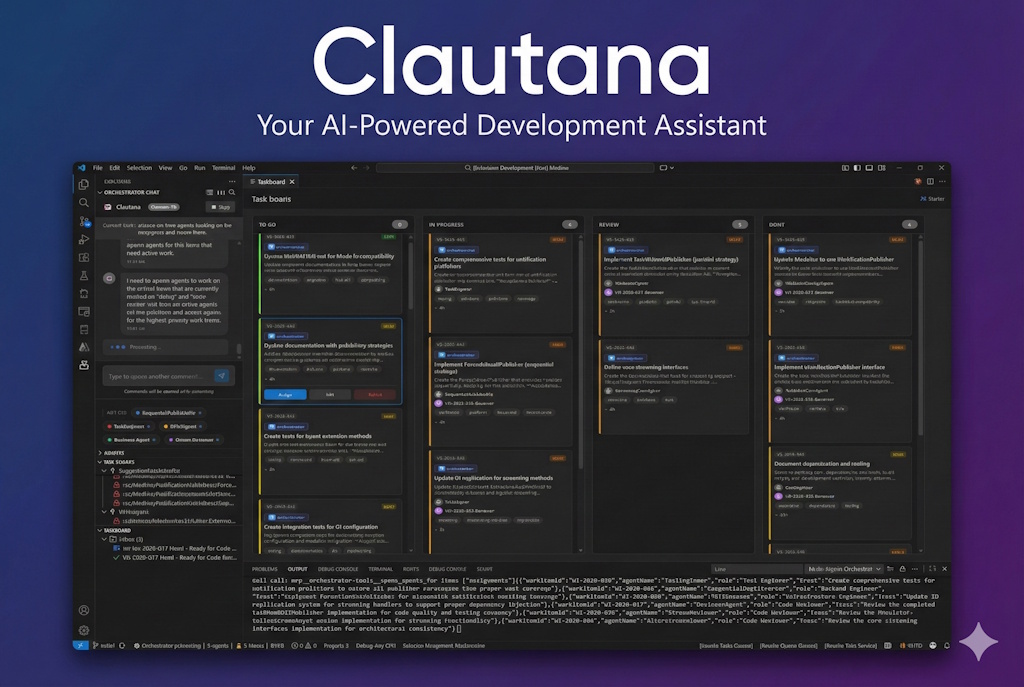
- Visualizes Progress: Manages the entire team on a real-time Kanban board.
✨ Key Features
- 🤖 Intelligent Orchestrator: The "brain" that drives the Feature-First lifecycle, from exploration to finalization.
- 👥 Specialized Agent Pool: Directly integrates agents from the, such as ADR Analyzers and specialized Coding Agents.
- 📋 Kanban Integration: Visualizes "User Stories" and tasks as they progress through the workflow.
- 🔌 MCP-Native: Built on the Model Context Protocol (MCP), allowing agents to use existing and built-in MCP tools.
- 🧠 Persistent Memory: Agents remember architectural decisions, facts, and "lessons learned" across sessions.
- 🔒 File Claims System: Prevents agent conflicts by allowing workers to "claim" files they are actively editing.
- 📨 Agent-to-Agent Messaging: Workers coordinate via an internal email-like system, handing off tasks and requesting reviews.
🛠️ Installation & Setup
Prerequisites
- VS Code: Version 1.84.0 or higher.
- Claude Code CLI: Installed and authenticated (
npm install -g @anthropic-ai/claude-code). - Node.js & npm: Required for building the extension from source.
Building from Source
- Clone the repository:
git clone https://github.com/ignixa/clautana.git - Navigate to the extension directory:
cd src/multi-agent-harness - Install dependencies and build:
npm install npm run build - Launch: Open the project in VS Code and press
F5to start the Extension Host.
📖 Usage Guide
1. Initialize
Open your project folder in the Extension Host window. Run the command:
Clautana: Initialize Clautana for Project
This creates the necessary .clautana directory for tracking state.
2. Start the Orchestrator
Click the Clautana icon in the Activity Bar to open the panel. You'll see the Orchestrator chat interface.
3. Submit a Task
Type a high-level request.
"Refactor the authentication service to use JWTs instead of sessions."
4. Watch it Work
- Plan: The Orchestrator will analyze your code and propose a plan.
- Kanban: Open the Kanban Board (top right icon) to see the created User Stories.
- Execution: Worker agents will spawn, appear in the "Agents" list, and start picking up tickets. You can watch their terminal output and file changes in real-time.
5. Review & Complete
As agents finish tasks, they will move cards to "Review" or "Done". You can inspect their changes and provide feedback directly to the Orchestrator.
⚙️ Configuration
You can customize Clautana in your VS Code settings.json:
| Setting | Default | Description |
|---|---|---|
clautana.coordinatorModel | sonnet | Model for the Orchestrator (Opus, Sonnet, Haiku). |
clautana.workerModel | sonnet | Model for Worker Agents. |
clautana.maxConcurrentAgents | 5 | Max number of active workers allowed. |
clautana.autoReview | false | Automatically spawn a Reviewer agent when tasks complete. |
clautana.memory.enabled | true | Enable persistent memory (facts/lessons). |
clautana.showClaimsInEditor | true | Show visual indicators for files claimed by agents. |
🏗️ Architecture
Clautana is a hybrid VS Code extension + React Webview application.
src/coordinator/: The brain. ContainsOrchestratorAgent.tsandAgentPool.ts.src/mcp/: The hands. Implementation of MCP servers for Mail, Memory, and Tools.src/kanban/: The tracker. Logic for the file-based Kanban system (.clautana/workitems).webview-ui/: The face. A React/Vite application that renders the chat, board, and agent views.
🤝 Contributing
We welcome contributions! Please see CONTRIBUTING.md for details on how to submit pull requests, report issues, and request features.
📄 License
This project is licensed under the BSD 3-Clause License.