README.md
July 30, 2026 · View on GitHub
The open-source Playwright library for AI regression testing.





Passmark covers your browser regression testing end-to-end and helps you catch regressions early. Fast.
It uses AI models to execute natural language browser steps via Playwright, with intelligent caching, auto-healing, and multi-model assertion verification. Your tests stay stable without needing to update AI prompts or retrain models.
Passmark is built by Bug0, the team also building FactoryKit, the AI software factory.
Quick Start
npm init playwright@latest passmark-project # select the default options and set language to TypeScript
cd passmark-project
npm install passmark
We need at least one model from Anthropic and one from Google to use Passmark's multi-model consensus features. Set the required environment variables in .env:
ANTHROPIC_API_KEY=sk-ant-...
GOOGLE_GENERATIVE_AI_API_KEY=AIza...
Alternatively, you can use an AI gateway like Vercel AI Gateway, OpenRouter, or OpenCode Zen to route requests to multiple providers without managing individual API keys. If you choose this option, set AI_GATEWAY_API_KEY (for Vercel), OPENROUTER_API_KEY (for OpenRouter), or OPENCODEZEN_API_KEY (for OpenCode Zen) instead.
You can also route requests through Cloudflare AI Gateway for observability, caching, and rate limiting. Unlike Vercel/OpenRouter/OpenCode Zen, Cloudflare is a proxy (not a reseller), so you still need your own ANTHROPIC_API_KEY / GOOGLE_GENERATIVE_AI_API_KEY alongside CLOUDFLARE_ACCOUNT_ID and CLOUDFLARE_AI_GATEWAY (and CLOUDFLARE_AI_GATEWAY_API_KEY if the gateway has authentication enabled).
Set your Playwright project to read .env by adding the following to playwright.config.ts (after import { defineConfig, devices } from '@playwright/test';):
import dotenv from 'dotenv';
import path from 'path';

dotenv.config({ path: path.resolve(__dirname, '.env') });
Make sure you install dotenv by running npm install dotenv.
Now, paste the following code into tests/example.spec.ts:
import { test, expect } from "@playwright/test";
import { runSteps } from "passmark";

test.use({
  headless: !!process.env.CI,
});

test("Shopping cart tests", async ({ page }) => {
  test.setTimeout(60_000); // increase timeout for AI execution
  await runSteps({
    page,
    userFlow: "Add product to cart",
    steps: [
      { description: "Navigate to https://demo.vercel.store" },
      { description: "Click Acme Circles T-Shirt" },
      { description: "Select color", data: { value: "White" } },
      { description: "Select size", data: { value: "S" } },
      { description: "Add to cart", waitUntil: "My Cart is visible" },
    ],
    assertions: [{ assertion: "You can see My Cart with Acme Circles T-Shirt" }],
    test,
    expect
  });
});
If you are using an AI gateway, you can add the following to the above code:
import { runSteps, configure } from "passmark";

configure({
  ai: {
    gateway: "vercel" // or "openrouter", "opencodezen", or "cloudflare"
    // Set AI_GATEWAY_API_KEY (Vercel), OPENROUTER_API_KEY (OpenRouter),
    // OPENCODEZEN_API_KEY (OpenCode Zen), or
    // CLOUDFLARE_ACCOUNT_ID + CLOUDFLARE_AI_GATEWAY (+ CLOUDFLARE_AI_GATEWAY_API_KEY
    // if the gateway is authenticated) in your .env file. Cloudflare also requires
    // the upstream provider keys (ANTHROPIC_API_KEY, GOOGLE_GENERATIVE_AI_API_KEY).
  }
});
To run the test, use:
npx playwright test example.spec.ts --project chromium
After the test completes, you can run npx playwright show-report to see a detailed report of the test execution, including an AI summary at the top, provided by Passmark.
Using CUA mode (OpenAI computer-use agent)
By default Passmark uses ARIA accessibility snapshots. For visual, screenshot-driven automation via OpenAI's computer-use agent, opt in with mode: "cua":
import { configure } from "passmark";

configure({
  ai: {
    mode: "cua",
    gateway: "none", // CUA requires direct OpenAI access
  },
});
Set OPENAI_API_KEY in your .env. Then you can write tests like this:
test("Shopping cart tests", async ({ page }) => {
  await runSteps({
    page,
    userFlow: "Add product to cart",
    steps: [
      { description: "Navigate to https://demo.vercel.store" },
      { description: "Click Acme Circles T-Shirt" },
      { description: "Select color", data: { value: "White" } },
      { description: "Add to cart", waitUntil: "My Cart is visible" },
    ],
    test,
    expect,
  });
});
Notes:
- CUA mode uses OpenAI's
gpt-5.5+ built-incomputertool. The CUA model is currently locked and not user-configurable. - Redis step caching is skipped in CUA mode because coordinate actions aren't portable across viewport sizes.
gateway: "vercel" | "openrouter" | "cloudflare"is not compatible with CUA — the Responses-APIcomputertool is only exposed on direct OpenAI access.- Account requirements: your OpenAI API key must have access to the CUA model and the built-in
computertool on the Responses API.
Per-step overrides (hybrid runs)
The same ai shape accepted by configure() can also be passed at the runSteps/runUserFlow call level and on individual Steps. This lets you mix snapshot steps (cheap, cacheable, OpenRouter/Vercel/etc.) with CUA steps (visual, direct OpenAI) in a single run. Precedence: step.ai ▶ call-level ai ▶ global configure().
configure({ ai: { gateway: "openrouter" } }); // most steps go through OpenRouter

await runSteps({
  page, test, expect,
  userFlow: "Buy product on sale",
  steps: [
    { description: "Navigate to /products" },                     // OpenRouter snapshot
    {
      description: "Drag the price slider to \$40",
      ai: { mode: "cua", gateway: "none" },                       // CUA for this step only
    },
    { description: "Click Add to cart" },                         // back to OpenRouter snapshot
  ],
});
Set OPENAI_API_KEY whenever any step opts into mode: "cua". CUA steps still require gateway: "none"; mixing CUA with a non-none gateway throws at the per-step level for the same reason it does globally.
Features
- Core Execution —
runSteps()andrunUserFlow()for flexible test orchestration in natural language, with smart caching and auto-healing - Multi-Model Assertion Engine — Consensus-based validation using Claude and Gemini, with an arbiter model to resolve disagreements
- Video Assertions — Opt in per-assertion to record the full step run and evaluate the assertion against the whole video via Gemini's Files API. Useful for ephemeral UI (toasts, snackbars) that a single screenshot may miss
- Redis-Based Step Caching — Cache-first execution with AI fallback and automatic self-healing when cached steps fail
- Configurable AI Models — 8 dedicated model slots for step execution, assertions, extraction, and more
- AI Gateway Support — Route requests through Vercel AI Gateway, OpenRouter, Cloudflare AI Gateway, or connect directly to provider SDKs
- Dynamic Placeholders — Inject values at runtime with
{{run.*}},{{global.*}},{{data.*}}, and{{email.*}}expressions for repeatable and data-driven tests - Email Extraction — Pluggable email provider interface with a built-in emailsink provider
- AI-Powered Data Extraction — Extract structured values from page snapshots and URLs using AI
- Smart Wait Conditions — AI-evaluated wait conditions with exponential backoff. No rigid selectors or time-based waits needed.
- Secure Script Runner — AST-validated Playwright script execution with an allowlisted API surface
- Telemetry — Optional Axiom and OpenTelemetry tracing via environment variables
- Structured Logging — Pino-based logger with configurable log levels
- Global Configuration — Single
configure()entry point for models, gateway, email provider, and upload path
Testing agent-written code
Regression risk scales with change volume, and coding agents have multiplied change volume. When a background coding agent like FactoryKit works your backlog, it runs your repo's own checks on every change before a human reviews the pull request; a Passmark suite slots in as exactly that check. Because steps are written in natural language and auto-heal, the suite keeps passing while the agent reshapes the DOM underneath it, which is where selector-based tests usually give up.
Core Functions
runSteps(options: RunStepsOptions)
Executes a sequence of steps using AI with caching. Each step is described in natural language and executed via Playwright.
await runSteps({
  page,
  userFlow: "Checkout Flow",
  steps: [
    { description: "Add item to cart" },
    { description: "Go to checkout" },
    { description: "Fill in shipping details", data: { value: "123 Main St" } },
  ],
  assertions: [{ assertion: "Order confirmation is displayed" }],
  test,
  expect,
});
runUserFlow(options: UserFlowOptions)
Runs a complete user flow as a single AI agent call. Best for exploratory testing where exact steps are flexible.
const result = await runUserFlow({
  page,
  userFlow: "Complete a purchase",
  steps: "Navigate to store, add an item, checkout with test card",
  effort: "high", // by default "low" uses gemini-3-flash for faster execution; "high" uses gemini-3.1-pro-preview for deeper thinking
});
assert(options: AssertionOptions)
Multi-model consensus assertion. Runs Claude and Gemini in parallel; if they disagree, a third model arbitrates (configurable — see Consensus Policy).
const result = await assert({
  page,
  assertion: "The dashboard shows 3 active projects",
  expect,
});
Consensus Policy
When the primary (Claude) and secondary (Gemini) assertion models reach the same verdict, the result is used directly. When they disagree, you choose how Passmark resolves it:
| Policy | Behavior |
|---|---|
consult-arbiter-on-disagreement (default) | Calls the arbiter model (Gemini 3.1 Pro) to break the tie. |
fail-on-disagreement | Treats any disagreement as a failure immediately — no arbiter call. The returned reasoning includes both models' takes so you can inspect what they saw differently. |
Pick fail-on-disagreement when you'd rather surface ambiguity/flakiness in the UI under test than let a single model swing the result. Pick the default when you trust the arbiter to make the final call.
configure({
  assertions: {
    consensusPolicy: "fail-on-disagreement",
  },
});
Video Assertions
For UI that's only visible for a second or two — toast messages, snackbar confirmations, transient banners — a single end-of-flow screenshot often misses the evidence. Set video: true on an assertion inside runSteps and Passmark will record the entire step run with page.screencast, upload the resulting .webm to Gemini's Files API, and evaluate the assertion against the full video:
await runSteps({
  page,
  userFlow: "Add to cart",
  steps: [
    { description: "Click Acme Circles T-Shirt" },
    { description: "Add to cart" },
  ],
  assertions: [
    { assertion: "An 'Added to cart' toast appears", video: true },
  ],
  test,
  expect,
});
Notes:
- Recording spans the entire step run (start of first step to end of last step). One recording is shared across all
video: trueassertions in the samerunStepscall. - The video file is written to
/tmp/passmark-recordings/by default and deleted automatically after the assertions consume it. Override viaconfigure({ videoDir: "/your/path" }). - This path uses only Gemini (no Claude/Gemini consensus) since Claude doesn't accept video. The model is
gemini-3-flash-preview. - Video assertions go directly to Gemini's Files API regardless of any configured
gateway— file URIs are tied to the uploading Google account, so the gateway can't proxy them. You must setGOOGLE_GENERATIVE_AI_API_KEY(orGEMINI_API_KEY) even when the rest of your stack runs through Vercel / OpenRouter / Cloudflare. - If
page.screencast.start()fails (rare), video assertions silently fall back to the regular screenshot/snapshot path so the run still completes.
Configuration
Call configure() once before using any functions:
import { configure } from "passmark";

configure({
  ai: {
    gateway: "none", // "none" (default), "vercel", "openrouter", "opencodezen", or "cloudflare"
    models: {
      stepExecution: "google/gemini-3-flash",
      utility: "google/gemini-2.5-flash",
    },
  },
  uploadBasePath: "./uploads",
});
Environment Variables
| Variable | Required | Default | Description |
|---|---|---|---|
REDIS_URL | No | - | Redis connection URL for step caching and global state. Can also be set via configure({ redis: { url } }), which takes precedence. |
ANTHROPIC_API_KEY | Yes | - | Anthropic API key for Claude models |
GOOGLE_GENERATIVE_AI_API_KEY | Yes | - | Google API key for Gemini models. Also required for video: true assertions regardless of gateway (file URIs are tied to the uploading account). |
OPENAI_API_KEY | No | - | OpenAI API key for OpenAI models (required for CUA mode; must have Responses-API computer tool access) |
AI_GATEWAY_API_KEY | If gateway=vercel | - | Vercel AI Gateway API key |
OPENROUTER_API_KEY | If gateway=openrouter | - | OpenRouter API key |
OPENCODEZEN_API_KEY | If gateway=opencodezen | - | OpenCode Zen API key |
CLOUDFLARE_ACCOUNT_ID | If gateway=cloudflare | - | Cloudflare account ID that owns the AI Gateway |
CLOUDFLARE_AI_GATEWAY | If gateway=cloudflare | - | Cloudflare AI Gateway name (slug) |
CLOUDFLARE_AI_GATEWAY_API_KEY | If gateway=cloudflare and the gateway is authenticated | - | Cloudflare AI Gateway token (sent as cf-aig-authorization) |
AXIOM_TOKEN | No | - | Axiom token for OpenTelemetry tracing. Can also be set via configure({ telemetry: { axiomToken } }), which takes precedence. |
AXIOM_DATASET | No | - | Axiom dataset for trace storage. Can also be set via configure({ telemetry: { axiomDataset } }), which takes precedence. |
PASSMARK_LOG_LEVEL | No | info | Log level: debug, info, warn, error, silent |
Model Configuration
All models are configurable via configure({ ai: { models: { ... } } }):
| Key | Default | Used For |
|---|---|---|
stepExecution | google/gemini-3-flash | Executing individual steps |
userFlowLow | google/gemini-3-flash-preview | User flow execution (low effort) |
userFlowHigh | google/gemini-3.1-pro-preview | User flow execution (high effort) |
assertionPrimary | anthropic/claude-4.5-haiku | Primary assertion model (Claude) |
assertionSecondary | google/gemini-3-flash | Secondary assertion model (Gemini) |
assertionArbiter | google/gemini-3.1-pro-preview | Arbiter for assertion disagreements |
utility | google/gemini-2.5-flash | Data extraction, wait conditions |
cua | gpt-5.5 | CUA mode — OpenAI Responses API with the built-in computer tool |
Caching
Passmark caches successful step actions in Redis. On subsequent runs, cached steps execute directly without AI calls, dramatically reducing latency and cost.
Provide the connection via configure({ redis: { url } }) or the REDIS_URL env var (configure value wins). Without either, caching, {{global.*}} placeholders, and project data are disabled.
- Steps are cached by
userFlow+step.description - Set
bypassCache: trueon individual steps or the entire run to force AI execution - Cache is automatically bypassed on Playwright retries
- Caching only applies to
runSteps. As of now, only those AI executions that are single-step are cached as multi-step actions can vary widely and are less likely to be identical on subsequent runs. We're exploring ways to safely cache multi-step flows.
Telemetry
Telemetry is opt-in. Either set the AXIOM_TOKEN and AXIOM_DATASET env vars, or pass them through configure():
configure({
  telemetry: {
    axiomToken: process.env.MY_AXIOM_TOKEN,
    axiomDataset: "passmark-traces",
  },
});
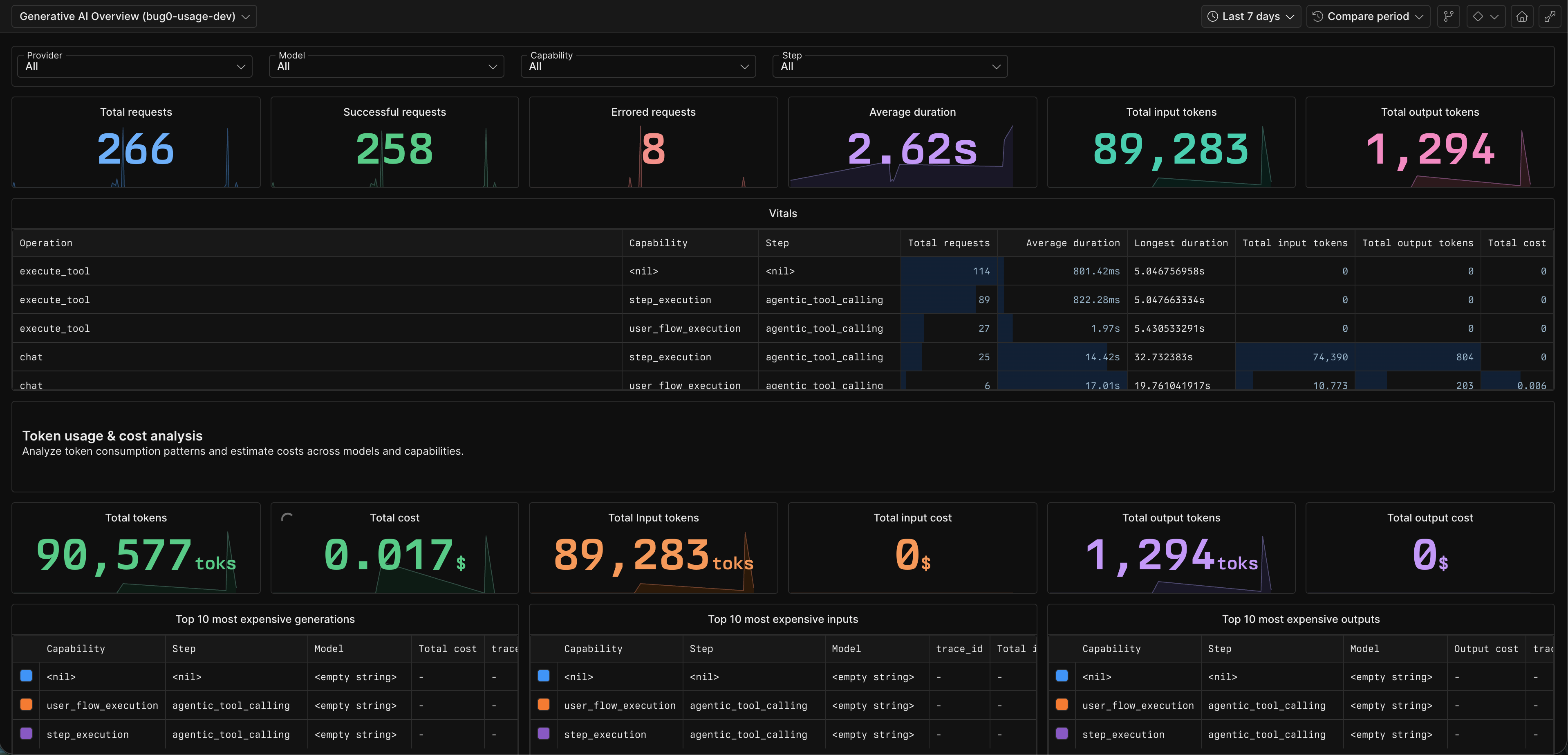
configure() values take precedence over env vars. Without either, telemetry is a no-op. All AI calls are wrapped with withSpan for observability.
Configure Axiom to get a rich dashboard like this:
Email Extraction
Configure an email provider for testing flows that involve email verification. By default, you can use the emailsink provider, which provides disposable email addresses and an API to fetch received emails. The free tier doesn't need any credentials, but for more reliability and flexible rate limits, you can sign up for an account and use your EMAILSINK_API_KEY. Reach out to us if you want to get an API key.
import { configure } from "passmark";
import { emailsinkProvider } from "passmark/providers/emailsink";

configure({
  email: emailsinkProvider({ apiKey: process.env.EMAILSINK_API_KEY }),
});
Or implement a custom provider:
configure({
  email: {
    domain: "my-test-mail.com",
    extractContent: async ({ email, prompt }) => {
      // Fetch and extract content from your email service
      return extractedValue;
    },
  },
});
Use in steps with the {{email.*}} placeholder pattern:
{
  description: "Enter the verification code",
  data: { value: "{{email.otp:get the 6 digit verification code:{{run.dynamicEmail}}}}" }
}
Placeholder System
Dynamic values can be injected into step data using placeholders:
| Pattern | Scope | Description |
|---|---|---|
{{run.email}} | Single test | Random email (faker) |
{{run.dynamicEmail}} | Single test | Email using configured domain |
{{run.fullName}} | Single test | Random full name |
{{run.shortid}} | Single test | Short unique ID |
{{run.phoneNumber}} | Single test | Random phone number |
{{global.email}} | All tests in an execution | Shared across runSteps calls with same executionId |
{{global.dynamicEmail}} | All tests in an execution | Shared dynamic email |
{{data.key}} | Per project | Stored in Redis, managed via project settings |
{{email.type:prompt}} | Resolved lazily | Extract content from received email |
Architecture Overview
Step Request
    |
    v
[Cache Check] --hit--> [Execute Cached Action] --success--> Done
    |                          |
    miss                     fail (auto-heal)
    |                          |
    v                          v
[AI Execution] ---------> [Cache Result]
    |
    v
[Assertions] (Claude + Gemini consensus)
Known Limitations
- Tests are not comprehensive at the moment. We welcome contributions to expand test coverage, especially around edge cases and failure modes.
Contributing
See CONTRIBUTING.md for development setup, code style, and PR workflow.
License
FSL-1.1-Apache-2.0 - Functional Source License, Version 1.1, with Apache 2.0 future license.