Introducing the RGBA bitmap file format
June 3, 2024 · View on GitHub
.rgba is the dumbest possible image interchange format, now available for your programming pleasure.
Why this revolutionary idea?! and why now?
It's time for a bitmap image interchange format that you can read and write comprehensively with the barest minimum of code and zero edge cases. The RGBA format I am proposing here is the new, beautifully stupid standard that you didn't know you needed until now. The actual spec is short enough to fit in a tweet, or on the back of an envelope. (It's also described below.)
If you're a programmer dealing with image or bitmap data, you'll be familiar with the idea of the raw bitmap in memory, which these days is almost always one big, linear, RGBA, 4-byte-per-pixel buffer. You'll be equally familiar with all the annoyances of getting this data to and from a file, the network, etc.
Why? Because although the bitmap in memory is super easy to work with, image files are all complicated, designed around the computing constraints and multifarious graphics hardware of the 1990s (!). Those standards all require you to pull in complex libraries and frameworks to work with them.
If you want to keep your code self-contained and simple there aren't a lot of options. PNG and GIF are nontrivial; JPEG will make you run screaming. Even Microsoft's BMP format, which is the nearest common format to "raw," is a rat's nest of accretive complexity once you start trying to parse it. Who the f--- needs to encode and decode 4 bit-per-pixel indexed palette RLE data in this futuristic year 2021? NO ONE. Disks are big and cheap, networks are fast. RGBA is fine, even if you're only using a few colors!
So in some sense, .rgba is a spiritual successor to the Windows BMP - a distillation of its very essence into the single and minimal form that the vast majority of those files were using anyway.
Important Note:
Popular image file processing tool imagemagick doers not support this file format, but does support a metadataless raw format which they also named "rgba": basically, pixel data that requires a tiny sprinkle of external knowledge of what it is, which is exactly what I'm trying to accomplish here. Conversion to and from that format can be done fairly trivially, but I encourage any interested programmer to take up the challenge of submitting a patch to imagemagick, adding support for this more useful rgba.
Specification
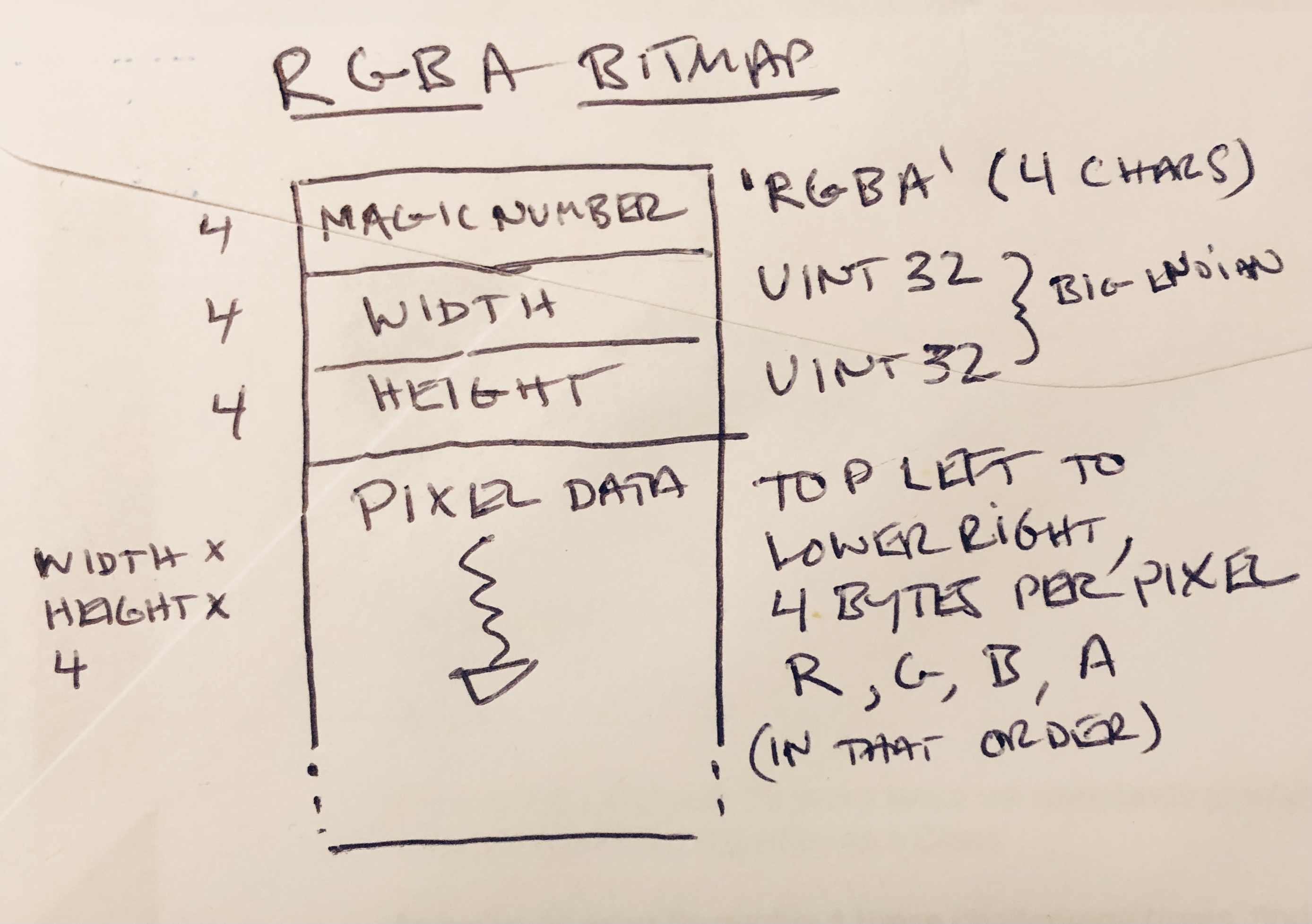
- 32-bit "magic number" to identify the file. This is the characters
RGBA, in that order. - 32-bit width (in pixels) Big-endian.
- 32-bit height (in pixels). Big-endian.
- Pixel data as 4 bytes per pixel, one byte each R, G, B, A. Always in that order. (This is sometimes referred to as
R8G8B8A8.) The bitmap starts at the upper-left of the image and scans each line, all the way to the bottom. There is no padding anywhere. The total length of the pixel data will be thus equal towidth * height * 4, and the formula for accessing the first byte (red channel) of any pixel will be:pixel_data[(y * width * 4) + (x * 4)]
The two numeric values, for the dimensions, are in big-endian byte order, also known as network byte order, also known as the one that's easier to look at in a hex editor or memory dump.
I am providing a handy public domain C module to conveniently save and load if you want to use that, but the format is so simple that you can do it in lots of different ways.
F.A.Q.s
What is the file extension for these files?
.rgba of course.
Won't these files be huge?
Lol maybe. But so is your disk and your Dropbox and your RAM so who cares. This is not meant to take the place of a judicious JPEG, obviously. Just an option to have when you're building simple tooling.
Can I store the pixels in ARGB or BGRA order?
No, you can't! It's right there in the name. I mean, you can do anything you want, but the .rgba file will only be correct if it's in actual RGBA (a.k.a. R8G8B8A8) order. This was a kind of hard call, because there are some non-crazy scenarios why you might find it convenient if the file data mapped exactly onto your slightly different in-memory layout.
But once you introduce the option to have other orderings, you immediately end up with half the code out there reading these files being incorrect or incomplete, and then you might as well just be using the BMP format, which has the same problem.
The point is clarity and simplicity. You may need to transform the data slightly when reading or writing it. The code in this repository will do some basic transforms, if you need them. Or it should be easy enough to do your own!
Where does the other image metadata go?
It doesn't! You could, I suppose, append additional data in your preferred format after the pixel data. A reasonable decoder might probably just ignore it? But I do not necessarily encourage this course of action.
How do I specify a color space? Don't I need that?
I barely even understand what that gamut stuff means. Isn't 16 million colors enough for you?? If you need to make an assumption about color space, assume sRGB (a.k.a "Standard RGB") because that's like 99.9% of bitmap data anyone cares about in the real world. (If you're doing work that distinguishes color spaces, you're probably looking for a different file format.)
Is the alpha channel premultiplied?
No. And if your image doesn't have transparency, just use 0xFF for the alpha channel.
What about alignment?
Everything in the file (the three header fields and every pixel) is naturally 32-bit aligned, and no padding anywhere is required (or allowed). Your in-memory needs may vary, of course, and to that end, the included helper routines are happy to pad each row of loaded pixels to the boundaries you wish. You can also write a custom load function if you need something bespoke. The idea is that it should be easy!
How does .rgba beat the competition?
In simplicity of implementation, and speed of read/write. Any compressed format is more complex (PNG, GIF, or my god, JPEG). Windows BMP is the closest to allowing raw data but you still need to screw around with a bunch of semi-documented header fields and pick your bitmasks correctly. Any file format that needs a huge corpus of sample files to reasonably validate a decoder is not simple enough!
Who the hell are you?
Just some guy who's sick of spending more time decoding image files than doing the actual projects I'm trying to do. You're welcome. ;-)