rockhopper
June 23, 2026 · View on GitHub


rockhopper is an embeddable database migration tool written in Go. Compile your SQL migrations into a single, self-contained binary, manage schemas across MySQL, PostgreSQL, and SQLite from one consistent workflow, and let your AI assistant drive the whole thing — create, apply, and roll back migrations in plain English with built-in Claude Code skills. It reads Goose migration files as-is, handles real-world SQL down to raw mysqldump output, and connects to MySQL with no DSN tweaking required.
🐧 Named after the rockhopper penguin — a small bird with a yellowish crest that scales subantarctic cliffs by hopping from rock to rock, the same way you step through migrations one version at a time.
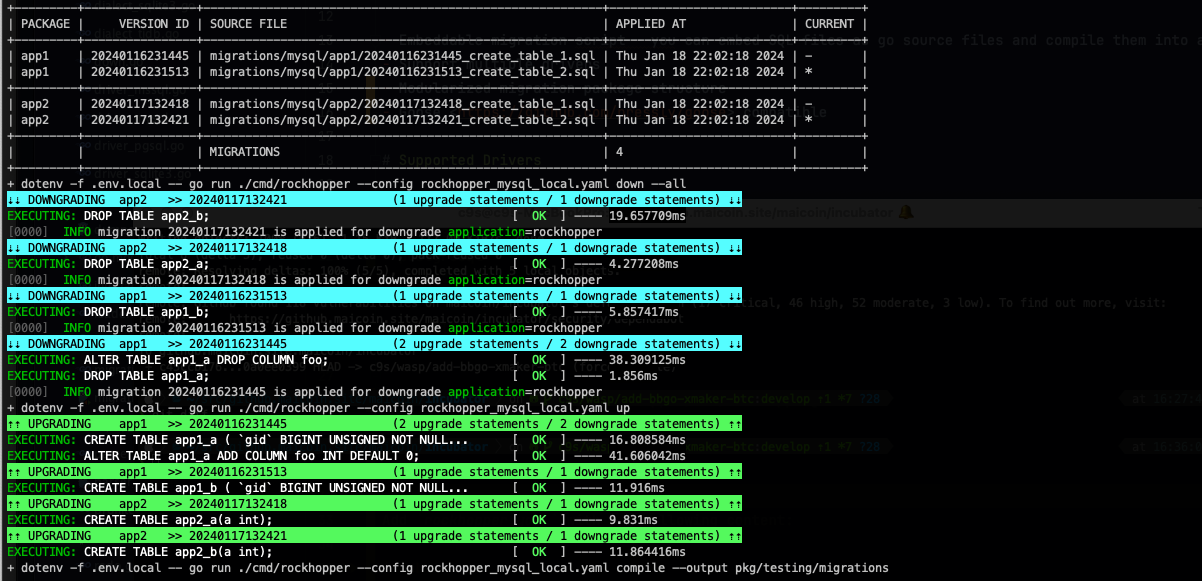
Table of Contents
- Why rockhopper?
- Core Concepts
- Install
- Quick Start
- CLI Commands
- Configuration
- SQL Migration Format
- Go Code-Based Migrations
- Multi-Dialect Workflow
- Compiling Migrations into Go
- Go API
- Data Migrations
- Environment Variables
- Claude Code Support
- Migrating from Goose
- Credit
- License
Why rockhopper?
- 🤖 AI-friendly by design — ships with Claude Code skills so you can create, apply, and roll back migrations conversationally. Drop them into any project with a single
rockhopper skills install. - 📦 Truly embeddable — compile SQL migrations into Go source and ship them inside your binary. No migration files to deploy, no runtime file dependencies.
- 🗄️ Multi-dialect — one consistent workflow across MySQL, PostgreSQL, and SQLite3 (plus TiDB and Redshift aliases).
- 🔁 Resumable data migrations — beyond schema changes, run long-running backfills as throttled, checkpointed batches that pick up exactly where they left off after an interruption, with each batch's writes and progress committed atomically. Gate them behind a schema version so they only run once the table they depend on exists.
- 💪 Resilient with real-world SQL — parses everyday dumps, including raw
mysqldumpoutput, skips empty statements left behind when migrations are merged, and names the exact migration file and version when a statement fails. - 🔌 Zero-config connections — auto-enables MySQL's
parseTime=true, soDATETIME/TIMESTAMPcolumns just work without hand-editing your DSN. - 🧩 Package-based — organize migrations by module and migrate each package independently.
- 🔄 Goose-compatible — reads Goose's
-- +gooseannotation syntax directly, and auto-migrates legacygoose_db_versiontables for you. - 🛠️ CLI or library — drive migrations from the cobra-based CLI, or call the Go API directly at app startup.
Core Concepts
A few ideas explain how rockhopper behaves. Skim these once and the commands below will make sense.
-
Migrations & version IDs — A migration is a single SQL (or Go) file describing one schema change. Its filename starts with a timestamp (
20240116231445_add_trades_table.sql); that number is its version ID. Rockhopper always applies migrations in ascending version order, so newer changes never run before older ones. -
Up and down — Every migration has an
-- +upblock (what to apply) and an optional-- +downblock (how to undo it).uprolls the schema forward;downrolls it back. -
Version tracking table — Rockhopper records which versions have been applied in a table named
rockhopper_versions. It creates this table automatically on first run (and transparently migrates from a legacy Goosegoose_db_versiontable if it finds one), so it always knows what's pending versus already applied. -
Packages — Migrations can be grouped into named packages (via
-- @package <name>, defaultmain). Each package tracks its own current version and is migrated independently. This lets a modular application keep, say, abillingmodule's migrations separate from ausersmodule's. -
Dialects — Rockhopper generates its bookkeeping SQL per database dialect (MySQL, PostgreSQL, SQLite3, and the TiDB/Redshift aliases). Your own migration SQL is dialect-specific too, which is why multi-database projects keep one migration directory per dialect (see Multi-Dialect Workflow).
-
Embedding —
rockhopper compileturns your SQL files into Go source. You can then ship migrations inside your binary and run them at startup with no migration files on disk (see Compiling Migrations into Go).
Install
go install github.com/c9s/rockhopper/v2/cmd/rockhopper@latest
Quick Start
1. Configure. Rockhopper looks for rockhopper.yaml in the current directory by default. Tell it how to reach your database and where your migration files live:
---
driver: mysql      # mysql | postgres | sqlite3
dialect: mysql     # SQL dialect (defaults to driver if omitted)
dsn: "root@tcp(localhost:3306)/rockhopper?parseTime=true"
package: myapp     # default package name for new migrations
migrationsDirs:    # one or more directories rockhopper scans for migrations
- migrations/module1
- migrations/module2
2. Create the migration directories referenced above:
mkdir -p migrations/{module1,module2}
3. Generate a migration file. This writes an empty, timestamped template you then fill in:
rockhopper create -t sql --output migrations/module1 add_trades_table
# -> migrations/module1/20240116231445_add_trades_table.sql
4. Edit the file to add your -- +up and -- +down SQL (see SQL Migration Format).
5. Apply pending migrations. Rockhopper applies everything not yet recorded in the version table, in version order:
rockhopper up
6. Inspect what happened at any time with status:
rockhopper status
+---------+----------------+---------------------------------------------------------+--------------------------+---------+
| PACKAGE |     VERSION ID | SOURCE FILE                                             | APPLIED AT               | CURRENT |
+---------+----------------+---------------------------------------------------------+--------------------------+---------+
| app1    | 20240116231445 | migrations/mysql/app1/20240116231445_create_table_1.sql | Fri Jan 19 15:34:51 2024 | -       |
| app1    | 20240116231513 | migrations/mysql/app1/20240116231513_create_table_2.sql | Fri Jan 19 15:34:51 2024 | *       |
+---------+----------------+---------------------------------------------------------+--------------------------+---------+
| app2    | 20240117132418 | migrations/mysql/app2/20240117132418_create_table_1.sql | Fri Jan 19 15:34:51 2024 | -       |
| app2    | 20240117132421 | migrations/mysql/app2/20240117132421_create_table_2.sql | Fri Jan 19 15:34:51 2024 | *       |
+---------+----------------+---------------------------------------------------------+--------------------------+---------+
|         |                | MIGRATIONS                                              | 4                        |         |
+---------+----------------+---------------------------------------------------------+--------------------------+---------+
Roll back a single migration:
rockhopper down
Redo the last migration (down then up):
rockhopper redo
CLI Commands
Global Flags
| Flag | Default | Description |
|---|---|---|
--config | rockhopper.yaml | Path to config file |
--debug | false | Enable debug logging |
up — Apply pending migrations
rockhopper up                       # apply all pending migrations
rockhopper up --steps 3             # apply the next 3 pending migrations
rockhopper up --to 20240117         # apply up to a specific version
rockhopper up --allow-out-of-order  # also apply pending migrations older than the latest applied
| Flag | Description |
|---|---|
--steps | Number of migrations to apply |
--to | Target version to migrate up to |
--allow-out-of-order | Apply pending migrations whose version is below an already-applied migration |
Out-of-order migrations
When you work on parallel branches, a teammate can merge a migration with a
timestamp lower than one you have already applied. By default up refuses
to run in this situation and lists the offending files, because a normal upgrade
walks forward from the last applied migration and would silently skip them:
out-of-order migrations detected in package "main": the following are pending but
have a lower version than the highest applied migration (20240103000000), so a
normal upgrade would silently skip them:
  - 20240102000000  migrations/20240102000000_b.sql
re-run with --allow-out-of-order to apply them anyway, or renumber them above the latest applied version
You then have two choices:
- Renumber the new migration so its version is above the latest applied one (the safe default — history stays linear).
- Apply it in place with
rockhopper up --allow-out-of-order. Rockhopper warns for each out-of-order migration and applies it. Use this only when the older migration is independent of the newer ones, since it changes the applied order.
down — Roll back migrations
rockhopper down              # roll back the last applied migration
rockhopper down --steps 3    # roll back the last 3 migrations
rockhopper down --to 20240116  # roll back down to a specific version
rockhopper down --all        # roll back all applied migrations
| Flag | Description |
|---|---|
--steps | Number of migrations to roll back |
--to | Target version to roll back to |
--all | Roll back all migrations |
redo — Redo the last migration
Rolls back the last applied migration, then re-applies it:
rockhopper redo
status — Show migration status
Lists every known migration per package and whether it has been applied:
rockhopper status
In the output, the Applied At column shows the timestamp when a migration ran (or Pending if it hasn't), and the Current column marks each package's current version with * (all other rows show -).
version — Print the version
Prints the rockhopper build version, commit, and build time. This command works without a config file:
rockhopper version
# rockhopper v2.0.7 (commit abc1234, built 2024-01-19T12:00:00Z)
create — Create a new migration file
rockhopper create -t sql --output migrations/mysql add_trades_table
rockhopper create -t go --output migrations add_custom_logic
| Flag | Default | Description |
|---|---|---|
-t, --type | sql | Migration type: sql or go |
-o, --output | from config | Output directory for the migration file |
Migration files are named with a timestamp prefix: {YYYYMMDDhhmmss}_{name}.sql
compile — Compile SQL migrations into Go
rockhopper compile --output pkg/migrations/mysql
rockhopper compile --output pkg/migrations/mysql --package main --package app2
rockhopper compile --output pkg/migrations/mysql --no-build
| Flag | Default | Description |
|---|---|---|
-o, --output | pkg/migrations | Output directory for the generated Go package |
-p, --package | all | Filter specific packages to compile (repeatable) |
-B, --no-build | false | Skip building the package after compiling |
align — Align migration version
Synchronize the database state to a specific migration version:
rockhopper align main 20240116231445
Arguments: <packageName> <versionID>
Configuration
Config File
Pass --config to use a different config file:
rockhopper --config rockhopper_sqlite.yaml status
Config Fields
---
driver: mysql                    # Database driver: mysql, sqlite3, postgres
dialect: mysql                   # SQL dialect (defaults to driver if omitted)
dsn: "root@tcp(localhost:3306)/mydb?parseTime=true"
package: myapp                   # Default package name (defaults to "main")
migrationsDirs:                  # List of migration directories
- migrations/module1
- migrations/module2
includePackages:                 # Optional: only include these packages
- main
- app2
| Field | Default | Description |
|---|---|---|
driver | Database driver: mysql, sqlite3, postgres | |
dialect | same as driver | SQL dialect for query generation. Also supports tidb (uses mysql) and redshift (uses postgres) |
dsn | Data source name / connection string | |
package | main | Default migration package name |
migrationsDir | Legacy, for Goose compatibility (Goose uses a single directory). Prefer migrationsDirs; a value set here is migrated into migrationsDirs as its first entry. | |
migrationsDirs | migrations | List of migration directories. create writes new migrations to the first directory. |
includePackages | all | Whitelist of packages to include when loading migrations |
The version-tracking table is always named
rockhopper_versionswhen using the CLI. To use a custom table name, call the library'sOpen/Newfunctions directly and pass your own name (see Go API).
Environment variables in the config file
Values in the config file may reference environment variables using $VAR or
${VAR} syntax. They are expanded when the file is loaded, which is handy for
keeping connection strings and secrets out of version control:
---
driver: mysql
dialect: mysql
dsn: ${MYSQL8_URL}        # expanded from the MYSQL8_URL environment variable
migrationsDirs:
- migrations/myapp
export MYSQL8_URL="root:secret@tcp(localhost:3306)/myapp?parseTime=true"
rockhopper up
Notes:
- Both
${VAR}and bare$VARare supported. - An undefined variable expands to an empty string.
- To keep a literal dollar sign in a value (e.g. inside a password), write
$$. - This is independent of the
ROCKHOPPER_*overrides below: if both are set, theROCKHOPPER_*environment variable still takes precedence over the file value (see Environment Variables).
SQL Migration Format
A simple migration:
-- +up
CREATE TABLE post (
    id int NOT NULL,
    title text,
    body text,
    PRIMARY KEY(id)
);

-- +down
DROP TABLE post;
Each migration file must have exactly one -- +up annotation. The -- +down annotation is optional. If both are present, -- +up must come first.
Annotations
| Annotation | Description |
|---|---|
-- +up | Statements following this are executed on upgrade |
-- +down | Statements following this are executed on rollback |
-- +begin / -- +end | Wrap multi-statement blocks (e.g. PL/pgSQL with internal semicolons) |
-- !txn | Disable transaction wrapping for this file (e.g. CREATE DATABASE) |
-- @package name | Assign this migration to a named package (default: main) |
Multi-statement example
-- +up
-- +begin
create or replace procedure prac_transfer(
   sender int,
   receiver int,
   amount dec
)
language plpgsql
as $$
begin
    update accounts
    set balance = balance - amount
    where id = sender;

    update accounts
    set balance = balance + amount
    where id = receiver;

    commit;
end;$$;
-- +end
Non-transactional migrations
Use -- !txn for statements that cannot run inside a transaction:
-- +up
-- !txn
CREATE INDEX CONCURRENTLY idx_users_email ON users (email);

-- +down
-- !txn
DROP INDEX CONCURRENTLY idx_users_email;
Package-based migrations
Use -- @package <name> to assign migrations to named packages. Rockhopper groups and executes them per package:
-- @package billing
-- +up
CREATE TABLE invoices (id INT PRIMARY KEY, amount DECIMAL(10,2));

-- +down
DROP TABLE invoices;
- Collect all migration scripts
- Categorize by package name
- Execute migrations package by package
The default package name is main. Use includePackages in your config to selectively apply only certain packages.
Go Code-Based Migrations
When a migration needs real program logic — branching on data, calling into your
application packages, reading a file, transforming rows in Go — write it as a Go
migration instead of a SQL file. A Go migration is an ordinary Go function that
registers itself with rockhopper at init() time and receives a transaction to run
statements against.
SQL migrations cover most schema changes and are easier to read in a diff. Reach for Go migrations only when you need control flow that SQL can't express.
1. Generate a Go migration file
rockhopper --config rockhopper_mysql.yaml create --type go add_users
# -> migrations/mysql/20240116231445_add_users.go
The timestamp prefix is not cosmetic: AddMigration derives the migration's
version from the file name (via runtime.Caller), and the package name from the
Go package the file lives in. Keep the {timestamp}_{description}.go naming — the same
convention as SQL migrations — or registration will fail to parse a version.
2. Fill in the up/down functions
Each migration registers a pair of functions from init(). The executor passed in is
a live transaction (rockhopper wraps the migration in BEGIN/COMMIT by default and
rolls back automatically if you return an error):
package migrations

import (
    "context"

    "github.com/c9s/rockhopper/v2"
)

func init() {
    rockhopper.AddMigration(upAddUsers, downAddUsers)
}

func upAddUsers(ctx context.Context, tx rockhopper.SQLExecutor) error {
    if _, err := tx.ExecContext(ctx, `
        CREATE TABLE users (
            id    BIGINT PRIMARY KEY,
            name  VARCHAR(128) NOT NULL,
            email VARCHAR(255) NOT NULL
        )`); err != nil {
        return err
    }

    // Logic a plain SQL file can't express: seed rows computed in Go.
    for i, name := range []string{"alice", "bob", "carol"} {
        if _, err := tx.ExecContext(ctx,
            "INSERT INTO users (id, name, email) VALUES (?, ?, ?)",
            i+1, name, name+"@example.com",
        ); err != nil {
            return err
        }
    }

    return nil
}

func downAddUsers(ctx context.Context, tx rockhopper.SQLExecutor) error {
    _, err := tx.ExecContext(ctx, "DROP TABLE users")
    return err
}
SQLExecutor is just the ExecContext method, so the same body works whether the
underlying executor is a *sql.Tx or a *sql.DB. Migrations registered with
AddMigration always run inside a transaction; for statements that can't run in one
(e.g. CREATE INDEX CONCURRENTLY on PostgreSQL), use a SQL migration with the -- !txn
annotation instead — see Non-transactional migrations.
3. Register the package and run
Registration happens as a side effect of the package's init(), so the package must be
imported somewhere in your build. Then run the registered Go migrations:
package main

import (
    "context"

    "github.com/c9s/rockhopper/v2"

    // Blank import: pulls the package in so its init() registers the migrations.
    _ "github.com/yourorg/yourapp/migrations"
)

func main() {
    ctx := context.Background()

    db, err := rockhopper.OpenWithEnv("MYAPP") // MYAPP_DRIVER / MYAPP_DIALECT / MYAPP_DSN
    if err != nil {
        panic(err)
    }
    defer db.Close()

    if err := db.Touch(ctx); err != nil { // create the version table if needed
        panic(err)
    }

    // Apply every registered Go migration in the "migrations" package.
    if err := rockhopper.UpgradeFromGo(ctx, db, "github.com/yourorg/yourapp/migrations"); err != nil {
        panic(err)
    }
}
UpgradeFromGo(ctx, db, packageNames...) applies all registered Go migrations whose
package matches one of the given names. For finer control, load them yourself and drive
the linked list directly:
loader := &rockhopper.GoMigrationLoader{}

migrations, err := loader.Load() // every registered Go migration, sorted
if err != nil {
    return err
}

// Or scope to one package:
migrations, err = loader.LoadByExactPackage("github.com/yourorg/yourapp/migrations")

migrations = migrations.SortAndConnect()
if err := rockhopper.Up(ctx, db, migrations.Head(), 0); err != nil {
    return err
}
SQL vs Go migrations at a glance
| SQL migration | Go migration | |
|---|---|---|
| File | *.sql with -- +up / -- +down | *.go calling AddMigration in init() |
| Created by | create --type sql | create --type go |
| Version source | file name | file name (via runtime.Caller) |
| Package source | -- @package (default main) | the Go package path |
| Best for | declarative DDL/DML | data transforms, branching, calling app code |
| Embeddable | yes (via compile) | yes (already Go) |
Because Go migrations are already Go, they don't need the compile step — they embed in
your binary as soon as the package is imported. The compile command exists to turn
SQL migrations into this same registered form (see
Compiling Migrations into Go).
Multi-Dialect Workflow
When supporting multiple databases (e.g. MySQL and SQLite), maintain separate config files and migration directories:
# Create migration files for each dialect
rockhopper --config rockhopper_sqlite.yaml create --type sql add_pnl_column
rockhopper --config rockhopper_mysql.yaml create --type sql add_pnl_column

# Edit both files — SQL syntax may differ between dialects

# Apply migrations
rockhopper --config rockhopper_sqlite.yaml up
rockhopper --config rockhopper_mysql.yaml up
Compiling Migrations into Go
Compile SQL migrations into a Go package for embedding in your binary:
rockhopper compile --config rockhopper_mysql.yaml --output pkg/migrations/mysql
rockhopper compile --config rockhopper_sqlite.yaml --output pkg/migrations/sqlite3
The generated package provides:
Migrations()— returns all compiled migrations as a sortedMigrationSliceSortedMigrations()— alias forMigrations()GetMigrationsMap()— returns migrations grouped by packageMergeMigrationsMap()— merge additional migrations at runtimeAddMigration()— register new migrations dynamically
Then import and use the compiled migrations in your application:
import (
    "context"
    "database/sql"

    "github.com/c9s/rockhopper/v2"

    mysqlMigrations "github.com/yourorg/yourapp/pkg/migrations/mysql"
)

func Migrate(ctx context.Context, db *sql.DB) error {
    dialect, err := rockhopper.LoadDialect("mysql")
    if err != nil {
        return err
    }

    rh := rockhopper.New("mysql", dialect, db, rockhopper.TableName)

    if err := rh.Touch(ctx); err != nil {
        return err
    }

    migrations := mysqlMigrations.Migrations()
    migrations = migrations.FilterPackage([]string{"main"}).SortAndConnect()
    if len(migrations) == 0 {
        return nil
    }

    _, lastAppliedMigration, err := rh.FindLastAppliedMigration(ctx, migrations)
    if err != nil {
        return err
    }

    if lastAppliedMigration != nil {
        return rockhopper.Up(ctx, rh, lastAppliedMigration.Next, 0)
    }

    return rockhopper.Up(ctx, rh, migrations.Head(), 0)
}
Go API
Rockhopper can be used as a library in your Go application. Below are the key APIs.
Opening a Database Connection
// From a config struct
db, err := rockhopper.OpenWithConfig(config)

// From environment variables (reads MYAPP_DRIVER, MYAPP_DIALECT, MYAPP_DSN)
db, err := rockhopper.OpenWithEnv("MYAPP")

// Manual setup
dialect, _ := rockhopper.LoadDialect("mysql")
db, err := rockhopper.Open("mysql", dialect, dsn, rockhopper.TableName)

// Wrap an existing *sql.DB
dialect, _ := rockhopper.LoadDialect("mysql")
rh := rockhopper.New("mysql", dialect, existingDB, rockhopper.TableName)
Running Migrations
// Apply all pending migrations (pass 0 as target version to apply all)
rockhopper.Up(ctx, db, migrations.Head(), 0)

// Apply N steps
rockhopper.UpBySteps(ctx, db, migrations.Head(), 3)

// Apply all pending migrations across all packages
rockhopper.Upgrade(ctx, db, migrations)

// Apply from compiled Go migrations by package name
rockhopper.UpgradeFromGo(ctx, db, "main", "app2")

// Roll back to a specific version (pass 0 to roll back all)
rockhopper.Down(ctx, db, migrations.Tail(), 0)

// Roll back N steps
rockhopper.DownBySteps(ctx, db, migrations.Tail(), 3)

// Redo the last migration (down then up)
rockhopper.Redo(ctx, db, lastMigration)

// Align database to a specific version
rockhopper.Align(ctx, db, versionID, migrations)
Migration functions accept optional callbacks that fire after each migration is applied:
rockhopper.Up(ctx, db, migrations.Head(), 0, func(m *rockhopper.Migration) {
    log.Printf("applied migration %d: %s", m.Version, m.Name)
})
Working with MigrationSlice
migrations := mysqlMigrations.Migrations()

// Filter by package and prepare the linked list
filtered := migrations.FilterPackage([]string{"main", "app2"}).SortAndConnect()

// Traverse
first := filtered.Head()
last := filtered.Tail()
versions := filtered.Versions() // []int64

// Find a specific version
m, err := filtered.Find(20240116231445)

// Group by package
migrationMap := migrations.MapByPackage()
Loading SQL Migrations at Runtime
loader := rockhopper.NewSqlMigrationLoader(config)
migrations, err := loader.Load("migrations/mysql")
Registering Go Migrations
For Go-based migrations (instead of SQL files), register them from init(). See
Go Code-Based Migrations for the full tutorial; in short:
package migrations

import (
    "context"

    "github.com/c9s/rockhopper/v2"
)

func init() {
    rockhopper.AddMigration(upAddUsers, downAddUsers)
}

func upAddUsers(ctx context.Context, tx rockhopper.SQLExecutor) error {
    _, err := tx.ExecContext(ctx, "CREATE TABLE users (id INT PRIMARY KEY, name TEXT)")
    return err
}

func downAddUsers(ctx context.Context, tx rockhopper.SQLExecutor) error {
    _, err := tx.ExecContext(ctx, "DROP TABLE users")
    return err
}
Database Initialization
Touch() automatically creates the version table if it doesn't exist, and migrates from legacy Goose tables if detected:
if err := db.Touch(ctx); err != nil {
    return err
}
Querying Migration State
// Get current version for a package
version, err := db.CurrentVersion(ctx, "main")

// Load a specific migration's record from the database
m, err := db.LoadMigration(ctx, migration)
if m != nil && m.Record != nil && m.Record.IsApplied {
    // migration has been applied
}

// Load all records for a package
records, err := db.LoadMigrationRecordsByPackage(ctx, "main")

// Find the last applied migration from a slice
idx, lastApplied, err := db.FindLastAppliedMigration(ctx, migrations)
Data Migrations
Schema migrations change table structure; data migrations move or backfill the rows. For a large table that work often can't run as a single statement in one transaction — it needs to be chunked, throttled, and able to resume after an interruption. Rockhopper's data-migration API owns that loop, so you only write the per-batch logic. This is a library feature (there is no CLI command for it).
Each data migration implements the DataMigrator interface:
Planruns once before the first batch. It may read the database to compute bounds (e.g. the maximum primary key) and returns the initial checkpoint — an opaque, serializable progress cursor (commonly JSON).Batchprocesses one chunk starting from the current checkpoint and returns the advanced checkpoint plus whether the migration isdone. It is handed aBatchExecutorbound to the transaction that also commits the new checkpoint, so a batch's writes and its progress advance atomically.
Status and checkpoint are persisted in a separate rockhopper_data_migrations
table, independent of rockhopper_versions. Because each batch and its
checkpoint commit together, a process that dies mid-batch rolls back cleanly and
resumes from the last committed checkpoint without double-applying work — so
batches should be written to be idempotent.
Implementing a migrator
// a JSON checkpoint that advances an exclusive lower bound over the primary key
type pkCursor struct {
    Last int64 `json:"last"`
    Max  int64 `json:"max"`
}

type backfillUsers struct{ batchSize int64 }

func (b *backfillUsers) Plan(ctx context.Context, q rockhopper.Queryer) (rockhopper.Checkpoint, error) {
    var c pkCursor
    if err := q.QueryRowContext(ctx, "SELECT COALESCE(MAX(id), 0) FROM users").Scan(&c.Max); err != nil {
        return nil, err
    }
    return json.Marshal(c)
}

func (b *backfillUsers) Batch(ctx context.Context, exec rockhopper.BatchExecutor, cp rockhopper.Checkpoint) (rockhopper.Checkpoint, bool, error) {
    var c pkCursor
    if err := json.Unmarshal(cp, &c); err != nil {
        return nil, false, err
    }

    hi := c.Last + b.batchSize
    // idempotent: only touches the (Last, hi] window that isn't migrated yet
    if _, err := exec.ExecContext(ctx,
        "UPDATE users SET migrated = 1 WHERE id > ? AND id <= ? AND migrated = 0", c.Last, hi); err != nil {
        return nil, false, err
    }

    c.Last = hi
    next, err := json.Marshal(c)
    if err != nil {
        return nil, false, err
    }
    return next, c.Last >= c.Max, nil // done once we pass the planned Max
}
Registering and running
Register migrators from init() (the version is parsed from the source
filename, like schema migrations), optionally gating them behind a schema
version and throttling between batches:
func init() {
    rockhopper.AddDataMigration(
        &backfillUsers{batchSize: 1000},
        rockhopper.WithDataMigrationName("backfill_users"),
        rockhopper.After(20240116231445),               // run only after this schema version is applied
        rockhopper.WithThrottle(200*time.Millisecond),  // pause between batches to limit load / replication lag
    )
}
A data migration belongs to a package, the same namespace your schema
migrations use. AddDataMigration defaults the package to "main" (the default
package of SQL scripts), so a Go data migration registered alongside plain SQL
migrations lands in the same namespace by default. When your schema lives in a
different package, set it together with the name:
rockhopper.WithDataMigrationName("backfill_users", "orders"), // name + package
The After dependency is resolved within the data migration's own package.
Pass a package as the second argument to depend on a schema version in a
different package:
rockhopper.After(20240116231445)          // schema version 20240116231445 in this migration's package
rockhopper.After(20240116231445, "core")  // ... in the "core" package instead
Then drive them to completion. Each call is safe to repeat: completed migrations are skipped and interrupted ones resume.
// run every registered data migration (optionally filtered by package), in version order
err := rockhopper.RunRegisteredDataMigrations(ctx, db, "main")

// or run a specific one / an explicit list
err = rockhopper.RunDataMigration(ctx, db, dm)
err = rockhopper.RunDataMigrations(ctx, db, dms)
RunDataMigration creates the state table if needed, enforces the After
dependency, calls Plan on the first run (or resumes from the stored
checkpoint), then loops Batch — committing each batch with its checkpoint and
pausing for Throttle — until the migrator reports done. Cancel the ctx to
stop between batches; the next run picks up where it left off.
Environment Variables
You can override config file values with environment variables:
| Variable | Description |
|---|---|
ROCKHOPPER_DRIVER | Database driver: mysql, sqlite3, postgres |
ROCKHOPPER_DIALECT | SQL dialect for query generation |
ROCKHOPPER_DSN | Data source name / connection string |
ROCKHOPPER_MIGRATIONS_DIR | Single migration directory |
ROCKHOPPER_MIGRATIONS_DIRS | Migration directories (comma-separated) |
ROCKHOPPER_TABLE_NAME | Custom version table name |
Example with dotenv:
dotenv -f .env.local -- rockhopper --config rockhopper_mysql.yaml up
Claude Code Support
Rockhopper ships with built-in Claude Code skills, so you can manage migrations conversationally from your terminal. The following slash commands are available when working in a rockhopper-based project:
| Command | Description |
|---|---|
/create-migration <name> | Create migration files for all configured dialects at once |
/compile-migrations | Compile SQL migrations into Go source for embedding |
/apply-migrations | Apply pending migrations (up) |
/rollback-migration | Roll back the last applied migration (down) with confirmation |
/migration-status | Show migration status across all configured databases |
These skills auto-discover rockhopper_*.yaml config files in your project root, so they work out of the box for any multi-dialect setup.
Installing the skills into your project
The skills are bundled inside the rockhopper binary. Any project that uses rockhopper can scaffold them into its own .claude/skills directory with a single command:
# from the root of your project
rockhopper skills install

# list the skills bundled in the binary
rockhopper skills list
| Flag | Default | Description |
|---|---|---|
-d, --dir | . | Target project directory |
-f, --force | false | Overwrite existing skill files |
skills install works without a config file, so you can run it before configuring rockhopper. Existing files are left untouched unless you pass --force. Because the skills ship inside the binary, they stay in sync with the CLI — after upgrading rockhopper, re-run rockhopper skills install --force to pick up the matching versions. Commit the generated .claude/skills directory so the whole team shares the same migration tooling.
There is also a helper script scripts/create-migration.sh that can be used independently:
# Create migration files for all dialects
bash scripts/create-migration.sh add_pnl_column

# Specify migration type
bash scripts/create-migration.sh -t sql add_trades_table
Migrating from Goose
Rockhopper was forked from goose, so moving an existing goose project over is mostly mechanical — and in many cases your migration files already work unchanged.
1. The version table migrates itself
On the first run, Touch() (called automatically by every CLI command) detects a
legacy goose_db_version table, adds a package column defaulting to main, and
renames it to rockhopper_versions. Your applied-version history is preserved, so
already-applied migrations are not re-run — rockhopper picks up exactly where
goose left off. No manual data copy is needed.
Take a database backup before the first run, as with any schema change.
2. Filenames are already compatible
Goose's default timestamp filenames (20170506082420_add_some_column.sql) match
rockhopper's format exactly — no renaming required. (Rockhopper does not have an
equivalent of goose's sequential -s / fix numbering; it always orders by the
timestamp version ID.)
3. SQL annotations work as-is
Rockhopper's parser understands goose's annotation syntax directly, so most goose migration files run without any edits. Each goose annotation maps to a rockhopper one:
| Goose | Rockhopper equivalent | Parsed directly? |
|---|---|---|
-- +goose Up | -- +up | ✅ yes |
-- +goose Down | -- +down | ✅ yes |
-- +goose StatementBegin | -- +begin | ✅ yes |
-- +goose StatementEnd | -- +end | ✅ yes |
-- +goose NO TRANSACTION | -- !txn | ✅ yes |
-- +goose ENVSUB ON/OFF | (not supported) | ❌ ignored |
The only unsupported annotation is ENVSUB (goose's environment-variable
substitution); files using it need those values inlined.
You can keep the goose annotations or convert them to rockhopper's shorter native form — both parse identically. To normalize a directory:
sed -i '' \
  -e 's/-- +goose Up/-- +up/g' \
  -e 's/-- +goose Down/-- +down/g' \
  -e 's/-- +goose StatementBegin/-- +begin/g' \
  -e 's/-- +goose StatementEnd/-- +end/g' \
  -e 's/-- +goose NO TRANSACTION/-- !txn/g' \
  migrations/*.sql
Rockhopper also adds -- @package <name> for grouping migrations into independent
packages — a concept goose doesn't have. Existing files default to the main
package, which matches the column default used during the table migration.
4. Map the CLI commands
| Goose | Rockhopper |
|---|---|
goose up | rockhopper up |
goose up-by-one | rockhopper up --steps 1 |
goose up-to VERSION | rockhopper up --to VERSION |
goose down | rockhopper down |
goose down-to VERSION | rockhopper down --to VERSION |
goose reset | rockhopper down --all |
goose redo | rockhopper redo |
goose status | rockhopper status |
goose create NAME sql | rockhopper create -t sql NAME |
goose up -allow-missing | rockhopper up --allow-out-of-order |
goose version | rockhopper status ¹ |
goose validate | (not yet available) |
goose fix | (no equivalent — timestamps only) |
¹ Note: rockhopper version prints the build version of the CLI, not the
current database schema version. Use rockhopper status to see the applied
version per package.
Where goose takes connection settings as flags/env vars, rockhopper reads them
from rockhopper.yaml (see Configuration). The -table flag
maps to the library's table-name argument; the CLI always uses
rockhopper_versions.
5. Update Go-based migrations
The registration call is the same name, but the function signature changed: goose
passes a *sql.Tx, while rockhopper passes a context.Context and a
rockhopper.SQLExecutor:
// goose
func init() { goose.AddMigration(Up, Down) }
func Up(tx *sql.Tx) error   { _, err := tx.Exec("...");                return err }
func Down(tx *sql.Tx) error { _, err := tx.Exec("...");                return err }

// rockhopper
func init() { rockhopper.AddMigration(up, down) }
func up(ctx context.Context, tx rockhopper.SQLExecutor) error   { _, err := tx.ExecContext(ctx, "..."); return err }
func down(ctx context.Context, tx rockhopper.SQLExecutor) error { _, err := tx.ExecContext(ctx, "..."); return err }
Also swap the import path from github.com/pressly/goose/v3 to
github.com/c9s/rockhopper/v2.
Checklist
- Back up the database.
- Add a
rockhopper.yamlwith your driver, dialect, DSN, andmigrationsDirs. - (Optional) Normalize goose annotations to rockhopper's native form — they
parse either way, except
ENVSUB, which must be inlined. - Update any Go migrations to the
(ctx, SQLExecutor)signature and import path. - Run
rockhopper statusto confirm the table migrated and history is intact. - Run
rockhopper upto apply anything still pending.
Credit
Thanks to https://github.com/pressly/goose, this project was forked from goose.
License
MIT License