STAC API and OGC API - Features - Part 1: Core
September 7, 2022 · View on GitHub
This API is an implementation of both the STAC API and the OGC API - Features - Part 1: Core (OAFeat). The STAC API and OAFeat have a slightly different data model, which is briefly discussed below.
The STAC API is a “dataset based” download service providing access to packaged geospatial data and related metadata. The data model is based on the following main concepts:
- Collection: a
collectionis a set of metadata about a geospatial dataset, like its name, description, spatial and temporal extent, etc. Individual records within a collection are calleditems - Item: an
itemrepresents an atomic collection of inseparable data and metadata. A STACitemis a GeoJSON Feature and can be easily read by any modern GIS or geospatial library, and it describes a SpatioTemporal Asset. This means that the GeoJSON is not the "actual" thing, but instead references files and serves as an index to anasset - Asset: an
assetis any file containing the actual data.
OAFeat is a "features based" service providing access to single objects (features) of a dataset. In OAFeat there is no concept of asset and the item is the actual data.
To summarize, the STAC API is aimed at providing access to the complete dataset, while OAFeat is aimed at providing access to single features of a dataset.
Note Feedback required: after you tested our Proof of Concept, give us feedback on the MeteoSwiss data or OGC API Features services -> Fill out the SURVEY (DE) or SURVEY (EN), it takes only 10 min
API endpoints
The API provides the following endpoints:
| Endpoint | Returns | Description |
|---|---|---|
| / | JSON | Landing page |
| /conformance | JSON | Info about standards to which the API conforms |
| /collections | JSON | Object containing an array of Collection objects in the Catalog, and Link relations |
/collections/{collectionId} | Collection | Returns single Collection JSON |
/collections/{collectionId}/items | ItemCollection | GeoJSON FeatureCollection-conformant entity of Item objects in collection |
/collections/{collectionId}/items/{featureId} | Item | Returns single Item (GeoJSON Feature) |
| /search | Item Collection | STAC search endpoint |
The API documentation is available here:
| Endpoint | Description |
|---|---|
| /api | The Open API definition |
| /swagger | The Swagger UI |
Default limit and pagination
The number of items returned as a result to a query (/collections/{collectionId}/items and /search endpoints) is limited to 100. In case the number of matched items is greater than 100, the API implements a pagination mechanism and provides two links rel: "next" and rel: "prev" to allow you to go through all matched items.
The following query, for example, matches 394092 (see property numberMatched) items but only returns 100 of them (see property numberReturned). The link with rel: "next" returns the next 100 items and so on. The link with rel: "prev" returns the previous 100 items.
Available datasets
The API provides currently the following datasets (collections):
Note The collections Measurement values air temperature 2 m, Instantaneous Value and Measurement values: Hourly values (PoC) have been implemented as STAC and as OAFeat resources. The STAC assets (the complete datasets) are available directly at collection level. The assets at item level do not link to packaged files but to the API call to the item itself.
- Measurement values air temperature 2 m, Instantaneous Value - ID: 0a62455f-c39c-4084-bd54-36ee2192d3af (OAFeat+STAC)
- Climate normals temperature 1961-1990 (PoC) - ID: ed6a30c9-672e-4d8f-95e4-8c5bef8ab417 (STAC)
- CombiPrecip Niederschlagmenge akkumuliert 1h - ID: e74c17ea-0822-44db-bef9-f37135a68245 (STAC)
- CombiPrecip Precipitation accumulated 24h (PoC) - ID: 7880287e-5d4b-4e15-b13f-846df89979a3 (STAC)
- Gridded dataset of global radiation ID: 4ccc5153-cc27-47b8-abee-9d6e12e19701 (STAC)
- Numerical forecasts COSMO-1E (PoC) - ID: a6296aa9-d183-45c3-90fc-f03ec7d637be (STAC)
- Radar: precipitation intensity 5 min (PoC) - ID: e2e5132c-85df-417a-8706-f75068d4937e (STAC)
- Measurement values: Hourly values (PoC) - ID: ad2b1452-9f3c-4137-9822-9758298bc025 (OAFeat+STAC)
- Measurement values: Daily values (PoC) - ID: b46a8f8d-bc48-41d3-b20a-de61d0763318 (STAC)
- Severe weather warnings (PoC) - ID: 35ff8133-364a-47eb-a145-0d641b706bff (STAC)
Some example queries
Note For the collections Measurement values air temperature 2 m, Instantaneous Value and Measurement values: Hourly values (PoC) all item properties can be used as key-value pairs (
KVP) in the query URL.
Here a list of example queries you can test within a browser. Use Firefox, which has a built-in json viewer. Copy&paste the example queries in URL bar of the browser:
- Get the description of the collection
Gridded dataset of global radiation(ID:4ccc5153-cc27-47b8-abee-9d6e12e19701): - Get all items the collection
Gridded dataset of global radiation(ID:4ccc5153-cc27-47b8-abee-9d6e12e19701): - Get the item with ID
20220301from the collectionGridded dataset of global radiation(ID:4ccc5153-cc27-47b8-abee-9d6e12e19701) and associated assets: - Get the item with
datetime=2022-07-04T13:24:00Zfrom the collectionSevere weather warnings (PoC)(ID:35ff8133-364a-47eb-a145-0d641b706bff):- https://poc.meteoschweiz-poc.swisstopo.cloud/root/collections/35ff8133-364a-47eb-a145-0d641b706bff/items?datetime=2022-07-04T13:24:00Z (OAFeat interface)
- https://poc.meteoschweiz-poc.swisstopo.cloud/root/search?collections=35ff8133-364a-47eb-a145-0d641b706bff&datetime=2022-07-04T13:24:00Z (STAC /search)
- Get all items of the collection
Measurement values: Daily values (PoC)(ID:b46a8f8d-bc48-41d3-b20a-de61d0763318) in a givenbbox:- https://poc.meteoschweiz-poc.swisstopo.cloud/root/collections/b46a8f8d-bc48-41d3-b20a-de61d0763318/items?bbox=7.222133596513244,46.8348382353821,7.632747610185119,47.022404503762395 (OAFeat interface)
- https://poc.meteoschweiz-poc.swisstopo.cloud/root/search?bbox=7.222133596513244,46.8348382353821,7.632747610185119,47.022404503762395&collections=b46a8f8d-bc48-41d3-b20a-de61d0763318 (STAC /search)
- Get all items of the collection
Measurement values: Hourly values (PoC)(ID:ad2b1452-9f3c-4137-9822-9758298bc025) withdatetime=2022-07-10T16:00:00Zin a givenbbox:- https://poc.meteoschweiz-poc.swisstopo.cloud/root/collections/ad2b1452-9f3c-4137-9822-9758298bc025/items?bbox=7.36427035898788,46.89164576822265,7.569577365823817,46.98541165749452&datetime=2022-07-10T16:00:00Z (OAFeat interface)
- https://poc.meteoschweiz-poc.swisstopo.cloud/root/search?collections=ad2b1452-9f3c-4137-9822-9758298bc025&bbox=7.36427035898788,46.89164576822265,7.569577365823817,46.98541165749452&datetime=2022-07-10T16:00:00Z (STAC /search)
- Get the information on the current temperature at the Arosa (ID: ARO) station from the collection
Measurement values air temperature 2 m, Instantaneous Value(ID:0a62455f-c39c-4084-bd54-36ee2192d3af):- https://poc.meteoschweiz-poc.swisstopo.cloud/root/collections/0a62455f-c39c-4084-bd54-36ee2192d3af/items/ARO (OAFeat interface)
- https://poc.meteoschweiz-poc.swisstopo.cloud/root/collections/0a62455f-c39c-4084-bd54-36ee2192d3af/items?station_name=Arosa (OAFeat interface.
KVPexample) - https://poc.meteoschweiz-poc.swisstopo.cloud/root/search?collections=0a62455f-c39c-4084-bd54-36ee2192d3af&ids=ARO (STAC /search)
- Get all hourly observations of the last seven days at the Bantiger station from the collection
Measurement values: Hourly values (PoC)(ID:ad2b1452-9f3c-4137-9822-9758298bc025):- https://poc.meteoschweiz-poc.swisstopo.cloud/root/collections/ad2b1452-9f3c-4137-9822-9758298bc025/items?nat_abbr=BAN (OAFeat interface.
KVPexample) - https://poc.meteoschweiz-poc.swisstopo.cloud/root/collections/ad2b1452-9f3c-4137-9822-9758298bc025/items?station_name=Bantiger (OAFeat interface.
KVPexample)
- https://poc.meteoschweiz-poc.swisstopo.cloud/root/collections/ad2b1452-9f3c-4137-9822-9758298bc025/items?nat_abbr=BAN (OAFeat interface.
- Get all observations of the parameter
pp0qnhh0for all stations at thedatetime=2022-07-17T00:00:00Zfrom the collectionMeasurement values: Hourly values (PoC)(ID:ad2b1452-9f3c-4137-9822-9758298bc025):
Working with the STAC Browser
Note At this link you will find a list of clients that can be used to work with APIs implementing the STAC API Specification. Here the basic usage with the STAC Browser will be shortly discussed.
An easy way to consume the API is to use the STAC Browser:
- Go to https://radiantearth.github.io/stac-browser/#/
- Copy&Paste the URL https://poc.meteoschweiz-poc.swisstopo.cloud/root/ in
Please specify a STAC Catalog or API... - Click
Load

You will get a HTML presentation of the Landing Page with a description and a list of collections and additional links. You can visualize the collections as List or as Tiles and you can order them alphabetically by title. Then you just follow your nose to browse the different resources. Meaning: click on a collection of interest, click on an item of interest, download the asset files.

Note For the collections Measurement values air temperature 2 m, Instantaneous Value and Measurement values: Hourly values (PoC) the asset files are available directly at collection level.
Working with the STAC API Browser Plugin in QGIS
In order to consume the API with the STAC API Browser Plugin in QGIS proceed as follows:
- Open QGIS and go to
Plugins>Manage and Install Plugins... - Search for
STAC API Browserand install the plugin

- Go to
Plugins>STAC API Browser Plugin>Open STAC API Browser - Click on
New, set a name for the connection, copy&paste the URL https://poc.meteoschweiz-poc.swisstopo.cloud/root/ inURL, click onOK

- Click on
Fetch collections, select the collection of interest and click onSearch - Click on
View assetsin the item of interest - Click on
Download assetand load back into QGIS the downloaded file

It is additionally possible to filter by datetime and by bbox. In the following example we will retrieve the asset files of the item with datetime 2022-07-07T13:24:00Z from the collection Warnung vor Naturgefahren:
- In the main window of the plugin select the collection
Warnung vor Naturgefahren - Activate
Filter by dateand set the date and time inStart. LeaveEndasNULL - Click on
Searchand download the asset file

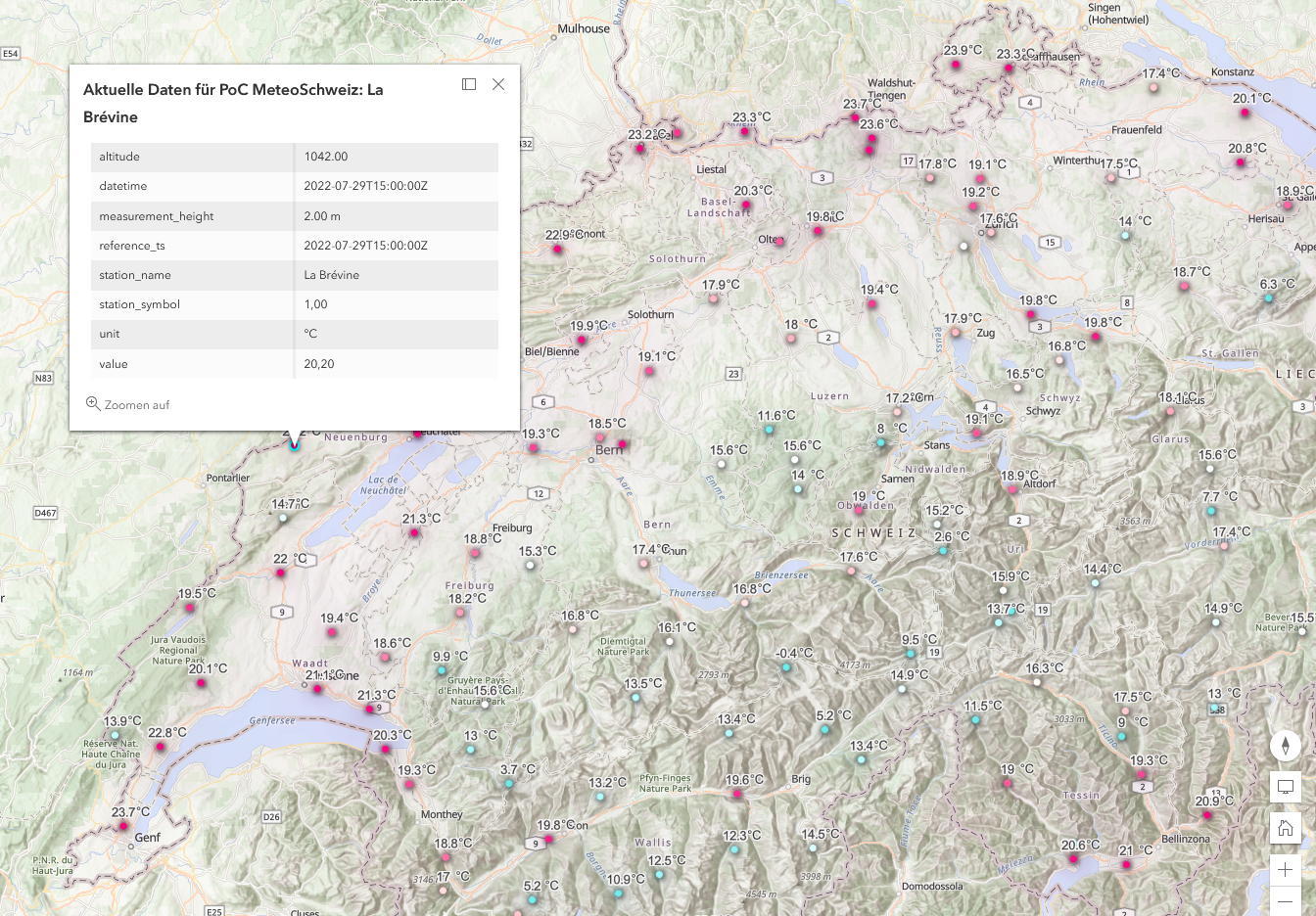
Working with the OAFeat interface in ArcGIS Online
Note At this link you will find a list of clients that can be used to work with APIs implementing OAFeat. Here the basic usage with ArcGIS Online will be shortly discussed.
- Open ArcGIS Online and go to
Add>OGC API Features - Copy&paste the URL https://poc.meteoschweiz-poc.swisstopo.cloud/root/ in
URL - Choose
Aktuelle Daten für PoC MeteoSchweiz - Click on
add to map

- Adapt symbology, labels and various other settings with the right hand menu, make sure you set the refresh interval

- Test the dataset Aktuelle Daten für PoC MeteoSchweiz live
Working with the OAFeat interface in QGIS
Note At this link you will find a list of clients that can be used to work with APIs implementing OAFeat. Here the basic usage with the GIS client QGIS will be shortly discussed.
- Open QGIS and go to
Layer>Add Layer>Add WFS Layer... - Click on
New, set a name for the connection, copy&paste the URL https://poc.meteoschweiz-poc.swisstopo.cloud/root/ inURL - Under
WFS OptionssetVersiontoOGC API - Featuresand click onOK

- In the main window choose the newly created connection, click on
Connect, select the collectionAktuelle Daten..., click onAddthen onClose

It is additionally possible to filter by datetime, bbox and by other item properties. In the following example we will retrieve all observations (collection Measurement values: Hourly values (PoC)...) of the parameter pp0qnhh0 for all stations at the datetime 2022-07-17T00:00:00Z:
- Select the collection
Measurement values: Hourly values (PoC)...and click onBuild query - Under
Provide Specific Filter Expressionsset the expression to"param_short" = 'pp0qnhh0' AND "datetime" = '2022-07-17T00:00:00Z' - Click on
OK, click onAddthen onClose

Working with the command line
Note At this link you will find a list of CLI clients that can be used to work with APIs implementing the STAC API Specification. For the following examples we will be using
curl,jqandwget
- Get the title and the ID of all available collections:
curl "https://poc.meteoschweiz-poc.swisstopo.cloud/root/collections" | jq ".collections[] | .title, .id"
- Get all items of the collection
Gridded dataset of global radiation(ID:4ccc5153-cc27-47b8-abee-9d6e12e19701):curl "https://poc.meteoschweiz-poc.swisstopo.cloud/root/collections/4ccc5153-cc27-47b8-abee-9d6e12e19701/items" | jq ".features[].id"
- Get the URL of the assets of the item with ID
20220301from the collectionGridded dataset of global radiation(ID:4ccc5153-cc27-47b8-abee-9d6e12e19701):curl "https://poc.meteoschweiz-poc.swisstopo.cloud/root/collections/4ccc5153-cc27-47b8-abee-9d6e12e19701/items/20220301" | jq ".assets[].href"
- Download an asset file:
wget "https://s3.meteoschweiz-poc.swisstopo.cloud/4ccc5153-cc27-47b8-abee-9d6e12e19701/msg.SIS-No-Horizon.M_ch02.lonlat_20220301000000.nc"
- Get the URL of the assets of the item with
datetime=2022-07-04T13:24:00Zfrom the collectionSevere weather warnings (PoC)(ID:35ff8133-364a-47eb-a145-0d641b706bff):curl "https://poc.meteoschweiz-poc.swisstopo.cloud/root/collections/35ff8133-364a-47eb-a145-0d641b706bff/items?datetime=2022-07-04T13:24:00Z" | jq ".features[].assets[].href"
- Get the URL of all assets of all items in a given
bboxfrom the collectionMeasurement values: Daily values (PoC)(ID:b46a8f8d-bc48-41d3-b20a-de61d0763318):curl "https://poc.meteoschweiz-poc.swisstopo.cloud/root/collections/b46a8f8d-bc48-41d3-b20a-de61d0763318/items?bbox=7.222133596513244,46.8348382353821,7.632747610185119,47.022404503762395" | jq ".features[].assets[].href"
Under Windows 10 - Powershell
-
In case you are behind a proxy server, you need to execute this 4 commands:
$browser = New-Object System.Net.WebClient$browser.Proxy.Credentials =[System.Net.CredentialCache]::DefaultNetworkCredentials$AllProtocols = [System.Net.SecurityProtocolType]'Ssl3,Tls,Tls11,Tls12'[System.Net.ServicePointManager]::SecurityProtocol = $AllProtocols(Invoke-WebRequest -Uri "https://s3.meteoschweiz-poc.swisstopo.cloud/").StatusCode
-
Download an asset file, e.g. based from the items list or you can construct the URL yourself e.g. for COSMO-1E with
<model-name>/<format>/<ZZ>/<HHH>/<parameter-shortname>/<file name>with ZZ= modelrun, HHH forecast e.g.COSMO-1E_alps_rotlatlon_single-level_leadtime_000_member_000_parameter_T_2M.grib2:wget "https://s3.meteoschweiz-poc.swisstopo.cloud/a6296aa9-d183-45c3-90fc-f03ec7d637be/COSMO-1E_alps_rotlatlon_single-level_leadtime_000_member_000_parameter_T_2M.grib2" -Outfile "COSMO-1E_alps_rotlatlon_single-level_leadtime_000_member_000_parameter_T_2M.grib2"
-
In case you want to increase the Donwload speed in Powershell, deactivate the progress bar with
$ProgressPreference = 'SilentlyContinue'and reactivate it with$ProgressPreference = 'Continue'
An example of an interactive web map with Leaflet
Here an example of an interactive web map using Leaflet, the WMTS of the Federal Spatial Data Infrastructure for the backgroung map and the OAFeat interface to the collection Measurement values air temperature 2 m, Instantaneous Value:

Feedback required: Can you answer our questions about the Proof of Concept?
We are inviting you to take our survey about our Proof of Concept data and services since you are interested in MeteoSwiss data or OGC API Features services.
-> Fill out the SURVEY (DE) or SURVEY (EN), it takes only 10 min
Terms Of Service
Consult the Terms of Service section of the README.md.
Questions?
Please drop us an e-mail to customerservice@meteoswiss.ch with the subject POC OGD24.