Contribution guide
February 6, 2022 · View on GitHub
How to start?
Contributing is quite easy: suggest ideas and make them done. We use GitHub issues for bug reports and feature requests.
Every good PR usually consists of:
- feature implementation :)
- documentation to describe this feature to other people
- tests to ensure everything is implemented correctly
CHANGELOG.mdupdate for framework development history
PR examples
You can check these examples as good practices to follow.
Fixes
- https://github.com/catalyst-team/catalyst/pull/855
- https://github.com/catalyst-team/catalyst/pull/858
- https://github.com/catalyst-team/catalyst/pull/1150
New features
- https://github.com/catalyst-team/catalyst/pull/842
- https://github.com/catalyst-team/catalyst/pull/825
- https://github.com/catalyst-team/catalyst/pull/1170
Contrib extensions
- https://github.com/catalyst-team/catalyst/pull/862
- https://github.com/catalyst-team/catalyst/pull/1151
Step-by-step guide
Before the PR
Please ensure that you have read the following docs:
New feature
- Make an issue with your feature description;
- We shall discuss the design and its implementation details;
- Once we agree that the plan looks good, go ahead and implement it.
Bugfix
- Goto GitHub issues;
- Pick an issue and comment on the task that you want to work on this feature;
- If you need more context on a specific issue, please ask, and we will discuss the details.
You can also join our Catalyst slack to make it easier to discuss. Once you finish implementing a feature or bugfix, please send a Pull Request.
If you are not familiar with creating a Pull Request, here are some guides:
- http://stackoverflow.com/questions/14680711/how-to-do-a-github-pull-request
- https://help.github.com/articles/creating-a-pull-request/
Contribution best practices
- Install Python v3.7.0+
- Install requirements
# for MacOS users, as we need bash version >= 4.0.0, wget and gnu-based sed brew install bash wget gnu-sed # It is often useful to have one or more Python environments # where you can experiment with different combinations # of packages without affecting your main installation. # Create the virtual conda environment conda create --name catalyst_dev conda activate catalyst_dev # or ``source activate catalyst_dev`` # Install the required dependencies pip install -r requirements/requirements.txt -r requirements/requirements-dev.txt # for easy-to-go development, we suggest installing all extra dependencies # that's why the independent conda environment is preferable # Catalyst has a lot of extensions :) pip install \ -r ./catalyst/requirements/requirements.txt \ -r ./catalyst/requirements/requirements-dev.txt \ -r ./catalyst/requirements/requirements-cv.txt \ -r ./catalyst/requirements/requirements-ml.txt \ -r ./catalyst/requirements/requirements-optuna.txt \ -r ./catalyst/requirements/requirements-comet.txt \ -r ./catalyst/requirements/requirements-mlflow.txt \ -r ./catalyst/requirements/requirements-neptune.txt \ -r ./catalyst/requirements/requirements-wandb.txt \ -r ./catalyst/requirements/requirements-profiler.txt - Break your work into small, single-purpose updates if possible. It's much harder to merge in a large change with a lot of disjoint features.
- Submit the update as a GitHub pull request against the
masterbranch. - Make sure that you provide docstrings for all your new methods and classes.
- Add new unit tests for your code (PR examples).
- (Optional) Check the codestyle. We use a pre-commit hook that runs the formatting on commit, so you don't have to.
- Make sure that your code passes the Github CI
Github CI
We are using the Github CI for our test cases validation:
We also have a colab minimal CI/CD as an independent step-by-step handmade tests option. Please use it as a collaborative platform, if you have any issues during the PR.
Codestyle
We also have our own catalyst code-style package to help with code formatting issues, and a corresponding pre-commit hook installed.
-
You could check the codestyle for your PR with:
# to make code compatible with `catalyst` code style
catalyst-make-codestyle -l 89

# to check that the code is `catalyst` code style compliant
catalyst-check-codestyle -l 89
Or you can use
make check -
or To set the hook, please run (this requires
pre-commitpackage, pinned in the requirements-dev.txt):pre-commit installOnce the installation is done, all the files that are changed will be formatted automatically (and commit halted if something goes wrong, e.g there is a syntactic error). You can also run the formatting manually:
pre-commit runIf for some reason you'll want to turn the hook off temporarily, you can do that with:
SKIP=catalyst-make-codestyle git commit -m "foo"Or you can uninstall it completely with:
pre-commit uninstall
Once again, make sure that your python packages complied with requirements/requirements.txt and requirements/requirements-dev.txt to get codestyle and pre-commit run clean:
pip install -r requirements/requirements.txt -r requirements/requirements-dev.txt
For more information on pre-commit, please refer to pre-commit documentation.
Documentation
Catalyst uses Google style for formatting docstrings. Length of a line inside docstrings block must be limited to 100 characters to fit into Jupyter documentation popups.
How to setup Google style documentation style in PyCharm:
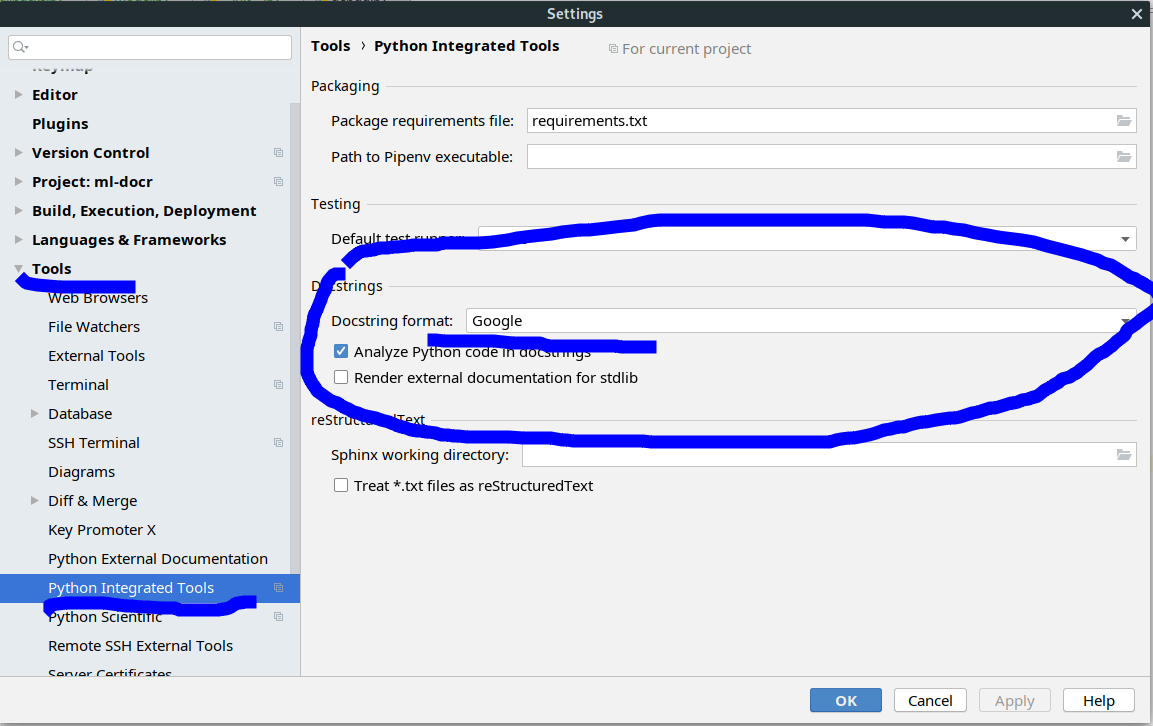
You could check the docs with:
rm -rf ./builds; REMOVE_BUILDS=0 make check-docs
Now you could open them into your browser, for example with
open ./builds/index.html
If you have some issues with building docs - please make sure that you installed the required pip packages.
Tests
Do not forget to check that your code passes the unit tests:
pytest .
Adding new tests
Please follow PR examples for best practices.
Integrations
If you have contributed a new functionality with extra dependencies, please ensure you have submitted the required tests. Please follow PR examples for best practices and review current integrations tests.