Badger Color Theme
February 26, 2018 · View on GitHub
Dark Emacs 24 color theme (using deftheme). Inspired by the wombat theme, primarily.

Installing
If you don't already know how to install a theme in Emacs, you can try this:
(add-to-list 'custom-theme-load-path "path/to/badger-theme-directory")
(load-theme 'badger t)

;; OR via use-package

(use-package badger-theme
  :ensure t
  :config (load-theme 'badger t))
Org Mode
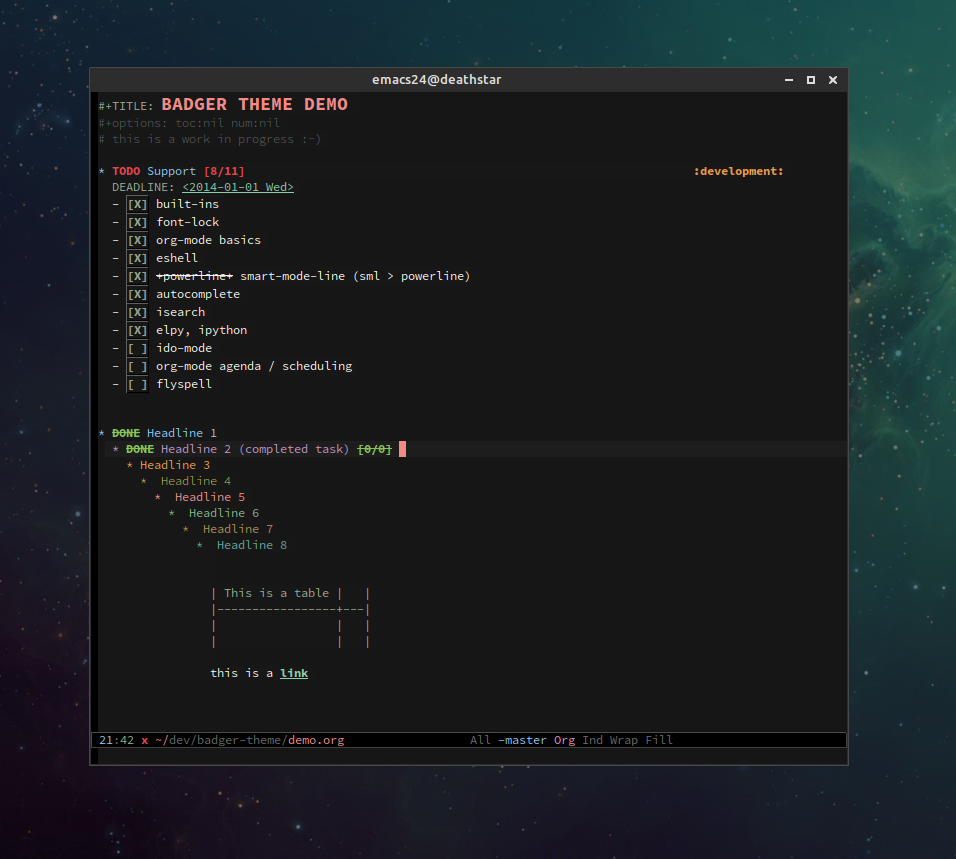
Some people might prefer the headline after a DONE keyword to be struck-through. Add the following code to your init file:
(setq org-fontify-done-headline t)
Note that this strikethough extends to the end of the line, so if you tag a headline the strikethrough extends over empty space to reach the tag:

This doesn't look great, IMO.
If you would prefer the DONE keyword to not have the stikethrough effect use
M-x customize-face RET org-done
and change stike-through's value to Off. Save this change so that it applies to future emacs sessions.
License
copyright Cody Canning 2014
This program is free software; you can redistribute it and/or modify
it under the terms of the GNU General Public License as published by
the Free Software Foundation, either version 3 of the License, or
(at your option) any later version.

This program is distributed in the hope that it will be useful,
but WITHOUT ANY WARRANTY; without even the implied warranty of
MERCHANTABILITY or FITNESS FOR A PARTICULAR PURPOSE.  See the
GNU General Public License for more details.

You should have received a copy of the GNU General Public License
along with this program.  If not, see <http://www.gnu.org/licenses/>.