Enhanced File Manager Actions for Linux
August 31, 2026 · View on GitHub
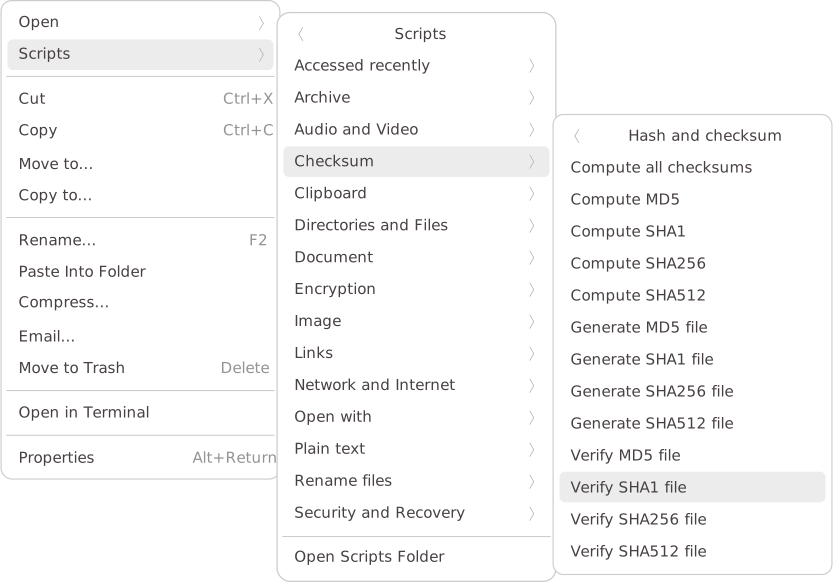
A set of file manager actions that enhance your workflow. Useful right-click options to simplify common tasks across GNOME, KDE, Xfce, and more.



Installation
Option 1: Online installation (recommended)
You can use either curl or wget. Choose one of the following commands and run it in your terminal:
🚀 Using curl
bash -c "$(curl -fsSL https://cfgnunes.github.io/nautilus-scripts/install.sh)"
🚀 Using wget
bash -c "$(wget -qO- https://cfgnunes.github.io/nautilus-scripts/install.sh)"
Option 2: Local installation
After cloning this repository, run the following command:
bash install.sh
Advantages
While numerous Nautilus Scripts are available for file managers on the web, many suffer from poor functionality, lack of error checking, and dependency management. Some scripts only work with files that don't have special characters in their names, among other limitations. To address these shortcomings, I have developed my own set of scripts, which offer the following advantages:
- Parallel task execution: Processes multiple files simultaneously. Very fast!
- Multi-language support: Automatically detects the system language and displays messages in the appropriate language.
- Progress dialog: Displays a progress dialog and allows interruption of tasks at any time.
- Dependency management: Prompts users to install any missing dependencies.
- Status notifications: Notifies users of dependency errors and types.
- Keyboard accelerators: Provides keyboard shortcuts for some scripts.
- Easy access to recent scripts: Includes a menu, Accessed recently, to quickly access recently used scripts.
- Category-based installation: The installer allows you to choose which script categories you want to install, so there's no need to install everything.
- Log file: Produces an
Errors.logfile when a task finishes with an error. - File manager compatibility: Designed for major file managers like GNOME Files (Nautilus), Nemo, Caja, Dolphin, and Thunar.
- Distro compatibility: Works on major GNU/Linux distributions, such as Debian, Ubuntu, Fedora, and Arch Linux.
- Easy adaptation: Scripts can be easily copied and adapted for other purposes.
- Bash implementation: All scripts are implemented in Bash. So, the scripts work well in the shell (without a graphical interface) and file managers.
- Shell script validation: All scripts have been checked using ShellCheck.
Design philosophy: Fewer clicks, dependencies, and verbose notifications, with a simple and intuitive directory structure.
Keyboard accelerators
| Key | Action |
|---|---|
F4 | Terminal |
F7 | Code editor |
F12 | Disk usage analyzer |
<Control>E | Extract here |
<Control><Alt>G | Compress to 'tar.gz' |
<Control><Alt>S | Compress to 'tar.zst' |
<Control><Alt>X | Compress to 'tar.xz' |
<Control><Alt>Z | Compress to 'zip' |
<Control><Alt>I | Show file information |
<Control><Alt>M | Show file MIME type |
<Control><Alt>0 | Find empty files |
<Control><Alt>J | Find junk files |
<Control><Alt>U | Find duplicate files |
<Control><Alt>H | List hidden files |
<Control><Alt>P | List permissions and owners |
<Control><Alt>B | List largest files |
<Control><Alt>R | List recent files |
<Control><Alt>W | Text: List issues |
<Control><Alt>C | Copy file names |
<Control><Alt>V | Paste clipboard contents |
<Control><Shift>V | Paste as symbolic link |
<Control><Shift>B | Create backup (via Rsync) |
<Control><Shift>C | Compare items |
<Control><Shift>O | Open item location |
<Control><Shift>H | Compute all checksums |
<Control><Shift>E | Find empty directories |
<Control><Shift>P | Rename: Remove suffixes |
<Control><Shift>G | Git: Clone URLs |
<Control><Shift>R | Git: Reset and pull |
<Control><Shift>X | URL: Download file |
<Shift><Alt>V | Create hard link here |
Compatibility
| File manager | Environment | Menu integration | Application shortcuts | Keyboard accelerators | Menu "Accessed recently" |
|---|---|---|---|---|---|
| GNOME Files (Nautilus) | GNOME | 🟢 | 🟢 | 🟢 | 🟢 |
| Nemo | Cinnamon | 🟢 | 🟢 | 🟢 | 🟢 |
| Caja | MATE | 🟢 | 🟢 | 🟢 | 🟢 |
| Thunar | Xfce | 🟢 | 🟢 | 🟢 | 🔴 |
| Dolphin | KDE Plasma | 🟢 | 🟢 | 🔴 | 🔴 |
| PCManFM-Qt | LXQt | 🟢 | 🟢 | 🔴 | 🔴 |
| PCManFM | LXDE | 🟢 | 🟢 | 🔴 | 🔴 |
Batch mode for large file selections
For very large selections (e.g., 10,000 input files), use batch mode: place everything inside a folder named batch and run the action on that folder. The scripts will process the files individually and avoid the "argument list too long" error.
Acknowledgments
Translation
Special thanks to everyone who contributed to the translation of this project:
- 🇧🇷 Nathália Medeiros - Brazilian Portuguese.
- 🇨🇳 Jove Yu (@JoveYu) - Chinese.
- 🇪🇸 Maravento (@maravento) - Spanish.
- 🇩🇪 Stephan Mikwauschk (@Pappmann) and La-vaos (@la-vaos) - German.
- 🇻🇳 Loc Huynh (@hthienloc) - Vietnamese.
- 🇫🇷 Germain Rémi (@remigermain) - French.
- 🇷🇺 Vladimir Kosolapov (@vmkspv) - Russian.
- 🇮🇱 Omer I.S. (@omeritzics) - Hebrew.
- 🇳🇱 Heimen Stoffels (@Vistaus) - Dutch.
- 🇰🇷 Yun Juhwan (@g-yunjh) - Korean.
- 🇯🇵 Camegone (@camegone) - Japanese.
- 🇹🇷 Yaşar Çiv (@yasarciv) - Turkish.
Contributors
Thank you for contributing to this project:
Contributing
If you spot a bug or want to improve the code or even improve the content, you can do the following:
- Open an issue describing the bug or feature idea;
- Fork the project, make changes, and submit a pull request.
If you'd like to translate this project into your native language, feel free to send me the translated file: en_template.pot