OS Agent Plugin
August 24, 2026 · View on GitHub





English | 中文
Give your DeepSeek Harness agent a real phone. This is a self-contained Harness plugin for Volcengine Mobile Use Agent: one installed package contributes both the Cordis runtime and its browser configuration surface, so your model can drive a cloud phone in natural language. It does not require patches or copied files in the Harness repository.
You:    Open the shopping app, search for wireless earbuds, and report the top 3 prices.
Agent:  mobile_use_start_task  → RunId: run-8f2c...
        mobile_use_get_status  → step 7/100, tapping search result
        mobile_use_get_result  → "1. ¥299  2. ¥349  3. ¥429"
Why this plugin
- No device lab. Volcengine hosts the phone; you need no USB cable, emulator, or Appium grid.
- No Harness fork. Installs as an external dual-face plugin — no patch, no vendored files.
- Natural language in, result out. Three tools cover the whole run lifecycle.
- Visual evidence in Harness. An opt-in switch shows validated step screenshots beneath status and result calls.
- Credentials stay server-side. AccessKey and Secret Key are write-only in the browser and live in the Harness credential store.
Architecture
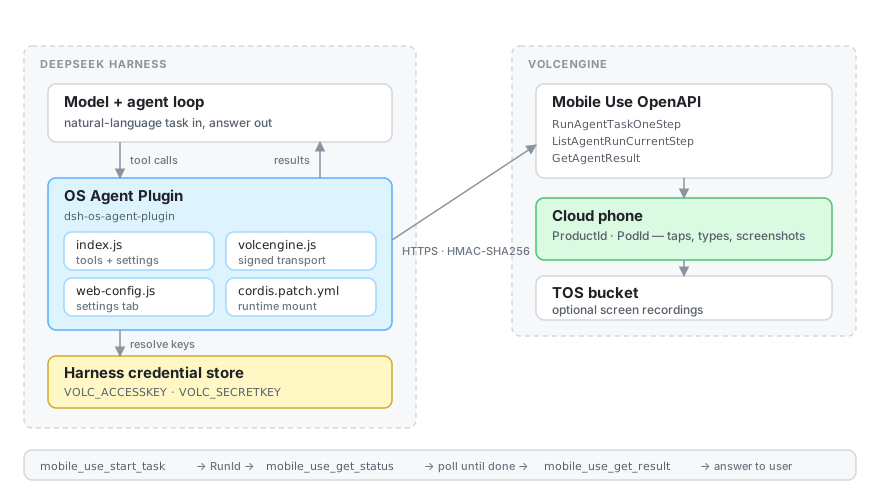
| Layer | What it does |
|---|---|
index.js | Registers settings, the system-prompt section, and the three model-facing tools |
volcengine.js | Signed (HMAC-SHA256) transport for the Mobile Use OpenAPI |
screenshots.js | Redacts base64 response fields and persists validated images as Harness attachments |
web-config.js + src/client | Settings → Plugins → OS Agent configuration tab |
cordis.patch.yml | Mounts the Node runtime into Harness |
Quick start
Five minutes from zero to your first cloud-phone run.
1. Prepare Volcengine (once)
- Enable Mobile Use Agent on your Volcengine account.
- Create or pick a cloud phone, and note its Product Id and PodId.
- Create an AccessKey / Secret Key pair with permission to operate that cloud phone.
2. Install the plugin
From any directory with the dsh CLI available:
pnpm dsh plugin --profile web add git+https://github.com/chenjie1129/deepseek-harness-os-agent-plugin.git
pnpm dsh --profile web --dump-config
pnpm dsh --profile web
3. Configure it in the browser
Open the URL printed by Harness, then go to Settings → Plugins → OS Agent and fill in AccessKey, Secret Key, Product Id, and PodId. Turn on Show task screenshots if you want visual evidence in the Harness conversation; it is off by default.
4. Run your first task
Ask your Harness agent, in plain language:
Use the cloud phone to open Settings and tell me the Android version.
The agent calls mobile_use_start_task, keeps the returned RunId, polls mobile_use_get_status, and reports what mobile_use_get_result returns. That is the whole loop.
Prefer to verify credentials without an agent? Run the headless smoke script:
VOLC_ACCESSKEY=... VOLC_SECRETKEY=... \
OS_AGENT_PRODUCT_ID=... OS_AGENT_POD_ID=... \
node examples/headless-run.mjs "Open Settings and report the Android version"
Examples
Copy-paste recipes live in examples/:
| Recipe | Scenario |
|---|---|
| App regression walkthrough | Drive a sign-up or checkout flow end to end, with screen recording |
| App store competitive scan | Search the store and extract ranking or pricing data |
| Cross-app data handoff | Move content between two apps and verify it arrived |
headless-run.mjs | Start → poll → result, without Harness, for credential checks |
Tools
| Tool | Purpose | Key arguments |
|---|---|---|
mobile_use_start_task | Start one Mobile Use run, return its RunId | task (required), run_name, thread_id, screen_record |
mobile_use_get_status | Read the run's current step | run_id (required) |
mobile_use_get_result | Fetch the completed result | run_id (required) |
screen_record: true requires the TOS options below.
Configuration
Configured under Settings → Plugins → OS Agent.
| Field | Notes |
|---|---|
| AccessKey / Secret Key | Default to the VOLC_ACCESSKEY and VOLC_SECRETKEY credential references; write-only in the browser |
| Product Id / PodId | Select the cloud-phone business and instance |
| Max steps | Integer, 1–500 (default 100) |
| Timeout | Seconds, 1–86,400 (default 120) |
| SystemPrompt | Optional extra instruction passed to Mobile Use |
| Show task screenshots | Off by default; captures step screenshots and shows validated attachments below status/result calls |
| TOS bucket / endpoint / region | Optional, but all three must be set together; required for screen recording |
The Volcengine account must have Mobile Use Agent enabled and permission to operate the configured cloud phone. TOS must be accessible when screen recording is requested.
Task screenshots
When Show task screenshots is on, new start requests set Volcengine's UseBase64Screenshot option. The plugin polls ListAgentRunCurrentStep in the background and preserves each distinct current-step snapshot as an ordered, visible task history. On completion it calls GetAgentResult with the documented IsDetail=true flag, which returns the run's complete ScreenShots collection rather than the default text-only result. The plugin accumulates and deduplicates those images, removes base64 and signed screenshot URLs from text output, validates PNG/JPEG/WebP/GIF bytes through Harness, and stores them as durable attachments.
When Volcengine returns a signed download URL instead of inline base64, the plugin downloads it server-side only over HTTPS from an allowlisted volces.com host, without forwarding credentials or the URL to the model. A bounded copy of validated preview data is persisted only in Tool presentation metadata for the clickable Web UI gallery; the model-facing Tool result remains text-only, so text-only DeepSeek adapters keep working. The result card shows both the ordered snapshots captured while the task ran and Volcengine's reported TotalSteps.
Volcengine's CallbackInfo is not a step-history or screenshot API: its documented callbacks report lifecycle status, failure, and interruption events. A callback receiver can be useful for a publicly reachable server, but it cannot replace IsDetail=true for screenshots or ListAgentRunCurrentStep snapshots for action history. This local Harness plugin therefore does not expose port 3080 as a public callback target.
The switch affects tasks started after it is enabled. Harness deployment image-count and byte limits still apply; the text result reports when images were absent, rejected, or capped. This feature is independent of screen_record and does not require TOS unless recording is also requested.
Compatibility
Integration-tested with DeepSeek Harness 0.1.1-rc.2, using extension surfaces also present in 0.1.0-rc.5. Node.js ^22.19.0 || >=24.0.0 is required. The package uses Harness's external dual-face plugin protocol: cordis.patch.yml mounts the Node runtime, while dsh.client publishes the prebuilt browser module.
Troubleshooting
| Message | Fix |
|---|---|
OS Agent Plugin is not configured: AccessKey is missing. | Set AccessKey in the settings tab, or provide the VOLC_ACCESSKEY credential |
... Product Id is missing. / ... PodId is missing. | Both are required before starting a task |
TOS bucket, endpoint, and region must be configured together. | Set all three, or clear all three |
Screen recording requires TOS bucket, endpoint, and region. | Configure TOS before passing screen_record: true |
Screenshot count is 0 | Enable Show task screenshots, save, then start a new task; keep Harness running until the task completes so the plugin can request GetAgentResult?IsDetail=true |
| A screenshot was rejected or capped | Check the Harness attachment image type, count, byte, and pixel limits |
Volcengine Mobile Use API rejected the request (...) | Check that Mobile Use Agent is enabled and the key can operate that PodId |
Uninstall
pnpm dsh plugin --profile web remove dsh-os-agent-plugin
Development and verification
The repository installs, builds, and tests without a parent Harness checkout:
corepack pnpm install
pnpm build
pnpm test
pnpm audit --audit-level high
The committed lib/client.js is required for Git installation. GitHub Actions repeats the standalone checks and installs the packed artifact into a clean, pinned Harness checkout on every push and pull request.
References
- Volcengine Mobile Use Agent product page
- Mobile Use OpenAPI
- RunAgentTaskOneStep (
UseBase64Screenshot) - ListAgentRunCurrentStep
- GetAgentResult
- Task status callback
- Python sample