Workspai CLI
September 21, 2026 · View on GitHub




Give your AI agent the system, not just the repository
Your AI coding agent wastes time guessing your project structure. Workspai fixes that.
One workspace. One truth. Humans and AI aligned.
Workspace Intelligence for software systems
Workspai is an open-source CLI that gives people and AI tools one governed view of the software system they are changing.
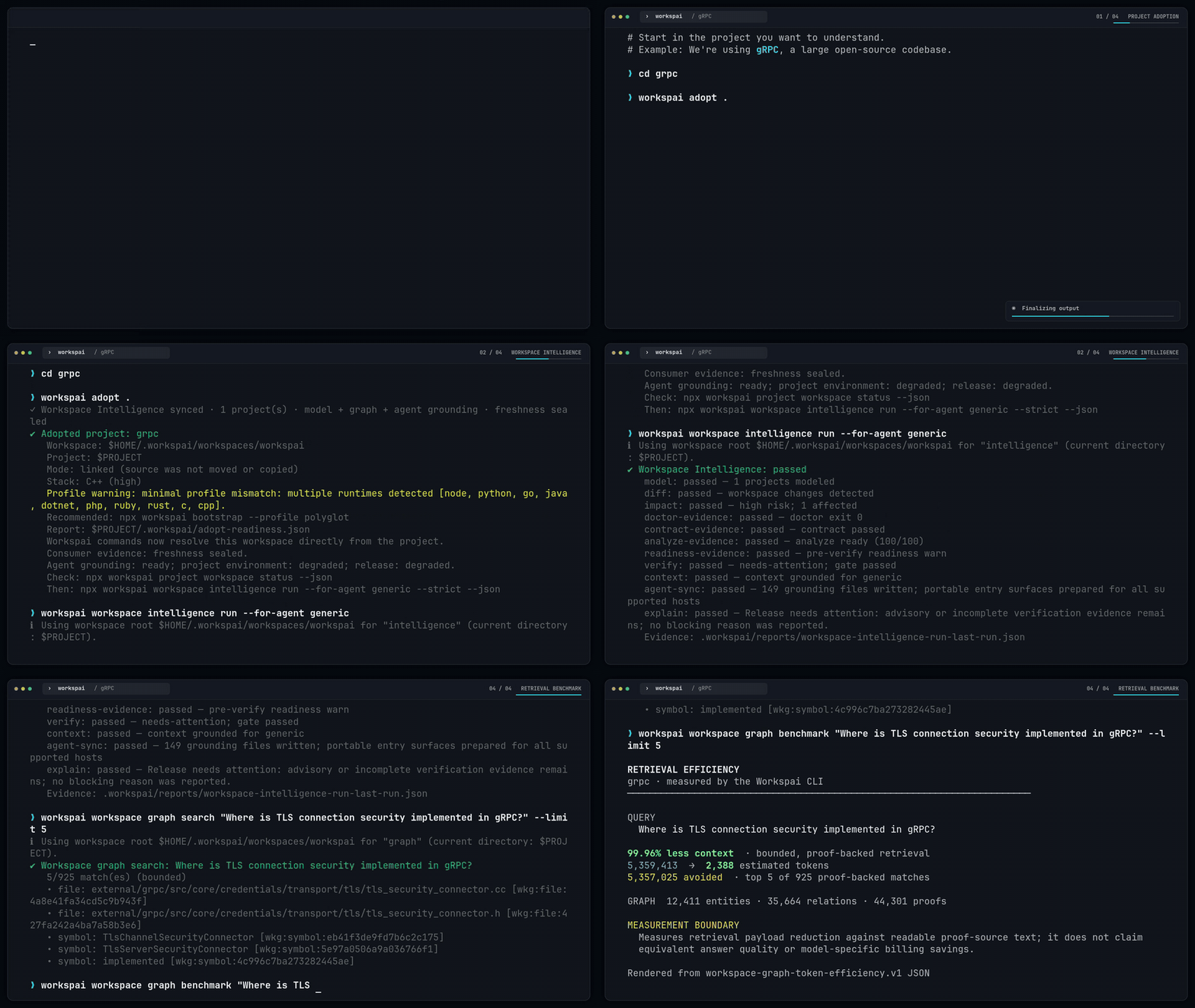
npx workspai adopt .
npx workspai workspace intelligence run --for-agent generic
Two commands. Your project gains a bounded, evidence-backed system view:
Before vs After
| Before Workspai | After Workspai |
|---|---|
| Agent scans thousands of files for context | Agent starts from bounded entry and context artifacts |
| No dependency map between services | Searchable graph with source-level proof |
| Broken test blocks release, no one knows why | Doctor localizes the blocker and next target |
| Every AI session starts from scratch | Sessions resume from durable evidence |
Here is what you get:
| What it produces | Why it matters |
|---|---|
| Workspace Model | A canonical inventory of registered projects, detected runtimes, frameworks, and proven dependencies |
| Knowledge Graph | Searchable relationships between projects, backed by source-level proof |
| Health & Readiness | Doctor checks, verification gates, and release posture based on evidence, not guesses |
| Agent Context | Bounded, focused instructions so AI tools read what they need, not the entire repo |
| Agent Rules | Ready-to-use grounding for Cursor, Copilot, Claude, Codex, Gemini, and more |
| Agent Skills | Runtime-, polyglot-, test-, and delivery-aware operational playbooks, with portable SKILL.md projections where the host supports Agent Skills |
| MCP Server | Versioned read-oriented tools for querying evidence, graph, blockers, and context live |
generic is the safe default when you do not yet know which agent will use the
project: Workspai builds one portable context and prepares discovery adapters
for every supported host, without duplicating the Model or Graph.
What the output looks like
The canonical workspace owns the Model, Graph, context, evidence index, and Skills. Each linked project keeps only its portable entry, scoped context, and workspace binding:
your-workspace/
├── .workspai/
│   ├── reports/                       # Model, Graph, verification, context
│   └── skills/                        # evidence-derived playbooks
├── AGENTS.md · .codex/ · .cursor/ · .claude/ · .github/ · .agents/
└── project/.workspai/
    ├── agent-entry.v1.json            # portable project entry
    └── workspace-link.local.json      # machine-local binding
Your agent starts with agent-entry.v1.json, compact workspace context, and the
Skills index; it then retrieves task-scoped Graph evidence and targeted source.
Get started · See what you get · How it works · Documentation
Start in two minutes
Use an existing project
Open the project and adopt it:
cd /absolute/path/to/project
npx workspai adopt .
The project stays where it is. Workspai creates or reuses a minimal workspace in the default system location and records a validated local link.
Stay in the same project directory and run Workspace Intelligence:
npx workspai workspace intelligence run --for-agent generic
Workspai now knows which workspace owns the project. You only need
--workspace <path> when a moved or ambiguous binding cannot be resolved.
The shorter command is intended for a human-readable first run. CI, agents, and
other machine consumers should use the strict JSON form shown in
How Workspace Intelligence works.
Start new software
Use the guided flow:
npx workspai create
Choose whether to create a workspace, scaffold a project, or add existing software. Project starters are grouped as Backend, Frontend, Desktop, AI Agent, AI Gateway, Extension, and Gaming.
# Optional global installation
npm install -g workspai
workspai --version
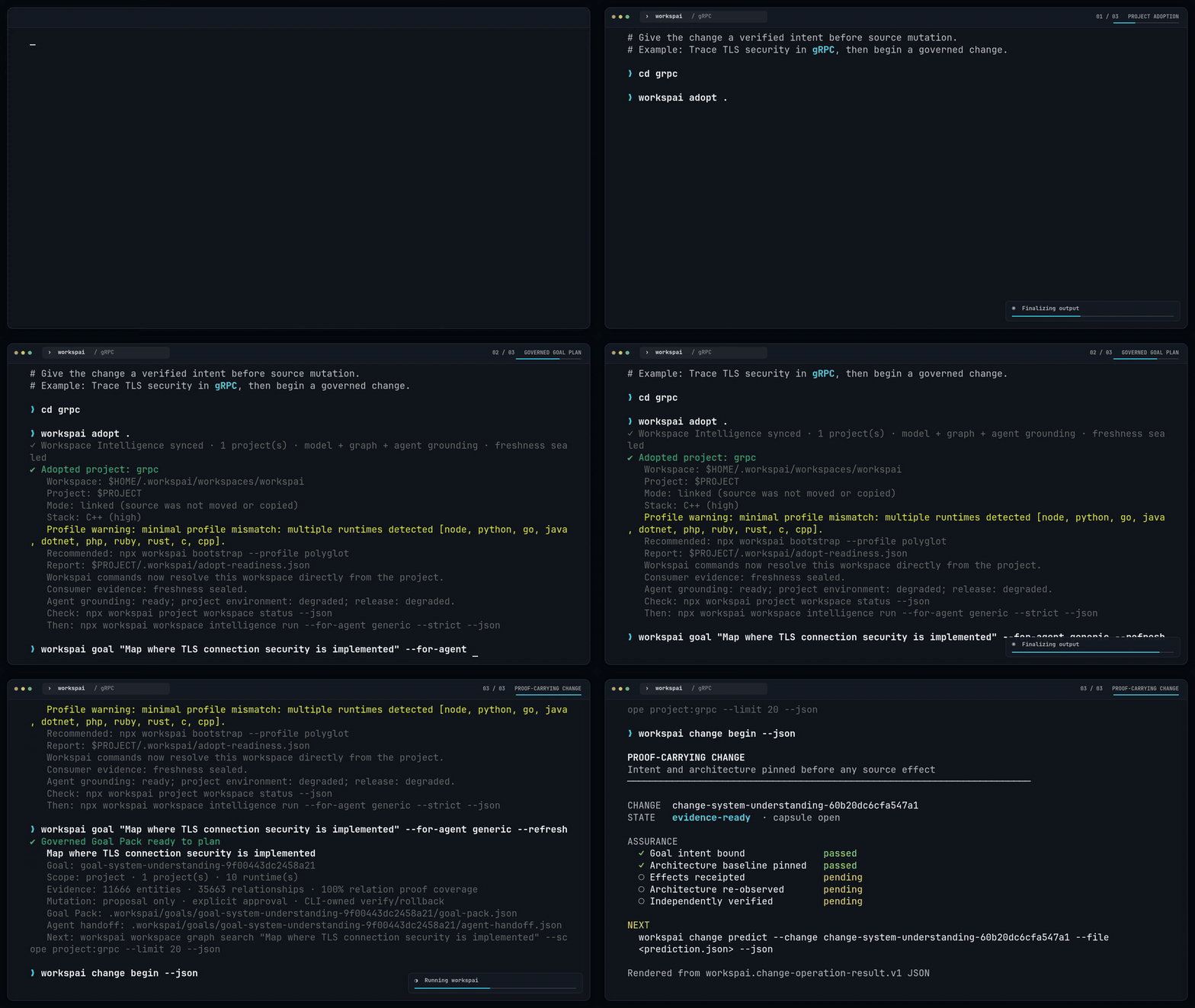
Give your agent a goal, not an open-ended prompt
Describe the outcome in plain language from the adopted project:
npx workspai goal "Raise test coverage to 85%" --for-agent generic
npx workspai goal "Raise test coverage to 85%" --runtime cpp --for-agent generic
npx workspai goal "Add retry with exponential backoff" --for-agent generic
Workspai turns it into a bounded, evidence-backed handoff:
Intent → project scope → proof-backed context → governed plan → safe execution
The agent gets a focused objective, not permission to scan or change
everything. Workspai keeps approval, verification, and rollback under CLI
control. The command prepares governed work; it does not edit source or claim
that the outcome is complete. Exact coverage, dependency-security, and release
Goals have deterministic CLI verifiers; other outcomes retain CLI safety and
rollback while the consumer performs an evidence-backed outcome review.
Multi-project scope and polyglot runtime choices are explicit. Interactive
users get bounded choices from the canonical Workspace Model; automation gets
a machine-readable decision and can use --scope and --runtime.
Make every agent change carry proof
For source-changing work, begin a Goal-bound change before mutation:
npx workspai change begin --json
npx workspai change authorize --change <change-id> --effects filesystem,command --json
npx workspai change effect record --change <change-id> --file effect-receipt.json --json
npx workspai change verify --change <change-id> --strict --json
npx workspai change capsule validate --change <change-id> --json
The resulting capsule binds intent, baseline architecture, authorization, observed effects, predicted-versus-actual Graph changes, verification receipts, and remaining uncertainty. Prediction can guide work but can never prove its own result. Learn how Proof-Carrying Change works.
What happens after the first run
The key outputs for each audience are:
| Audience | What to read |
|---|---|
| AI agent | agent-entry.v1.json (project) → workspace-context-agent.json (workspace) |
| Developer | Terminal summary, or workspace-explain-last-run.json for diagnosis |
| CI / automation | workspace-verify-last-run.json (exit code 0 = pass, 2 = blocked) |
| MCP client | workspace mcp serve (versioned read-oriented tools over JSON-RPC) |
| IDE extension | Same artifacts + watch events |
An agent can prove that it entered through governed evidence before scanning the repository:
npx workspai agent bootstrap --for-agent codex --strict --json
The receipt validates workspace membership, artifact integrity, Model/Graph freshness, and the active Goal handoff. A blocked receipt prevents architecture claims; it never falls back silently to a broad source scan. Learn about canonical-first agent entry.
A blocked result is useful evidence, not a crashed command. Workspai names what is missing or failing and keeps the generated reports available for inspection.
How Workspace Intelligence works
Workspace sources
       │
       ▼
Canonical Workspace Model
       │
       ▼
Evidence-backed Knowledge Graph
       │
       ▼
Impact · Doctor · Verify · Context · Explain
       │
       ▼
Humans · CI · IDEs · MCP · AI agents
The Workspace Model is the canonical source of truth. The Knowledge Graph is a derived, revision-bound representation of that model. It can add proof-backed detail without becoming a second source of truth or mutating the model that authorized the run.
A missing relationship means not proven by current evidence, not "these projects are independent."
The full contract-backed chain is:
Model → Diff → Impact → Doctor + Contract Verify + Analyze → Readiness
      → Verify → Context → Agent Sync → Explain
Run it with:
npx workspai workspace intelligence run --for-agent generic --strict --json
pipeline --json --strict is the broader release and governance workflow. It
complements this chain; it does not replace it.
The deterministic model, graph, and checks do not require an AI API key.
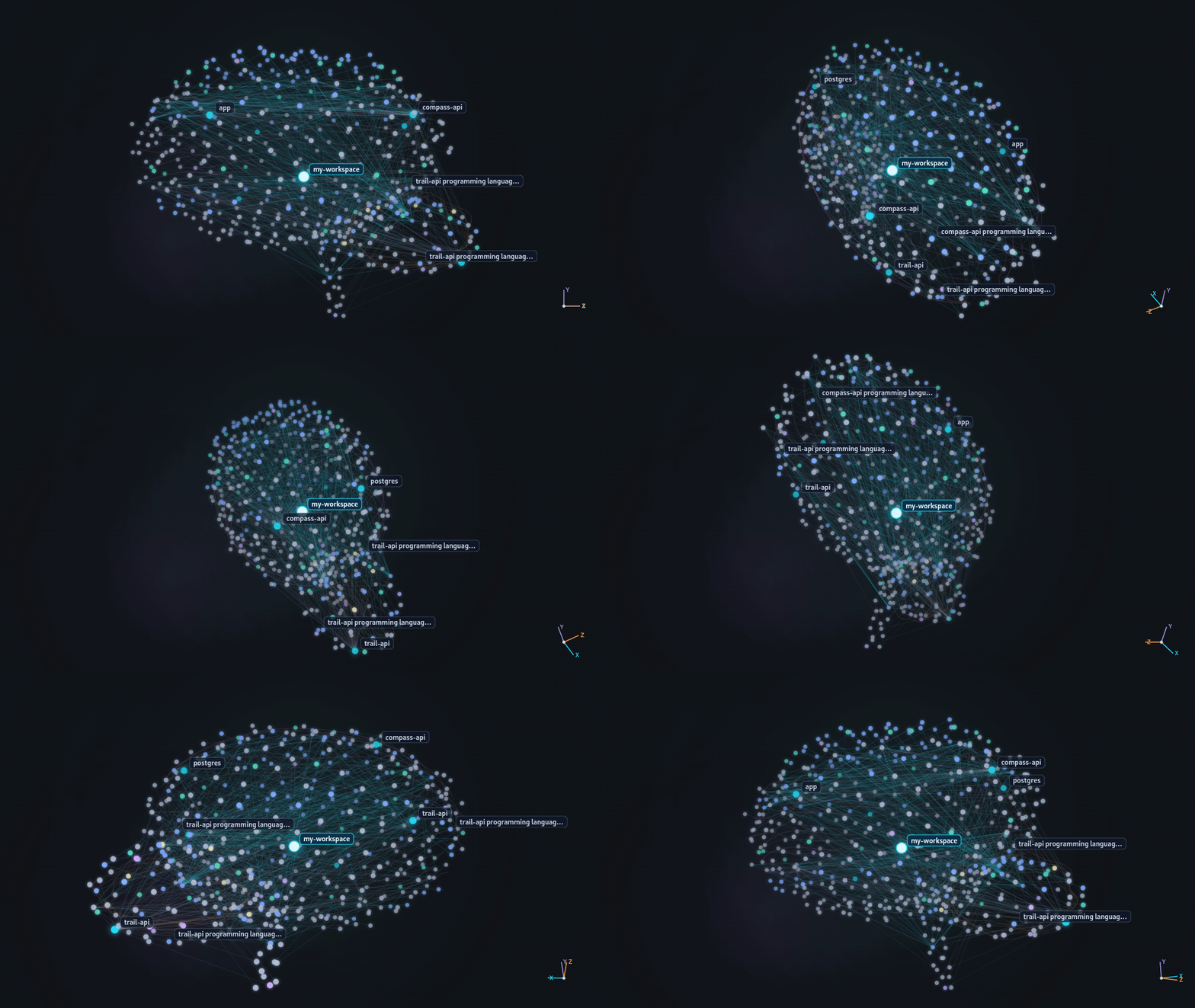
See the evidence-backed graph
The graph connects projects, APIs, packages, tests, infrastructure, ownership, and runtime topology only when current evidence supports the relationship. Every visible relationship can retain proof, while missing relationships stay explicitly unproven.
Query, explain, and export the graph
Everyday workflows
| Goal | Command |
|---|---|
| Use guided setup | npx workspai create |
| Link a project without moving it | npx workspai adopt . |
| Initialize workspace and project dependencies | npx workspai init |
| Refresh the complete system view | npx workspai workspace intelligence run --for-agent generic --strict --json |
| Turn an outcome into governed work | npx workspai goal "Raise test coverage to 85%" |
| Prove an agent change from intent to verify | npx workspai change begin --json |
| Ground an agent before source discovery | npx workspai agent bootstrap --for-agent generic --strict --json |
| Copy or clone a project into a workspace | npx workspai import <path-or-git-url> --workspace <path> |
| Diagnose project or workspace health | npx workspai doctor project / npx workspai doctor workspace |
| Observe CLI and Studio activity | npx workspai live --once --json --projection board |
| Ask a focused architecture question | npx workspai workspace graph search "authentication service" --limit 12 --json |
| Verify current evidence | npx workspai workspace verify --strict --json |
| Inspect a governed repair before execution | npx workspai workspace repair capabilities --json |
| Refresh agent and IDE context | npx workspai workspace agent-sync --write --preset enterprise --json |
| Run the broader release gate | npx workspai pipeline --strict --json |
| Start MCP server for workspace queries | npx workspai workspace mcp serve |
For every command and flag, use the Command Reference.
Outputs and integrations
Workspai exposes the same governed data through several stable surfaces:
- human-readable terminal summaries;
- JSON output for scripts and CI;
- versioned artifacts under
.workspai/reports/; - focused context and instructions for AI agents;
- MCP server with versioned read-oriented workspace tools (
workspace mcp serve); - Live activity projections and reports for IDEs and dashboards;
- JSON, JSON-LD, Mermaid, DOT, GraphML, and GEXF graph exports.
The Workspai VS Code extension uses this CLI, so visual and terminal workflows share the same contracts and artifacts.
Requirements
- Node.js
>=20.19.0 - npm
Python, Go, Java, .NET, Rust, or PHP are needed only for workflows that use those runtimes. Python is not required for Python-free workspaces or npm-owned project generators.
RapidKit Core is the optional Python engine for Python/Core-dependent kits and modules; Workspai remains the workspace-level CLI.
Documentation
| Goal | Guide |
|---|---|
| Learn the main terms | Glossary |
| Create, adopt, import, or connect software | Creating workspaces and projects |
| Query Graph and inspect proof | Workspace Knowledge Graph |
| Understand the exact decision loop | Workspace Intelligence runner |
| Run dependency, test, and build stages | Workspace Run |
| Observe CLI and Studio activity | Workspai Live |
| Plan, approve, execute, or roll back a repair | Workspace Repair Engine |
| Set a release, security, or coverage outcome | Verified engineering goals |
| Compile plain language into a governed plan | Goal Packs |
| Prove what an agent changed and why | Proof-Carrying Change |
| Ground an agent in canonical project evidence | Canonical-first agent entry |
| Measure bounded retrieval and model usage | Evaluation and benchmark |
| Integrate CI | CI workflows |
| Find generated files and schemas | Artifact Catalog |
| Browse all documentation | Documentation index |
Troubleshooting
| Problem | Next step |
|---|---|
| The workspace is not detected | Run from the project/workspace or inspect npx workspai project workspace status --json |
| A check reports stale evidence | Re-run the complete Workspace Intelligence command |
| A runtime is missing | Install only the runtime required by that project |
| An agent cannot find current context | Run npx workspai workspace agent-sync --write --refresh-context --json |
| You need a specific flag | Open the Command Reference |
Contributing
Workspai is developed in the open by Chistiq, the intelligence infrastructure company behind RapidKit and Workspai.
Read CONTRIBUTING.md, the Development Guide, and the Security Policy.
License
MIT. See LICENSE.