dsh-taskboard
September 2, 2026 · View on GitHub


English | 简体中文
dsh-taskboard
A task board plugin for DeepSeek Harness: humans create cards, agents claim and execute them, humans review and accept. Tasks live on projects (= workspaces), support per-task model & preset selection, and can run manually or on a cron schedule — full two-way collaboration from card to sign-off.
- Closed loop: human creates a card → agent claims & executes → structured hand-off report → human accepts (✓ done / ✗ send back with a reason)
- 10
taskboard_*agent tools plus code-level protocol gates: agents can never move a task to done, held tasks cannot be snatched away, cross-project claims are rejected - Execution: manual or cron-scheduled (host-side scheduling keeps firing with the browser closed); every execution opens a brand-new session inside the task's project, optionally pinned to a model and preset
- Git worktree isolation: each run works on its own worktree + dedicated task branch, one-click merge at acceptance; parallel multi-repo workspaces are mirrored whole (0.6.3); non-git projects fall back automatically
- Efficient acceptance: DoD acceptance checklists (agent checks items off with evidence), structured execution reports (summary / changed files / checks / artifacts / risks), in-board diff viewer
- Live board: SSE real-time refresh, five-column flow, persisted filters & sorting, JSON import/export, task templates
Zero configuration: install and it works — no tokens, no API keys, no extra services or databases.
Screenshots
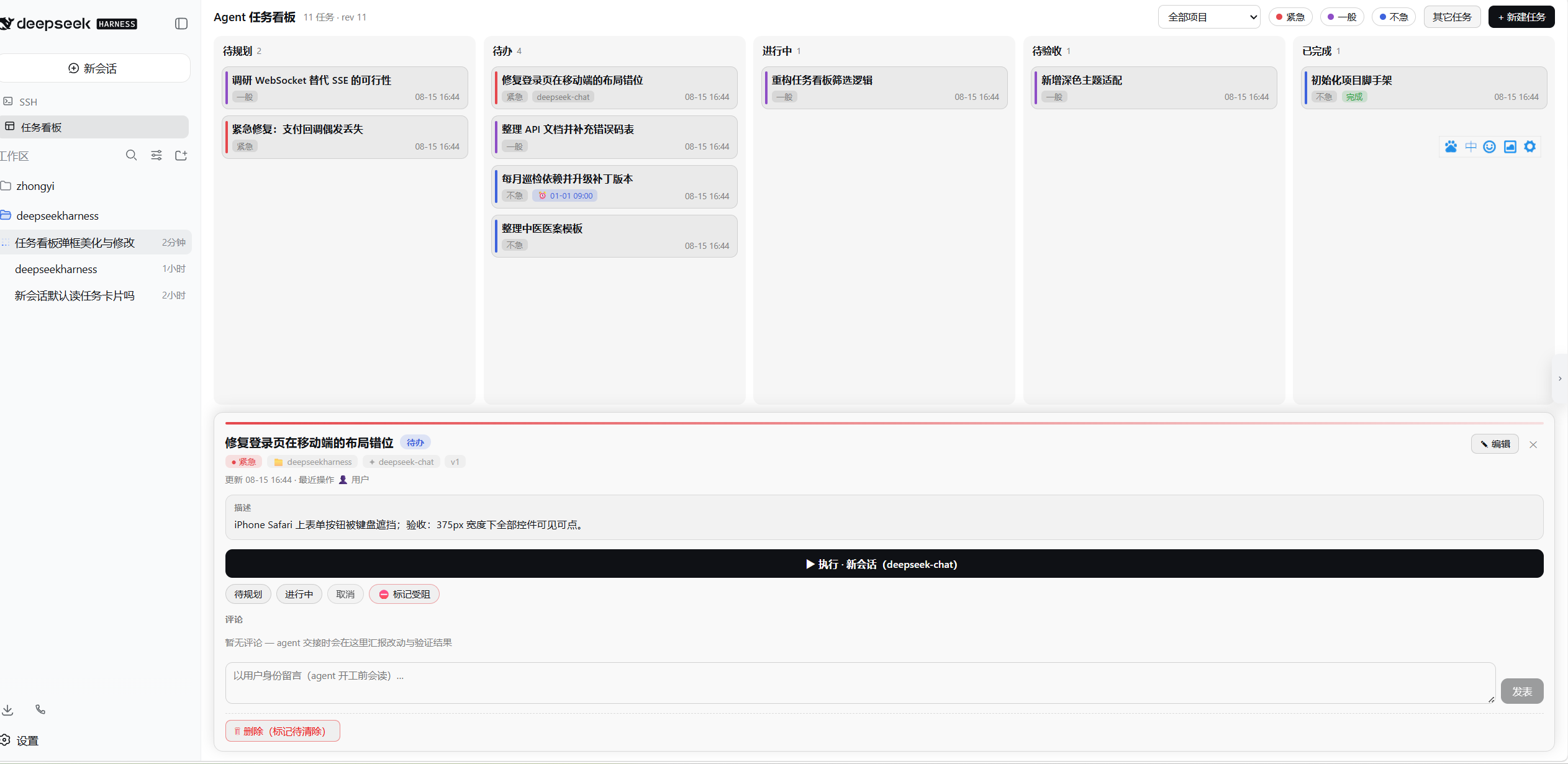
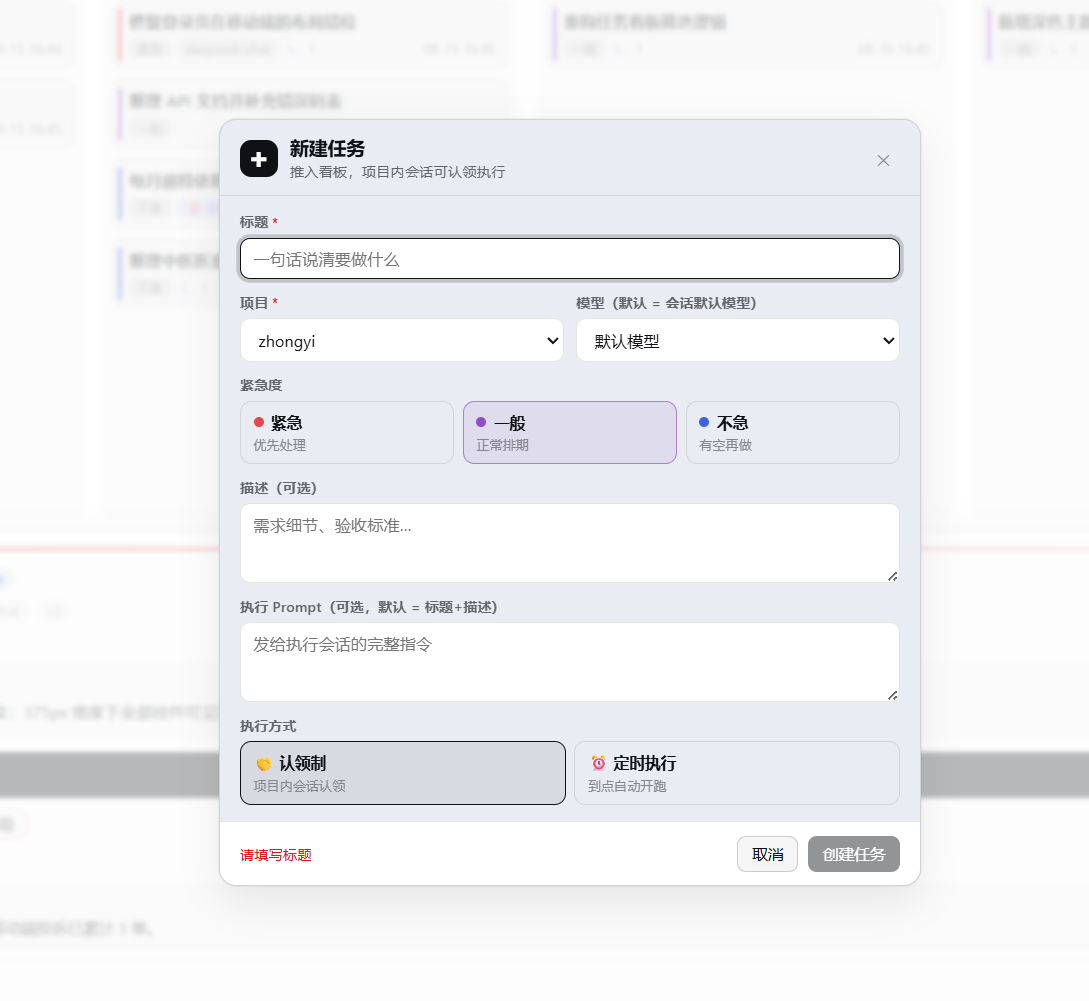
Table of Contents
- Prerequisites
- Installation
- Quick Start
- Agent Tool Reference
- Features
- Safety
- Configuration & Data
- FAQ
- Development
- Changelog
Prerequisites
| Dependency | Requirement | Notes |
|---|---|---|
| DeepSeek Harness | ≥ 0.1.1 | Requires the dsh plugin subcommand and the web profile |
| Node.js | ≥ 20 | Only needed when installing/building from the GitHub source |
| git | optional | Required for worktree isolation; falls back to running in place when missing |
Installation
# One-command install from npm (prebuilt, no build approval — recommended)
dsh plugin --profile web add dsh-taskboard

# Or install from the GitHub source
dsh plugin --profile web add github:cloader/dsh-taskboard
After installing, restart dsh web and refresh the page: you should see a "Task Board" entry in the sidebar. No further configuration needed.
GitHub-source install stuck on prepare / allowBuilds?
Plugins installed from a git source go through a prepare script, and pnpm blocks it first — follow the error message and add the exact key to allowBuilds in your profile's pnpm-workspace.yaml, then retry. The npm package ships prebuilt artifacts and never hits this step.
Developer-mode install (edit code and see changes immediately)
git clone https://github.com/cloader/dsh-taskboard.git
cd dsh-taskboard
npm install && npm run build
dsh plugin --profile web add "link:/path/to/dsh-taskboard"
With a link install, rebuild via npm run build in the repo and refresh the page; host-side changes additionally require restarting dsh web.
Uninstall: dsh plugin --profile web remove dsh-taskboard (ledger data stays in the DSH home directory — see Configuration & Data).
Official
@deepseek-ai/dsh-*packages belong in the profile'sbundleslist only — do notplugin addthem into dependencies (avoids shadowed dual SDK instances).
Quick Start
Step 1 · Create a card: click "+ New Task" in the board toolbar — pick a project, urgency, execution mode (claim / scheduled + cron), model and preset, Git isolation toggle, and an acceptance checklist; tick "⚡ Run now" to execute immediately.
Step 2 · An agent executes it, triggered any of three ways:
- GUI "Run now" / "↻ Resume" buttons (detail panel or form)
- Cron schedule (host-side — no browser required)
- Ask any agent in any session to claim it with the
taskboard_*tools:pick up task t-xxxxx from the board and execute it
Step 3 · Human acceptance: in the In Review column, "✓ Done" accepts in one click; "✗ Send back" returns it to Todo with an optional reason (agents read it before their next round).
A complete agent workflow (the protocol below is injected automatically by the plugin at execution start):
You: execute board task t-ab12cd
agent:
  taskboard_list                # read the board: todo tasks in this project
  taskboard_get t-ab12cd        # requirements, comments, acceptance checklist
  taskboard_move → in_progress  # claim (code gate: rejects held / cross-project tasks)
  ……code & test……
  taskboard_checklist check     # tick checklist items one by one, with evidence notes
  taskboard_execution_report    # structured report: summary/files/checks/artifacts/risks
  taskboard_comment_add         # hand-off notes
  taskboard_move → in_review    # move to In Review
You: click ✓ Done in the In Review column   # done belongs to humans only — agent calls are rejected by the code gate
Agent Tool Reference
Available in any session. Project boundary: only sessions belonging to the task's project can claim or execute it.
| Tool | Purpose |
|---|---|
taskboard_list | Read the board (filter by project / status / urgency; compact summaries) |
taskboard_get | Full single-card read: description, prompt, comment thread, checklist, executions |
taskboard_comments | List a task's comments (treated as the latest requirements — read before acting) |
taskboard_create | Create a card (workspaceId, urgency, checklist, preset, isolation, schedule) |
taskboard_update | Edit title / description / prompt / urgency / checklist (model & execution are read-only) |
taskboard_move | Move a card: todo→in_progress→in_review (done is unreachable) |
taskboard_comment_add | Append a comment (hand-offs, risks, progress) |
taskboard_delete | Soft delete (purge available; running executions cannot be deleted) |
taskboard_checklist | Acceptance checklist add / check (with evidence) / uncheck |
taskboard_execution_report | Submit the structured execution report, attached to the current execution |
Features
Board collaboration
- Five-column board (Backlog / Todo / In Progress / In Review / Done) + blocked markers, SSE real-time refresh
- Tasks belong to projects: claiming validates session ownership — no snatching across projects
- Three-color urgency (urgent red / normal purple / relaxed blue) with filtering and color bars; search (title / ID) and in-column sorting; filters and sorting persist
- Status-colored dots on column headers: backlog gray / todo blue / in-progress orange / in-review purple / done green / deleted red
- Create/edit modal: project, model (with reasoning effort), urgency, execution mode, cron with live validation & next-run preview, isolation toggle, checklist editor
- Detail panel: status transitions (done is human-only; completing with unchecked items asks for confirmation and shows the count), agent/user comment thread, execution history (newest first; session IDs open the execution session on click; deleted/archived targets get distinct notices), stop execution, worktree isolation block (branch / commits / change stats / merge & cleanup), execution report block, acceptance checklist block
- Quick actions on In Review cards: "✓ Done" one-click accept, "✗ Send back" returns to Todo with an optional reason agents read before starting
- Two-column wide task form + slash completion (0.6.0): the create/edit modal goes two-column (core fields and execution config on the left, description and prompt on the right); typing
/in the description/prompt pops command and skill completion (↑↓/Enter/Tab/Esc keyboard navigation; host-discovered items merge over the built-in list); Markdown images in description/prompt render as thumbnails with a click-to-zoom lightbox - Execution permission (0.6.0): per-task three-way execution permission (📁 workspace write / 🔒 read-only / ⚡ full access) picked in the form plus a default-permission board setting; permission badges on cards, the detail panel and the template list
- Bilingual UI, zh/en (0.6.0): every piece of board copy follows DSH's "Settings - General - Language" switch live (no reload); the preference is stored by DSH itself (locale.preference in settings.yaml) and the plugin adds no settings of its own; environments without the DSH locale service fall back to the browser language
- External session auto-sync (0.5.5): with "🔄 auto-capture sessions" enabled in board settings, sessions created directly in a workspace spawn task cards automatically — the project is resolved from the session's cwd and the first user message becomes the title/description; running sessions enter In Progress with the session bound (one-click jump works), successful turns settle into In Review, failures fall back to Todo; subagent sessions are filtered too since 0.6.0; off by default
- One-click session jump (0.5.4): task cards get a "🤖 sessionId ↗" button, the detail panel a "🤖 Jump to session" button, and the holder chip is clickable too — straight to the running (or most recent) execution's session (the board collapses over it); archived / deleted / unavailable sessions each get a precise notice
- Remember the last model (0.5.4): the new-task form brings back the last chosen model and reasoning effort (template prefill and editing are unaffected)
- DoD acceptance checklists (0.4.0): define acceptance criteria at creation (≤30 items); agents add/tick items via
taskboard_checklist(with evidence notes); users tick them directly in the detail panel; unchecked items glow red while In Review and the card shows a "☑ n/m" badge (red until all ticked); checklist editing manages the whole group in the form (tick states and evidence preserved) - Structured execution reports (0.4.0): agents finish with
taskboard_execution_report(summary / changed files / checks / artifacts / remaining risks), auto-attached to the current execution; rendered side-by-side in the In Review detail panel; the opening protocol makes the order explicit (report → comment → move to In Review) - JSON import (0.4.0): "⬆ Import" in the toolbar picks a backup file → dry-run preview (added / overwritten / invalid breakdown) → merge (upsert by id) or full replace (auto-backup of the current ledger first + double confirmation); JSON exports restore directly in the same format
- Task templates (0.4.0): "+ New Task ▼" dropdown (blank / built-in New feature · Bug fix · Release check · Routine inspection / manage templates) pre-fills the form (title / description / prompt / urgency / schedule / isolation / preset / checklist); "⌗ Save as template" in the task detail captures your own presets; templates live in a side file in the DSH home directory, rename/delete in the manager dialog
- Diff viewer (0.4.0): clicking a commit row or an uncommitted modified-file row in the isolation block expands a diff in-board (
git showfor commits,git difffor files, capped at 128 KB / 2000 lines with truncation noted); falls back to the main repo when the worktree is gone (commits and baseline-range diffs only)
Agent tools (taskboard_*)
- 10 tools: board / create / edit / move / comments / soft delete / checklist / execution report — usable from any session
- Code-level protocol gates: agents can never reach done (not even with every checklist item ticked); held tasks cannot be preempted; model/execution fields are read-only to agents
Execution
- Manual runs or cron schedules: each execution opens a brand-new session in the task's project (clean context, optional model, optional preset); two opening messages arrive in the same turn — the plugin context line carries the task frame and hand-off protocol (including failure fallback guidance), while the card payload (title+description+prompt) arrives as a normal user message
- Per-task presets (0.3.3): an "execution mode (preset)" dropdown in the create/edit form — execution sessions are composed from that preset (tool sets and persona come from it, matching how the GUI composes new sessions); defaults to the deployment default preset, or pick "follow deployment default"; a broken preset fails the execution outright and records why in the execution history (no half-composed sessions); changeable anytime, effective next round
- Git worktree isolated execution (0.3.0): per-task toggle (since 0.5.0 the default for newly created tasks comes from Board Settings; factory default runs in place). Every execution happens on a dedicated worktree at
<project>/.dsh-worktrees/<taskId>, branchtask/<title>+<taskId>(fixed after first creation; renaming doesn't rename branches). The executing session stays rooted at the project directory (grouping, tools, and the file sandbox fully available — DSH requires session cwd === workspace root, fixed in 0.3.2), and the worktree path plus boundary rules are spelled out in the opening instructions. Settlement collects commit lists / uncommitted-changes warnings / change stats automatically. Non-git projects or missing git degrade gracefully to in-place execution (the reason is recorded; the ledger and execution flow never fail because of git). At acceptance: one-click--no-ffmerge into the main working tree (dirty tree / conflicts reported verbatim, never auto-resolved), worktree deletion (refused with uncommitted changes), optional branch deletion. "↻ Resume" continues on the existing worktree/branch (previous commits and edits kept) - Multi-repo mirror isolation (0.6.3): when a workspace holds several parallel git repositories (a root repo plus nested independent ones), worktree mode upgrades into a whole-workspace task mirror — a bounded scan discovers every repo (depth ≤3, capped at 8, 60s cache; submodule / linked-worktree shapes are skipped), each repo gets its own worktree on the same task branch mounted at its relative path under
<project>/.dsh-worktrees/<taskId>/; the session framing lists every repo's mirror path and branch and marks un-mirrored repos do-not-touch; commit evidence, diff viewing (?repo=) and merging (per-repo--no-ff, one conflict never blocking the others, per-repo summaries) all work per repo; mirror cleanup aggregates dirty checks across all repo worktrees and removes children before the root; the newbranches/reposrecord fields are purely additive — single-repo behavior and old data are untouched; container workspaces whose root repo tracks sub-repos as gitlinks (embedded repos) are fully supported too — the structural noise nested child mirrors produce in the root mirror's status (untracked directories / gitlink drift) is exempted automatically from evidence collection, merge clean-checks, and mirror removal; the create-task form shows an "mirrors N repos" note on multi-repo workspaces, and pure-container workspaces (root not a repo, parallel sub-repos only) can pick worktree isolation too - Board settings (0.5.0): "🛠 Settings" in the toolbar — choose how new tasks execute by default (🌿 Worktree isolation / 📁 run in place; factory default is the latter). Saving applies to newly created tasks; later changes never affect existing ones
Worktree isolation is a collaboration convention, not a sandbox: execution sessions hold full tool permissions, isolation rests on the branch convention, and it is not suitable for running untrusted code.
- Host-side scheduling: fires with the browser closed; missed windows are skipped, never replayed
- Optimistic concurrency (ifVersion) + full attribution (who changed what, which session executed)
- ⚙ Health diagnostics: ledger sanity checks + orphaned worktrees (present on disk but unowned in the ledger) with one-click cleanup
Safety
- Acceptance authority belongs to humans: agent calls moving a task to done are rejected by the code-level protocol gate (a prompt suggestion, not); held tasks cannot be preempted; cross-project claims are rejected.
- Worktree isolation is a convention, not a sandbox: execution sessions have full tool permissions; isolation relies on the branch convention and is unsuitable for untrusted code.
- Local data: the ledger and templates live entirely in the local DSH home directory; nothing is sent anywhere and no tokens / API keys are required.
Configuration & Data
Works out of the box. The complete configuration surface:
| Environment variable | Default | Description |
|---|---|---|
DSH_TASKBOARD_MAX_CONCURRENT | 3 | Global cap on concurrently executing sessions |
DSH_HOME | ~/.dsh | DSH home directory (follows the deployment, plugin data along with it) |
ATB_TRACE | unset | With ATB_TRACE=1 the host prints tool-call traces (debugging) |
Data files (all under the DSH home directory; uninstalling the plugin keeps them):
| File | Contents |
|---|---|
dsh-taskboard.json | Task ledger (all tasks / executions / comments) |
dsh-taskboard-templates.json | Task templates |
dsh-taskboard.json.backup-<timestamp> | Automatic backup taken before a full-replace import |
<project>/.dsh-worktrees/<taskId>/ | Per-task execution worktree (multi-repo workspaces: a whole-workspace mirror with one sub-worktree per repo) |
Export a full backup anytime with "⬇ JSON" in the toolbar, or the task list as CSV ("⬇ Export", BOM included, opens straight in Excel).
FAQ
No "Task Board" entry in the sidebar?
Refresh the page. Still nothing? Confirm the plugin is installed in the current profile and restart dsh web (the host half loads at process start). All three shell generations are supported: data-pane (dev), hashed class names (official layout, since 0.4.2), and the DSH Desktop non-compat extended frame (since 0.5.2).
Where is task data stored? How do I back it up? See Configuration & Data. "⬇ JSON" in the GUI exports everything anytime; "⬆ Import" restores it.
Do scheduled tasks still fire when the browser is closed? Yes. Scheduling lives in the host process and is browser-independent; missed windows are skipped, not replayed.
My project isn't a git repo — does it still work? Yes. Worktree isolation degrades automatically to in-place execution with the reason recorded in the execution history; everything else is unaffected.
How do multiple projects cooperate? Tasks attach to projects (= DSH workspaces). Claiming validates session ownership: only sessions inside the task's project can claim/execute it — no cross-project snatching.
Can an agent mark a task "Done" itself?
No. That is a code-level protocol gate (not a prompt convention): taskboard_move calls targeting done are rejected outright; acceptance is always performed by a human on the board.
GitHub-source install blocked at prepare?
That's pnpm build authorization — add the key printed in the error to allowBuilds in the profile's pnpm-workspace.yaml and retry; or install from npm instead (prebuilt, no such step).
Development
git clone https://github.com/cloader/dsh-taskboard.git
cd dsh-taskboard
npm install && npm run build    # dual build: host ESM + client CJS
npm test                        # full vitest suite (266 cases, incl. the real-git mirror integration spec)
node tests/manual-git-e2e.mjs   # real-git end-to-end manual test (full worktree chain + resume + diff viewer)
node scripts/screenshot.mjs     # regenerate img/ screenshots (needs local Edge)
Changelog
0.6.4
- Fix: the UI language could freeze to English (#16): when the client activated before the locale service, the one-shot fallback read the server-rendered static
<html lang="en">and never retried — it now follows<html lang>changes live and briefly polls for the locale service, attaching it the moment it provides
0.6.3
- Worktree mirror mode for parallel multi-repo workspaces: worktree isolation upgrades into a whole-workspace task mirror — a bounded scan (depth ≤3, capped at 8 repos, 60s cache; submodule / linked-worktree shapes skipped) discovers every parallel git repo, gives each its own worktree on the same task branch mounted at its relative path under
<project>/.dsh-worktrees/<taskId>/; commit evidence, diff viewing (?repo=), merging (per-repo--no-ff, one conflict never blocking the others) and cleanup (aggregated dirty checks, children before root) all work per repo, and un-mirrored repos are marked do-not-touch in the framing; the newbranches/reposfields are purely additive — single-repo behavior and old data untouched - Container workspaces (root repo tracking sub-repos as gitlinks) fully supported: the structural noise nested child mirrors produce in the root mirror's status (untracked directories / gitlink drift
M sub-repo) is exempted from evidence collection, merge clean-checks, and mirror-removal pre-checks — previously a fully committed mirror was refused forever by every cleanup route on real git and settlement evidence showed phantom uncommitted changes; a real-git end-to-end spec (untracked + gitlink shapes) locks the loop - DSH STORE compatibility matrix extended to the 0.1.2-alpha line: 0.1.2-alpha.2 / alpha.3 / alpha.4 each declared
compatible(every version smoke-tested on a disposable profile: install → link-mount the plugin → headlessdsh web→ route probes at HTTP 200 → uninstall), clearing the "no compatible verdict for the latest 3 official releases" temporary unlisting (DSH-Store#321)
0.6.2
- Fix the two DSH STORE listing blockers (DSH-Store#321): the client bundle is minified (320,851 → 203,793 bytes, back under the 256 KiB per-file review bound);
package.jsongains thedsh.compatibility.dshReleasesmatrix andengines.node >= 22; a client size-budget test prevents silent regression — build & manifest remediation only, no functional changes
0.6.1
- Fix: the
/completion popup was clipped by the task-modal scroll container: the popup portals to document.body, fixed-anchored to the textarea, so the scrollable form body can no longer clip it; flips below when tight, clamps at the edges, and follows scrolling/resizes live - Fix: arrow-key selection did not scroll the completion list: the highlighted item is scrolled fully into view (wrap-around included) by adjusting the list's own scrollTop, never the modal body behind the popup
0.6.0
- Two-column wide task form,
/slash completion and execution-permission picker: @jw5555555555 (#14)- The create/edit modal becomes a two-column wide layout (core fields and execution config on the left, description and execution prompt on the right)
- The description and prompt inputs gain
/slash autocomplete for slash commands and agent skills (↑↓ navigate, Enter/Tab pick, Esc close; host-discovered commands/skills merge over the built-in list) - New per-task three-way "execution permission" picker (📁 workspace write / 🔒 read-only / ⚡ full access) plus a default-permission board setting, with permission badges on cards and the detail panel
- Markdown images in description/prompt render as clickable thumbnails with a lightbox
- Fixes model-catalog discovery (falls back to the host API when the runtime face is missing)
- Session auto-sync now filters out subagent sessions to avoid spurious cards
- Bilingual UI following the DSH language setting
- All board copy (columns / cards / detail / form / templates / import-export / settings / diagnostics / sidebar entry) now consumes the DSH locale service — switching zh/en under "Settings → General → Language" applies live without a reload
- The preference stays stored by DSH itself (locale.preference in settings.yaml); the plugin adds no settings of its own
- Deployments without the locale service fall back to the browser language (zh on Chinese browsers, en otherwise)
- Adds src/client/i18n/ (zh/en dictionaries + a thin adapter + a useT hook); labels.ts becomes enum key maps
- zh/en key parity enforced three ways (compile-time types, unit tests, a source scan)
- Also fixes the PLUGIN_VERSION drift against package.json (0.5.4 → 0.5.5)
0.5.5
- Sync external workspace sessions onto the board: @jw5555555555 (#13): board settings gain an "auto-sync external sessions" toggle (off by default) — once enabled, sessions created directly in a workspace spawn task cards automatically: the project is resolved from the session's cwd, and the first user message plus the session title become the task's description and title; running sessions enter In Progress with the session ID bound (cards gain one-click jump), successful turns settle into In Review with a system comment, failures return to Todo; the board's own internal execution sessions are filtered out to avoid duplicate cards; multi-turn continuations keep the same card
0.5.4
- One-click session jump from the card & task detail: @jw5555555555 (#11): a "🤖 sessionId ↗" button on cards, a "🤖 Jump to session" button on top of the detail panel, and a clickable holder chip — straight to the running (or most recent) execution's session (the board collapses over it); archived / deleted / unavailable sessions each get distinct notices
- New-task form remembers the last model, with reasoning-effort support: @jw5555555555 (#11): create mode brings back the last chosen model and effort (template prefill and editing are unaffected); a model can pin a reasoning effort (e.g. low/medium/high) passed down to the execution session; reasoning-capable models read their available efforts from the DSH model catalog
- Column sort gains "by title": @Amoss-1 (#4): numeric-aware comparison keeps numeric prefixes in true numeric order (
01 < 02 < 10 < 90— plain string comparison would put10before02); the choice persists with the rest of the view state - Interface polish: selects and inputs adapt to light/dark themes (DSH theme variables + color-scheme); template manager dialog layout improvements
📜 For the complete history of earlier versions, see changelog.md (in Chinese).
License: Apache-2.0