README.md
August 16, 2026 · View on GitHub
cysqlite

cysqlite provides performant bindings to SQLite. cysqlite aims to be roughly
compatible with the behavior of the standard lib sqlite3 module.
cysqlite supports standalone builds or dynamic-linking with the system SQLite.
Overview
cysqlite is a Cython-based SQLite driver that provides:
- DB-API 2.0 compatible
- Performant query execution
- Transaction management with context-managers and decorators
- User-defined functions, aggregates, window functions, and virtual tables
- BLOB support
- Row objects with dict-like access
- Schema introspection utilities
- Asyncio support
- Easy to create fully self-contained builds
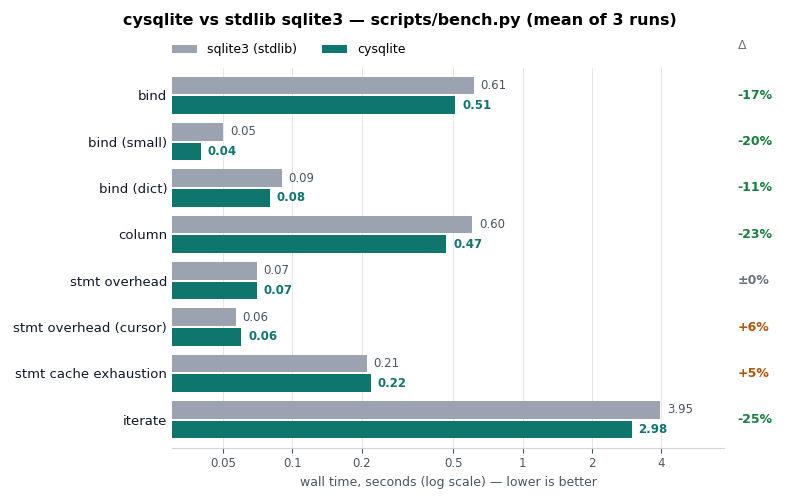
Performance
Installing
cysqlite can be installed as a pre-built binary wheel with SQLite embedded into the module:
pip install cysqlite
cysqlite can be installed from a source distribution (sdist) which will link against the system SQLite:
# Link against the system sqlite.
pip install --no-binary :all: cysqlite
Self-contained builds embedding a SQLite of your choosing, SQLCipher, or SQLite3 Multiple Ciphers are described in the installation docs.
Example
Example usage:
from cysqlite import connect

db = connect(':memory:')

db.execute('create table data (k, v)')

with db.atomic():
    db.executemany('insert into data (k, v) values (?, ?)',
                   [(f'k{i:02d}', f'v{i:02d}') for i in range(10)])
    print(db.last_insert_rowid())  # 10.

curs = db.execute('select * from data')
for row in curs:
    print(row)  # e.g., ('k00', 'v00')

# We can use named parameters with a dict as well.
row = db.execute_one('select * from data where k = :key and v = :val',
                     {'key': 'k05', 'val': 'v05'})
print(row)  # ('k05', 'v05')

db.close()
User-defined functions and hooks
cysqlite lets you extend SQLite with ordinary Python callables. Functions and collations are registered on the connection and automatically restored if it is closed and re-opened:
- Scalar functions:
db.create_function(fn) - Aggregates:
db.create_aggregate(cls)(step()+finalize()) - Window functions:
db.create_window_function(cls)(addsinverse()+value()) - Table-valued functions:
@db.table_function(columns=[...])over a generator - Collations:
db.create_collation(fn)
Connection hooks observe or veto activity (pass None to clear):
- Commit / rollback hooks:
db.commit_hook(fn),db.rollback_hook(fn) - Update hook:
db.update_hook(fn)(fires on INSERT, UPDATE or DELETE) - Authorizer:
db.authorizer(fn)
# Scalar function.
db.create_function(str.title, 'title_case')
db.execute('select title_case(?)', ('heLLo wOrLd',)).fetchone()  # ('Hello World',)

# Table-valued function from a generator.
@db.table_function(columns=['value'])
def series(start, stop, step=1):
    i = start
    while i < stop:
        yield (i,)
        i += step

list(db.execute('select value from series(0, 10, 2)'))  # [(0,), (2,), (4,), (6,), (8,)]
See the user-defined functions guide for full examples.