collective.z3cform.norobots
April 22, 2024 · View on GitHub
.. image:: https://github.com/collective/collective.outputfilters.tinymceaccordion/actions/workflows/meta.yml/badge.svg :target: https://github.com/collective/collective.outputfilters.tinymceaccordion/actions/workflows/meta.yml :alt: Plone Meta Workflow

.. image:: https://codecov.io/gh/collective/collective.z3cform.norobots/graph/badge.svg?token=DgZ7MzmVMr :target: https://codecov.io/gh/collective/collective.z3cform.norobots

.. image:: https://img.shields.io/pypi/v/collective.z3cform.norobots.svg :target: https://pypi.python.org/pypi/collective.z3cform.norobots/ :alt: Latest Version

.. image:: https://img.shields.io/pypi/status/collective.z3cform.norobots.svg :target: https://pypi.python.org/pypi/collective.z3cform.norobots :alt: Egg Status

.. image:: https://img.shields.io/pypi/pyversions/collective.z3cform.norobots.svg?style=plastic :alt: Supported - Python Versions

=============================================== collective.z3cform.norobots
.. contents:: Table of Contents :depth: 2
Overview
collective.z3cform.norobots provides a "human" captcha widget based on a list of
question/answer(s).
This captcha can be used :
* as a ``plone.app.discussion`` (Plone Discussions) captcha plugin

* as a ``z3c form`` field

* as a macro in a custom form

* as a PloneFormGen field with `collective.pfg.norobots`_
The widget is based on z3c.form.TextWidget.
Since version 1.4, questions configuration uses a dedicated control panel (using plone.app.registry)
instead of a simple properties sheet. An upgrade step provides migration from earlier versions.
Interface is translated in the following languages: Czech [cs], Danish [da], German [de], Basque [eu], Spanish [es], Suomeksi [fi], French [fr], Dutch [nl], Simplified Chinese [zh_CN], Italian [it] and Russian [ru].
Requirements
I have tested this release with Plone 4.3.10, Plone 5.0.5. Since version 2.0 Plone 6 is supported.
See previous releases for old Plone versions.
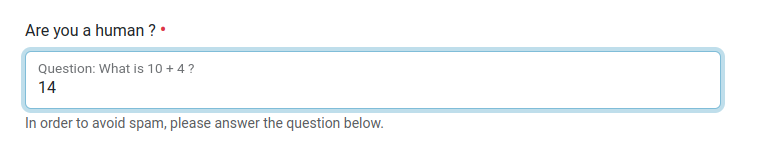
Screenshot
.. image:: https://raw.githubusercontent.com/collective/collective.z3cform.norobots/dev/docs/collective.z3cform.norobots-screenshot-1.png :scale: 100 % :alt: Screenshot :align: center

.. image:: https://raw.githubusercontent.com/collective/collective.z3cform.norobots/dev/docs/collective.z3cform.norobots-screenshot-2.png :scale: 100 % :alt: Screenshot :align: center
Installation
Getting the module - pip based
Add collective.z3cform.norobots to your requirements.txt
Getting the module - buildout based
Add ``collective.z3cform.norobots`` to your ``plone.recipe.zope2instance`` buildout section e.g.::

    [instance]
    ...
    eggs =
        Plone
        ...
        collective.z3cform.norobots

    ...

    zcml =
        ...
        collective.z3cform.norobots

Or, you can add it as a dependency on your own product *setup.py*::

    install_requires=[
        ...
        'collective.z3cform.norobots',
    ],

Enabling the module
~~~~~~~~~~~~~~~~~~~~

In the Addons control panel, install "Norobots captcha field (collective.z3cform.norobots)".

Add a new question
~~~~~~~~~~~~~~~~~~~~

In the "Norobots widget settings" control panel, add a new line in the field "Norobots question::answer":
::

   your_question::the_answer

   Example : What is 10 + 12 ?::22

Answer can contain multiple values delimited by semicolon:
::

   your_question::the_answer;another_answer

   Example : What is 5 + 5 ?::10;ten

Quickly test ?
~~~~~~~~~~~~~~~~~~~~

Checkout ``collective.z3cform.norobots`` and use ``venv`` and ``pip`` to test the module::

    python3 -m venv ./venv
    source venv/bin/activate
    (venv) pip install mxdev
    (venv) pip install -r requirements-mxdev.txt
    (venv) pip install cookiecutter
    (venv) cookiecutter -f --no-input --config-file instance.yml https://github.com/plone/cookiecutter-zope-instance
    (venv) runwsgi -v instance/etc/zope.ini

Go to http://localhost:8080, add a new Plone Site and install collective.z3cform.norobots (see above).

Launch tests::

    (venv) pip install tox
    (venv) tox

Launch code coverage::

    (venv) tox -e coverage

and open with a browser htmlcov/index.html

Usage as a ``plone.app.discussion`` (Plone Discussions) captcha plugin
----------------------------------------------------------------------

In the Discussion control panel, activate anonymous comments then select "Norobots" for the captcha.
This enable the captcha for anonymous users.


Usage in a z3c form
-------------------

You can use this widget setting the "widgetFactory" property of a form field:
::

    from zope import interface, schema
    from z3c.form import interfaces, form, field, button, validator
    from plone.z3cform.layout import wrap_form

    from collective.z3cform.norobots.i18n import MessageFactory as _
    from collective.z3cform.norobots.widget import NorobotsFieldWidget
    from collective.z3cform.norobots.validator import NorobotsValidator

    class INorobotsForm(interface.Interface):
        norobots = schema.TextLine(title=_(u'Are you a human ?'),
                                   description=_(u'In order to avoid spam, please answer the question below.'),
                                   required=True)

    class NorobotsForm(form.Form):
        fields = field.Fields(INorobotsForm)
        fields['norobots'].widgetFactory = NorobotsFieldWidget

    # wrap the form with plone.z3cform's Form wrapper
    NorobotsFormView = wrap_form(NorobotsForm)

    # Register Norobots validator for the corresponding field in the IContactInfo interface
    validator.WidgetValidatorDiscriminators(NorobotsValidator, field=INorobotsForm['norobots'])

In your configure.zcml you have to add the following adapter, to make the validation work.
::

    <adapter factory=".contact_info.NorobotsValidator" />

For more information see ``contact_info.py`` in the ``plone_forms`` directory.

To activate this example, add ``<include package=".plone_forms" />`` in the package's
``configure.zml`` file and open http://localhost:8080/Plone/@@z3cform-contact-info

Usage as a macro in a custom form
----------------------------------

See ``browser/norobots_macro.pt`` available through @@norobots_macro browser page.

Possible problems
-----------------

  * In a fresh Plone 5.0.5 the captcha widget does not appear in the comments form even if ``Norobots``
    is the selected captcha. Installing an other captcha like ``plone.formwidget.captcha`` solve
    this problem (sic!). In my website, updated from Plone 5.0.4 to 5.0.5, all is ok.

  * I have the following error when launching the tests: "ImportError: No module named lxml.html"
    => In order to run the tests you need lxml. You can add for example
    "z3c.form [test]" to your buildout. See http://plone.293351.n2.nabble.com/Custom-Dexterity-Widgets-td5594532.html for more details.

Credits
-----------------

* Sylvain Boureliou [sylvainb] - `GitHub <https://github.com/sylvainb>`_ - `Website <https://www.boureliou.com/>`_
* Makina Corpus `Makina Corpus <http://www.makina-corpus.com>`_

Source code
-----------

`Source code <https://github.com/collective/collective.z3cform.norobots>`_ is hosted on Github.

How to contribute and submit a patch ?
--------------------------------------

`Source code <https://github.com/collective/collective.z3cform.norobots>`_ and an `issue tracker <https://github.com/collective/collective.z3cform.norobots/issues>`_ is hosted on Github.

Contributors
-----------------
* Sylvain Boureliou [sylvainb]
* Mikel Larreategi [erral]
* Aijun Jian
* Radim Novotny [naro]
* Thomas Clement Mogensen [tmog]
* Peter Mathis [petschki]
* Petri Savolainen [petri]
* Helmut Toplitzer
* Luca Fabbri [keul]
* Andrea Cecchi [cekk]
* [serge73]
* [1letter]

.. _`collective.pfg.norobots`: http://pypi.python.org/pypi/collective.pfg.norobots