polars-url
July 13, 2024 · View on GitHub
⚠️ WIP ⚠️
Some polars plugins to parse/extract fields from urls.
There are currently two plugins:
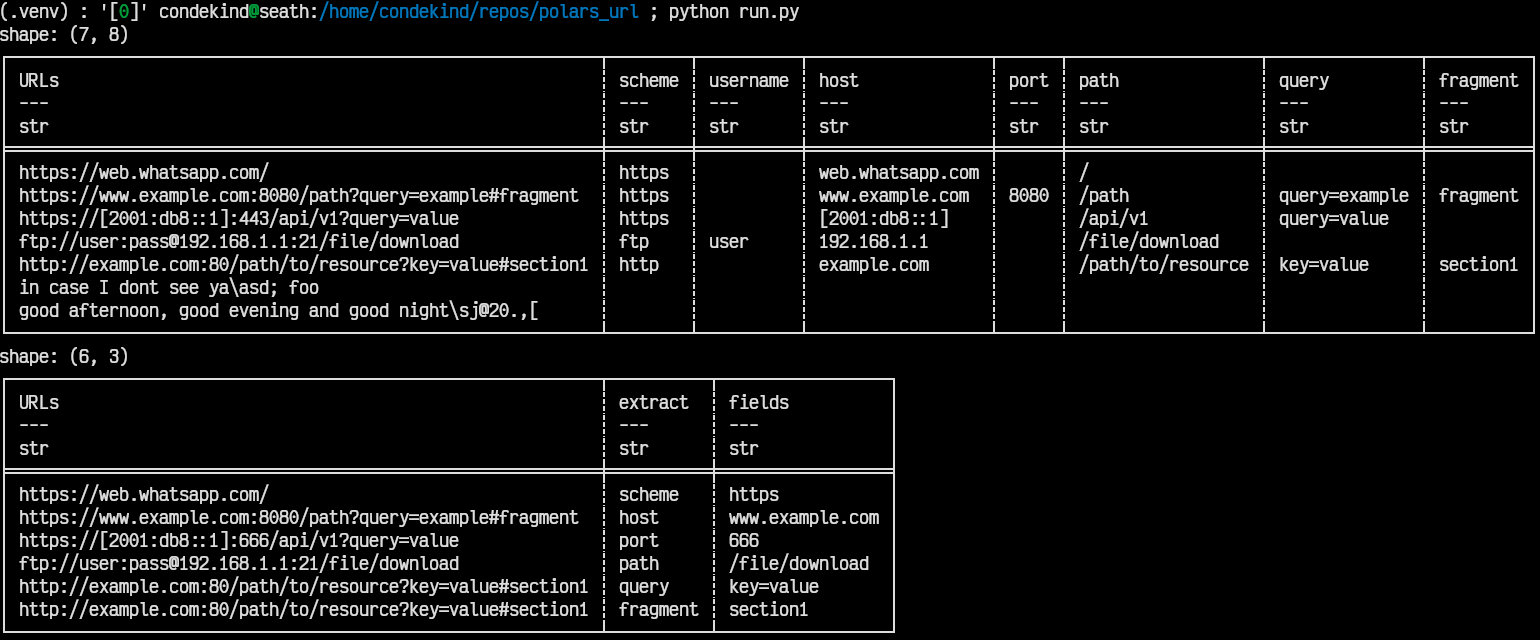
parse_urlwill take an input Series and a kwarg (field). It will parse the input str Series withUrl::parse(from theurlcrate) and extract the field requested in the kwarg, e.g.:
with pl.Config(tbl_rows=-1, tbl_cols=-1, fmt_str_lengths=80):
    df = pl.DataFrame({
        'URLs': [
            'https://web.whatsapp.com/',
            'https://www.example.com:8080/path?query=example#fragment',
            'https://[2001:db8::1]:443/api/v1?query=value',
            'ftp://user:pass@192.168.1.1:21/file/download',
            'http://example.com:80/path/to/resource?key=value#section1',
            'in case I dont see ya\\asd; foo',
            'good afternoon, good evening and good night\\sj@20.,[',
        ],
    })
    result = (df
              .with_columns(scheme=parse_url('URLs', field="scheme"))
              .with_columns(username=parse_url('URLs', field="username"))
              .with_columns(host=parse_url('URLs', field="host"))
              .with_columns(port=parse_url('URLs', field="port"))
              .with_columns(path=parse_url('URLs', field="path"))
              .with_columns(query=parse_url('URLs', field="query"))
              .with_columns(fragment=parse_url('URLs', field="fragment"))
              )
    print(result)
extract_field_from_serieswill take two input Series: one with the urls, another with the name of the field to be extracted from that row's url, e.g.:
with pl.Config(tbl_rows=-1, tbl_cols=-1, fmt_str_lengths=80):
    df = pl.DataFrame({
        'URLs': [
            'https://web.whatsapp.com/',
            'https://www.example.com:8080/path?query=example#fragment',
            'https://[2001:db8::1]:666/api/v1?query=value',
            'ftp://user:pass@192.168.1.1:21/file/download',
            'http://example.com:80/path/to/resource?key=value#section1',
            'http://example.com:80/path/to/resource?key=value#section1',
        ],
        'extract': [
            'scheme',
            'host',
            'port',
            'path',
            'query',
            'fragment',
        ]
    })
    result = (df
              .with_columns(fields=extract_field_from_series('URLs', 'extract'))
              )
    print(result)
These are the results from both examples above, respectively: